


What is Swift ?
Swift is a programming language introduced by Apple in WWDC 2014. As you know, Apple uses Objective-C as its native language to develop iOS apps (or OS X, watchOS, tvOS). Swift is a general purpose, multi-paradigm, compiled programming language. Apple has its own framework to develop apps, named Cocoa and CocoaTouch.
History
Development of Swift was started in the year 2010 by Chris Lattner. Language Swift is inspired from Objective-C, C, Rust, Haskell, Ruby, Python, C# and CLU (as per Wikipedia). On June 2, 2014, Apple WWDC became the first to release an app totally written in Swift. Apple has also introduced a bridging technique which lets you convert your existing Objective-C source code into Swift. Swift won first place for Most Loved Programming Language in Stack Overflow Developer Survey 2015. And, Google is also considering using Swift as its first language for Android.
Pre-Requisites (*These are must)
- A Mac or MacBook (Yes, you can’t code on Windows)
- Xcode 6.0+ IDE (Download it from AppStore)
- Prior knowledge of OOPs Programming
Agenda of Article
- About Swift Syntax
- What is Playground
- Variables & Constant
- Comments
- Mutability
Basic Swift Syntax
While writing Swift code, we follow Camelcase convention to declare variables. Unlike Objective-C, Swift is an independent language and it has no similarity with C (i.e. Swift is not a superset of C).
Swift statement doesn’t need a semicolon(;) to end but it doesn't mind if you add a semicolon at the end of a statement.
Swift doesn’t need any main() methods to start its execution.
So, brace yourself if you feel confused about Swift.
“What the heck Swift is :O ”
Playground
Whenever you start any new programming language, you really need a template where you can just test & tweak your code and see the different outputs on real time. So far, you write your code, compile your code, then see the output and vice-versa ( if you are not happy with the code). So, Xcode gives a special type of project template where you can write your code and see the output in real-time console window.
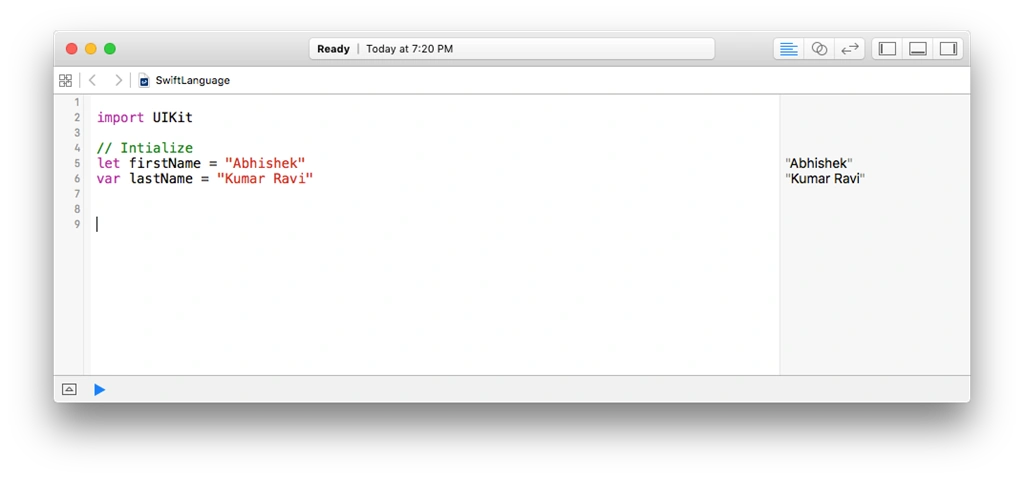
As you can see, I have declared a variable named firstName. There is a side window which is showing the value in that variable. We’ll discuss the code in later parts of the article.
For the time being, we are going to use playground for this article.
Variables & Constant
In programming language, variable is such an entity whose value changes across the program execution. Or, you can say that variables are used to store value of a certain data type. Type could be anything, like Bool, Integer, Float, Double, Character or String.
In swift, we use keyword var followed by variable’s name to declare a variable.
Say, my age is 23. So, I will code like this,
- var myAge = 23
So, it would be like,
- let votingAge = 18
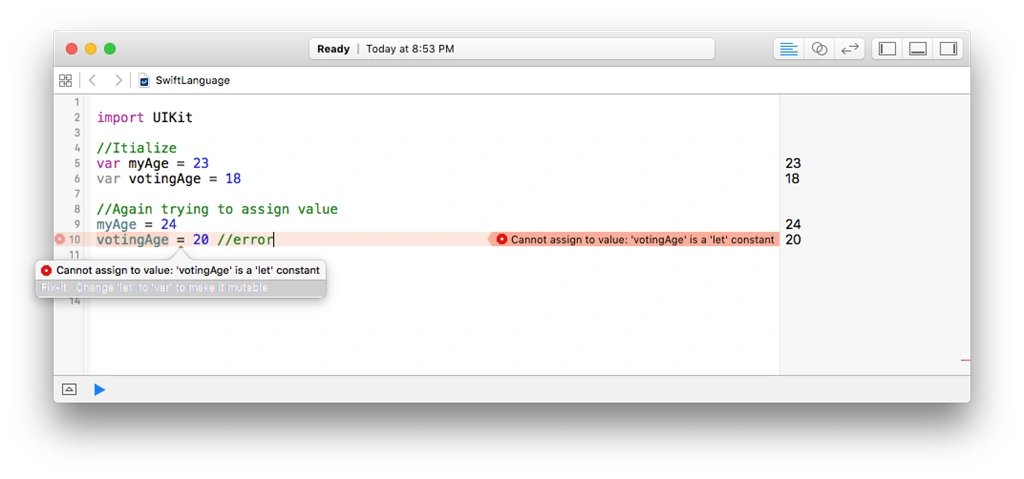
Before getting into Type Interface, let's write some code first.
- Var myName = “Abhishek”
Say, var myEmpolyeeId = 1308
Here, myEmpolyeeId is an Integer type ‘coz 1308 is an integral value.
So, Swift determines the nature of the value and assigns the type into the variable. This feature of Swift is called Type Interference.
Like,
- Var myName : String
- Var myAge : Int
- Var canVote : Bool
By the end of this, we came to know about two different types of variable-data-type declaration:
- Var myName = “Abhishek” // Type Interface
- Var myName : String // Explicit Type Declaration
Comments are those lines of code which are ignored by the compiler. In every programming language, comments play a vital role in one’s coding style. Frequent Comment in your code is a best practice (as per Best Practice of Coding Standards).
In Swift, we have three types of commenting.
- Single Line Comment
- Block Comment
- Marking Comment
For now, we are ignoring what Marking Comment is. But, it’s a vital technique when you write code in xcode to generalize the blocks.
Single Line Comment
It starts with double slashes (//) . It belongs to single statement.
- // This is my Comment
When you want to write more than one line of comment, then you can use block comment. As per conventions, Block Comment is written in the beginning of the class to describe the class and its functionality. But, it depends upon you where you want to use it. Most of the IDEs use single commenting technique to comment a block.
Shortcut in Xcode: Command + /
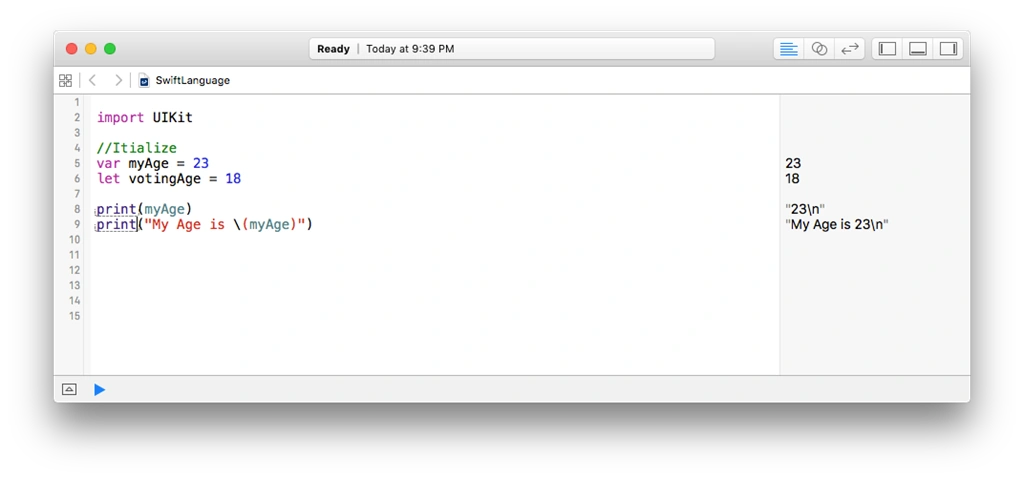
Print is an essential method call to print (or, display) value in the console window. Technically, it is a diagnostics technique which is used to print the logs in the console when you are in developing stage.
In Objective-C, we have NSlog(), in javascript we have console.log() and in C# we have Debug.Writeline()
We use the String Interpolation technique to print some variable/constant value inside the string. I know it sounds like a heavy word but string polation is just to make compound string. Both in C# and Java, we use place placeholders to print values inside some string.
So in Swift, we use a special format to interpolate a variable.
If you want to interpolate myAge in a string, then we will write something like this \(myAge).
If you are still confused,
We will use the \(VARIBALE_NAME) inside string and compiler will put the value of variable instead of the name.
Mutability of Data Type
I’m going little off-topic, but it’s an important concept before we move further.
Since Swift took aa few features from Objective-C, there are usually two version of class; i.e., Mutable and Immutable.
Like:
- NSString/NSMutableString
- NSArray/NSMutableArray
But, we can treat a type differently by assigning var & let.
When we are declaring a String variable,
Var myName: String then it’s a mutable String (that, we can modify in string).
Let myName: String = “Abhishek”
Then, it’s an Immutable String and you cannot modify its string. Same with the other type like Array or Dictionary.
Conclusion
In this article, we have discussed about basic syntax, variable, constants and their type. Additionally, different types of Comments in Swift
In the next article, we’ll cover Control Statements and Loops.
Vignesh ManiPosted Aug 17, 2016, 7:58 AM
Nice one
Ramesh PalaniappanPosted Aug 16, 2016, 8:33 AM
Nice content
Gagan SikriPosted Aug 15, 2016, 10:06 AM
Good One :)