

Introducing
I’ll admit it: I used to stash everything in my Docker images just in case I might need it later. But there’s a catch – every extra package or tool is another potential security hole. I vividly remember a Monday morning when our CVE scanner lit up like a Christmas tree. Our base image, bloated with unused libraries, was showing dozens of vulnerabilities. It felt like whack-a-mole, patching one thing only to see two more issues pop up. That headache is exactly what Docker Hardened Images (DHI) aim to solve. They represent a new approach to container images: secure-by-default and minimal.
The good news? DHI gives you a lean, minimal starting point with almost no known vulnerabilities. In practice, they come with built-in SBOMs (software bills of materials) and digital signatures to prove exactly what’s inside. Docker’s team continuously updates them, so updates happen automatically, and developers can stop babysitting patch cycles.
In this article, we’ll break down what Docker Hardened Images are, why Docker created them, and how they can solve real-world pain points – all in friendly, beginner-level terms. Along the way, we’ll use analogies and examples (think shipping containers and fortresses) to make the concepts click. Let’s dive in!
Containers and Base Images: A Quick Refresher

Before we get to “hardened,” let’s revisit the basics. Docker containers are like shipping containers for software. They hold everything your app needs: code, libraries, system tools, and runtime. Imagine your application as cargo loaded into one of these container ships; because it’s self-contained, you can move that “ship” to any port (server or cloud) and it should run the same way.
The base image is like the empty container’s interior design. It might be a minimal Linux OS with some default tools (for example, an Alpine or Debian base). Think of it as the blueprint on which you build your app. Official images like Python, Node, or Ubuntu come with a base Linux layer. Docker Hardened Images use familiar bases – Docker supports common distros like Alpine and Debian, so you don’t have to switch to an obscure OS.
Every piece of software in your image has its own security history. The industry catalogs serious bugs and flaws as CVEs (Common Vulnerabilities and Exposures). If your container includes a library with a known CVE, scanners will flag it. Over time, as you add software or skip updates, CVEs can pile up – each one like a “wanted poster” for a bug in your image.
This ties into the attack surface. The more code you include, the more ways an attacker might break in. It’s like having extra doors and windows in a fortress. Docker points out that as containers grow bloated with extra packages and outdated tools, they give attackers “more ways in”. In short: traditional base images become tough to keep secure without constant effort. And that’s exactly where Docker Hardened Images step in.
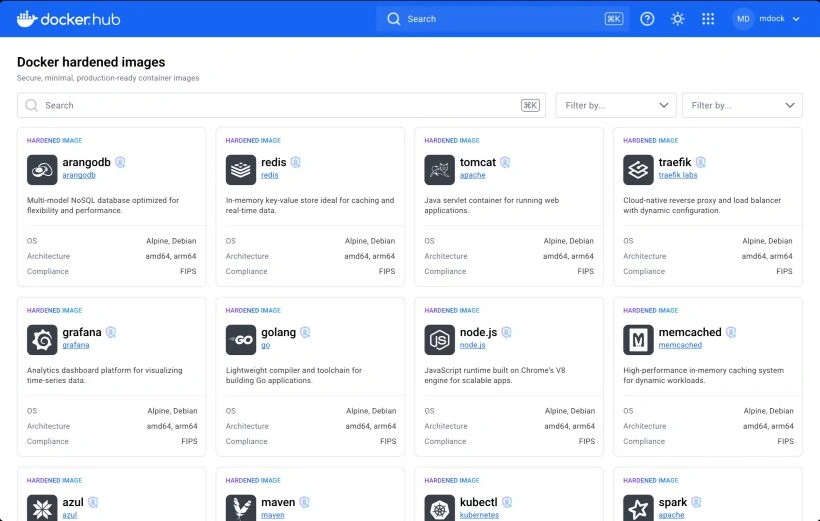
Related Image: © Docker
Why Hardened Images? The Security Headache

Let’s set the stage: Maybe you’re part of a small dev team in a startup. You write code and push it into a container (say, based on Debian). A week later, your vulnerability scanner complains about CVE-2023-XXXX and CVE-2024-YYYY in that image. It’s one fix after another, and it seems never-ending. We’ve all been there.
Docker heard teams talk about integrity concerns, swollen attack surfaces, and operational overload from constant CVE alerts. For many teams, this cycle of patching and scanning became unsustainable. Fixing each vulnerability one by one on a bloated base image is a ton of work and can stall development.
Here’s an analogy: your container is like a fortress with many rooms and gates. A hardened image is a fortress built lean and mean, only essential rooms and very strong doors. By stripping out extras (no shells, no package managers, etc.), DHI dramatically cut the attack surface – Docker says this can lead to up to a 95% reduction in attack surface from the outset.
What Are Docker Hardened Images?
So, what exactly are Docker Hardened Images? In simple terms, they’re secure-by-default base images curated and built by Docker. They’re ultra-minimal, production-ready container images with security baked in from the ground up. Docker even advertises that these images deliver “near-zero known CVEs” out of the box. Each DHI starts with only the essential runtime libraries your app needs, and nothing more.
Key features of Docker Hardened Images include:
- Extremely minimal content: For example, a hardened Python image might contain only the Python interpreter and libraries needed to run your app, with no extras. This approach (often called distroless) means there’s far less code for attackers to exploit. Docker reports that this can lead to up to a 95% smaller attack surface compared to general-purpose images.
- Build & signature: Docker builds each image from source in a secure pipeline and generates an SBOM and digital signature for it. Think of the SBOM as a detailed ingredient list and the signature as a tamper-evident seal. You can verify, if needed, so you always know exactly what’s inside.
- Automated updates: Docker continuously monitors for new CVEs and patches. When something needs fixing, they rebuild and publish the hardened image automatically. In other words, updates happen for you — no manual patching required. You end up running the most secure, verified version all the time.
- Rapid patch SLA: Since Docker controls the build process, it pushes critical and high-severity fixes very fast. In fact, they aim to patch these CVEs within 7 days, and they back it with an enterprise-grade SLA for peace of mind.
- Secure defaults: Hardened Images run as non-root by default and often disable development tools. That means even if someone jumps inside the container, they hit limited permissions. It’s one more layer of protection baked in.
- Customization: Finally, you can still add what you need on top — ca-certificates, configs, extra packages, you name it. DHI allows layering custom files just like any base image. You get the security foundation plus the flexibility to tailor the image to your needs.

Related Image: © Docker
In a nutshell, a Docker Hardened Image is a tiny, locked-down foundation for your container. It’s built to reduce vulnerabilities and to fit into your existing projects with minimal fuss.
Real-World Benefits and Examples
Now let’s make it concrete with an example. Suppose you’re running a Node.js app. Switching the base image from the normal node:alpine to a hardened Node image changes everything. In one internal test, Docker replaced a standard Node base image with a hardened Node image and saw all vulnerabilities drop to zero, with the image’s package count reduced by about 98%. That’s a huge win in security and efficiency.
Why is that useful? Fewer packages mean a smaller attack surface and simpler maintenance. In the example above, scanning the hardened image probably turns up almost no CVEs. Suddenly, developers and security teams aren’t chasing a long list of bugs every week. As the Docker product notes, hardened images “reduce scanner noise” and let “developers focus on shipping, not chasing CVEs”.
For teams with compliance or audit needs, DHI helps too. Each image comes with an SBOM and a signature, so you can hand auditors a precise report of what’s inside. You also stay up-to-date; if a critical bug is announced in a library, Docker will already have it patched in their image. In short, your pipeline becomes simpler and your risk is lower.
Overall, using Docker Hardened Images lets you replace a complicated, high-risk base with one that’s locked down and well-maintained. Your CVE count plummets, updates happen automatically, and you can sleep a bit better at night.
Integrating DHI into Your Workflow
You’re probably wondering: “Do I have to rewrite everything?” Fortunately, no. Docker built Hardened Images to slot into your current workflow with minimal fuss. In most cases, you simply update one line in your Dockerfile. For example:
# Original base
FROM node:23-alpine

# Hardened base
FROM docker/hardened-node:23.16.0-3-alpine

Related Image: © Docker
This swap keeps everything else the same. Docker specifically supports popular distros like Alpine and Debian, so moving to a hardened image is easy. Your build tools, CI/CD pipelines, and Kubernetes configs keep working. The only difference is the underlying image is now secure-by-default.
Docker also integrated Hardened Images with common registries and scanners. For instance, they’re on Docker Hub with verified signatures, and partners like GitLab or JFrog recognize them just like any other Docker Official Image. In practice, your scan/reporting tools might even show cleaner results (fewer CVEs).
Because updates are automated, you can also automate your image pulls. Some teams use :latest tags or nightly update jobs to always get the newest hardened base. Either way, the heavy lifting of patch management is done by Docker. As a result, developers focus on writing code, not on patching OS libraries.
Practical Takeaways
- Start with Hardened bases: When you create new containers, pick a Docker Hardened Image as your base (e.g.,
docker/hardened-node,docker/hardened-python). You’ll end up with far fewer CVEs from day one and a much smaller image footprint. - Leverage automation: Docker will patch and rebuild these images for you, often within days. By using them, your team offloads the manual work of chasing vulnerabilities.
- Reduce noise: With a smaller attack surface and minimal included software, scanners will have far less to report. Developers and security teams can focus on building features, not sifting through CVE alerts.
- Keep your workflow: Switching to a hardened image typically just means changing the
FROMline in your Dockerfile. No need to scrap your existing tools or processes. - Get supply-chain confidence: Hardened Images come with SBOMs and signatures. You can show auditors exactly what’s in your containers and ensure everything is verified and up-to-date.
Conclusion
Docker Hardened Images are like a seatbelt for your containers: once you click it on, you can stop worrying about the crash and drive on. They address real pain points in container security (bloated images, CVE overload, manual patching) in an elegant way. By adopting DHIs, you essentially start with a fortress already built and updated by Docker.
As the Docker team says, these images help you “ship software with confidence by dramatically reducing your attack surface, automating patching, and integrating seamlessly into your existing workflows.” That’s a fancy way of saying: less time fixing infrastructure and more time building cool stuff.
For anyone new to containers (or anyone who’s found security a bit scary), Hardened Images offer an easy boost. Give them a try in your next project – your future self (and your security team) will thank you!
Reference
Docker Blog
Join the conversation! Your thoughts help the community grow.