

Introduction
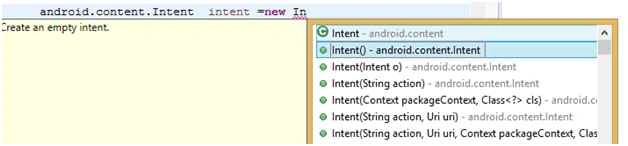
- android.content.Intent intent =new intent(parameters);
- startActivity(intent);
Types Of Intents
- Intent i = new Intent(Intent.ACTION_VIEW, Uri.parse("http://www.google.com"));
- startActivity(i);
According to this example when we use this intent then the web browser automatically opens and searches Google. In other words, the current activity transfers the link on the web browser for the search.
The following are all the Basic Actions:
- ACTION_MAIN
- ACTION_VIEW
- ACTION_ATTACH_DATA
- ACTION_EDIT
- ACTION_PICK
- ACTION_CHOOSER
- ACTION_GET_CONTENT
- ACTION_DIAL
- ACTION_CALL
- ACTION_SEND
- ACTION_SENDTO
- ACTION_ANSWER
- ACTION_INSERT
- ACTION_DELETE
- ACTION_RUN
- ACTION_SYNC
- ACTION_PICK_ACTIVITY
- ACTION_SEARCH
- ACTION_WEB_SEARCH
- ACTION_FACTORY_TEST
Ther action will be used depending on their format like:
- ACTION_VIEW -> Uri.parse(http://www.google.com);
- ACTION_DIAL ->Uri.parse(“tel:123456789”);
123456789 is contact Number.
Explicit Intent
- Intent i1 =new Intent(FirstMainActivity.this,SecondMainActivity.class);
- String username="Neeraj";
- String password="Neeraj";
- i1.putExtra("Username", username);
- i1.putExtra("Password", password);
- startActivity(i1);
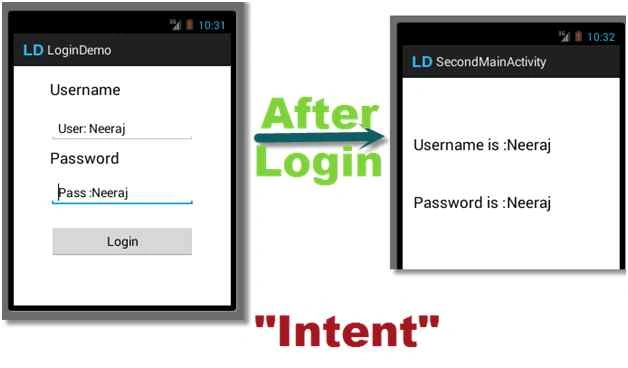
This example shows two activities, one is “FirstMainActivity” and the other is “SecondMainActivity”.
How to get Values in another Activity from an Intent?
FirstMainActivity.java file code,
- package com.example.logindemo;
- import android.app.Activity;
- import android.content.Intent;
- import android.os.Bundle;
- import android.view.Menu;
- import android.view.MenuItem;
- import android.view.View;
- import android.view.View.OnClickListener;
- import android.widget.Button;
- import android.widget.EditText;
- import android.widget.Toast;
- public class FirstMainActivity extends Activity {
- Button b;
- EditText user;
- EditText pass;
- @Override
- protected void onCreate(Bundle savedInstanceState) {
- super.onCreate(savedInstanceState);
- setContentView(R.layout.activity_first_main);
- b = (Button) findViewById(R.id.b1);
- user = (EditText) findViewById(R.id.t1);
- pass = (EditText) findViewById(R.id.t2);
- b.setOnClickListener(new OnClickListener() {
- @Override
- public void onClick(View v) {
- // TODO Auto-generated method stub
- if (user.getText().toString().equals("Neeraj")
- && pass.getText().toString().equals("Neeraj")) {
- Toast.makeText(FirstMainActivity.this,
- "Successfully Login", Toast.LENGTH_SHORT).show();
- Intent i = new Intent(FirstMainActivity.this,
- SecondMainActivity.class);
- i.putExtra("User", user.getText().toString());
- i.putExtra("Pass", pass.getText().toString());
- user.setText("");
- pass.setText("");
- startActivity(i);
- } else {
- Toast.makeText(FirstMainActivity.this, "Invalid",
- Toast.LENGTH_SHORT).show();
- user.setText("");
- pass.setText("");
- }
- }
- });
- }
- @Override
- public boolean onCreateOptionsMenu(Menu menu) {
- // Inflate the menu; this adds items to the action bar if it is present.
- getMenuInflater().inflate(R.menu.first_main, menu);
- return true;
- }
- @Override
- public boolean onOptionsItemSelected(MenuItem item) {
- // Handle action bar item clicks here. The action bar will
- // automatically handle clicks on the Home/Up button, so long
- // as you specify a parent activity in AndroidManifest.xml.
- int id = item.getItemId();
- if (id == R.id.action_settings) {
- return true;
- }
- return super.onOptionsItemSelected(item);
- }
- }
- package com.example.logindemo;
- import android.app.Activity;
- import android.os.Bundle;
- import android.view.Menu;
- import android.view.MenuItem;
- import android.widget.Button;
- import android.widget.TextView;
- public class SecondMainActivity extends Activity {
- TextView tv1, tv2;
- Button b;
- @Override
- protected void onCreate(Bundle savedInstanceState) {
- super.onCreate(savedInstanceState);
- setContentView(R.layout.activity_second_main);
- Bundle bundle = getIntent().getExtras();
- b = (Button) findViewById(R.id.fill);
- String user = bundle.getString("User");
- String pass = bundle.getString("Pass");
- tv1 = (TextView) findViewById(R.id.v1);
- tv2 = (TextView) findViewById(R.id.v2);
- tv1.setText(user);
- tv2.setText(pass);
- }
- @Override
- public boolean onCreateOptionsMenu(Menu menu) {
- // Inflate the menu; this adds items to the action bar if it is present.
- getMenuInflater().inflate(R.menu.second_main, menu);
- return true;
- }
- @Override
- public boolean onOptionsItemSelected(MenuItem item) {
- // Handle action bar item clicks here. The action bar will
- // automatically handle clicks on the Home/Up button, so long
- // as you specify a parent activity in AndroidManifest.xml.
- int id = item.getItemId();
- if (id == R.id.action_settings)
- {
- return true;
- }
- return super.onOptionsItemSelected(item);
- }
- }
Amit VermaPosted Jul 29, 2016, 7:12 AM
useful article
Abhijeet SinghPosted Jul 13, 2016, 1:28 AM
Good one..
kalu singh raoPosted Jul 12, 2016, 1:49 AM
Nice...