

Introduction
Microsoft Cognitive services is set of cloud-based intelligence APIs for building richer and smarter application development. Cognitive API will use for Search meta data from Photos and video and emotions, sentiment analysis and authenticating speakers via voice verification.
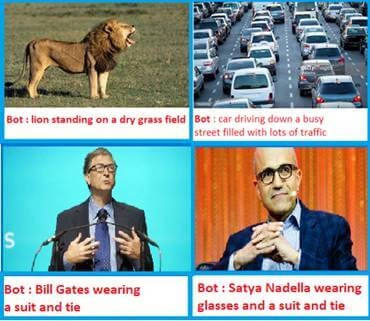
The Computer Vision API will help developers to identify the objects with access to advanced algorithms for processing images and returning image meta data information. In this article, you will learn about Computer Vision API and how to implement Compute Vision API into Bot application.
You can follow below steps for implement object detection in Bot Application
Computer Vision API Key Creation
Computer Vision API returns information about visual content found in an image. You can follow the below steps for creating Vision API key.
- Navigate to https://azure.microsoft.com/en-us/try/cognitive-services/
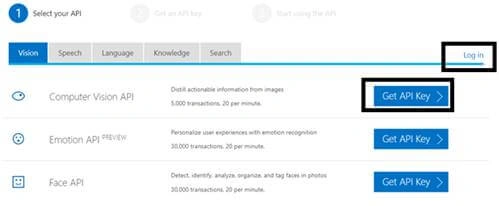
- Click on “Get API Key “or Login with Azure login.
- Login with Microsoft Account and Get API key

- Copy API key and store securely, we will use this API key into our application
Step 2 Create New Bot Application
Let's create a new bot application using Visual Studio 2017. Open Visual Studio > Select File > Create New Project (Ctrl + Shift +N) > Select Bot application.
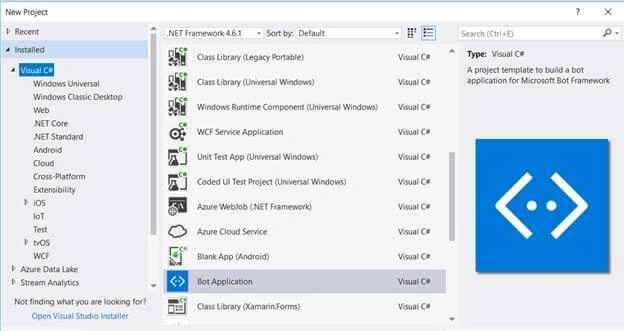
The Bot application template gets created with all the components and all required NuGet references installed in the solutions.
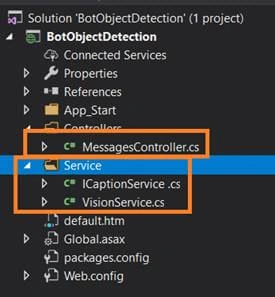
In this solution, we are going edit Messagecontroller and add Service class.
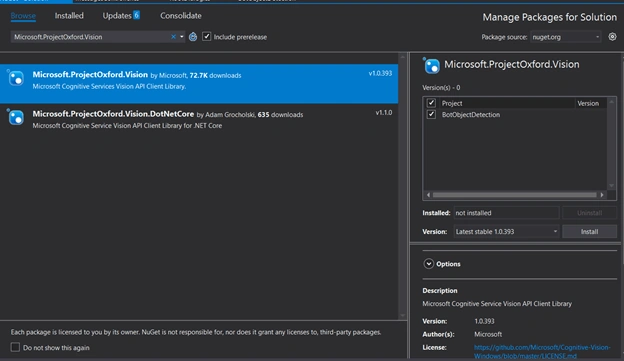
Install Microsoft.ProjectOxford.Vision Nuget Package
The Microsoft project oxford vision nuget package will help with access to cognitive service so Install “Microsoft.ProjectOxford.Vision” Library from the solution
Create Vision Service
Create a new helper class to the project called VisionService that wraps around the functionality from the VisionServiceClient from Cognitive Services and only returns what we currently need.
- using System;
- using System.Collections.Generic;
- using System.IO;
- using System.Linq;
- using System.Threading.Tasks;
- using System.Web;
- using Microsoft.ProjectOxford.Vision;
- using Microsoft.ProjectOxford.Vision.Contract;
- namespace BotObjectDetection.Service
- {
- public class VisionService : ICaptionService
- {
- /// <summary>
- /// Microsoft Computer Vision API key.
- /// </summary>
- private static readonly string ApiKey = "<API Key>";
- /// <summary>
- /// The set of visual features we want from the Vision API.
- /// </summary>
- private static readonly VisualFeature[] VisualFeatures = { VisualFeature.Description };
- public async Task<string> GetCaptionAsync(string url)
- {
- var client = new VisionServiceClient(ApiKey);
- var result = await client.AnalyzeImageAsync(url, VisualFeatures);
- return ProcessAnalysisResult(result);
- }
- public async Task<string> GetCaptionAsync(Stream stream)
- {
- var client = new VisionServiceClient(ApiKey);
- var result = await client.AnalyzeImageAsync(stream, VisualFeatures);
- return ProcessAnalysisResult(result);
- }
- /// <summary>
- /// Processes the analysis result.
- /// </summary>
- /// <param name="result">The result.</param>
- /// <returns>The caption if found, error message otherwise.</returns>
- private static string ProcessAnalysisResult(AnalysisResult result)
- {
- string message = result?.Description?.Captions.FirstOrDefault()?.Text;
- return string.IsNullOrEmpty(message) ?
- "Couldn't find a caption for this one" :
- "I think it's " + message;
- }
- }
- }
In the above helper class, replace vision API key and call the Analyze image client method for identify image meta data
Messages Controller
MessagesController is created by default and it is the main entry point of the application. it will call our helper service class which will handle the interaction with the Microsoft APIs. You can update “Post” method like below
- using System;
- using System.Diagnostics;
- using System.IO;
- using System.Linq;
- using System.Net;
- using System.Net.Http;
- using System.Net.Http.Headers;
- using System.Text.RegularExpressions;
- using System.Threading.Tasks;
- using System.Web.Http;
- using BotObjectDetection.Service;
- using Microsoft.Bot.Builder.Dialogs;
- using Microsoft.Bot.Connector;
- namespace BotObjectDetection
- {
- [BotAuthentication]
- public class MessagesController : ApiController
- {
- private readonly ICaptionService captionService = new VisionService();
- /// <summary>
- /// POST: api/Messages
- /// Receive a message from a user and reply to it
- /// </summary>
- public async Task<HttpResponseMessage> Post([FromBody]Activity activity)
- {
- if (activity.Type == ActivityTypes.Message)
- {
- //await Conversation.SendAsync(activity, () => new Dialogs.RootDialog());
- var connector = new ConnectorClient(new Uri(activity.ServiceUrl));
- string message;
- try
- {
- message = await this.GetCaptionAsync(activity, connector);
- }
- catch (Exception)
- {
- message = "I am object Detection Bot , You can Upload or share Image Url ";
- }
- Activity reply = activity.CreateReply(message);
- await connector.Conversations.ReplyToActivityAsync(reply);
- }
- else
- {
- HandleSystemMessage(activity);
- }
- var response = Request.CreateResponse(HttpStatusCode.OK);
- return response;
- }
- private Activity HandleSystemMessage(Activity message)
- {
- if (message.Type == ActivityTypes.DeleteUserData)
- {
- // Implement user deletion here
- // If we handle user deletion, return a real message
- }
- else if (message.Type == ActivityTypes.ConversationUpdate)
- {
- // Handle conversation state changes, like members being added and removed
- // Use Activity.MembersAdded and Activity.MembersRemoved and Activity.Action for info
- // Not available in all channels
- }
- else if (message.Type == ActivityTypes.ContactRelationUpdate)
- {
- // Handle add/remove from contact lists
- // Activity.From + Activity.Action represent what happened
- }
- else if (message.Type == ActivityTypes.Typing)
- {
- // Handle knowing tha the user is typing
- }
- else if (message.Type == ActivityTypes.Ping)
- {
- }
- return null;
- }
- private async Task<string> GetCaptionAsync(Activity activity, ConnectorClient connector)
- {
- var imageAttachment = activity.Attachments?.FirstOrDefault(a => a.ContentType.Contains("image"));
- if (imageAttachment != null)
- {
- using (var stream = await GetImageStream(connector, imageAttachment))
- {
- return await this.captionService.GetCaptionAsync(stream);
- }
- }
- string url;
- if (TryParseAnchorTag(activity.Text, out url))
- {
- return await this.captionService.GetCaptionAsync(url);
- }
- if (Uri.IsWellFormedUriString(activity.Text, UriKind.Absolute))
- {
- return await this.captionService.GetCaptionAsync(activity.Text);
- }
- // If we reach here then the activity is neither an image attachment nor an image URL.
- throw new ArgumentException("The activity doesn't contain a valid image attachment or an image URL.");
- }
- private static async Task<Stream> GetImageStream(ConnectorClient connector, Attachment imageAttachment)
- {
- using (var httpClient = new HttpClient())
- {
- var uri = new Uri(imageAttachment.ContentUrl);
- return await httpClient.GetStreamAsync(uri);
- }
- }
- private static bool TryParseAnchorTag(string text, out string url)
- {
- var regex = new Regex("^<a href=\"(?<href>[^\"]*)\">[^<]*</a>$", RegexOptions.IgnoreCase);
- url = regex.Matches(text).OfType<Match>().Select(m => m.Groups["href"].Value).FirstOrDefault();
- return url != null;
- }
- }
- }
Run Bot Application
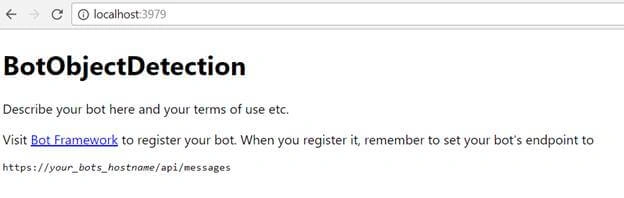
The emulator is a desktop application that lets us test and debug our bot on localhost. Now, you can click on "Run the application" in Visual studio and execute in the browser
Test Application on Bot Emulator
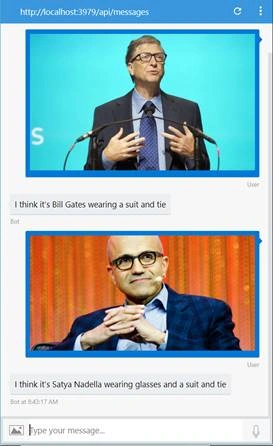
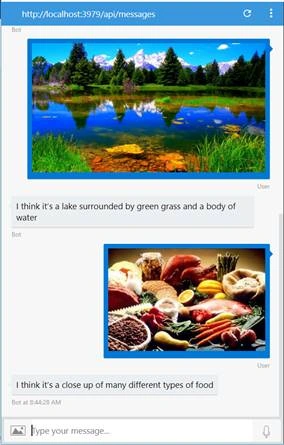
You can follow the below steps to test your bot application.
- Open Bot Emulator.
- Copy the above localhost url and paste it in emulator e.g. - http://localHost:3979
- You can append the /api/messages in the above url; e.g. - http://localHost:3979/api/messages.
- You won't need to specify Microsoft App ID and Microsoft App Password for localhost testing, so click on "Connect".
Related Article
I have explained about Bot framework Installation, deployment and implementation in the below articles:
- Getting Started with Chatbot Using Azure Bot Service
- Getting Started with Bots Using Visual Studio 2017
- Deploying A Bot to Azure Using Visual Studio 2017
- How to Create ChatBot In Xamarin
- Getting Started with Dialog Using Microsoft Bot Framework
- Getting Started with Prompt Dialog Using Microsoft Bot Framework
- Getting Started With Conversational Forms And FormFlow Using Microsoft Bot Framework
- Getting Started With Customizing A FormFlow Using Microsoft Bot Framework
- Sending Bot Reply Message With Attachment Using Bot Framework
- Getting Started With Hero Card Design Using Microsoft Bot Framework
- Getting Started With Thumbnail Card Design Using Microsoft Bot Framework
- Getting Started With Adaptive Card Design Using Microsoft Bot Framework
- Getting Started with Receipt Card Design Using Microsoft Bot Framework
- Building Bot Application With Azure AD Login Authentication Using AuthBot
- Building Chat Bots With Bing Search Results Using Bot Framework
Summary
In this article, you learned how to create an Intelligent Image Object Detection Bot using Microsoft Cognitive Computer Vision API. If you have any questions/feedback/ issues, please write in the comment box.
giri KPosted Nov 16, 2018, 9:35 AM
Where is the IcaptionServiceClass??
Rungson SongsermPosted Jul 19, 2018, 2:26 AM
VisionService.cs replace var client = new VisionServiceClient(ApiKey); with var client = new VisionServiceClient(ApiKey, "https://southeastasia.api.cognitive.microsoft.com/vision/v1.0"); ** https://southeastasia.api.cognitive.microsoft.com/vision/v1.0 ** is endpoint of your compute vision api
Jonathan NunezPosted Apr 17, 2018, 11:08 AM
There are a lot of errors. Where is the ICaptionImage class?