

In this article, I am going to discuss how to integrate the Kendo Sortable control in the Grid so that we can drag and drop the records within a Grid.
Remote Data Source for Kendo Grid
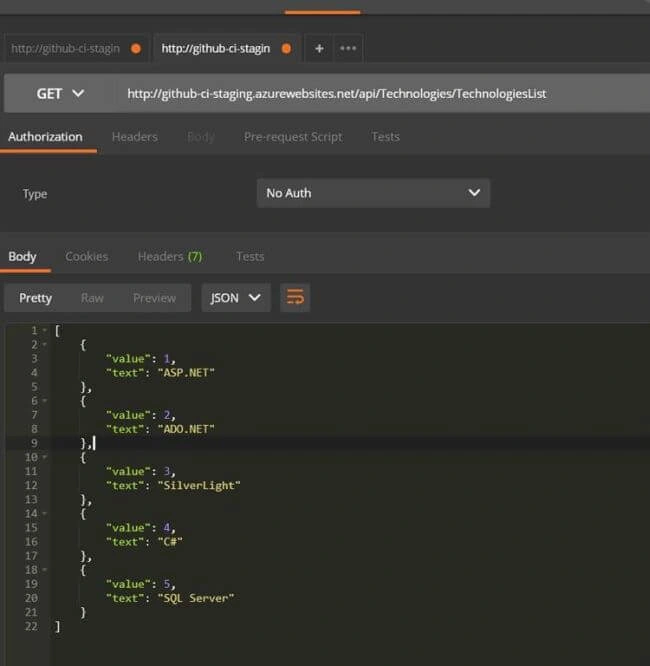
I am going to use the API response given below to construct my remote data source for Kendo Grid which was created in my previous article.
API - http://github-ci-staging.azurewebsites.net/api/Technologies/TechnologiesList
Type - GET.
Testing the APIs, using POSTMAN.
Create a new HTML page. In my case, I named it KendoSortableGrid.cshtml.
KendoSortableGrid.cshtml
- <!DOCTYPE html>
- <html>
- <head>
- <base href="http://demos.telerik.com/kendo-ui/sortable/integration-grid">
- <style>
- html {
- font-size: 14px;
- font-family: Arial, Helvetica, sans-serif;
- }
- </style>
- <title></title>
- <link rel="stylesheet" href="https://kendo.cdn.telerik.com/2017.3.913/styles/kendo.common-material.min.css" />
- <link rel="stylesheet" href="https://kendo.cdn.telerik.com/2017.3.913/styles/kendo.material.min.css" />
- <link rel="stylesheet" href="https://kendo.cdn.telerik.com/2017.3.913/styles/kendo.material.mobile.min.css" />
- <script src="https://kendo.cdn.telerik.com/2017.3.913/js/jquery.min.js"></script>
- <script src="https://kendo.cdn.telerik.com/2017.3.913/js/kendo.all.min.js"></script>
- </head>
- <body>
- <div id="example">
- <div id="grid"></div>
- <script>
- $(document).ready(function() {
- var grid = $("#grid").kendoGrid({
- dataSource: {
- type: "json",
- transport: {
- read: "http://github-ci-staging.azurewebsites.net/api/Technologies/TechnologiesList"
- },
- schema: {
- model: {
- fields: {
- value: { type: "number" },
- text: { type: "string" },
- }
- }
- },
- },
- scrollable: true,
- columns: [
- { field: "value", title: "S No", width: "130px" },
- { field: "text", title: "Technology", width: "130px" },
- ]
- }).data("kendoGrid");
- });
- </script>
- </div>
- </body>
- </html>
From the code given above, it is obvious that we have constructed a data source for the Kendo Grid using our API, i.e., http://github-ci-staging.azurewebsites.net/api/Technologies/TechnologiesList.
Kendo Grid in Browser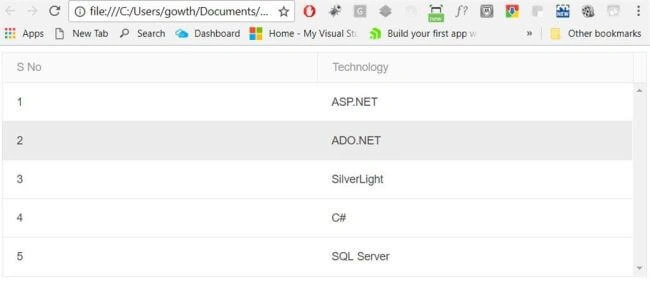
Figure 2
Kendo Sortable
Kendo Sortable makes the DOM element sortable by drag and drop with a mouse or a finger in mobile device.
Integrating Kendo Sortable in Kendo Grid
KendoSortableGrid.cshtml
- <!DOCTYPE html>
- <html>
- <head>
- <base href="http://demos.telerik.com/kendo-ui/sortable/integration-grid">
- <style>
- html {
- font-size: 14px;
- font-family: Arial, Helvetica, sans-serif;
- }
- </style>
- <title></title>
- <link rel="stylesheet" href="https://kendo.cdn.telerik.com/2017.3.913/styles/kendo.common-material.min.css" />
- <link rel="stylesheet" href="https://kendo.cdn.telerik.com/2017.3.913/styles/kendo.material.min.css" />
- <link rel="stylesheet" href="https://kendo.cdn.telerik.com/2017.3.913/styles/kendo.material.mobile.min.css" />
- <script src="https://kendo.cdn.telerik.com/2017.3.913/js/jquery.min.js"></script>
- <script src="https://kendo.cdn.telerik.com/2017.3.913/js/kendo.all.min.js"></script>
- </head>
- <body>
- <div id="example">
- <div id="grid"></div>
- <script>
- $(document).ready(function() {
- var grid = $("#grid").kendoGrid({
- dataSource: {
- type: "json",
- transport: {
- read: "http://github-ci-staging.azurewebsites.net/api/Technologies/TechnologiesList"
- },
- schema: {
- model: {
- fields: {
- value: { type: "number" },
- text: { type: "string" },
- }
- }
- },
- },
- scrollable: true,
- columns: [
- { field: "value", title: "S No", width: "130px" },
- { field: "text", title: "Technology", width: "130px" },
- ]
- }).data("kendoGrid");
- grid.table.kendoSortable({
- filter: ">tbody >tr",
- hint: $.noop,
- cursor: "move",
- autoScroll: true,
- placeholder: function(element) {
- return element.clone().addClass("k-state-hover").css("opacity", 0.65);
- },
- container: "#grid tbody",
- change: function(e) {
- var skip = grid.dataSource.skip(),
- oldIndex = e.oldIndex + skip,
- newIndex = e.newIndex + skip,
- data = grid.dataSource.data(),
- dataItem = grid.dataSource.getByUid(e.item.data("uid"));
- grid.dataSource.remove(dataItem);
- grid.dataSource.insert(newIndex, dataItem);
- }
- });
- });
- </script>
- <style>
- .k-grid tbody tr {
- cursor: move;
- }
- </style>
- </div>
- </body>
- </html>
"Change event" definition of the Kendo Sortable is used to reorder the index of the data item which is in Grid data source.
- Filter - This determines which items are sortable
- Container - Determines to which boundaries the hint movement will be constrained
- autoScroll - To enable scrolling when there is drag and drop within scrollable Grid
After reordering the records by drag and drop using mouse,
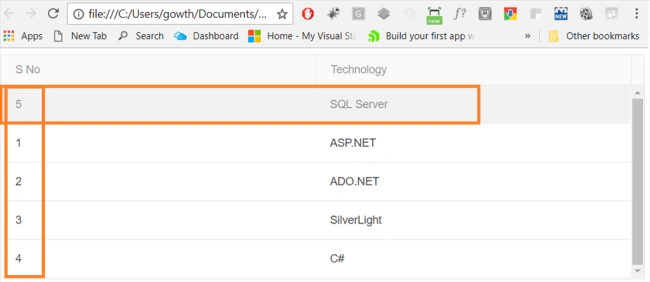
Figure 3
I hope, you have enjoyed this article. Your valuable feedback, questions, or comments about this article are always welcome.
References
http://docs.telerik.com/kendo-ui/controls/interactivity/sortable/overview
Download the source code here.
Join the conversation! Your thoughts help the community grow.