


Introduction
Coding has been revolutionized by artificial intelligence, making software development faster and more efficient. One of the leading AI-driven coding assistants, GitHub Copilot, leverages Azure AI to help developers write code with real-time suggestions, automate repetitive tasks, and enhance productivity. This article explores how developers can integrate Azure AI with GitHub Copilot to generate high-quality code efficiently.
Why Combine Azure AI with GitHub Copilot?
GitHub Copilot, powered by OpenAI Codex, already provides AI-powered code completion, but when integrated with Azure AI services, it becomes even more powerful. Here’s why:
- Enhanced Code Generation: Azure AI can analyze patterns in enterprise codebases to improve code suggestions.
- Context-Aware Assistance: With Azure’s NLP models, Copilot can provide more relevant and domain-specific recommendations.
- Security & Compliance: Integrating Azure AI Security Services ensures that AI-generated code aligns with security best practices.
- Scalability: By leveraging Azure Functions, developers can scale AI-assisted code generation across teams and projects.
Setting Up GitHub Copilot with Azure AI
Step 1. Enabling GitHub Copilot
To use GitHub Copilot, ensure you have an active subscription and install the extension in VS Code:
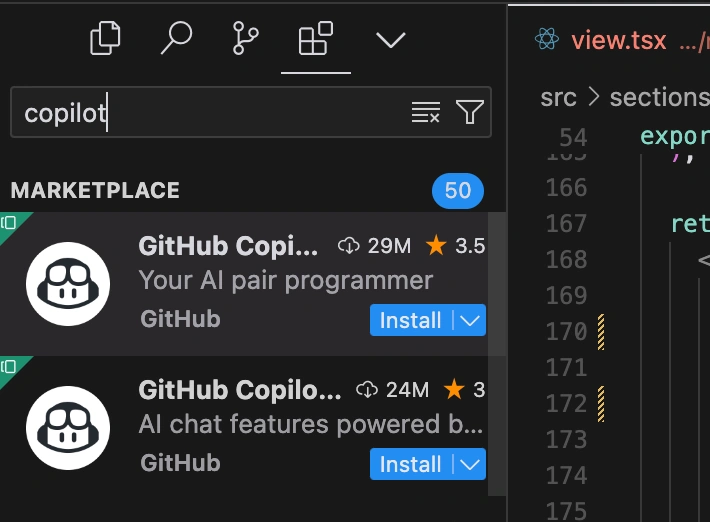
- Navigate to Extensions in VS Code.
- Search for GitHub Copilot and install it.
- Sign in with your GitHub account and enable Copilot.
Step 2. Connecting Azure AI to GitHub Copilot
To enhance Copilot with Azure AI, you need an Azure OpenAI API key:
- Go to the Azure Portal and create an OpenAI service.
- Navigate to Keys and Endpoints to retrieve your API key.
- Store the key securely and configure it in your development environment.
Step 3. Using AI-Powered Code Suggestions
Once Copilot is active, you can start coding in Python, JavaScript, or any supported language. The AI will automatically generate suggestions based on your input:
Example. Generate a function to sort a list in Python
def sort_numbers(numbers):

    """Sorts a list of numbers in ascending order"""
    return sorted(numbers)

# GitHub Copilot may suggest optimized sorting algorithms
Real-World Applications
- Enterprise Software Development: Speed up backend development with AI-generated functions and automation scripts.
- Data Science & Machine Learning: Generate Python scripts for data preprocessing and model training with minimal effort.
- Cybersecurity: AI can suggest best practices for secure coding and identify vulnerabilities in real-time.
- DevOps Automation: Combine GitHub Actions with Azure AI for automated infrastructure deployment.
Improving AI-Generated Code with Azure Cognitive Services
By integrating Azure Cognitive Services, Copilot can provide more than just autocompletions:
- Azure Text Analytics: Detects sentiment and context in comments to refine code suggestions.
- Azure Anomaly Detector: Identifies inconsistencies or errors in AI-generated scripts.
- Azure Custom Vision: Helps with AI-assisted front-end development, auto-generating UI components based on designs.
Enhancing Security with AI
One of the primary concerns with AI-generated code is security. By integrating Azure AI Security Services, developers can:
- Scan AI-generated code for vulnerabilities.
- Detect hardcoded credentials.
- Ensure compliance with OWASP security standards.
Conclusion
The integration of GitHub Copilot and Azure AI enhances software development by automating routine tasks, improving efficiency, and ensuring security. By leveraging Azure’s powerful AI models, developers can write better code faster while maintaining high-quality standards.
Ready to elevate your coding experience? Start integrating Azure AI with GitHub Copilot today and unlock the future of AI-powered development.
Further Reading & Resources
Join the conversation! Your thoughts help the community grow.