

MVC type framework (Called MVT in Django)
- M= Model
- V= View
- T= Template
Main Features of Django:
- A WSGI (web server gateway interface) is a standard interface between web servers and Python web applications or frameworks.
- Routing - www.example.com/index where /index should be routed to a particular python code that handles it.
- Admin Panel - Django provides an admin panel of your database tables that want to use in the admin panel.
- Database - It provides connectivity to many databases for change only database connectivity code.
Installation steps of Django:
- Download the MSI installer. Select 32 bit or 64 bit based on the System Install Python in your system.
- Run the installer. Be sure to check the option to add Python to your PATH while installing.
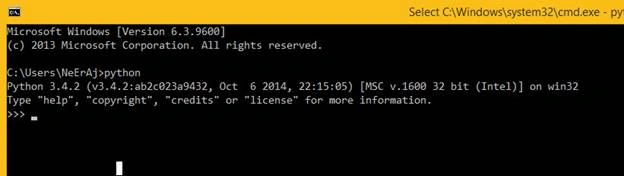
- Now Run Command Prompt and Enter “python”. You will see the output as below
- We need some libraries for further process like pip,virtualenv
- Now download get-pip.py file.
- Where you download the above file then open a command prompt with this directory.
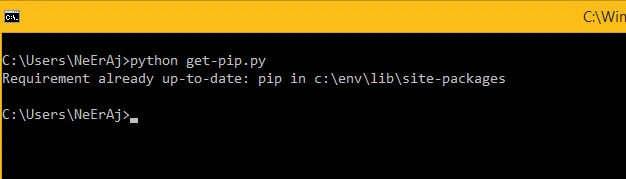
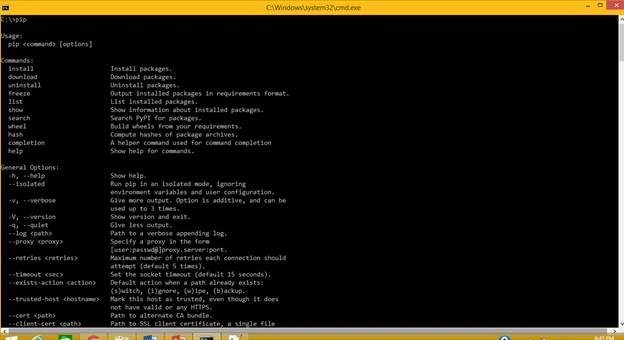
- Enter Command in CMD: “python get-pip.py”. It will install pip command for use in CMD. I have already installed therefore it is shown as Requirement already up-to-date. Check it is successfully installed or not using CMD to enter the “pip” command.
- Now Install virtualenv library using pip. Enter Command in CMD:” pip install virtualenv”.
- After installation, open command prompt in base C: drive directory and Enter Command in CMD: “virtualenv env”.
- It will create a folder in C: base directory and copy the required files in this directory.

- Now again run command in CMD of base directory: “/env/Scripts/activate”.
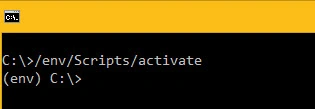
- You are in working in the virtual environment of python and also see (env) before the command directory. If you want to go out from a virtual environment then run the command “deactivate”.
- Now you can install Django in your System. Write Command in CMD with the virtual environment “pip install django”.I have already installed it.

- Now go to the directory where you want to create a project of Django in command prompt. I’m creating a project in C:\Users\NeErAj\project directory.
- Write command in CMD: “django-admin startproject demo”.It creates a project demo folder with some python files.
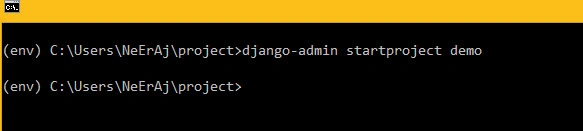
- Here manage.py are used to run the command through this file.
- In the demo folder, a new same demo already exists that contains __init__.py, settings.py, urls.py, wsgi.py files.
- Now go to inner demo “(env) C:\Users\NeErAj\project\demo> “folder in command prompt and write command: “django-admin startapp main”.
- It creates the main folder in the root demo folder that contains multiple files which are the most useful files for further use in the Django project.
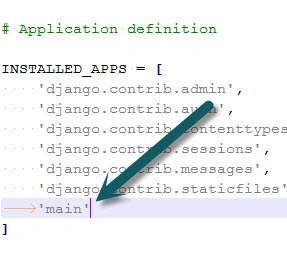
- In command “django-admin startapp main”. Here “main” is an app name then you must write this app name in settings.py files in INSTALLED_APP block. Without it, you can’t use the main directory as Project.
- Now Run command in the root demo directory. “python manage.py runserver”
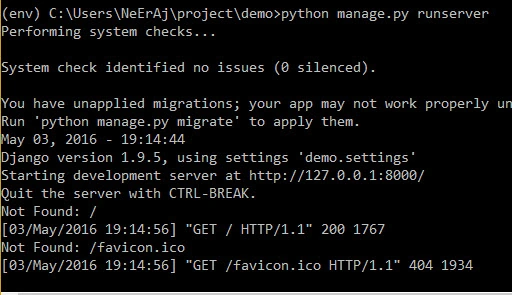
- Open the browser and enter URL http://127.0.0.1:8000/.

- Now Django is successfully installed.
Use Django directly in Visual Studio
- Download python tools for visual studio at https://github.com/Microsoft/PTVS and install it.
- Now you will see in Visual Studio.
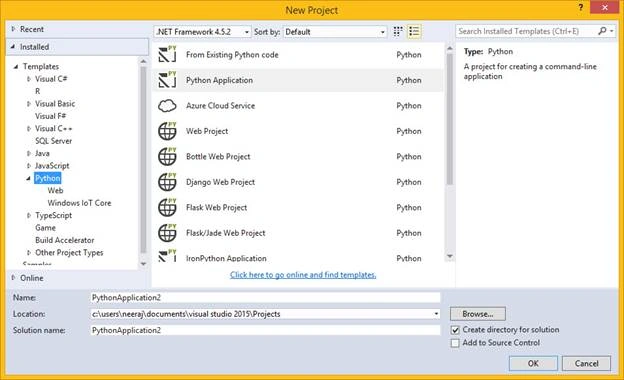
- You can make the Django web project directly.
- But according to me you should have knowledge about all basic commands of django for customization.
Zeeshan AzimPosted Mar 14, 2018, 4:57 AM
Neeraj Kumar ... Please write an article for basic commands of django for customization.
Sonu ChaudharyPosted May 16, 2016, 3:34 PM
good one...
Neeraj KumarPosted May 5, 2016, 7:43 AM
Thank you All :)
Manisha BiswasPosted May 5, 2016, 12:23 AM
Nice
Vignesh ManiPosted May 4, 2016, 4:24 PM
Good one
Munesh SharmaPosted May 4, 2016, 1:27 PM
good one
Debasis SahaPosted May 4, 2016, 10:19 AM
Nice One..