

Before reading this article, I highly recommend reading my previous article.
Step 1: After successful installation of Ubuntu log into Ubuntu with your credentials.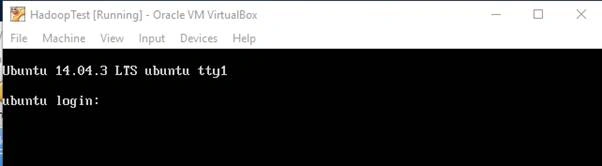
Step 2: After login we have to installan Ubuntu update if there is any. Write the following code.
Code: sudo apt-get install update
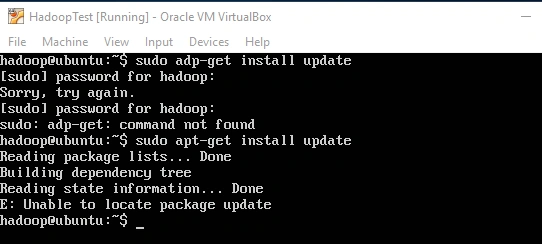
If you find “Unable to locate package update”, it means your operating system does not require any updates.
Step 3: Install jdk using the following code
sudo apt-get install default-jdk
Step 4: Le't's create a dedicated Hadoop group and Hadoop user called hduser
sudo addgroup hadoop
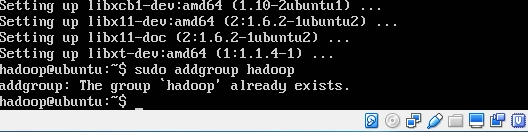
It returns an error thataHhadoop group already exists. We had created that group when we installed Ubuntu on VM. Now we add user.
sudo adduser --ingroup hadoop hduser
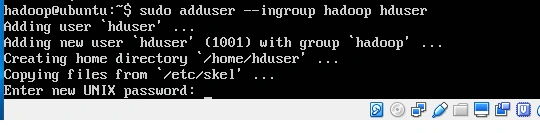
After entering password leave the default and say y.
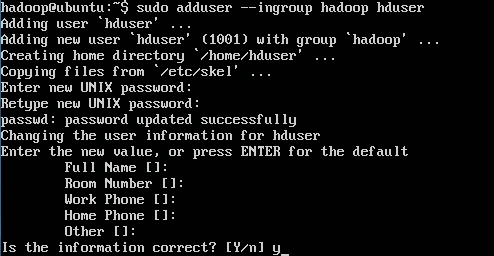
Now let’s add hduser as administrator or sudo user.
sudo adduser hduser sudo

Now let’s install openssh server. Wikipedia says “OpenSSH, also known as OpenBSD Secure Shell,[a] is a suite of security-related network-level utilities based on the SSH protocol, which help to secure network communications via the encryption of network traffic over multiple authentication methods and by providing secure tunneling capabilities.”
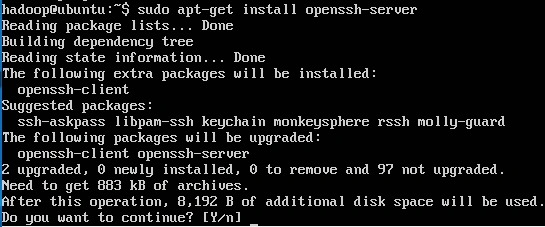
Now let’s login with hduser and generate a key for hduser and add the key to the authorized keys.
su hduser

ssh-keygen –t rsa –P “”
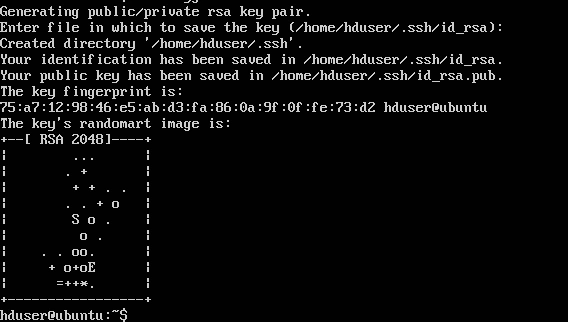
cat $HOME/.ssh/id_rsa.pub >> $HOME/.ssh/authorized_keys

Now let's try to login on localhost
ssh localhost
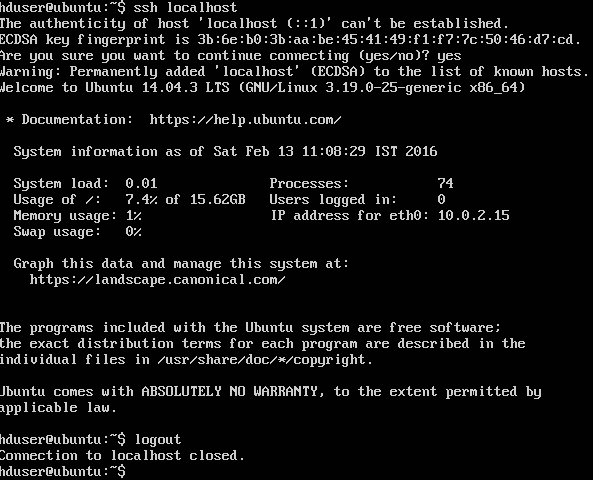
Don’t worry about all these messages. Now say logout for closing connection of localhost.
Now let’s install Hadoop. Download hadoop.

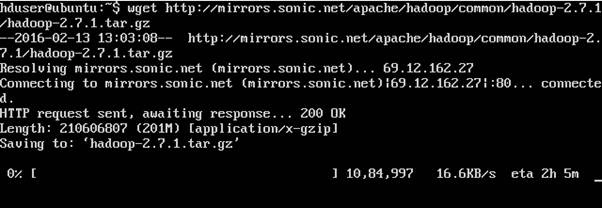
After download is completed you will find a message like “hadoop-2.7.1.tar.gz saved”. For me its like “hadoop-2.7.1.tar.gz.2 saved” because of my net connection. This download completed on third attempt.
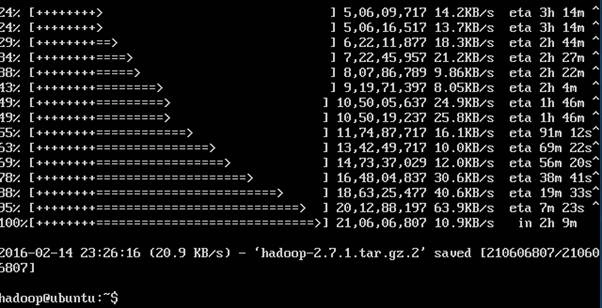
tar xvzf hadoop-2.7.1.tar.gz

Don’t confuse with tar xvzf hadoop-2.7.1.tar.gz.2. My zip downloaded file name is
“hadoop-2.7.1.tar.gz.2” that’s why I have written hadoop-2.7.1.tar.gz.2.
Now let’s move Hadoop 2.7.1 to a directory /usr/local/hadoop.
sudo mv hadoop-2.7.1 /usr/local/hadoop

Let's give the directory to the hduser as the owner. After that edit the bashrc file and append to the end of the file the path of hadoop.
sudo chown –R hduser /user/local
sudo nano ~/.bashrc

export JAVA_HOME=/usr/lib/jvm/java-7-openjdk-amd64
export HADOOP_HOME=/usr/local/hadoop
export PATH=$PATH:$HADOOP_HOME/bin
export PATH=$PATH:$HADOOP_HOME/sbin
export HADOOP_MAPRED_HOME=$HADOOP_HOME
export HADOOP_COMMON_HOME=$HADOOP_HOME
export HADOOP_HDFS_HOME=$HADOOP_HOME
export YARN_HOME=$HADOOP_HOME
export HADOOP_COMMON_LIB_NATIVE_DIR=$HADOOP_HOME/lib/native
export HADOOP_OPTS=”-Djava.library.path”= $HADOOP_HOME/lib
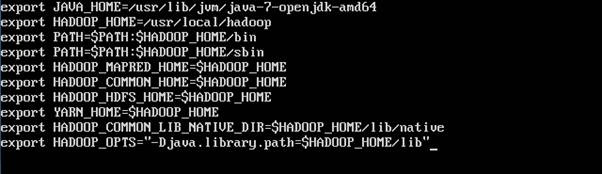
After press ctr+”X”

Say yes.
source ~/.bashrc

Now let's give the Java path to run Hadoop.
sudo nano /usr/local/hadoop/etc/hadoop/hadoop-env.sh

After some scrolling we find export JAVA_HOME=$( JAVA_HOME)

Replace $(JAVA_HOME) to usr/lib/jvm/java-7-openjdk-amd64(your java location) and save.
Now let's configure the following xml file. Write following code in the configuration tag and save.
Core-site.xml
sudo nano /usr/local/hadoop/etc/hadoop/hadoop/core-site.xml
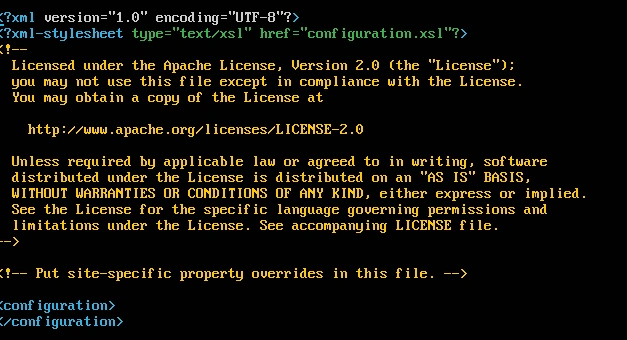
- <property>
- <name>fs.default.name</name>
- <value>hdfc://localhost:9000</value>
- </property>

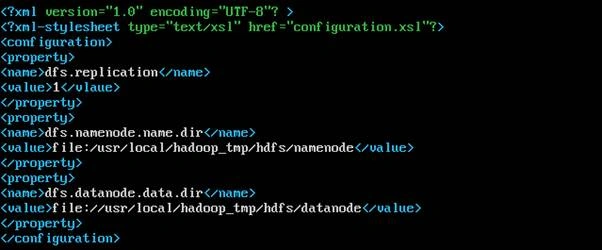
hdfs-site.xml
sudo nano /usr/local/hadoop/etc/hadoop/hadoop/hdfs-site.xml
- <property>
- <name>dfs.replication</name>
- <value>1</value>
- </property>
- <property>
- <name>dfs.namenode.name.dir</name>
- <value>file:/usr/local/hadoop_tem/hdfs/namenode</value>
- </property>
- <property>
- <name>dfs.datanode.data.dir</name>
- <value> file:/usr/local/hadoop_tem/hdfs/datanode </value>
- </property>
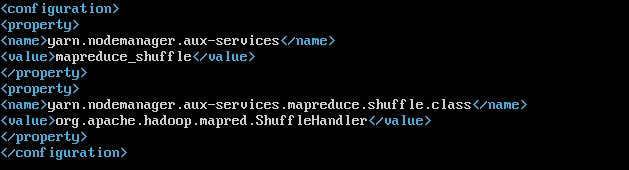
yarn-site.xml
sudo nano /usr/local/hadoop/etc/hadoop/hadoop/yarn-site.xml
- <property>
- <name>yarn.nodemanager.aux-services</name>
- <value>mapreduce_shuffle</value>
- </property>
- <property>
- <name> yarn.nodemanager.aux-services.mapreduce.shuffle.class </name>
- <value>org.apache.hadoop.mapred.ShuffleHandler</value>
- </property>
Let copy the mapred.xml template and then edit the file.
cp /usr/local/hadoop/etc/hadoop/mapred-site.xml.template /usr/local/hadoop/etc/hadoop/mapred-site.xml
After copying the file let's make the following changes.
mapred-site.xml
sudo nano /usr/local/hadoop/etc/hadoop/hadoop/mapred-site.xml
- <property>
- <name>mapreduce.framework.name</name>
- <value>yarn</value>
- </property>

Now create a folder where Hadoop will process the hdfs jobs.
sudo mkdir –p /usr/local/hadoop_tmp
sudo mkdir –p /usr/local/hadoop_tmp/hdfs/namenode
sudo mkdir –p /usr/local/hadoop_tmp/hdfs/datanode


Now assign hduser the ownership of the folder. Run all the following commands.
sudo chown –R hduser /usr/local/hadoop_tmp
hdfs namenode –format
start –dfs.sh
start-yarn.sh
jsp
Now single node Hadoop cluster is installed. Now you can write the program.
Hope this article is helpful.
Hadshana KamalanathanPosted Jul 19, 2018, 2:52 AM
Thanks for sharing
Reshwanth SPosted Oct 15, 2017, 10:16 AM
Thanks for sharing your resource
SubashPosted Aug 18, 2016, 12:28 AM
Great work sir
Pramod ThakurPosted Apr 30, 2016, 11:42 AM
thanks Pankaj Kumar Choudhary
Pankaj Kumar ChoudharyPosted Apr 30, 2016, 9:55 AM
Nice Explain parmod........
Pramod ThakurPosted Mar 4, 2016, 3:37 AM
Gowtham Rajamanickam tnx..
Pramod ThakurPosted Mar 4, 2016, 3:37 AM
Vignesh Mani tnx..
Pramod ThakurPosted Mar 4, 2016, 3:37 AM
Shubham Kumar tnx..
Gowtham RajamanickamPosted Mar 4, 2016, 1:39 AM
keep wrting
Gowtham RajamanickamPosted Mar 4, 2016, 1:39 AM
Good one..
Vignesh ManiPosted Mar 3, 2016, 6:19 AM
Nice
Shubham KumarPosted Mar 3, 2016, 12:17 AM
nice
Raja TPosted Mar 2, 2016, 11:13 PM
Nice,Thanks for sharing..
Pramod ThakurPosted Mar 2, 2016, 8:57 PM
thnx sreenivasa k..
Pramod ThakurPosted Mar 2, 2016, 8:57 PM
thank you sir Mahesh Chand
Pramod ThakurPosted Mar 2, 2016, 8:57 PM
thanks Kirtan Parmar
sreenivasa kPosted Mar 2, 2016, 3:16 PM
many thanks
Mahesh ChandPosted Mar 2, 2016, 2:52 PM
This is great, Pramod to see Hadoop on Windows. I always thought it is all Linux which is black box to me.
Kirtan ParmarPosted Mar 2, 2016, 12:47 PM
great...soon i am going to work on it
Pramod ThakurPosted Mar 2, 2016, 12:20 PM
thanks Asfend Yar...
Asfend YarPosted Mar 2, 2016, 12:02 PM
nice
Pramod ThakurPosted Mar 2, 2016, 11:51 AM
thanks..
Vignesh ManiPosted Mar 2, 2016, 11:33 AM
Nice