

Introduction
This article is in continuation of the previous one in which I discussed how to create ADO.NET Data Service and access Database using Silverlight 2. Here I am going to show how to perform Insert, Update, and Delete in Silverlight Datagrid using ADO.NET Data Service.
1. Create a class of the Entities type
- TestEntities proxy;
2. Create a variable to track if DataGrid is in Edit mode
- private bool inEdit;
3. Create Page_Loaded event to initailize the ADO.NET Data Service
- void Page_Loaded(object sender, RoutedEventArgs e) {
- proxy = new TestEntities(new Uri("WebDataService.svc", UriKind.Relative));
- }
4. Create Events for the DataGrid
- < my: DataGrid x: Name = "dataGrid"
- Margin = "10"
- AutoGenerateColumns = "True"
- AutoGeneratingColumn = "OnGeneratedColumn"
- BeginningEdit = "dataGrid_BeginningEdit"
- CommittingEdit = "dataGrid_CommittingEdit"
- CancelingEdit = "dataGrid_CancelingEdit"
- KeyDown = "dataGrid_KeyDown" / >
5. AttachTo method is used when an entity exists in the store already and you would want the DataServiceContext to track that entity. Use AddObject or AddTo method when a new entity is created and want the Context to track the entity. Write the Event Handelers for DataGrid Events
- private void dataGrid_BeginningEdit(object sender, DataGridBeginningEditEventArgs e) {
- inEdit = true;
- }
- private void dataGrid_CancelingEdit(object sender, DataGridEndingEditEventArgs e) {
- inEdit = false;
- }
- private void dataGrid_CommittingEdit(object sender, DataGridEndingEditEventArgs e) {
- //Attach the object to the context.
- try {
- proxy.AttachTo("Users", dataGrid.SelectedItem);
- }
- catch {}
- proxy.UpdateObject(e.Row.DataContext);
- }
6. Create a ObservableCollection
- /// <summary>
- /// Represents a dynamic data collection that provides notifications when items get added, removed, or when the whole list is refreshed.
- /// </summary>
- ObservableCollection < Users > BoundData {
- get {
- return (dataGrid.ItemsSource as ObservableCollection < Users > );
- }
- }
7. KeyDown Event of the DataGrid to Insert, Update and Delete rows
- private void dataGrid_KeyDown(object sender, KeyEventArgs e) {
- if (!inEdit) {
- TextBlockStatus.Text = "";
- if (e.Key == Key.Delete) {
- if (dataGrid.SelectedItem != null) {
- //Attach the object to the context.
- try {
- proxy.AttachTo("Users", dataGrid.SelectedItem);
- }
- catch(Exception ex) {
- TextBlockStatus.Text = ex.Message;
- }
- proxy.DeleteObject(dataGrid.SelectedItem);
- // Remove from the bound collection, disappears from DataGrid.
- BoundData.Remove(dataGrid.SelectedItem as Users);
- }
- }
- else if (e.Key == Key.Insert) {
- Users u = new Users() {
- FirstName = "",
- LastName = ""
- };
- int index = BoundData.IndexOf(dataGrid.SelectedItem as Users);
- BoundData.Insert(index, u);
- dataGrid.SelectedIndex = index;
- dataGrid.BeginEdit();
- proxy.AddObject("Users", u);
- }
- }
- }
8. Save the changes to the database
- void ButtonSave_Click(object sender, RoutedEventArgs args) {
- //save the changes to the database
- proxy.BeginSaveChanges(SaveChangesOptions.Batch, (asyncResult) =>{
- try {
- proxy.EndSaveChanges(asyncResult);
- }
- catch(Exception ex) {
- TextBlockStatus.Text = ex.Message;
- }
- },
- null);
- //datagrid is not in edit mode anymore
- inEdit = false;
- //show the message
- TextBlockStatus.Text = "Changes Saved to the database";
- }
9. Currently the Data Contract objects do not support INotifyPropertyChanged or INotifyCollectionChanged so change the Proxy.cs from
- [global::System.Data.Services.Common.DataServiceKeyAttribute("UserID")]
- public partial class Users {
- /// <summary>
- /// Create a new Users object.
- /// </summary>
- /// <param name="userID">Initial value of UserID.</param>
- public static Users CreateUsers(int userID) {
- Users users = new Users();
- users.UserID = userID;
- return users;
- }...
- to[global::System.Data.Services.Common.DataServiceKeyAttribute("UserID")]
- public partial class Users: System.ComponentModel.INotifyPropertyChanged {
- public event System.ComponentModel.PropertyChangedEventHandler PropertyChanged;
- protected virtual void OnPropertyChanged(string propertyName) {
- if (PropertyChanged != null) {
- PropertyChanged(this, new System.ComponentModel.PropertyChangedEventArgs(propertyName));
- }
- }
- /// <summary>
- /// Create a new Users object.
- /// </summary>
- /// <param name="userID">Initial value of UserID.</param>
- public static Users CreateUsers(int userID) {
- Users users = new Users();
- users.UserID = userID;
- return users;
- }...
That's all. You are done. Build and run the application.
To load the data in DataGrid, press the GetData button.
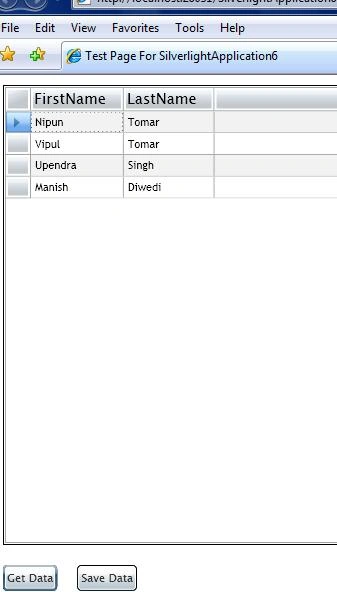
Select the DataGrid and Press Insert from KeyBoard. A new row will be inserted in the DataGrid. You can type text in this new row and click button Save Data to save the new row in the database.
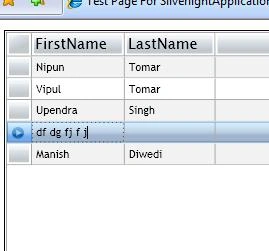
Press the "Save Data" button, the data will be saved in the database.
To delete any row select the row and press the Delete button from KeyBoard, row will be removed from the DataGrid, and to persist the changes in the database click the Save Data button. Similarly to update any column, select the row, update First name or last name, and press the Save Data button.
Summary
In this article, we learned about Insert, Update, and Delete in Silverlight DataGrid using ADO.NET with example.
brahmam keditedPosted Feb 1, 2011, 11:45 PMEdited Feb 1, 2011, 11:57 PM
please Help me i am New for Entity Model in silverlight. i am getting below error at proxy.AttachTo method try { proxy.AttachTo("Users", dataGrid.SelectedItem); } catch { } Error:The context is already tracking the entity.
Dharmesh ranaPosted May 28, 2010, 9:08 PM
it didn't work
sk pPosted Mar 7, 2010, 4:11 PM
I found another article that might help you. get-update-delete-in-silverlight-datagrid-using-wcf-service
sandeep reddyPosted Oct 9, 2009, 10:17 AM
Hi I am sandeep and I am new to silverlight and I have Implemented the same application while clicking the Get Data button I am facing an error System.Data.Services.Client.DataServiceQueryException was unhandled by user code Message="An error occurred while processing this request." StackTrace: at System.Data.Services.Client.QueryAsyncResult.EndExecute[TElement](Object source, IAsyncResult asyncResult) at System.Data.Services.Client.DataServiceQuery`1.EndExecute(IAsyncResult asyncResult) at silverlightado.MainPage.OnLoadComplete(IAsyncResult result) at System.Data.Services.Client.BaseAsyncResult.HandleCompleted() at System.Data.Services.Client.QueryAsyncResult.AsyncEndRead(IAsyncResult asyncResult) at System.IO.Stream.BeginRead(Byte[] buffer, Int32 offset, Int32 count, AsyncCallback callback, Object state) at System.Data.Services.Client.QueryAsyncResult.AsyncEndGetResponse(IAsyncResult asyncResult) InnerException: System.InvalidOperationException Message="An error occurred while saving changes. See the inner exception for details." StackTrace: at System.Data.Services.Client.BaseAsyncResult.EndExecute[T](Object source, String method, IAsyncResult asyncResult) at System.Data.Services.Client.QueryAsyncResult.EndExecute[TElement](Object source, IAsyncResult asyncResult) InnerException: System.Data.Services.Client.DataServiceClientException Message="<?xml version=\"1.0\" encoding=\"iso-8859-1\" standalone=\"yes\"?>\r\n<error xmlns=\"http://schemas.microsoft.com/ado/2007/08/dataservices/metadata\">\r\n <code></code>\r\n <message xml:lang=\"en-AU\">An error occurred while processing this request.</message>\r\n</error>" StatusCode=500 InnerException: and after looking back to application i found one more thing is missing In your application 4.Run the Service and results will be as below after this point there is a picture of xml and in 5.And if use the database object name then the respective records are displayed on clicking users you have shown the data well while i am implementing i am not able to see 5th point but ie didnot shown any error and browsed in firefox and displays <message xml:lang="en-AU">An error occurred while processing this request.</message> error like this please help me on this how to fix this issue it helps me lot and I was thinking it could be the problem please help me. Regards sandeep
Steven MayhuePosted Aug 28, 2009, 11:34 AM
There is no RowEditEnding event available either.
Steven MayhuePosted Aug 28, 2009, 11:28 AM
ObservableCollection<ApplauseModel.tblSettings> BoundData { get { return (dgSettings.ItemsSource as ObservableCollection<ApplauseModel.tblSettings>); } } BoundData returns null even though grid has 8 items loaded?? Steve
JaiPosted Jul 1, 2009, 11:10 AM
Hi, Its a good sample :) However, I am getting two errors when I build. Error 1 'System.Windows.Controls.DataGridAutoGeneratingColumnEventArgs' does not contain a definition for 'Property' and no extension method 'Property' accepting a first argument of type 'System.Windows.Controls.DataGridAutoGeneratingColumnEventArgs' could be found (are you missing a using directive or an assembly reference?) D:\Tutorials\Silver Light Samples\silverLightSimpleGrid\SilverlightApplication6\SilverlightApplication6\Page.xaml.cs 152 19 SilverlightApplication6 Error 2 Could not load file or assembly 'Microsoft.Data.Web, Version=3.5.0.0, Culture=neutral, PublicKeyToken=b77a5c561934e089' or one of its dependencies. The system cannot find the file specified. D:\Tutorials\Silver Light Samples\silverLightSimpleGrid\SilverlightApplication6\SilverlightApplication6Web\web.config 44
Joseph Britto BrittoeditedPosted Jun 4, 2009, 10:34 AMEdited Jun 4, 2009, 10:36 AM
I can't get CommittingEdit="dataGrid_CommittingEdit" in .xaml page.
AndrusPosted Jan 20, 2009, 9:21 AM
Trying to compile this sample in SL2 RTM causes warnings Warning 1 The property 'CommittingEdit' does not exist on the type 'DataGrid' in the XML namespace 'clr-namespace:System.Windows.Controls;assembly=System.Windows.Controls.Data'. C:\ssleditingingrid\SilverlightApplication6\SilverlightApplication6\Page.xaml 13 22 SilverlightApplication6 Warning 2 The property 'CancelingEdit' does not exist on the type 'DataGrid' in the XML namespace 'clr-namespace:System.Windows.Controls;assembly=System.Windows.Controls.Data'. C:\ssleditingingrid\SilverlightApplication6\SilverlightApplication6\Page.xaml 13 63 SilverlightApplication6 Sample saves changes in CommittingEdit event. Since this event does not exist in RTM, this code cannot used to save changes: moving to other row is not dedected by code. How to fix ? Andrus.
DipsaPosted Jan 19, 2009, 6:27 AM
This article is very useful to me. I have used above code to prepare a CRUD operation using VB.Net. Project build successfully. but when i click 'Insert' nothing happens, when i update row and click 'Save' button DB row not updating. Please help me. can you please provide same example in vb.net? Thanks a lot.
Jiang EdwardPosted Nov 3, 2008, 4:23 AM
your code is helped me to much. Now, I have some question, I can't find CommittingEdit and CancelingEdit events in my DataGrid. Can you help me , thanks a lot
umar kashmiriPosted Oct 13, 2008, 1:17 AM
when i implemented previous and this article i got this exception "No parameterless Constructor defined for this object" on data binding with datagrid.itemsource. Can u tell me plz y is that so.kindly email me the solution.