

Introduction
In this article, I will explain how to insert records to a database using TextBox in JavaScript.
Note: This program will work only with Internet Explorer.
First I created a database EmpDetail. Then I created a table in this database.
Query Code
- CREATE TABLE [dbo].[Emp_Info](
- [Emp_Id] [int] NULL,
- [Name] [varchar](50) NULL,
- [Salary] [int] NULL,
- [City] [varchar](50) NULL
- ) ON [PRIMARY]
Now insert some data into the Emp_Info table. Then use the following procedure.
Complete Program
Insert_Value.htm
- <!DOCTYPE html PUBLIC "-//W3C//DTD XHTML 1.0 Transitional//EN" "http://www.w3.org/TR/xhtml1/DTD/xhtml1-transitional.dtd">
- <html xmlns="http://www.w3.org/1999/xhtml">
- <head>
- <title></title>
- <script type="text/javascript" >
- function InsertRecord()
- {
- var txtid = document.getElementById('txtid').value;
- var txtname = document.getElementById('txtname').value;
- var txtsalary = document.getElementById('txtsalary').value;
- var txtcity = document.getElementById('txtcity').value;
- if (txtid.length != 0 || txtname.length !=0 || txtsalary.length !=0|| txtcity.length !=0)
- {
- var connection = new ActiveXObject("ADODB.Connection");
- var connectionstring = "Data Source=.;Initial Catalog=EmpDetail;Persist Security Info=True;User ID=sa;Password=****;Provider=SQLOLEDB";
- connection.Open(connectionstring);
- var rs = new ActiveXObject("ADODB.Recordset");
- rs.Open("insert into Emp_Info values('" + txtid + "','" + txtname + "','" + txtsalary + "','" + txtcity + "')", connection);
- alert("Insert Record Successfuly");
- txtid.value = " ";
- connection.close();
- }
- else
- {
- alert("Please Enter Employee \n Id \n Name \n Salary \n City ");
- }
- }
- function ShowAll()
- {
- var connection = new ActiveXObject("ADODB.Connection");
- var connectionstring = "Data Source=.;Initial Catalog=EmpDetail;Persist Security Info=True;User ID=sa;Password=****;Provider=SQLOLEDB";
- connection.Open(connectionstring);
- var rs = new ActiveXObject("ADODB.Recordset");
- rs.Open("select * from Emp_Info ", connection);
- rs.MoveFirst();
- var span = document.createElement("span");
- span.style.color = "Blue";
- span.innerText = " ID " + " Name " + " Salary" + " City ";
- document.body.appendChild(span);
- while (!rs.eof)
- {
- var span = document.createElement("span");
- span.style.color = "green";
- span.innerText = "\n " + rs.fields(0) + " | " + rs.fields(1) + " | " + rs.fields(2) + " | " + rs.fields(3);
- document.body.appendChild(span);
- rs.MoveNext();
- }
- rs.close();
- connection.close();
- }
- </script>
- <style type="text/css">
- #main
- {
- height: 264px;
- }
- #ShowRecord
- {
- width: 67px;
- z-index: 1;
- left: 20px;
- top: 257px;
- position: absolute;
- }
- #showall
- {
- z-index: 1;
- left: 114px;
- top: 257px;
- position: absolute;
- }
- </style>
- </head>
- <body style="height: 431px">
- <div id="show"
- style="font-size: x-large; font-weight: bold; height: 298px; color: #009999;">
- Insert Employee Record<p style="font-size: medium; color: #000000;">
- Employee Id
- <input id="txtid" type="text" /></p>
- <p style="font-size: medium; color: #000000;">
- Name
- <input id="txtname" type="text" /></p>
- <p style="font-size: medium; color: #000000;">
- Salary
- <input id="txtsalary" type="text" /></p>
- <p style="font-size: medium; color: #000000;">
- City
- <input id="txtcity" type="text" /></p>
- <input id="ShowRecord" type="button" value="Insert" onclick="InsertRecord()" />
- <input id="showall" type="button" value="Show All Record" onclick="ShowAll()" /></div>
- </body>
- </html>
Output 1
Click on the "Show All Record" button.
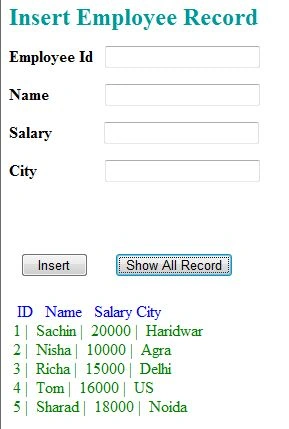
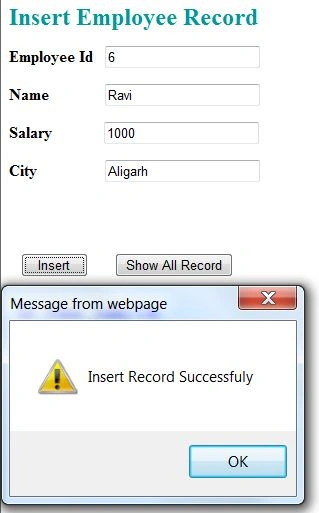
Output 2
Insert records in the textboxes then click on the "Insert" button.
Output 3
After inserting a record, click on the "Show All Record" button. You will see the record inserted successfully.
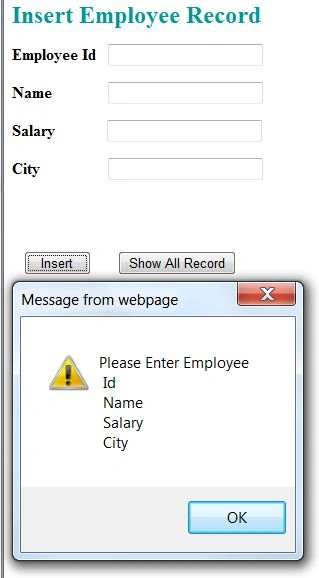
Output 4
If you click on the Insert button without entering any value in the textboxes then it will show the error.
For more information, download the attached sample application.
aaaPosted Apr 22, 2018, 2:12 AM
How to apply this code in android studio??
Nitin SontakkePosted Sep 12, 2016, 6:51 AM
To my understanding, this will work only on your machine, because "Data Source=." is impossible to resolve on any other machine. It will try to connect to SQL Server on that machine. Another thing is, while you might have put **** password here, in reality you will need to type the password there and it is possible to see the connection string by "View Page source", Am I right?
Nitin BhardwajPosted Aug 10, 2015, 6:15 AM
http://www.c-sharpcorner.com/UploadFile/9a81a4/adodb-connection-in-net-application-using-C-Sharp/
s dPosted Aug 5, 2015, 10:02 AM
what's this ADODB?