

The following is the SQL Server table in design mode.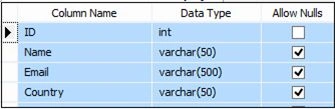
The following is the script for the table.
- CREATE TABLE [dbo].[Employee]
- (
- [ID] [int] IDENTITY(1, 1) NOT NULL,
- [Name] [varchar](50) NULL,
- [Email] [varchar](500) NULL,
- [Country] [varchar](50) NULL
- ) ON [PRIMARY] GO
- <%@ Page Language="C#" AutoEventWireup="true" CodeBehind="Default.aspx.cs" Inherits="jQueryWebMethodInsertData.Default" %>
- <!DOCTYPE html>
- <html
- xmlns="http://www.w3.org/1999/xhtml">
- <head runat="server">
- <title></title>
- <script type="text/javascript" src="http://ajax.googleapis.com/ajax/libs/jquery/1.8.3/jquery.min.js"></script>
- <script type="text/javascript" src="http://cdn.jsdelivr.net/json2/0.1/json2.js"></script>
- <script type="text/javascript">
- $(function () {
- $("[id*=btnSave]").bind("click", function () {
- var employee = {};
- employee.Name = $("[id*=txtName]").val();
- employee.Email = $("[id*=txtEmail]").val();
- employee.Country = $("[id*=txtCountry]").val();
- $.ajax({
- type: "POST",
- url: "Default.aspx/SaveUser",
- data: '{employee: ' + JSON.stringify(employee) + '}',
- contentType: "application/json; charset=utf-8",
- dataType: "json",
- success: function (response) {
- alert("Employee has been added successfully.");
- window.location.reload();
- }
- });
- return false;
- });
- });
- </script>
- </head>
- <body>
- <form id="form1" runat="server">
- <table border="0" cellpadding="5" cellspacing="5" style="border: solid 2px Red; background-color: skyblue; width:100%;">
- <tr>
- <td colspan="2" style="background-color: #f00; color: white; font-weight: bold; font-size: 12pt; text-align: center; font-family: Verdana;">Saving Data In SQL Server By Calling WEB Method using jQuery & JSON</td>
- </tr>
- <tr>
- <td style="text-align: left; vertical-align: top; width: 300px;">
- <table border="0" cellpadding="5" cellspacing="5" style="border: solid 2px Green;">
- <tr>
- <td colspan="2" style="background-color: red; color: white; font-weight: bold; font-size: 12pt; text-align: center; font-family: Verdana;">Enter Employee Information</td>
- </tr>
- <tr>
- <td>Name:
- </td>
- <td>
- <asp:TextBox ID="txtName" runat="server" Text="" />
- </td>
- </tr>
- <tr>
- <td>Email:
- </td>
- <td>
- <asp:TextBox ID="txtEmail" runat="server" />
- </td>
- </tr>
- <tr>
- <td>Country:
- </td>
- <td>
- <asp:TextBox ID="txtCountry" runat="server" />
- </td>
- </tr>
- <tr>
- <td></td>
- <td>
- <asp:Button ID="btnSave" Text="Save" runat="server" />
- </td>
- </tr>
- </table>
- </td>
- <td>
- <table>
- <tr>
- <td>
- <asp:GridView ID="gvEmployee" runat="server" AutoGenerateColumns="False" HeaderStyle-BackColor="#3AC0F2"
- HeaderStyle-ForeColor="White" RowStyle-BackColor="#A1DCF2" CellPadding="4" ForeColor="#333333" GridLines="None">
- <AlternatingRowStyle BackColor="SkyBlue" ForeColor="#284775" />
- <Columns>
- <asp:BoundField DataField="Id" HeaderText="ID" ItemStyle-Font-Names="Verdana" ItemStyle-Width="40px" HeaderStyle-HorizontalAlign="Center" />
- <asp:BoundField DataField="Name" HeaderText="Name" ItemStyle-Font-Names="Verdana" ItemStyle-Width="180px" HeaderStyle-HorizontalAlign="Center" />
- <asp:BoundField DataField="Email" HeaderText="Email" ItemStyle-Font-Names="Verdana" ItemStyle-Width="250px" HeaderStyle-HorizontalAlign="Center" />
- <asp:BoundField DataField="Country" HeaderText="Country" ItemStyle-Font-Names="Verdana" />
- </Columns>
- <EditRowStyle BackColor="#999999" />
- <FooterStyle BackColor="#5D7B9D" Font-Bold="True" ForeColor="White" />
- <HeaderStyle BackColor="#5D7B9D" ForeColor="White" Font-Bold="True" HorizontalAlign="Center"></HeaderStyle>
- <PagerStyle BackColor="#284775" ForeColor="White" HorizontalAlign="Center" />
- <RowStyle BackColor="#F7F6F3" ForeColor="#333333"></RowStyle>
- <SelectedRowStyle BackColor="#E2DED6" Font-Bold="True" ForeColor="#333333" />
- <SortedAscendingCellStyle BackColor="#E9E7E2" />
- <SortedAscendingHeaderStyle BackColor="#506C8C" />
- <SortedDescendingCellStyle BackColor="#FFFDF8" />
- <SortedDescendingHeaderStyle BackColor="#6F8DAE" />
- </asp:GridView>
- </td>
- </tr>
- </table>
- </td>
- </tr>
- </table>
- </form>
- </body>
- </html>
The following is the aspx.cs.
- using System;
- using System.Collections.Generic;
- using System.Linq;
- using System.Web;
- using System.Web.UI;
- using System.Web.UI.WebControls;
- using System.Data;
- using System.Data.SqlClient;
- using System.Configuration;
- using System.Web.Services;
- using System.Web.Script.Services;
- namespace jQueryWebMethodInsertData
- {
- public partial class Default: System.Web.UI.Page
- {
- protected void Page_Load(object sender, EventArgs e) {
- if (!this.IsPostBack)
- {
- BindEmployees();
- }
- }
- private void BindEmployees()
- {
- string constr = ConfigurationManager.ConnectionStrings["RConnection"].ConnectionString;
- using(SqlConnection con = new SqlConnection(constr)) {
- using(SqlCommand cmd = new SqlCommand("SELECT * FROM Employee ORDER BY ID")) {
- using(SqlDataAdapter da = new SqlDataAdapter()) {
- DataTable dt = new DataTable();
- cmd.CommandType = CommandType.Text;
- cmd.Connection = con;
- da.SelectCommand = cmd;
- da.Fill(dt);
- gvEmployee.DataSource = dt;
- gvEmployee.DataBind();
- }
- }
- }
- }
- [WebMethod]
- [ScriptMethod]
- public static void SaveUser(Employee employee)
- {
- string constr = ConfigurationManager.ConnectionStrings["RConnection"].ConnectionString;
- using(SqlConnection con = new SqlConnection(constr)) {
- using(SqlCommand cmd = new SqlCommand("INSERT INTO Employee VALUES(@Name, @Email, @Country)")) {
- cmd.CommandType = CommandType.Text;
- cmd.Parameters.AddWithValue("@Name", employee.Name);
- cmd.Parameters.AddWithValue("@Email", employee.Email);
- cmd.Parameters.AddWithValue("@Country", employee.Country);
- cmd.Connection = con;
- con.Open();
- cmd.ExecuteNonQuery();
- con.Close();
- }
- }
- }
- }
- }
Next, run the application.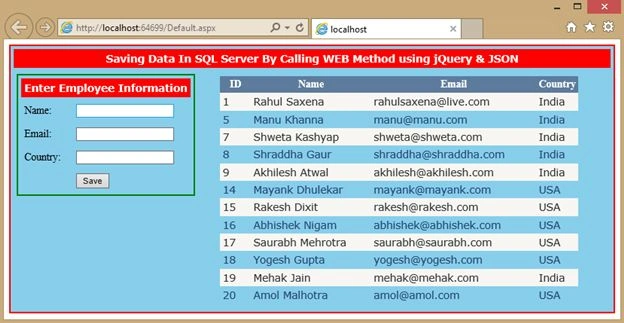
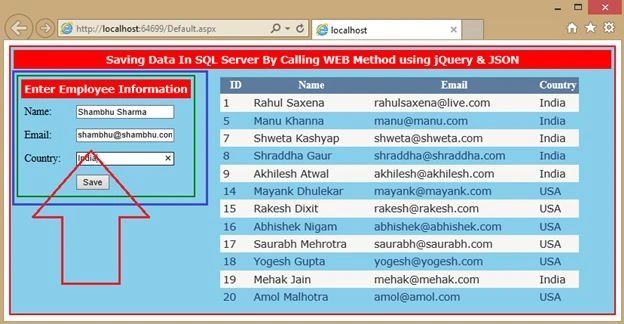
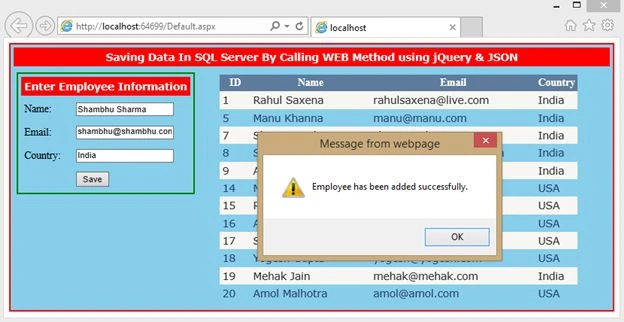
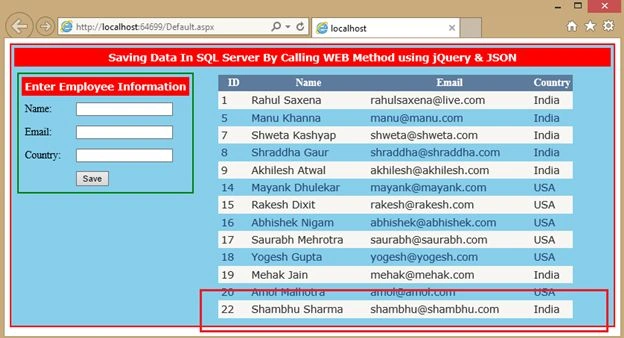
Thameem AnsariPosted Sep 27, 2018, 2:09 AM
How can i get the employee detalils. i means how is that object acesssed in the saveuser void function. please explain
Gilson KuriakosePosted Feb 7, 2018, 4:04 AM
Can we connect SharePoint online with SQL DB using json
Ekrem TapanPosted May 16, 2016, 10:40 AM
good article
Ahamefule EboguPosted Aug 12, 2015, 4:43 PM
Nice article , but can you tell me how or where the Employee object in the Web Method was declared ?
Rahul Kumar SaxenaPosted May 23, 2015, 3:16 PM
Thanks Nitin Tyagi
NitinPosted May 23, 2015, 8:59 AM
nice
Rahul Kumar SaxenaPosted May 20, 2015, 11:40 PM
Thanks Pankaj Kumar Choudhary...
Rahul Kumar SaxenaPosted May 20, 2015, 11:40 PM
Thanks Santhakumar Munuswamy
Pankaj Kumar ChoudharyPosted May 20, 2015, 6:33 PM
Nice Article Sir...........
Santhakumar MunuswamyPosted May 20, 2015, 3:00 PM
Thanks for nice article
Rahul Kumar SaxenaPosted May 20, 2015, 2:29 PM
Thanks.Anurag Sarkar
Rahul Kumar SaxenaPosted May 20, 2015, 2:29 PM
Thanks.Manoj Bhoir
Rahul Kumar SaxenaPosted May 20, 2015, 2:28 PM
Thanks.Rakesh Chavda
Rahul Kumar SaxenaPosted May 20, 2015, 2:28 PM
Thanks.Upendra Pratap Shahi
Rahul Kumar SaxenaPosted May 20, 2015, 2:28 PM
Thanks.Khalid DRISSI SLIMANI
Rahul Kumar SaxenaPosted May 20, 2015, 2:27 PM
Thanks Khargesh Rajput
Anurag SarkarPosted May 20, 2015, 1:28 PM
Nice article & Nice Screenshots. Thanks.
Manoj BhoirPosted May 20, 2015, 8:04 AM
Nice Article.
RakeshPosted May 20, 2015, 7:17 AM
good one
Upendra Pratap ShahiPosted May 20, 2015, 6:42 AM
once again...very nice sir..................
Khalid DRISSI SLIMANIPosted May 20, 2015, 6:22 AM
Nice article it's very helpful
Khargesh RajputPosted May 20, 2015, 5:02 AM
nice article sir