
Introduction
In this article I explain how to perform insert and update operations using a single store procedure and the CellDoubleClick Event of a DataGridView Control. First, understand the scenario here. I have used only one button for doing both the insert and update and a single procedure also. So first of all create a table and a Stored Procedure to implement it.
Create Table
create table emp2(id int identity(1,1),Name varchar(max), salary int )
Create Procedure
create procedure insertupdate
(
@id int,
@name varchar(max),
@salary int,
@Flag char(1)
)
As
IF @Flag ='S'
begin
insert into emp2 values (@name, @salary )
end
Else
begin
Update emp2 set Name =@name ,salary =@salary where id =@id
end
Now implement this procedure that inserts and updates in Windows Forms applications.
Step 1
Create a Windows Forms application and insert three TextBoxes and one DataGridView control on the form1 with the visible property set to false,
Step 2
Now write the code to insert and update the record.
using System;
using System.Collections.Generic;
using System.ComponentModel;
using System.Data;
using System.Drawing;
using System.Linq;
using System.Text;
using System.Windows.Forms;
using System.Data.SqlClient;
namespace use_gridview
{
public partial class Form1 : Form
{
//-----------------------------------------------------------------------//
public Form1()
{
InitializeComponent();
}
//-----------------------------------------------------------------------//
SqlConnection con = new SqlConnection("Data Source=MCNDESKTOP03;Initial Catalog=pulkit;User ID=sa;Password=wintellect@123");
SqlCommand cmd;
SqlDataAdapter da;
DataSet ds;
int i;
int num = 0;
//-----------------------------------------------------------------------//
private void Form1_Load(object sender, EventArgs e)
{
showrecord();
}
//-----------------------------------------------------------------------//
private void dataGridView1_CellDoubleClick(object sender, DataGridViewCellEventArgs e)
{
if (e.RowIndex > -1 && e.ColumnIndex > -1)
{
label1.Visible = true;
textBox1.Visible = true;
textBox1.ReadOnly = true;
textBox1.Text = dataGridView1.Rows[e.RowIndex].Cells[0].Value.ToString();
textBox2.Text = dataGridView1.Rows[e.RowIndex].Cells[1].Value.ToString();
textBox3.Text = dataGridView1.Rows[e.RowIndex].Cells[2].Value.ToString();
}
}
//-----------------------------------------------------------------------//
public void saverecord()
{
if (textBox2.Text == "")
{
MessageBox.Show("Please enter Name");
return;
}
if (textBox3.Text == "")
{
MessageBox.Show("Please enter salary");
}
con.Open();
cmd = new SqlCommand("insertupdate", con);
cmd.CommandType = CommandType.StoredProcedure;
if (textBox1.Text == "")
{
num = 0;
}
else
{
num = int.Parse(textBox1.Text);
}
cmd.Parameters.AddWithValue("@id", num);
cmd.Parameters.AddWithValue("@name", textBox2.Text);
cmd.Parameters.AddWithValue("@salary", int.Parse(textBox3.Text));
if (btnsave.Text == "Save")
{
cmd.Parameters.AddWithValue("@Flag", 'S');
}
else
{
cmd.Parameters.AddWithValue("@Flag", 'U');
}
i=cmd.ExecuteNonQuery();
if (i > 0 && btnsave.Text == "Save")
{
MessageBox.Show("record inserted");
}
else
{
MessageBox.Show("record Update");
}
con.Close();
}
//-----------------------------------------------------------------------//
public void clearfilds()
{
textBox1.Text = "";
textBox2.Text = "";
textBox3.Text = "";
btnsave.Text = "Save";
label1.Visible = textBox1.Visible = false;
}
//-----------------------------------------------------------------------//
public void showrecord()
{
con.Open();
cmd = new SqlCommand("select * from emp2", con);
da = new SqlDataAdapter(cmd);
ds = new DataSet();
da.Fill(ds);
dataGridView1.DataSource = ds.Tables[0];
con.Close();
}
//---------------------------------------------------------------------//
private void btnsave_Click(object sender, EventArgs e)
{
saverecord();
showrecord();
clearfilds();
}
//-----------------------------------------------------------------------//
}
}
Step 3
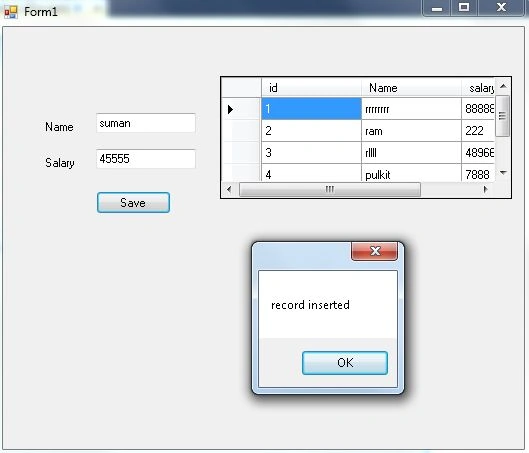
Run your application and insert a record.
Step 4
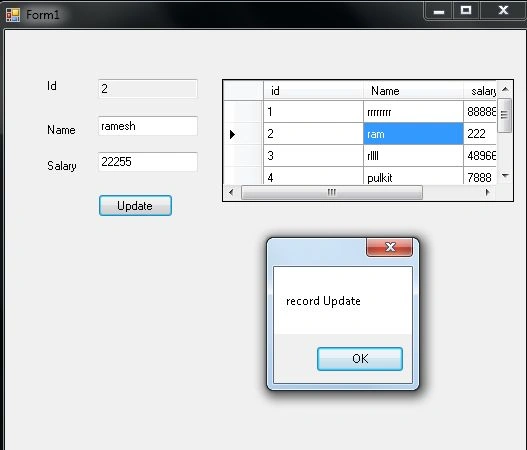
Now double-click in a DataGridView cell, then the record value is filled in the TextBox and the Save button becomes an Update button after that the value of the name salary field is changed; click on the Update button to update the record.
Anurag SarkarPosted Mar 24, 2013, 10:27 AM
Nice One.