

Introduction
Remember last time, when we figured out how to bind data with different modes here.
We used Prism's SetProperty method to update UI.
What exactly do I mean by updating UI?
We can bind properties of ViewModel with View, but is there any way to tell UI that bound properties have been modified so that the UI must update itself?
In simple words, we want to trigger UI when any bound value is modified.
To achieve this, WPF has introduced the INotifyPropertyChanged interface. It is a contract between view & viewmodel.
Let's see this in action.
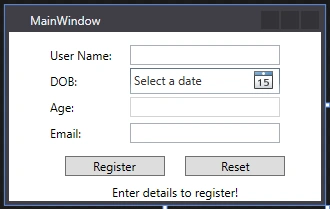
Say we want to register a user & we want to calculate the user's age based on the date of birth entered by the user.
The screen will have 4 fields: User Name (TextBox), DOB (DateTimePicker), Age (TextBlock), EmailId (TextBox), Register plus Reset (Button) & response (TextBlock).
So the final window would look like this:
- <Window x:Class="A.MainWindow"
- xmlns="http://schemas.microsoft.com/winfx/2006/xaml/presentation"
- xmlns:d="http://schemas.microsoft.com/expression/blend/2008"
- xmlns:x="http://schemas.microsoft.com/winfx/2006/xaml"
- xmlns:mc="http://schemas.openxmlformats.org/markup-compatibility/2006"
- mc:Ignorable="d"
- xmlns:ViewModel="clr-namespace:A"
- Title="MainWindow" Height="200" Width="320">
- <Window.Resources>
- <ViewModel:MainWindowViewModel x:Key="VM" ></ViewModel:MainWindowViewModel>
- <BooleanToVisibilityConverter x:Key="BooleanToVisibilityConverter"/>
- </Window.Resources>
- <Grid DataContext="{Binding Source={StaticResource VM}}"
- HorizontalAlignment="Center">
- <Grid.RowDefinitions>
- <RowDefinition Height="Auto"/>
- <RowDefinition Height="Auto"/>
- <RowDefinition Height="Auto"/>
- <RowDefinition Height="Auto"/>
- <RowDefinition Height="Auto"/>
- <RowDefinition Height="5*"/>
- </Grid.RowDefinitions>
- <Grid.ColumnDefinitions>
- <ColumnDefinition Width="Auto"/>
- <ColumnDefinition Width="Auto"/>
- </Grid.ColumnDefinitions>
- <Label x:Name="LabelUserName"
- Content="User Name:"
- Margin="0 10 0 0"/>
- <Label x:Name="LabelDOB"
- Content="DOB:"
- Grid.Row="1"/>
- <Label x:Name="LabelAge"
- Content="Age:"
- Grid.Row="2"/>
- <Label x:Name="LabelEmailId"
- Content="Email:"
- Grid.Row="3"/>
- <TextBox x:Name="TextBoxUserName"
- Text="{Binding UserName}"
- Height="20"
- Width="150"
- Margin="0 10 0 0"
- Grid.Column="1"/>
- <DatePicker x:Name="DatePickerDOB"
- SelectedDate="{Binding DOB}"
- DisplayDateStart="1/1/1990"
- Width="150"
- Grid.Column="1"
- Grid.Row="1"/>
- <Rectangle
- Stroke="LightGray"
- StrokeThickness="1"
- Height="20"
- Width="150"
- Grid.Column="1"
- Grid.Row="2"/>
- <TextBlock x:Name="TextBlockAge"
- Text="{Binding Age}"
- Height="20"
- Width="150"
- Grid.Column="1"
- Grid.Row="2"/>
- <TextBox x:Name="TextBoxEmail"
- Text="{Binding EmailId}"
- Height="20"
- Width="150"
- Grid.Column="1"
- Grid.Row="3"/>
- <StackPanel x:Name="StackPanelButtons"
- Orientation="Horizontal"
- Grid.ColumnSpan="2"
- Grid.Row="4" >
- <Button x:Name="ButtonRegister"
- Height="20"
- Width="100"
- Content="Register"
- HorizontalAlignment="Center"
- Margin="20 10 0 0"
- Command="{Binding RegisterButtonClicked}"/>
- <Button x:Name="ButtonReset"
- Height="20"
- Width="100"
- Content="Reset"
- HorizontalAlignment="Center"
- Margin="20 10 0 0"
- Command="{Binding ResetButtonClicked}"/>
- </StackPanel>
- <TextBlock x:Name="TextBlockMessage"
- HorizontalAlignment="Center"
- Margin="20 8 0 0"
- Grid.Row="5"
- Grid.ColumnSpan="2">
- <TextBlock.Style>
- <Style TargetType="TextBlock">
- <Setter Property="Text"
- Value="Enter details to register!">
- </Setter>
- <Style.Triggers>
- <DataTrigger Binding="{Binding IsButtonClicked}" Value="True">
- <Setter Property="Text"
- Value="{Binding UserName, StringFormat='User: {0} is successfully registered!'}">
- </Setter>
- </DataTrigger>
- </Style.Triggers>
- </Style>
- </TextBlock.Style>
- </TextBlock>
- </Grid>
- </Window>
Now the ViewModel: MainWindowViewModel will consist of the following:
- string UserName: User Name (TextBox)
- DateTime DOB DOB (DateTimePicker)
- string Age: Age (TextBlock)
- string EmailId: EmailId (TextBox)
- ICommand RegisterButtonClicked: Register (Button)
- ICommand ResetButtonClicked: Reset (Button)
- bool IsButtonClicked: What response to display in TextBlockMessage (TextBlock)
- ViewModel will inherit INotifyPropertyChanged interface & we will override PropertyChangedEventHandler event
- Function for calculating an age based on DOB:
Let's encapsulate all of the above:
- using System;
- using System.ComponentModel;
- using System.Windows.Input;
- namespace A
- {
- class MainWindowViewModel : INotifyPropertyChanged
- {
- #region Properties
- private string _userName;
- public string UserName
- {
- get { return _userName; }
- set { _userName = value;
- RaisePropertyChange("UserName");
- }
- }
- private string _age;
- public string Age
- {
- get { return _age; }
- set { _age = value;
- RaisePropertyChange("Age");
- }
- }
- private string _emailId;
- public string EmailId
- {
- get { return _emailId; }
- set { _emailId = value;
- RaisePropertyChange("EmailId");
- }
- }
- private bool _isButtonClicked;
- public bool IsButtonClicked
- {
- get { return _isButtonClicked; }
- set { _isButtonClicked = value;
- RaisePropertyChange("IsButtonClicked");
- }
- }
- private DateTime _dob;
- public DateTime DOB
- {
- get { return _dob; }
- set { _dob = value;
- RaisePropertyChange("DOB");
- CalculateAge();
- }
- }
- #endregion
- #region ICommands
- public ICommand RegisterButtonClicked { get; set; }
- public ICommand ResetButtonClicked { get; set; }
- #endregion
- #region INotifyChangeProperty
- public event PropertyChangedEventHandler PropertyChanged;
- public void RaisePropertyChange(string propertyname)
- {
- if (PropertyChanged != null)
- {
- PropertyChanged(this, new PropertyChangedEventArgs(propertyname));
- }
- }
- #endregion
- #region Constructor
- public MainWindowViewModel()
- {
- RegisterButtonClicked = new RelayCommand(RegisterUser, CanUserRegister);
- ResetButtonClicked = new RelayCommand(ResetPage, CanResetPage);
- }
- #endregion
- #region Event Methods
- private void RegisterUser(object value)
- {
- IsButtonClicked = true;
- }
- private bool CanUserRegister(object value)
- {
- if (string.IsNullOrEmpty(UserName))
- {
- return false;
- }
- else
- {
- return true;
- }
- }
- private void ResetPage(object value)
- {
- IsButtonClicked = false;
- UserName = Age = EmailId = "";
- }
- private bool CanResetPage(object value)
- {
- if (string.IsNullOrEmpty(UserName)
- || string.IsNullOrEmpty(EmailId))
- {
- return false;
- }
- else
- {
- return true;
- }
- }
- private void CalculateAge()
- {
- int Years = new DateTime(DateTime.Now.Subtract(DOB).Ticks).Year - 1;
- DateTime PastYearDate = DOB.AddYears(Years);
- Age = String.Format("{0}Years",Years);
- }
- #endregion
- }
- }

There you go. As soon as DOB is modified, we call CalulateAge() method which sets the value of Age property thus Age property has been modified with new value in the background (in the C# class) now our PropertyChange event has been raised, which triggered UI and updated the value of Age)
Here is the syntax for calling a RaisePropertyChange:
- RaisePropertyChange("UserName");
You may have wonder why we have to pass the Property name as a parameter. What if someone makes a mistake while typing a name? Then it will lead to a problem.
Let's add a new method to take care of this.
- protected bool SetProperty<T>(ref T prop, T value, [CallerMemberName] string propertyName = null)
- {
- if (object.Equals(prop, value)) return false;
- prop = value;
- this.RaisePropertyChange(propertyName);
- return true;
- }
And how do we call this method?
- private string _userName;
- public string UserName
- {
- get { return _userName; }
- set {
- SetProperty(ref _userName, value);
- }
- }
For example, when I enter "Rikam" in UserNameTextBox, the ViewModel's property UserName is updated with "Rikam" & _userName and the private variable will be null as per the above code.
Then SetProperty method will update _userName with "Rikam" and will raise the event with "UserName" property.
Now suppose I am entering "Rikam" in UI, but on the click of the Register button, it will change the property to "Alex".
- private void RegisterUser(object value)
- {
- UserName = "Alex";
- IsButtonClicked = true;
- }
Then SetProperty will get these parameters:
- ref T prop = "Rikam", T value = "Alex"
With respect to _userName = "Rikam" & Value(UserName) = "Alex".
Now let's see the final updated ViewModel:
- using System;
- using System.ComponentModel;
- using System.Runtime.CompilerServices;
- using System.Windows.Input;
- namespace A
- {
- class MainWindowViewModel : INotifyPropertyChanged
- {
- #region Properties
- private string _userName;
- public string UserName
- {
- get { return _userName; }
- set {
- SetProperty(ref _userName, value);
- }
- }
- private string _age;
- public string Age
- {
- get { return _age; }
- set {
- SetProperty(ref _age, value);
- }
- }
- private string _emailId;
- public string EmailId
- {
- get { return _emailId; }
- set {
- SetProperty(ref _emailId, value);
- }
- }
- private bool _isButtonClicked;
- public bool IsButtonClicked
- {
- get { return _isButtonClicked; }
- set {
- SetProperty(ref _isButtonClicked, value);
- }
- }
- private DateTime _dob;
- public DateTime DOB
- {
- get { return _dob; }
- set {
- SetProperty(ref _dob, value);
- CalculateAge();
- }
- }
- #endregion
- #region ICommands
- public ICommand RegisterButtonClicked { get; set; }
- public ICommand ResetButtonClicked { get; set; }
- #endregion
- #region INotifyChangeProperty
- public event PropertyChangedEventHandler PropertyChanged;
- public void RaisePropertyChange(string propertyname)
- {
- if (PropertyChanged != null)
- {
- PropertyChanged(this, new PropertyChangedEventArgs(propertyname));
- }
- }
- protected bool SetProperty<T>(ref T prop, T value, [CallerMemberName] string propertyName = null)
- {
- if (object.Equals(prop, value)) return false;
- prop = value;
- this.RaisePropertyChange(propertyName);
- return true;
- }
- #endregion
- #region Constructor
- public MainWindowViewModel()
- {
- RegisterButtonClicked = new RelayCommand(RegisterUser, CanUserRegister);
- ResetButtonClicked = new RelayCommand(ResetPage, CanResetPage);
- }
- #endregion
- #region Event Methods
- private void RegisterUser(object value)
- {
- _userName = "Alex";
- IsButtonClicked = true;
- }
- private bool CanUserRegister(object value)
- {
- if (string.IsNullOrEmpty(UserName))
- {
- return false;
- }
- else
- {
- return true;
- }
- }
- private void ResetPage(object value)
- {
- IsButtonClicked = false;
- UserName = Age = EmailId = "";
- }
- private bool CanResetPage(object value)
- {
- if (string.IsNullOrEmpty(UserName)
- || string.IsNullOrEmpty(EmailId))
- {
- return false;
- }
- else
- {
- return true;
- }
- }
- private void CalculateAge()
- {
- int Years = new DateTime(DateTime.Now.Subtract(DOB).Ticks).Year - 1;
- DateTime PastYearDate = DOB.AddYears(Years);
- Age = String.Format("{0}Years",Years);
- }
- #endregion
- }
- }
There will be no change in the output.
Conclusion
In this article, we grasp knowledge on following things:
- How to use the INotifyPropertyChanged interface with MVVM.
- How to trigger UI with modified properties.
- How to rectify error-prone code.
Thank you so much for being here, I wish you all the very best.
Keep coding.
Join the conversation! Your thoughts help the community grow.