

Introduction
Today, in this article let's play around with one of the interesting and most useful concepts in LINQ.
Question: What is inner join using LINQ with lambda?
In simple terms "It provides the flexibility to retrieve the matching result sets from two tables using LINQ with an inner join and lambda operator." .
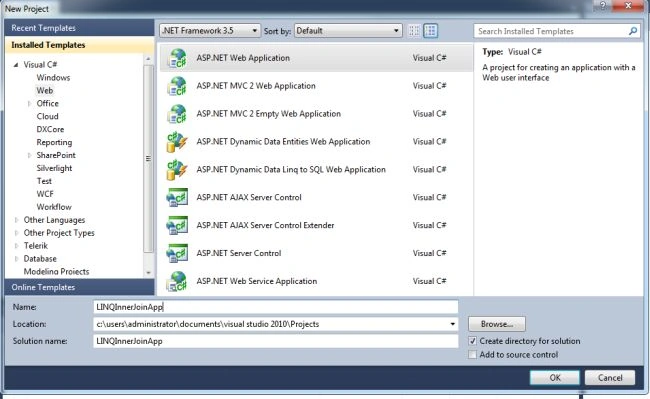
Step 1: Create a new "ASP.NET Web Application", as in:
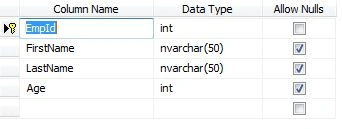
Step 2: The design of the Employee table looks like this:
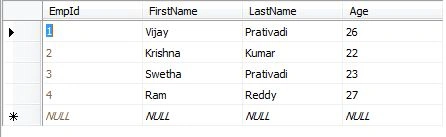
Step 3: The design of the Department table looks like this:
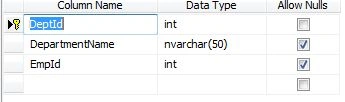
Step 4: The complete code of WebForm1.aspx looks like this:
<%@ Page Language="C#" AutoEventWireup="true" CodeBehind="Default.aspx.cs" Inherits="LINQInnerJoinApp._Default" %>
<!DOCTYPE html PUBLIC "-//W3C//DTD XHTML 1.0 Transitional//EN" "http://www.w3.org/TR/xhtml1/DTD/xhtml1-transitional.dtd">
<html xmlns="http://www.w3.org/1999/xhtml">
<head id="Head1" runat="server">
<title></title>
</head>
<body>
<form id="form1" runat="server">
<center>
<div>
<table>
<tr>
<td colspan="2">
<asp:Label ID="Label1" runat="server" Text="INNER JOIN using LINQ with Lambda" Font-Bold="true"
Font-Size="Large" Font-Names="Verdana" ForeColor="Maroon"></asp:Label>
</td>
</tr>
<tr>
<td colspan="2" align="center">
<asp:Button ID="Button1" runat="server" Text="Select Data" Font-Names="Verdana" Width="213px"
BackColor="Orange" Font-Bold="True" OnClick="Button1_Click" />
</td>
</tr>
<tr>
<td colspan="2" align="center">
<br />
<asp:GridView ID="GridView1" runat="server" BackColor="LightGoldenrodYellow" BorderColor="Tan"
BorderWidth="1px" CellPadding="2" EnableModelValidation="True" ForeColor="Black"
GridLines="None" AutoGenerateColumns="False">
<AlternatingRowStyle BackColor="PaleGoldenrod"></AlternatingRowStyle>
<FooterStyle BackColor="Tan"></FooterStyle>
<HeaderStyle BackColor="Tan" Font-Bold="True"></HeaderStyle>
<PagerStyle HorizontalAlign="Center" BackColor="PaleGoldenrod" ForeColor="DarkSlateBlue">
</PagerStyle>
<SelectedRowStyle BackColor="DarkSlateBlue" ForeColor="GhostWhite"></SelectedRowStyle>
<Columns>
<asp:BoundField DataField="FirstName" HeaderText="First Name" ReadOnly="true" />
<asp:BoundField DataField="LastName" HeaderText="Last Name" />
<asp:BoundField DataField="DepartmentName" HeaderText="Department Name" />
</Columns>
</asp:GridView>
</td>
</tr>
</table>
</div>
</center>
</form>
</body>
</html>
Step 5: The complete code of WebForm1.aspx.cs looks like this:
using System;
using System.Collections.Generic;
using System.Linq;
using System.Web;
using System.Web.UI;
using System.Web.UI.WebControls;
namespace LINQInnerJoinApp
{
public partial class _Default : System.Web.UI.Page
{
protected void Page_Load(object sender, EventArgs e)
{
}
protected void Button1_Click(object sender, EventArgs e)
{
var query = objEntities.Employee.Join(objEntities.Department, r => r.EmpId, p => p.EmpId, (r,p) => new{r.FirstName, r.LastName, p.DepartmentName});
GridView1.DataSource = query;
GridView1.DataBind();
}
#region
Instance MembersCompanyEntities objEntities = new CompanyEntities();
#endregion
}
}
Step 6: The output of the application looks like this:

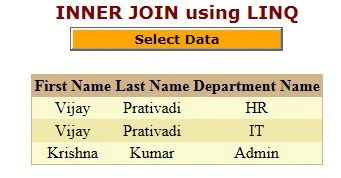
Step 7: The results retrieved output of the application looks like this:
I hope this article is useful for you ...I look forward for your comments and feedback....Thanks Vijay Prativadi
quan buiPosted May 26, 2020, 9:36 PM
Nice article
Vipul MalhotraPosted Jul 6, 2015, 6:45 AM
nice Article
Naeem KhanPosted Oct 31, 2012, 3:00 AM
thank you very much for this article
Tanuj KhuranaPosted Oct 23, 2012, 1:01 AM
thanks nice one....
PriyaPosted Oct 23, 2012, 12:01 AM
nice article vijay...
mahi singhPosted Oct 22, 2012, 11:35 PM
Nice article Vijay.
Anil SaxenaPosted Oct 22, 2012, 11:02 PM
Great.. Now I have another way to perform join operations.
Varesh TuliPosted Oct 22, 2012, 11:00 PM
Good article, thanks for sharing.