

Introduction
In my previous article , I explained the five types of Slowly Changing Dimensions (SCDs)—Type 1, Type 2, Type 3, Type 4, and Type 6—showing how data looks before and after applying each type.
In this article, I will focus on implementing SCD Type 4 in Azure SQL Database.
Link to my previous article - https://www.csharp.com/article/handling-slowly-changing-dimensions-scd-in-azure-data-warehouse/
What is SCD Type 4?
SCD (Slowly Changing Dimension) is a technique used to track historical data changes. SCD Type 4 involves maintaining a current data table while storing historical data in a separate history table. This approach ensures the operational table remains lightweight, while history is preserved for archival and auditing purposes.
Real-World Use Cases
1. Customer Profile History in Banking
- Scenario: A bank maintains a current customer profile table but needs to track historical address and employment changes.
- Implementation
- A current table stores only the latest customer details.
- A history table logs all changes with timestamps.
- Why SCD Type 4?
- Reduces the size of the operational table.
- Allows fast access to current data while keeping history separately.
2. Product Pricing in E-Commerce
- Scenario: An e-commerce platform tracks current product prices but must also store historical pricing for analytics and compliance.
- Implementation
- A current table holds only the latest price.
- A history table logs previous prices with timestamps.
- Why SCD Type 4?
- Enables fast lookups for real-time pricing.
- Historical data is preserved for reporting.
SCD Type 4 Implementation in Azure SQL Database
Schema Design
For this demo, I am implementing customer details tracking in Azure SQL Database.
I created three schemas.
- Staging: Stores raw data before processing.
- Dimension: Holds only the latest records.
- History: Stores historical data separately.
CREATE SCHEMA [Staging];
CREATE SCHEMA [Dimension];
CREATE SCHEMA [History];
Tables & Stored Procedure
I created three tables and a stored procedure to implement SCD Type 4 logic.
1. Staging Table ([Staging].[Customer])
Stores incoming customer data before processing.
CREATE TABLE [Staging].[Customer] (
    [CustomerID]                [int]                 NOT NULL,
    [CustomerName]              [varchar](255)            NULL,
    [Address]                   [varchar](255)            NULL,
)
2. Dimension Table ([Dimension].[Customer])
Contains only current customer records.
CREATE TABLE [Dimension].[Customer] (
    [CustomerID]                [int]                 NOT NULL,
    [CustomerName]              [varchar](255)            NULL,
    [Address]                   [varchar](255)            NULL,
    [IsDeleted]                 [bit]                     NULL,
    [InsertedBy]                [varchar](128)        NOT NULL,
    [InsertDate]                [datetime]            NOT NULL,
    [UpdatedBy]                 [varchar](128)        NOT NULL,
    [UpdatedDate]               [datetime]            NOT NULL
)
3. History Table ([History].[Customer])
Stores all historical customer data.
CREATE TABLE [History].[Customer] (
    [CustomerID]                [int]                 NOT NULL,
    [CustomerName]              [varchar](255)            NULL,
    [Address]                   [varchar](255)            NULL,
    [IsDeleted]                 [bit]                     NULL,
    [StartDate]                 [datetime]            NOT NULL,
    [EndDate]                   [datetime]            NOT NULL,
    [InsertedBy]                [varchar](128)        NOT NULL,
    [UpdatedBy]                 [varchar](128)        NOT NULL,
    [UpdatedDate]               [datetime]            NOT NULL
)
4. Stored Procedure ([Sproc].[Customer])
A stored procedure is a precompiled collection of SQL statements that can be executed as a single unit. It is commonly used for data processing, automation, and performance optimization in databases.
In this implementation, the stored procedure has SCD Type 4 logic.
- Inserts new records into the Dimension table if they don’t exist.
- Moves updated or deleted records to the History table while maintaining only the latest data in the Dimension table.
CREATE PROC [Sproc].[Customer] AS
BEGIN
    -- Local variables declaration
    DECLARE @CurrentDate DATETIME = GETDATE();
    DECLARE @CurrentUser VARCHAR(128) = SYSTEM_USER;

    -- Create a new table 'DeleteCTAS' and populate it with records from 'Dimension.Customer'
    -- that are NOT present in 'Staging.Customer'.
    SELECT
        Cust.[CustomerID],
        Cust.[CustomerName],
        Cust.[Address],
        Cust.[IsDeleted],
        Cust.[InsertedBy],
        Cust.[InsertDate],
        Cust.[UpdatedBy],
        Cust.[UpdatedDate]
    INTO DeleteCTAS
    FROM [Dimension].[Customer] Cust
    WHERE NOT EXISTS (
        SELECT 1 FROM [Staging].[Customer] Stg
        WHERE Cust.[CustomerID] = Stg.[CustomerID]
    );

    -- Create HistoryCTAS table with updated records from Dimension.Customer
    SELECT
        Cust.[CustomerID],
        Cust.[CustomerName],
        Cust.[Address],
        Cust.[IsDeleted],
        Cust.[InsertedBy],
        Cust.[InsertDate]
    INTO HistoryCTAS
    FROM [Dimension].[Customer] Cust
    INNER JOIN [Staging].[Customer] Stg
    ON Cust.[CustomerID] = Stg.[CustomerID]
    EXCEPT
    SELECT
        Stg.[CustomerID],
        Stg.[CustomerName],
        Stg.[Address],
        0 AS [IsDeleted],
        Cust.[InsertedBy],
        Cust.[InsertDate]
    FROM [Staging].[Customer] Stg
    INNER JOIN [Dimension].[Customer] Cust
    ON Cust.[CustomerID] = Stg.[CustomerID];

    -- Create DimensionCTAS table combining Staging and DeleteCTAS tables
    SELECT
        Stg.[CustomerID],
        Stg.[CustomerName],
        Stg.[Address],
        0 AS [IsDeleted],
        ISNULL(T.[InsertedBy], @CurrentUser) AS [InsertedBy],
        ISNULL(T.[InsertDate], @CurrentDate) AS [InsertDate],
        ISNULL(T.[UpdatedBy], @CurrentUser) AS [UpdatedBy],
        ISNULL(T.[UpdatedDate], @CurrentDate) AS [UpdatedDate]
    INTO DimensionCTAS
    FROM [Staging].[Customer] Stg
    LEFT JOIN (
        SELECT [CustomerID], [InsertedBy], [InsertDate], [UpdatedBy], [UpdatedDate]
        FROM [Dimension].[Customer] Cust
        WHERE NOT EXISTS (
            SELECT 1 FROM HistoryCTAS Hist
            WHERE Hist.[CustomerID] = Cust.[CustomerID]
        )
    ) T
    ON T.[CustomerID] = Stg.[CustomerID]
    UNION
    SELECT
        [CustomerID],
        [CustomerName],
        [Address],
        1 AS [IsDeleted],
        CASE WHEN IsDeleted = 1 THEN [InsertedBy] ELSE @CurrentUser END AS [InsertedBy],
        CASE WHEN IsDeleted = 1 THEN [InsertDate] ELSE @CurrentDate END AS [InsertDate],
        CASE WHEN IsDeleted = 1 THEN [UpdatedBy] ELSE @CurrentUser END AS [UpdatedBy],
        CASE WHEN IsDeleted = 1 THEN [UpdatedDate] ELSE @CurrentDate END AS [UpdatedDate]
    FROM DeleteCTAS;

    BEGIN TRANSACTION;

    -- Delete records from the Dimension table
    DELETE FROM [Dimension].[Customer];

    -- Insert into Dimension table from DimensionCTAS
    INSERT INTO [Dimension].[Customer] (
        [CustomerID],
        [CustomerName],
        [Address],
        [IsDeleted],
        [InsertedBy],
        [InsertDate],
        [UpdatedBy],
        [UpdatedDate]
    )
    SELECT
        [CustomerID],
        [CustomerName],
        [Address],
        [IsDeleted],
        [InsertedBy],
        [InsertDate],
        [UpdatedBy],
        [UpdatedDate]
    FROM DimensionCTAS;

    -- Insert into History table from HistoryCTAS and DeleteCTAS
    INSERT INTO [History].[Customer] (
        [CustomerID],
        [CustomerName],
        [Address],
        [IsDeleted],
        [StartDate],
        [EndDate],
        [InsertedBy],
        [UpdatedBy],
        [UpdatedDate]
    )
    SELECT
        [CustomerID],
        [CustomerName],
        [Address],
        [IsDeleted],
        InsertDate AS [StartDate],
        @CurrentDate AS [EndDate],
        InsertedBy AS [InsertedBy],
        @CurrentUser AS [UpdatedBy],
        @CurrentDate AS [UpdatedDate]
    FROM HistoryCTAS
    UNION
    SELECT
        [CustomerID],
        [CustomerName],
        [Address],
        IsDeleted,
        InsertDate AS [StartDate],
        @CurrentDate AS [EndDate],
        InsertedBy AS [InsertedBy],
        @CurrentUser AS [UpdatedBy],
        @CurrentDate AS [UpdatedDate]
    FROM DeleteCTAS
    WHERE IsDeleted = 0;

    COMMIT TRANSACTION;

    -- Drop CTAS Tables
    DROP TABLE DeleteCTAS;
    DROP TABLE DimensionCTAS;
    DROP TABLE HistoryCTAS;
END
Note. The stored procedure does not include error handling (e.g., duplicate keys), which can be added later.
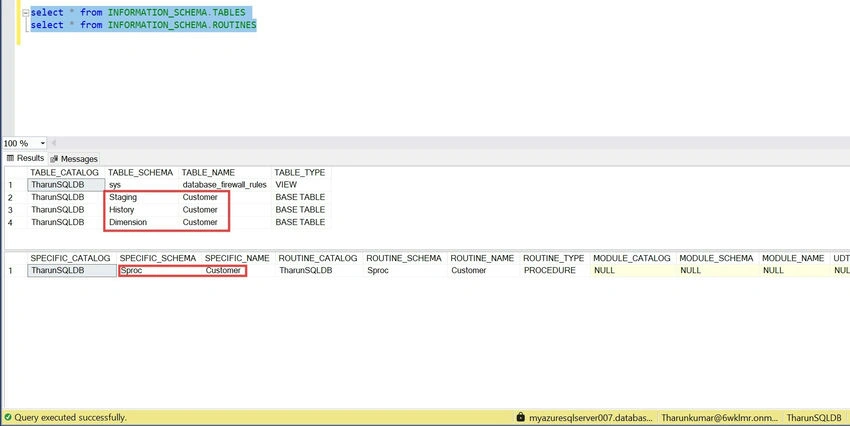
Below query to list the entities.
select * from INFORMATION_SCHEMA.TABLES;
select * from INFORMATION_SCHEMA.ROUTINES;
Execution Scenarios & Outcomes
Scenario 1. New Data Load
Staging Data
INSERT INTO [Staging].[Customer] ([CustomerID], [CustomerName], [Address])
VALUES
    (1, 'John Doe', '123 Main St, New York, NY'),
    (2, 'Jane Smith', '456 Elm St, Los Angeles, CA'),
    (3, 'Michael Johnson', '789 Oak St, Chicago, IL'),
    (4, 'Emily Davis', '101 Pine St, Houston, TX'),
    (5, 'Robert Brown', '202 Maple St, San Francisco, CA');

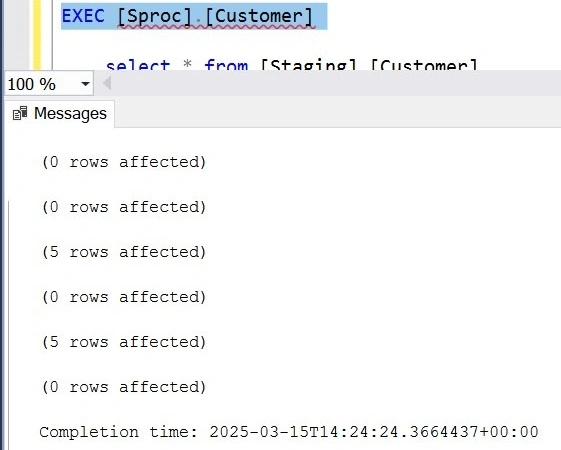
SP Execution
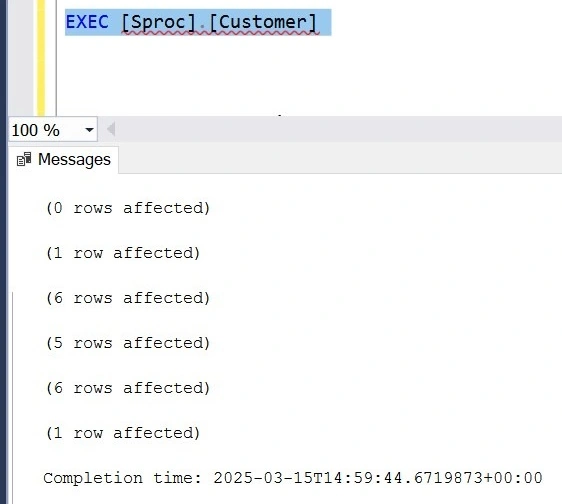
EXEC [Sproc].[Customer];
Outcome
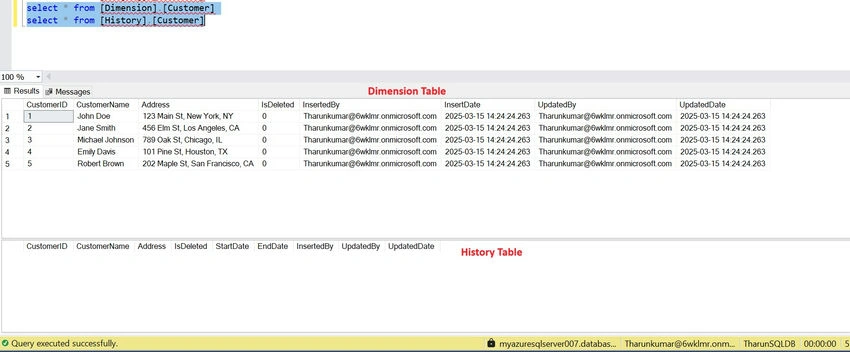
Since the Dimension & History tables are empty, all records from Staging are inserted into the Dimension table.
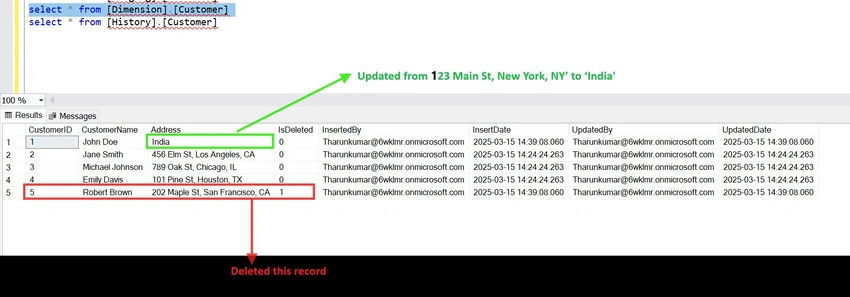
Scenario 2. Updating & Deleting Records
Staging Data
- Delete CustomerID = 5
- Update CustomerID = 1 (Address changed to 'India')
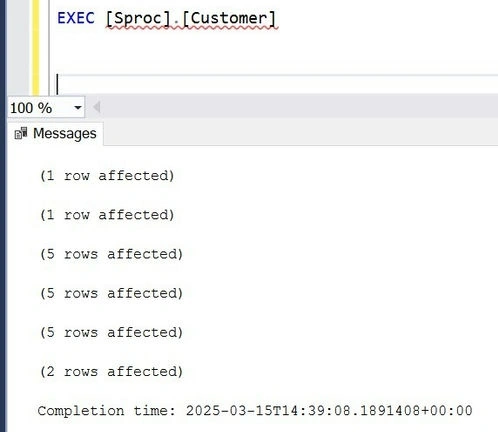
Execution
Outcome
- Dimension Table
- CustomerID = 5 is marked as IsDeleted = 1 instead of physical deletion.
- CustomerID = 1 has its address updated.
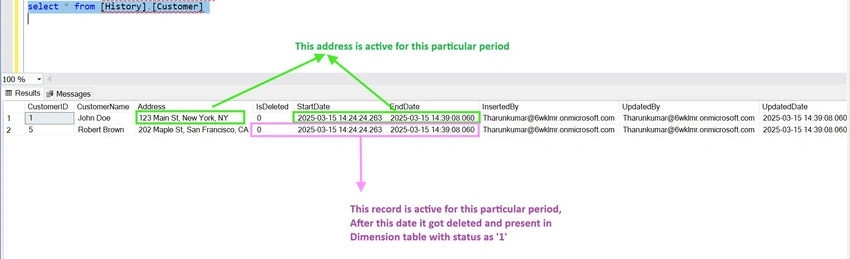
- History Table
- CustomerID = 1 with previous address is stored with StartDate & EndDate.
- CustomerID = 5 is recorded with IsDeleted = 0 with its timestamps period on when it was active.
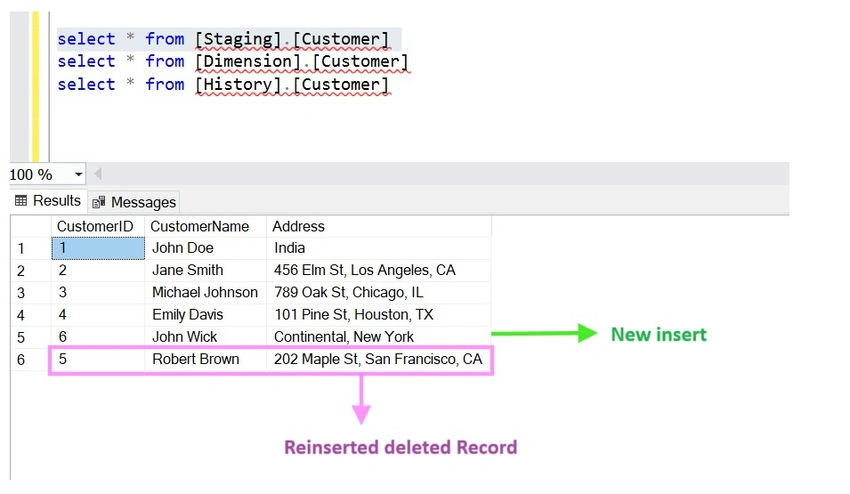
Scenario 3. Reinsert Deleted Record & Insert New Record
Staging Data Update
- Reinsert CustomerID = 5
- Insert CustomerID = 6 (New customer: John Wick, New York)
Execution
Outcome
- Dimension Table
- New customer (John Wick) is inserted.
- CustomerID = 5 (Robert Brown) is reactivated (IsDeleted = 0).
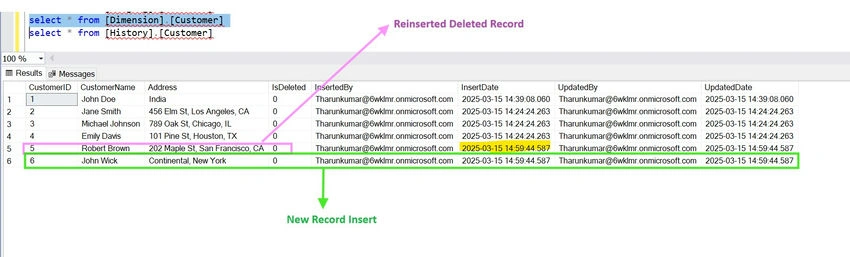
- History Table: Tracks Robert Brown's deletion and reactivation timestamps.

Conclusion
In this article, I demonstrated the SCD Type 4 implementation in Azure SQL Database using a staging layer, dimension table, and history table.
I executed a stored procedure manually to cover various scenarios.
- New inserts
- Updates
- Deletions
- Reinsertions
For any other scenarios or improvements, please leave a comment!
In the next article, I will cover,
- Creating an Azure SQL Database
- Automating the stored procedure using ADF
Stay tuned!
Join the conversation! Your thoughts help the community grow.