
Introduction
I was trying to implement JWT Auth in the Web API in my Angular 2 client-side application. But while searching on the internet, I could not find a simple solution. Finally, I learned and implemented the process successfully. Here, I am sharing the steps involved in solving this problem. This will help you and will definitely save your time too.
- Web API in ASP.NET Core with JWT Authentication Project solution .
- Angular2/4 for a client-side application.
See the project stucture below.
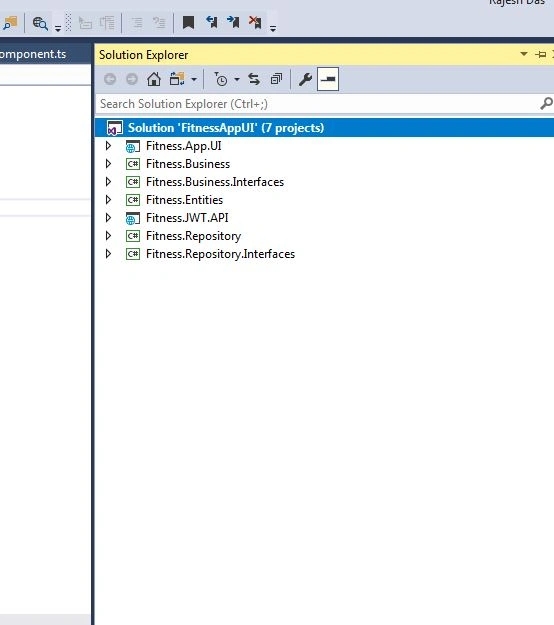
Step 1 - Create ASP.NET Core Web API Project
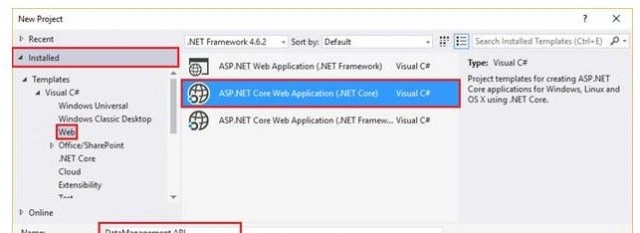
- Open Visual Studio 2017 and go to File >> New >> Project
- Select the project template.
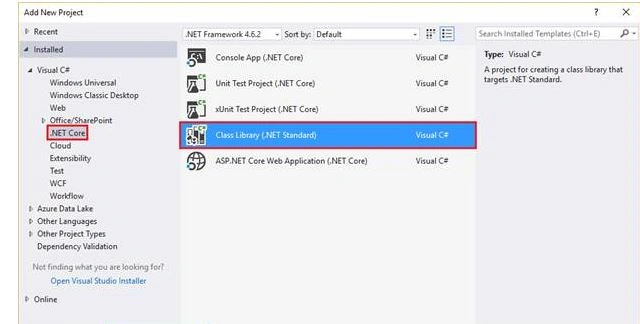
- Right click the Solution Explorer and select Add -> New Project->Class Librabry.
Fitness.JWT.API Project
I would like to explain the highlighted part of the project source code for enabling JWT Authentication.
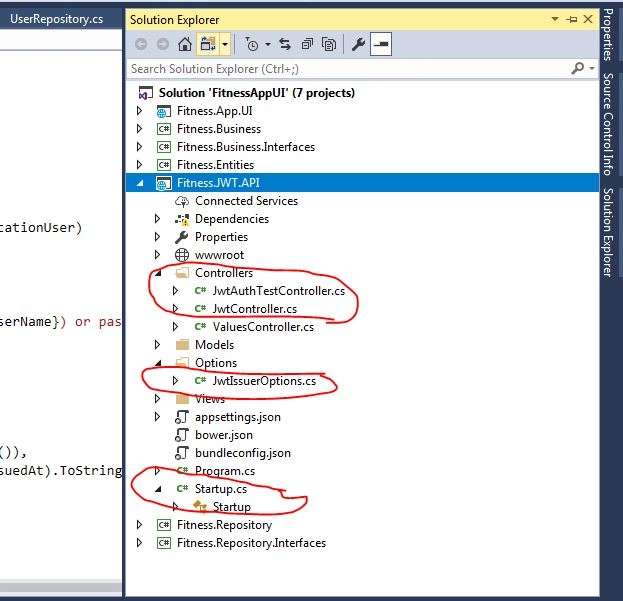
Using the code
Blocks of code should look like this.
startup.cs
Configuring secret key, allowing cross-origin, and applying User policy authentication.
- //
- public IConfigurationRoot Configuration { get; }
- //SecretKey for Authentication
- private const string SecretKey = "ABCneedtogetthisfromenvironmentXYZ";
- private readonly SymmetricSecurityKey _signingKey = new SymmetricSecurityKey(Encoding.ASCII.GetBytes(SecretKey));
- // This method gets called by the runtime. Use this method to add services to the container.
- public void ConfigureServices(IServiceCollection services)
- {
- // Add framework services.
- // services.AddMvc();
- // Add framework services.
- // Add framework services.
- services.AddCors(options =>
- {
- options.AddPolicy("CorsPolicy",//Allow Cross origin
- builder => builder.AllowAnyOrigin()
- .AllowAnyMethod()
- .AllowAnyHeader()
- .AllowCredentials());
- });
- services.AddOptions();
- // Make authentication compulsory across the board (i.e. shut
- // down EVERYTHING unless explicitly opened up).
- services.AddMvc(config =>
- {
- var policy = new AuthorizationPolicyBuilder()
- .RequireAuthenticatedUser()
- .Build();
- config.Filters.Add(new AuthorizeFilter(policy));
- });
- // Use policy auth.
- services.AddAuthorization(options =>
- {
- options.AddPolicy("FitnessJWT",
- policy => policy.RequireClaim("FitnessJWT", "FitnessUser"));
- });
- // Get options from app settings
- var jwtAppSettingOptions = Configuration.GetSection(nameof(JwtIssuerOptions));
- // Configure JwtIssuerOptions
- services.Configure<JwtIssuerOptions>(options =>
- {
- options.Issuer = jwtAppSettingOptions[nameof(JwtIssuerOptions.Issuer)];
- options.Audience = jwtAppSettingOptions[nameof(JwtIssuerOptions.Audience)];
- options.SigningCredentials = new SigningCredentials(_signingKey, SecurityAlgorithms.HmacSha256);
- });
- }
- //
JwtIssuerOptions.cs
This is the class file which is responsible to create Auth unique ticket on the server.
- //
- public class JwtIssuerOptions
- {
- /// <summary>
- /// "iss" (Issuer) Claim
- /// </summary>
- /// <remarks>The "iss" (issuer) claim identifies the principal that issued the
- /// JWT. The processing of this claim is generally application specific.
- /// The "iss" value is a case-sensitive string containing a StringOrURI
- /// value. Use of this claim is OPTIONAL.</remarks>
- public string Issuer { get; set; }
- /// <summary>
- /// "sub" (Subject) Claim
- /// </summary>
- /// <remarks> The "sub" (subject) claim identifies the principal that is the
- /// subject of the JWT. The claims in a JWT are normally statements
- /// about the subject. The subject value MUST either be scoped to be
- /// locally unique in the context of the issuer or be globally unique.
- /// The processing of this claim is generally application specific. The
- /// "sub" value is a case-sensitive string containing a StringOrURI
- /// value. Use of this claim is OPTIONAL.</remarks>
- public string Subject { get; set; }
- /// <summary>
- /// "aud" (Audience) Claim
- /// </summary>
- /// <remarks>The "aud" (audience) claim identifies the recipients that the JWT is
- /// intended for. Each principal intended to process the JWT MUST
- /// identify itself with a value in the audience claim. If the principal
- /// processing the claim does not identify itself with a value in the
- /// "aud" claim when this claim is present, then the JWT MUST be
- /// rejected. In the general case, the "aud" value is an array of case-
- /// sensitive strings, each containing a StringOrURI value. In the
- /// special case when the JWT has one audience, the "aud" value MAY be a
- /// single case-sensitive string containing a StringOrURI value. The
- /// interpretation of audience values is generally application specific.
- /// Use of this claim is OPTIONAL.</remarks>
- public string Audience { get; set; }
- /// <summary>
- /// "nbf" (Not Before) Claim (default is UTC NOW)
- /// </summary>
- /// <remarks>The "nbf" (not before) claim identifies the time before which the JWT
- /// MUST NOT be accepted for processing. The processing of the "nbf"
- /// claim requires that the current date/time MUST be after or equal to
- /// the not-before date/time listed in the "nbf" claim. Implementers MAY
- /// provide for some small leeway, usually no more than a few minutes, to
- /// account for clock skew. Its value MUST be a number containing a
- /// NumericDate value. Use of this claim is OPTIONAL.</remarks>
- public DateTime NotBefore => DateTime.UtcNow;
- /// <summary>
- /// "iat" (Issued At) Claim (default is UTC NOW)
- /// </summary>
- /// <remarks>The "iat" (issued at) claim identifies the time at which the JWT was
- /// issued. This claim can be used to determine the age of the JWT. Its
- /// value MUST be a number containing a NumericDate value. Use of this
- /// claim is OPTIONAL.</remarks>
- public DateTime IssuedAt => DateTime.UtcNow;
- /// <summary>
- /// Set the timespan the token will be valid for (default is 3 min/180 seconds)
- /// </summary>
- public TimeSpan ValidFor { get; set; } = TimeSpan.FromMinutes(1);
- /// <summary>
- /// "exp" (Expiration Time) Claim (returns IssuedAt + ValidFor)
- /// </summary>
- /// <remarks>The "exp" (expiration time) claim identifies the expiration time on
- /// or after which the JWT MUST NOT be accepted for processing. The
- /// processing of the "exp" claim requires that the current date/time
- /// MUST be before the expiration date/time listed in the "exp" claim.
- /// Implementers MAY provide for some small leeway, usually no more than
- /// a few minutes, to account for clock skew. Its value MUST be a number
- /// containing a NumericDate value. Use of this claim is OPTIONAL.</remarks>
- public DateTime Expiration => IssuedAt.Add(ValidFor);
- /// <summary>
- /// "jti" (JWT ID) Claim (default ID is a GUID)
- /// </summary>
- /// <remarks>The "jti" (JWT ID) claim provides a unique identifier for the JWT.
- /// The identifier value MUST be assigned in a manner that ensures that
- /// there is a negligible probability that the same value will be
- /// accidentally assigned to a different data object; if the application
- /// uses multiple issuers, collisions MUST be prevented among values
- /// produced by different issuers as well. The "jti" claim can be used
- /// to prevent the JWT from being replayed. The "jti" value is a case-
- /// sensitive string. Use of this claim is OPTIONAL.</remarks>
- public Func<Task<string>> JtiGenerator =>
- () => Task.FromResult(Guid.NewGuid().ToString());
- /// <summary>
- /// The signing key to use when generating tokens.
- /// </summary>
- public SigningCredentials SigningCredentials { get; set; }
- }
- //
JwtController.cs
it is a controller where the anonymous users will login and which creates the JWT security token, encodes it, and sends back to the client as a response with policy.
identity.FindFirst("FitnessJWT")
- [HttpPost]
- [AllowAnonymous]
- public async Task<IActionResult> Get([FromBody] ApplicationUser applicationUser)
- {
- var identity = await GetClaimsIdentity(applicationUser);
- if (identity == null)
- {
- _logger.LogInformation($"Invalid username ({applicationUser.UserName}) or password ({applicationUser.Password})");
- return BadRequest("Invalid credentials");
- }
- var claims = new[]
- {
- new Claim(JwtRegisteredClaimNames.Sub, applicationUser.UserName),
- new Claim(JwtRegisteredClaimNames.Jti, await _jwtOptions.JtiGenerator()),
- new Claim(JwtRegisteredClaimNames.Iat, ToUnixEpochDate(_jwtOptions.IssuedAt).ToString(), ClaimValueTypes.Integer64),
- identity.FindFirst("FitnessJWT")
- };
- // Create the JWT security token and encode it.
- var jwt = new JwtSecurityToken(
- issuer: _jwtOptions.Issuer,
- audience: _jwtOptions.Audience,
- claims: claims,
- notBefore: _jwtOptions.NotBefore,
- expires: _jwtOptions.Expiration,
- signingCredentials: _jwtOptions.SigningCredentials);
- var encodedJwt = new JwtSecurityTokenHandler().WriteToken(jwt);
- // Serialize and return the response
- var response = new
- {
- access_token = encodedJwt,
- expires_in = (int)_jwtOptions.ValidFor.TotalSeconds,
- State=1,
- expire_datetime= _jwtOptions.IssuedAt
- };
- var json = JsonConvert.SerializeObject(response, _serializerSettings);
- return new OkObjectResult(json);
- }
JwtAuthTestController.cs
This is the controller where I have defined the policy [Authorize(Policy = "FitnessJWT")]. So, when a user requsets to the Controller, then it matches the policy and secret key. Then only the response is returned to the client.
- [HttpGet("[action]")]
- [Authorize(Policy = "FitnessJWT")]
- public IActionResult WeatherForecasts()
- {
- var rng = new Random();
- List<WeatherForecast> lstWeatherForeCast = new List<WeatherForecast>();
- for (int i = 0; i < 5; i++)
- {
- WeatherForecast obj = new WeatherForecast();
- obj.DateFormatted = DateTime.Now.AddDays(i).ToString("d");
- obj.TemperatureC = rng.Next(-20, 55);
- obj.Summary = Summaries[rng.Next(Summaries.Length)];
- lstWeatherForeCast.Add(obj);
- }
- var response = new
- {
- access_token = lstWeatherForeCast,
- State = 1
- };
- var json = JsonConvert.SerializeObject(response, _serializerSettings);
- return new OkObjectResult(json);
- }
Step 2 - Angular2/4 for Client side application.
I would like to add one note that I have not focused on the UI part too much but I have tried to implement JWT Auth from Angular 2/4 Application.
Fitness.App.UI Solution
login.component.ts
This is the login module with TypeScript where we authenticate a user by passing Username and password.
- import { Component } from '@angular/core';
- import { Router } from '@angular/router';
- import { AuthService } from "../../../app/services/auth.service";
- import { LoginModel } from "../../model/login.model";
- @Component({
- selector: 'Fitness-Login',
- templateUrl: './login.component.html',
- styleUrls: ['./login.component.css'],
- providers: [AuthService]
- })
- export class LoginComponent {
- loginModel = new LoginModel();
- constructor(private router: Router, private authService: AuthService) {
- }
- login() {
- this.authService.login(this.loginModel.userName, this.loginModel.password)
- .then(result => {
- if (result.State == 1) {
- this.router.navigate(["/nav-menu"]);
- }
- else {
- alert(result.access_token);
- }
- });
- }
- }
auth.service.ts
Authentication service validates the credentials and redirects to the homepage.
- login(userName: string, password: string): Promise<ResponseResult> {
- let data = {
- "userName": userName,
- "password": password
- }
- let headers = new Headers({ 'Content-Type': 'application/json' });
- let applicationUser = JSON.stringify(data);
- let options = new RequestOptions({ headers: headers });
- if (this.checkLogin()) {
- return this.authPost(this.localUrl + '/api/Jwt', applicationUser, options);
- }
- else {
- return this.http.post(this.localUrl + '/api/Jwt', applicationUser, options).toPromise()
- .then(
- response => {
- let result = response.json() as ResponseResult;
- if (result.State == 1) {
- let json = result.access_token as any;
- localStorage.setItem(this.tokeyKey, json);
- localStorage.setItem(this.tokeyExpKey, result.expire_datetime);
- this.sg['isUserExist'] = true;
- }
- return result;
- }
- )
- .catch(this.handleError);
- }
- }
app.module.client.ts
{ provide: 'ORIGIN_URL', useValue: 'http://localhost:57323' }, path on the JWT WEB API.
You need to change the localhost API based on your machine URL.
- @NgModule({
- bootstrap: sharedConfig.bootstrap,
- declarations: sharedConfig.declarations,
- imports: [
- BrowserModule,
- FormsModule,
- HttpModule,
- ...sharedConfig.imports
- ],
- providers: [
- //{ provide: 'ORIGIN_URL', useValue: location.origin },
- { provide: 'ORIGIN_URL', useValue: 'http://localhost:57323' },
- AuthService, AuthGuard, SimpleGlobal
- ]
- })
- export class AppModule {
- }
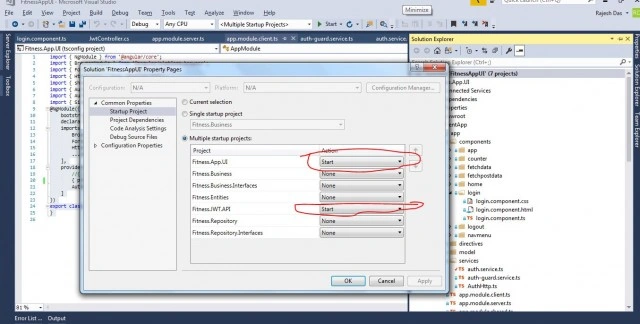
To run the application, you need to set he project as below.
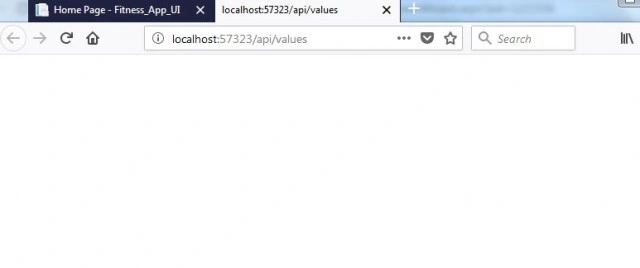
Run the solution with multiple startup projects. Then, in the browser, both - the client app and the Web API Service will start in two tabs.
The output of the application is given below.
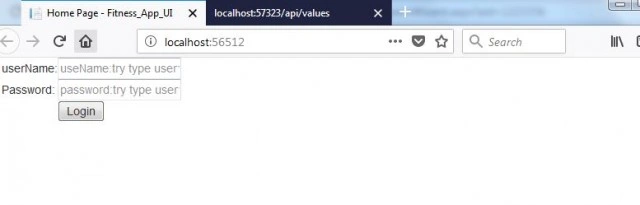
User Name: Test
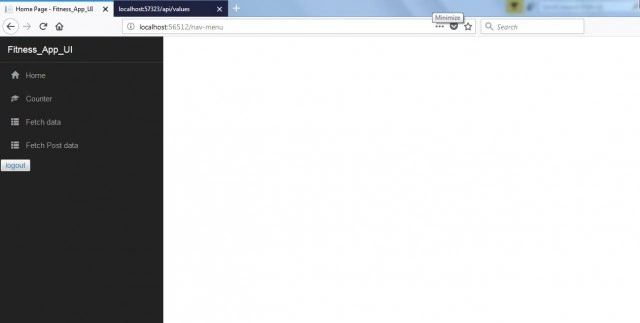
Then, it will redirect you to the nav menu page as below.
Aniket DholePosted Mar 28, 2019, 1:41 PM
My token is getting expired even though i am active on my website since last 10 hrs? my token expire time is 8 hrs. Please help me
pramod ramanPosted May 21, 2018, 12:40 AM
Is it possible to have a secure JWT connection with .net api and android app
Arvind SinghPosted Dec 21, 2017, 11:02 PM
Nice share keep it up...