

Here in this article I am going to explain how to use Google place AutoComplete textbox and find the accurate distance between the source and destination place using ASP.NET. AutoComplete is a feature of the Places library in the Google Maps JavaScript API. You can use autocomplete to give your application to search words on the basis of characters entered by you. When a user starts typing an address, autocomplete will fill in the rest.
The following JavaScript is used to implement autocomplete location search textbox in your webpage. So to use this you have to use this javascript in your project.
The following JavaScript is used to implement autocomplete location search textbox in your webpage. So to use this you have to use this javascript in your project.
- http://maps.googleapis.com/maps/api/js?sensor=false&libraries=places
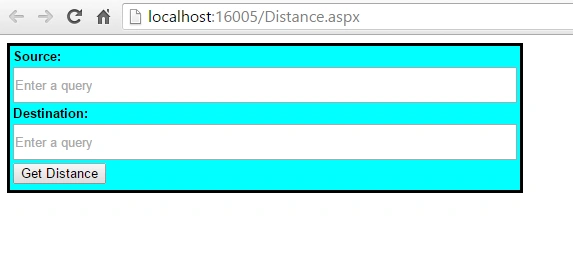
And here is the html code for the design.
- <body>
- <table border="0" cellpadding="0" cellspacing="3" style="border:solid; background-color:aqua;">
- <tr>
- <td>
- <b>Source:</b>
- </td>
- </tr>
- <tr>
- <td>
- <input type="text" id="txt_Source" style="width: 500px;height:30px" />
- </td>
- </tr>
- <tr>
- <td>
- <b>Destination:</b>
- </td>
- </tr>
- <tr>
- <td>
- <input type="text" id="txt_Destination" style="width: 500px;height:30px" />
- </td>
- </tr>
- <tr>
- <td>
- <input type="button" value="Get Distance" onclick="getdistance()" />
- </td>
- </tr>
- <tr>
- <td>
- <asp:Label runat="server" ID="lbl_distance"></asp:Label>
- </td>
- </tr>
- </table>
- </body>
- <script type="text/javascript" src="http://maps.googleapis.com/maps/api/js?sensor=false&libraries=places"></script>
- <script type="text/javascript">
- var source, destination;
- var directionsService = new google.maps.DirectionsService();
- google.maps.event.addDomListener(window, 'load', function () {
- new google.maps.places.SearchBox(document.getElementById('txt_Source'));
- new google.maps.places.SearchBox(document.getElementById('txt_Destination'));
- });
- </script>
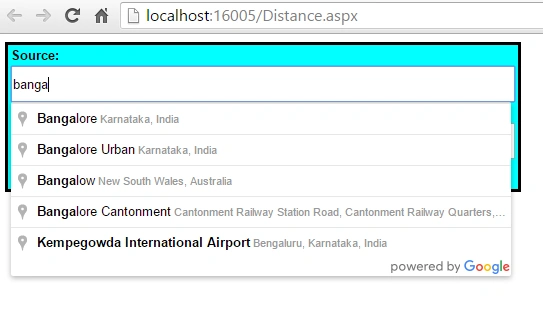
Now if we check source textbox it will be applied with the Google location Textbox as follows.
Now, let's check the second one, that is Destination Textbox:.
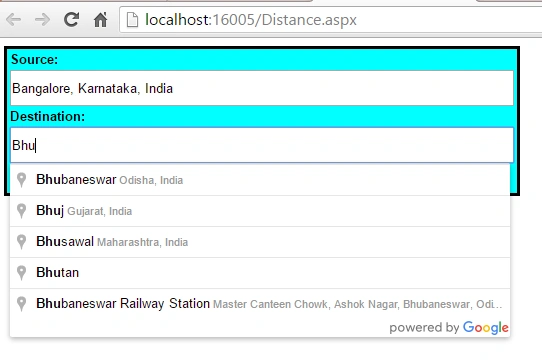
Now our second work is to calculate the distance between the source and destination entered in the textbox, so these are the places I want distance.
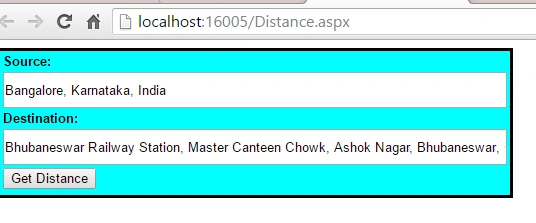
Now implement this JavaScript and call this on button click.
- function getdistance() {
- source = document.getElementById("txt_Source").value;
- destination = document.getElementById("txt_Destination").value;
- var service = new google.maps.DistanceMatrixService();
- service.getDistanceMatrix({
- origins: [source],
- destinations: [destination],
- travelMode: google.maps.TravelMode.DRIVING,
- unitSystem: google.maps.UnitSystem.METRIC,
- avoidHighways: false,
- avoidTolls: false
- }, function (response, status) {
- if (status == google.maps.DistanceMatrixStatus.OK && response.rows[0].elements[0].status != "ZERO_RESULTS") {
- var distance = response.rows[0].elements[0].distance.text;
- // var duration = response.rows[0].elements[0].duration.text;
- var lbl_distance = "Distance: " + distance;
- document.getElementById('lbl_distance').innerHTML = lbl_distance;
- }
- else {
- alert("Unable to calculate distance.");
- }
- });
- }
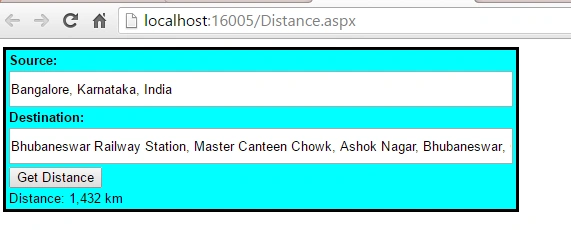
Now we are getting the distance.
So in this way we will find the distance. Here I have posted the whole code.
- <%@ Page Language="C#" AutoEventWireup="true" CodeFile="Distance.aspx.cs" Inherits="Distance" %>
- <!DOCTYPE html>
- <head>
- <title></title>
- <style type="text/css">
- body
- {
- font-family: Arial;
- font-size: 10pt;
- }
- </style>
- </head>
- <body>
- <script type="text/javascript" src="http://maps.googleapis.com/maps/api/js?sensor=false&libraries=places"></script>
- <script type="text/javascript">
- var source, destination;
- var directionsService = new google.maps.DirectionsService();
- google.maps.event.addDomListener(window, 'load', function () {
- new google.maps.places.SearchBox(document.getElementById('txt_Source'));
- new google.maps.places.SearchBox(document.getElementById('txt_Destination'));
- });
- function getdistance() {
- source = document.getElementById("txt_Source").value;
- destination = document.getElementById("txt_Destination").value;
- var service = new google.maps.DistanceMatrixService();
- service.getDistanceMatrix({
- origins: [source],
- destinations: [destination],
- travelMode: google.maps.TravelMode.DRIVING,
- unitSystem: google.maps.UnitSystem.METRIC,
- avoidHighways: false,
- avoidTolls: false
- }, function (response, status) {
- if (status == google.maps.DistanceMatrixStatus.OK && response.rows[0].elements[0].status != "ZERO_RESULTS") {
- var distance = response.rows[0].elements[0].distance.text;
- // var duration = response.rows[0].elements[0].duration.text;
- var lbl_distance = "Distance: " + distance;
- document.getElementById('lbl_distance').innerHTML = lbl_distance;
- }
- else {
- alert("Unable to calculate distance.");
- }
- });
- }
- </script>
- <table border="0" cellpadding="0" cellspacing="3" style="border:solid; background-color:aqua;">
- <tr>
- <td>
- <b>Source:</b>
- </td>
- </tr>
- <tr>
- <td>
- <input type="text" id="txt_Source" style="width: 500px;height:30px" />
- </td>
- </tr>
- <tr>
- <td>
- <b>Destination:</b>
- </td>
- </tr>
- <tr>
- <td>
- <input type="text" id="txt_Destination" style="width: 500px;height:30px" />
- </td>
- </tr>
- <tr>
- <td>
- <input type="button" value="Get Distance" onclick="getdistance()" />
- </td>
- </tr>
- <tr>
- <td>
- <asp:Label runat="server" ID="lbl_distance"></asp:Label>
- </td>
- </tr>
- </table>
- </body>
- </html>
Read more articles on ASP.NET:
manu vijayPosted Sep 19, 2020, 11:32 PM
Now Google map requires api keys for accessing maps
varun maliPosted Mar 23, 2020, 7:59 AM
This page can't load Google Maps correctly. pls fixed the problem
Rizwana RijjuPosted Dec 26, 2019, 10:18 PM
Google map cant load properly......how can i fix this problem? anyone please replay me.....thanks in advance....
Joicy SunnyPosted May 13, 2017, 4:37 AM
Sir.. auto completion not working for me.. why??? can u tell me a solution for this???
Raja TPosted Mar 16, 2016, 12:25 AM
Nice,Thanks for sharing..
Vignesh ManiPosted Mar 14, 2016, 5:49 PM
Nice one
Mohammed IbrahimPosted Mar 14, 2016, 4:00 AM
nice
Shridhar SharmaPosted Mar 14, 2016, 2:34 AM
Nice share :)
Debasis SahaPosted Mar 14, 2016, 12:45 AM
Nice share
Asfend YarPosted Mar 13, 2016, 2:01 PM
good job
Sthitaprajnya Debasis NayakPosted Mar 13, 2016, 11:18 AM
Nice One !!!
Humayun Kabir MamunPosted Mar 13, 2016, 8:22 AM
Nice...
Kirtan ParmarPosted Mar 13, 2016, 3:54 AM
useful...thanks for sharing