

XMPP is a protocol used for real time Extensible Messaging and Presence Protocol, a set of instant messaging, presence, multi-party chat, voice and video calls, collaboration, lightweight middleware, content syndication, and generalized routing of XML data.

For more information on XMPP please visit xmpp.org.
Facebook WhatsApp is an example of chat application using XMPP protocols.
It is really tough to implement XMPP in Windows Phone, because there is no free client library. There is some paid libraries which is highly expensive.
After a few days of research I found one library from xmedianet which works on windows phone 8 but there is no proper documentation.
Here I am going to explain the implementation.
Get the library from the following: XMPP/Media Library for .NET and Windows Phone 7.5.
Now create new Windows Phone Project and name it as your wish.
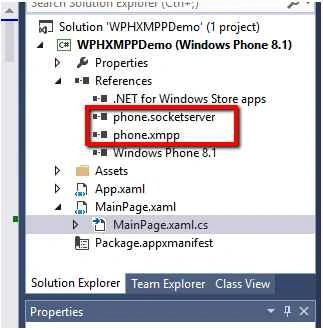
Add the phone.socketserver.dll and phone.xmpp.dll in your project which is already downloaded from xmedianet like the following screen.

Now design the screen like below to perform the xmpp implementation.

Next in your code page (MainPage.cs) add the following code:
Firstly, refer the library namespace as we added earlier.
- using xmedianet.socketserver;
- using System.Net.XMPP;
- public String UserName
- {
- get;
- set;
- }
- public String PassWord
- {
- get;
- set;
- }
- private Boolean IsXmppSuccess
- {
- get;
- set;
- }
- private String Server = "www.google.in"; // replace your server details
- private String ServerIPAddress = "123.4.5.6:8080"; // replace your ip
- public XMPPClient ObjXmppClient
- {
- get;
- set;
- }
- public XMPPConnection ObjXmppCon
- {
- get;
- set;
- }
- In your login button click event write the below code
- for connecting to XMPP server
- private void loginBtn_Click(object sender, RoutedEventArgs e)
- {
- UserName = useridtxtbox.Text.ToString();
- PassWord = passwordtxtbox.Text.ToString();
- ObjXmppClient = new XMPPClient();
- ObjXmppClient.JID = UserName + "@" + Server;
- ObjXmppClient.Password = PassWord;
- ObjXmppClient.Server = ServerIPAddress; //user server for emulator and ip address for device.
- ObjXmppClient.AutoReconnect = true;
- ObjXmppClient.RetrieveRoster = true;
- ObjXmppClient.PresenceStatus = new PresenceStatus()
- {
- PresenceType = PresenceType.available, IsOnline = true
- };
- ObjXmppClient.AutoAcceptPresenceSubscribe = true;
- ObjXmppClient.AttemptReconnectOnBadPing = true;
- ObjXmppCon = new XMPPConnection(ObjXmppClient);
- ObjXmppCon.Connect();
- ObjXmppClient.Connect();
- //Initialize event handler
- ObjXmppCon.OnAsyncConnectFinished += ObjXmppCon_OnAsyncConnectFinished;
- ObjXmppClient.OnStateChanged += new EventHandler(xMPPClient_OnStateChanged);
- ObjXmppClient.OnXMLReceived += ObjXmppClient_OnXMLReceived; //for all xml
- ObjXmppClient.OnNewConversationItem += ObjXmppClient_OnNewConversationItem; //for receive message
- ObjXmppClient.OnRetrievedRoster += ObjXmppClient_OnRetrievedRoster;
- }
- OnAsyncConnectFinished is the event handler
- for xmpp connection.After finishing the connection this event will be fired and I set the IsXmppSuccess value like below.
- void ObjXmppCon_OnAsyncConnectFinished(SocketClient client, bool bSuccess, string strErrors)
- {
- IsXmppSuccess = client.Connected;
- }
- OnStateChanged is the event handler
- for xmpp connection states status
- while connecting to xmpp server there is different connection states stated below as enum
- public enum XMPPState
- {
- Unknown = 0,
- Connecting = 1,
- Connected = 2,
- Authenticating = 3,
- Authenticated = 4,
- AuthenticationFailed = 5,
- CanBind = 6,
- Binding = 7,
- Bound = 8,
- Sessioning = 9,
- Session = 10,
- Ready = 11,
- }
- If XMPPState is ready means your credentials are correct.
- private void xMPPClient_OnStateChanged(object sender, EventArgs e)
- {
- try
- {
- switch (ObjXmppClient.XMPPState)
- {
- case XMPPState.Ready:
- if (IsXmppSuccess)
- {
- //sucessfully logged in
- }
- break;
- }
- }
- catch (Exception ex)
- {
- }
- }
To add roster in your contact:
- ObjXmppClient.AddToRoster("[email protected]", "User Name", "Group name");
- private void sendChatBtn_Click(object sender, RoutedEventArgs e)
- {
- JID tojid = new JID("toaddress");
- ObjXmppClient.SendChatMessage("Hi New text message", tojid);
- }
- void ObjXmppClient_OnNewConversationItem(RosterItem item, bool bReceived, TextMessage msg)
- {
- if (bReceived)
- ShowMessage("Received: " + msg.Message.ToString());
- else
- ShowMessage("Send: " + msg.Message.ToString());
- }
- void ObjXmppClient_OnXMLReceived(XMPPClient client, string strXML)
- {
- //all xml received
- }
- JID- Jabber ID a unique address for each rosters like Gmail id.
- Roster- User contact is called rosters.
- Presence-User offline/online/away etc.
deepak lenkaPosted Apr 28, 2016, 9:15 AM
one more doubt... its possible to make windows 8.1 app with xmpp right..? as i read some where there is no free xmpp library for windows 8.1 but in your example am able to login and send message though am confused little bit with these library part. xmpp is core part of my app i need to send message with modified xml and need to parse xml am receiving which will have many tags.. is these will happen.
deepak lenkaPosted Apr 28, 2016, 9:07 AM
finally it worked i was facing difficult in creating wph 8...thank you very very much suresh you saved me.
deepak lenkaPosted Apr 28, 2016, 6:07 AM
yes i am....
deepak lenkaPosted Apr 27, 2016, 1:33 AM
Hey surtesh, Am getting an exception in xmpp client An exception of type 'System.IO.FileNotFoundException' occurred in WPHXMPPDemo.exe but was not handled in user code Additional information: Could not load file or assembly 'System.Windows, Version=2.0.5.0, Culture=neutral, PublicKeyToken=7cec85d7bea7798e' or one of its dependencies. The system cannot find the file specified .....am new to c# am not getting whats the issue if you can help it will be realy helpfull.
Suresh MPosted Oct 26, 2015, 1:02 AM
Thank you.....
Santhakumar MunuswamyPosted Oct 25, 2015, 11:41 AM
Good one
Nilesh JadavPosted Oct 23, 2015, 8:22 AM
Good share sir !
Vinodh NarayananPosted Oct 23, 2015, 1:58 AM
good one
Sibeesh VenuPosted Oct 23, 2015, 1:36 AM
Nice Share
Mukesh KumarPosted Oct 22, 2015, 2:46 PM
Great one
Priyaranjan K SPosted Oct 22, 2015, 12:25 PM
Good One