
Singleton - Creational Design Pattern:
Intent (Introduction):
Description:
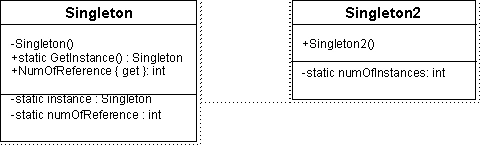
There are at least two solutions or scenario for implementing Singleton Class. The first solution says that there should be only one shared object and reference to that object should be available only through static method like GetInstance() while making the constructor private. A number of clients can be awarded the reference to such shared object. The second solution says that the constructor should be public (as it appears in most cases) but once an object has been instantiated, an exception should be thrown for each successive constructor call; thus limiting the class to only one object.
An Example:
First case Singleton can be used in a data repository or data collection where creation of more than one object can be resource wastage. Hence each client is given a reference to a single shared object to operate on. While the second case Singleton can be used in locking mechanisms. Once a client has got the object, no other client can have an object.
Class Diagram:
Implementation:
Let us first discuss the code of first case Singleton which is like:
class Singleton
{
private static Singleton instance;
private static int numOfReference;
private string code;
private Singleton()
{
numOfReference = 0;
code = "Maasoom Faraz";
}
public static Singleton GetInstance()
{
if(instance == null)
{
instance = new Singleton();
}
numOfReference++;
return instance;
}
public static int Reference
{
get { return numOfReference; }
}
public string Code
{
get { return code; }
set { code = value;}
}
}
There are 3 fields in the Singleton class. Static field instance is a reference to shared object in this Singleton class. Static field numOfReference is an integer variable to hold the number of current references to the single shared object of Singleton class. Code is a string value, it is used to demonstrate that the object is shared b/w references and change made to this field through one reference can be realized through other reference.
The constructor is made private and used to initialize the numOfReference and default value of code. GetInstance() method checks the instance, if it is null then it assign it an instance of Singleton otherwise return the old reference. GetInstance() also increments the numOfReference each time it is called to keep track of current number of reference to our shared instance. Property Reference returns the number of reference referencing our shared object while Code property can be used to set/get the code string of shared object.
The second case Singleton class (Singleton2) looks like:
class Singleton2
{
private static int numOfInstance = 0;
public Singleton2()
{
if(numOfInstance == 0)
{
Console.WriteLine("\r\nCreating First Object of Singleton2 class...");
numOfInstance++;
}
else
{
throw new Exception("This class is Singleton,
+ so only one object of it can be instantiated.");
}
}
}
Here we make the constructor public and use a private field numOfInstance which is incremented for each constructor call. If numOfInstance is zero (no object is yet instantiated), a new object is allowed to made. But, if this value is not zero (there is already an object of Singleton2 class, an exception is thrown.
Now let us try these with Main() method, the code in main is like:
static void Main(string[] args)
{
Singleton obj1 = Singleton.GetInstance();
obj1.Code = "Faraz Rasheed";
Console.WriteLine("No. of references : " + Singleton.Reference);
Console.WriteLine("First Objects code: " + obj1.Code);
Singleton obj2 = Singleton.GetInstance();
Console.WriteLine("No. of references : " + Singleton.Reference);
Console.WriteLine("Second Objects code: " + obj2.Code);
Singleton2 obj3 = new Singleton2();
Singleton2 obj4 = new Singleton2();
}
First we called GetInstance() and took the reference to the new object in obj1. The code for this object is changed to Faraz Rasheed which was Maasoom Faraz by default. Then, we check for number of references to this object and code set for this. Next, we get another reference to this object through GetInstance() in obj2. We again check the number of references and code using this reference. If both the references are pointing to the same shared object, the number of references now should be 2 while the code should also be Faraz Rasheed (remember if obj2 points to a new object then code would have been Maasoom Faraz, the default one) which is shown in the output.
We also made an object of Singleton2. When constructor is called for the first reference (obj3), the new object is instantiated printing the message on Console. But when another instance of Singleton2 is attempted to be made through obj4, an exception is thrown saying Singleton class can only be instantiated once.
Sample output from the program is:
No. of references : 1
First Objects code: Faraz Rasheed
Second Objects code: Faraz Rasheed
Unhandled Exception: System.Exception: This class is Singleton,so only one object of it can be instantiated.
Benefits Achieved Through This Pattern:
By using Singleton Design Pattern, it is possible for a programmer to control the instantiation of class by allowing only single object to be instantiated when desirable.
JohneditedPosted Jan 19, 2012, 10:56 AMEdited Jan 19, 2012, 10:57 AM
Thanks for great article on singleton design pattern. For more info on singleton design pattern http://www.4microsoftsolutions.com/post/Creational-Pattern-Singleton-Design-Pattern-Example-of-Singleton-Pattern-in-C.aspx
arshad mahmoodPosted Mar 28, 2010, 10:30 PM
Excellent approach to explain Singleton. Awsome.
Srihari ChinnaPosted Dec 25, 2009, 3:00 AM
Also what about managing the instance in multi thread application sceniro?
Srihari ChinnaPosted Dec 25, 2009, 2:56 AM
Hellow, This is not correct example, Per Singleton definition there is no way that the same instance can be exposed through the public constructior. How can we share the same instance.