

Introduction
Cross-Origin Resource Sharing (CORS) is a security feature implemented in web browsers that restricts web pages from making requests to a different domain than the one that served the web page. In modern web development, particularly when using Angular as a front-end framework and .NET Core 8 as a backend, understanding how to implement CORS correctly is essential for building secure and functional applications. This article outlines best practices and common pitfalls when setting up CORS in a .NET Core 8 environment.
CORS
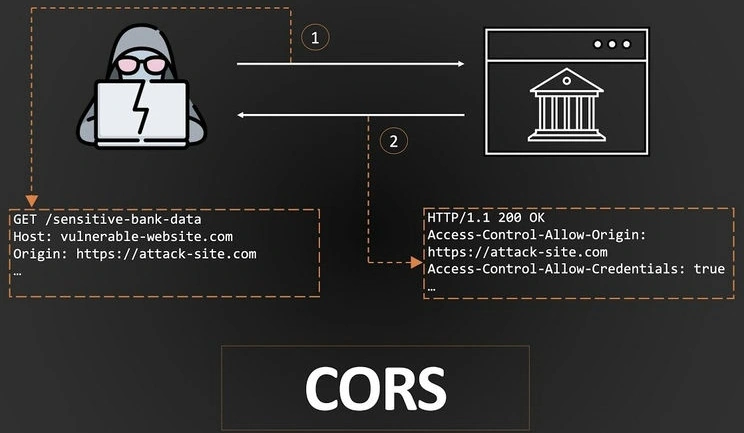
Imagine you have a toy box at home (your website), and you have a friend who lives next door (another website). Your friend wants to play with your toys (data) in your toy box, but your mom (the browser) has a rule that says your friend can only play with their own toys. This is to keep everything safe and secure.
Let’s say your website is mycooltoys.com, and your friend’s website is funfriend.com if funfriend.com wants to borrow a toy from mycooltoys.com, CORS checks.
- Is funfriend.com allowed to borrow toys from mycooltoys.com?
- Did they follow the rules about how to ask?
- If everything is good, then your friend can borrow the toy!
Setting Up CORS in .NET Core 8
- Install Necessary Packages: If you haven't already, ensure you have the required .NET Core packages installed. In most cases, the default setup will suffice, but you can install any specific CORS libraries if needed.
- Configure CORS in Startup: In .NET Core 8, the configuration of CORS is typically done in the Program.cs file. Here’s a simple setup.
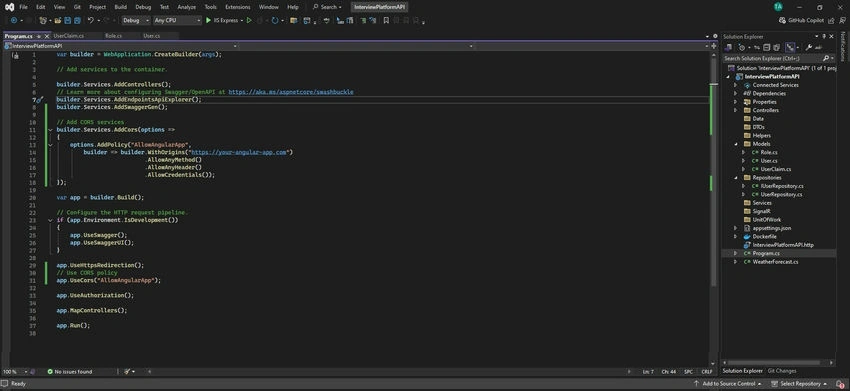
var builder = WebApplication.CreateBuilder(args); // Add CORS services builder.Services.AddCors(options => { options.AddPolicy("AllowAngularApp", builder => builder.WithOrigins("https://your-angular-app.com") .AllowAnyMethod() .AllowAnyHeader() .AllowCredentials()); }); var app = builder.Build(); // Use CORS policy app.UseCors("AllowAngularApp"); app.MapControllers(); app.Run(); - Allowing Specific Origins: For production environments, it’s crucial to specify the exact origin rather than using AllowAnyOrigin(), which is a common pitfall. Limiting allowed origins enhances security.
options.AddPolicy("AllowAngularApp", builder => builder.WithOrigins("https://your-angular-app.com") .AllowAnyMethod() .AllowAnyHeader()); - Handling Preflight Requests: Ensure your server can handle preflight requests. These are OPTIONS requests sent by browsers to check permissions. By enabling CORS and handling these requests, you ensure that your application can respond correctly.
- Allow Credentials: If your Angular application needs to send cookies or HTTP authentication information, you need to set AllowCredentials() in your CORS policy. Be cautious with this feature, as it requires that the origin is explicitly specified and cannot be set to AllowAnyOrigin().
Advanced CORS Configuration
- Customizing Allowed Methods: You can customize allowed methods if your API uses specific HTTP methods.
options.AddPolicy("AllowAngularApp", builder => builder.WithOrigins("https://your-angular-app.com") .WithMethods("GET", "POST", "PUT", "DELETE") .AllowAnyHeader() .AllowCredentials()); - Setting Exposed Headers: If your API returns custom headers that the client needs to access, specify these using WithExposedHeaders.
options.AddPolicy("AllowAngularApp", builder => builder.WithOrigins("https://your-angular-app.com") .AllowAnyMethod() .AllowAnyHeader() .WithExposedHeaders("X-Custom-Header") .AllowCredentials()); - Logging CORS Requests: For debugging purposes, you can log CORS requests to track any issues that arise. Here’s a simple logging middleware.
app.Use(async (context, next) =>
{
    if (context.Request.Headers.ContainsKey("Origin"))
    {
        var origin = context.Request.Headers["Origin"];
        Console.WriteLine($"CORS request from: {origin}");
    }
    await next();
});
Best Practices
- Limit Origins: Always specify the exact origins that are permitted to interact with your API. Avoid using wildcards (*) as they expose your API to potential security risks.
- Use HTTPS: Ensure both your .NET Core backend and Angular frontend are served over HTTPS. This secures data in transit and enhances trustworthiness.
- Regularly Review CORS Policies: As your application grows and evolves, periodically review your CORS configurations to ensure they align with current security requirements.
- Test CORS Configurations: Use tools like Postman or browser developer tools to test your CORS setup. Check for errors and ensure your API is returning the expected headers.
- Document Your API: Clearly document the CORS policies and allowed origins in your API documentation. This helps other developers understand how to interact with your API correctly.
Common Pitfalls
- Misconfigured Allowed Origins: One of the most frequent mistakes is misconfiguring allowed origins. Double-check the exact URLs, including the protocol (HTTP vs. HTTPS) and any potential trailing slashes.
- Forgetting to Apply CORS Middleware: Ensure that the UseCors middleware is applied before any endpoints are mapped. Placing it after endpoint mapping can lead to unexpected behaviors.
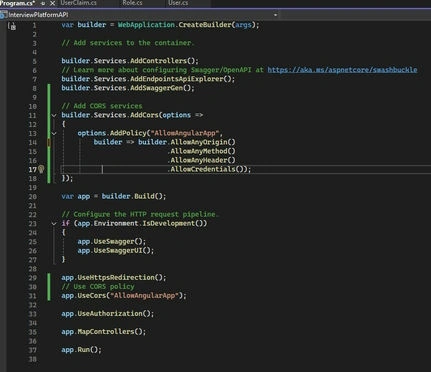
- AllowAnyOrigin with AllowCredentials: This combination is not allowed and will cause CORS requests to fail. If you need credentials, specify the exact origins.
- Not Handling OPTIONS Requests: Ignoring the preflight OPTIONS requests can lead to issues when your API is accessed from different origins. Ensure your server can properly handle these requests.
Example
Default
Allowing Specific Origins
Conclusion
Implementing CORS in .NET Core 8 for Angular applications is crucial for creating a secure and functional web application. By following best practices and being aware of common pitfalls, you can ensure that your CORS setup is both effective and secure. Regularly revisiting your CORS configuration as your application evolves will help maintain security and functionality in the long run.
Happy Coding!
Join the conversation! Your thoughts help the community grow.