

Azure Private Link enhances Azure’s connectivity by allowing secure, private access to Azure-hosted services. It enables organizations to create private connections between their on-prem environments and the Azure services, ensuring data remains secure and isolated from the public internet. It confines interactions to the Azure network, avoiding exposure to the public internet. Private link’s integration with Microsoft Fabric boosts security, governance, and compliance and secures your organization’s data. By limiting traffic within Azure’s network, Private Link helps businesses confidently protect critical assets while maximizing performance and productivity and accelerating growth.
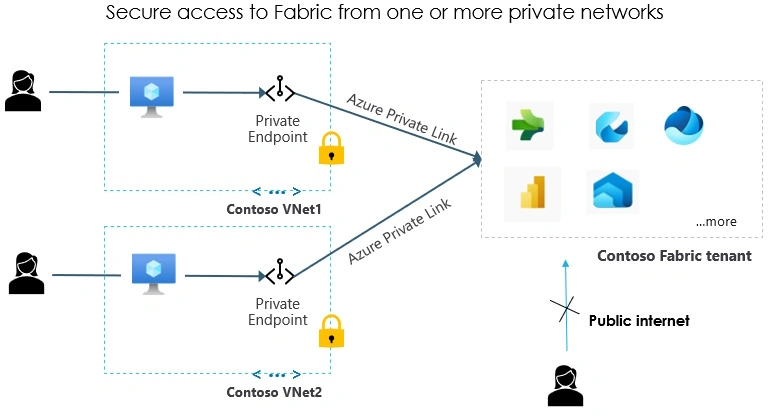
Azure Private Link will.
- Restrict data exchanges to Azure’s private network.
- Protect against unauthorized access and data leaks.
- Reduce the need for VPNs or NAT setups.
- Works seamlessly with services like Azure Storage and SQL Database.
Microsoft Fabric Overview
Microsoft Fabric is a data platform that merges data engineering, real-time analytics, and business intelligence in one unified solution. It simplifies complex data tasks, offering integrated services like Data Factory, Data Lake, and Power BI. This synergy accelerates decision-making, fosters collaboration, and drives smarter insights for global organizations every day. It unifies data services for analytics and decision-making. It integrates data engineering, real-time analytics, and business intelligence into a single platform.
Core Features
- Data Engineering: Manages large-scale transformations
- Data Factory: Supports ETL workflows
- Data Lake: Centralized storage for various data types
- Real-Time Analytics: Provides fast insights
- Power BI: Delivers powerful visualizations
- SQL Database: Now included, offering robust relational database capabilities directly within the Fabric ecosystem
Benefits
- Private endpoints keep sensitive data within secure boundaries, which is essential for industries like healthcare and finance.
- Private Link aligns with strict regulations, ensuring adherence to GDPR, HIPAA, and data residency rules.
- Avoiding public network configurations eases integration with Fabric.
- Private Link integrates Fabric with services like Synapse Analytics and Data Lake Storage, creating a cohesive data ecosystem.
First, this must be enabled from the fabric given below. Following that, there are a series of steps that are being updated frequently in Microsoft Docs, hence providing the link that can provide the updated information.
Step 1. Enable Private Link in Fabric.
- Sign in as an administrator to Fabric, go to tenant settings, and enable the Azure Private Link toggle.
- Configuration takes ~15 minutes, including setting up a private FQDN.
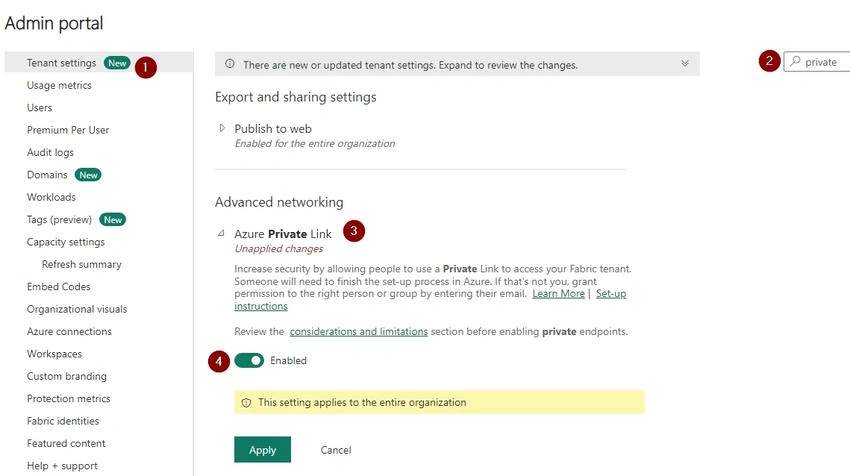
Step 2. Create a Private Link Service for Fabric.
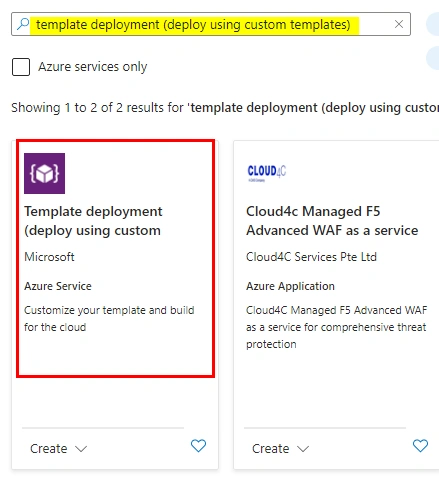
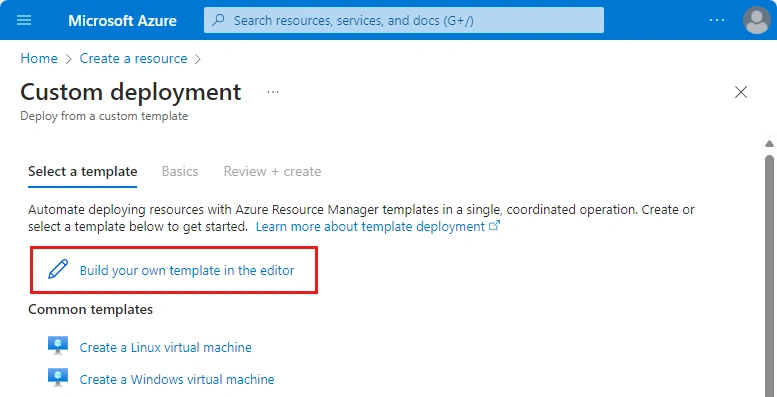
- In the Azure portal, use a custom ARM template to create a Microsoft.PowerBI/privateLinkServicesForPowerBI resource.
- Fill in tenant-object-id and other details. Use global as the location unless using Azure Government regions.
Step 3. Set Up a Virtual Network.
- Create a virtual network (VNet) with required subnets. Allocate IPs based on the number of capacities plus 15.
- Proceed through the setup by configuring security and IP addresses and validating the setup.
Step 4. Deploy a Virtual Machine (VM).
Create a VM in the same resource group and VNet. Configure instance details, admin credentials, and networking.
Step 5. Create a Private Endpoint for Fabric.
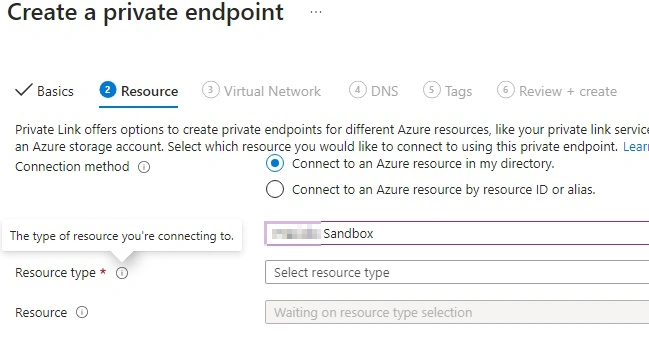
| Settings | Value |
|---|---|
| Connection method | Select connect to an Azure resource in my directory. |
| Subscription | Select your subscription. |
| Resource type | Select Microsoft.PowerBI/privateLinkServicesForPowerBI |
| Resource | Choose the Fabric resource you created in Step 2. |
| Target subresource | Tenant |
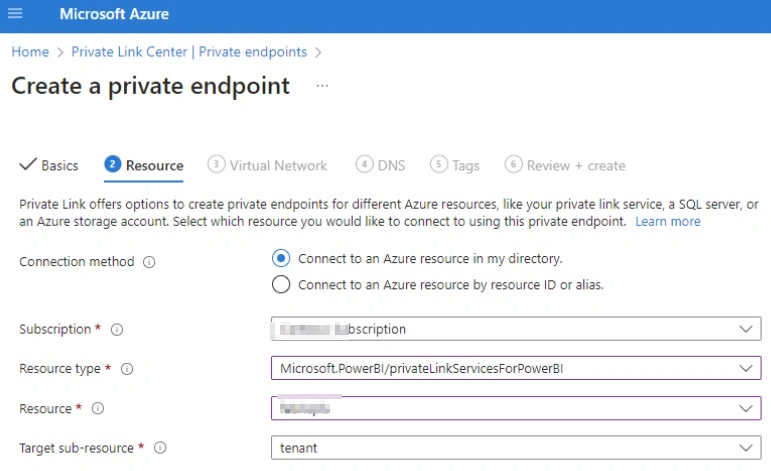
- In the Azure portal, create a private endpoint, linking it to the Fabric resource.
- Integrate with private DNS zones (e.g., privatelink.analysis.windows.net).
Step 6. Connect to the VM via Bastion.
Add an AzureBastionSubnet to your VNet, deploy Azure Bastion, and connect to the VM securely using Bastion.
Step 7. Access Fabric Privately from the VM.
On the VM, use PowerShell to confirm private IP resolution for Fabric endpoints. Access Fabric via a browser at app.fabric.microsoft.com.
Step 8. Disable Public Access (Opt.).
- In the Fabric admin portal, enable "Block Public Internet Access" under Advanced Networking in tenant settings.
- This applies limitations on unsupported Fabric services.
Complete steps are given below for reference: Set up and use private links for secure access to Fabric - Microsoft Fabric | Microsoft Learn
A few practical use-case examples
- A bank secures analytics and reporting by integrating Private Link with Fabric, meeting regulatory requirements.
- A provider ensures secure patient data analysis and compliance with HIPAA
- A retailer uses Private Link for secure sales and inventory data transfer
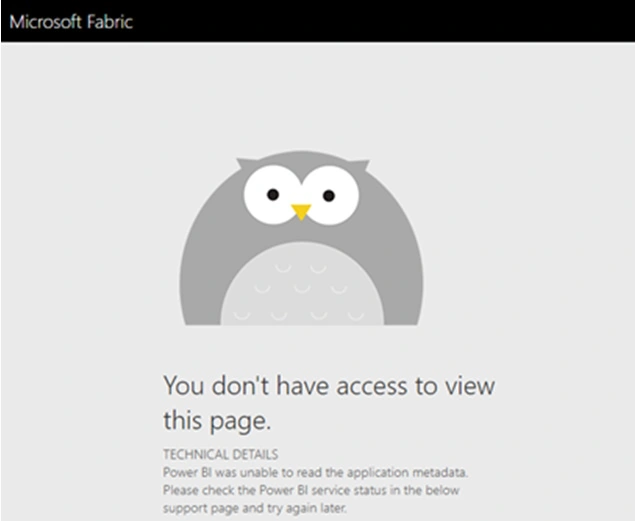
Once implemented successfully, the users trying to access fabric from public networks will not be able to do, ending up the following error.
Summary
Azure Private Link’s integration with Microsoft Fabric strengthens security, simplifies networks, and ensures compliance. It is a vital component for organizations aiming to protect data and streamline operations.
Join the conversation! Your thoughts help the community grow.