

Introduction
In this article, we are going to implement the infinite scroll in our Angular 6 app. When we are developing any application, at that time we deal with tons of records at a time. In this situation a question will be raised -- how to show thousands of a records in a single page?
It's not a good practice to load thousands of records at the same time into a single page, and there are many advantages to implementing infinite scroll.
- Boost our website's time so that we can have faster operations
- Increase the page level depth in an easy manner
- Minimum number of clicks required
- Enhance the user interface
- Better for the mobile layout
- One of the main advantages is that it decreases a website's bounce rate
We are going to learn one of the ways to implement infinite scrolling without complex settings. Before starting with this article you can always clone the source code from Github here.
To implement the infinite scroll into Angular, I'm using an npm package called ngx-infinite-scroll which supports angular 6.0.0 as well. You can find more information about the ngx-infinite-scroll package in detail here.
To get started with infinite scroll, we just need to create a new project by following a few steps which are described below.
Create a new Angular project by following a few commands.
- ng new ng6infinitescroll
- npm install // to install dependencies
- ng serve // to run angular app
- npm install ngx-infinite-scroll --save
- npm install @angular/cdk
- <mat-toolbar color="accent">
- <span>Manav Pandya - C#Corner</span>
- <span class="demo-toolbar"></span>
- </mat-toolbar>
- <mat-card>
- <div class="container">
- <div class="row" infiniteScroll [infiniteScrollDistance]="2" [infiniteScrollThrottle]="50" (scrolled)="onScroll()" [scrollWindow]="false"
- style="height: 400px; overflow-y: scroll;">
- <div *ngFor="let item of myPhotosList" class="col-md-4" style="margin-top: 10px;">
- <img style="height: 220px;width: 315px;" src="{{item.url}}" />
- </div>
- </div>
- </div>
- </mat-card>
For that i have provided few properties to an element to work with scrolling.
- infiniteScroll
It is the primary property that defines the content is being scrolled.
- infiniteScrollDistance
Used to provide distance where we will reach up to the defined percentage of the element, at that time scroll event will be triggered.
- infiniteScrollThrottle
Number of milliseconds after the scroll event will be triggered.
- scrolled
It is a method to perform a specific action when scroll is being reached.
- scrollWindow
We should decide that we want to listen to window scroll event or the element scroll event, here in this demo I have used false because I'm using element to be scrolled.
So these are some properties I have used in this demo project, but you can use more methods or properties as per your requirements. The next part is to use some dummy data to load into the element for scrolling, for that I'm going to use fake rest api data of jsonPlaceHolder.
To explain the exact mechanism of scrolling, we need a large amount of data so that we can see the actual result, to learn more about jsonplaceholder fake api just click here
Create the service in angular project by using the below npm command, which generates a service file.
- ng generate service mydataservice
- import { Injectable } from '@angular/core';
- import { HttpClient , HttpHeaders } from '@angular/common/http';
- @Injectable()
- export class MydataserviceService {
- constructor(private http: HttpClient) { }
- // Method to call api to get images
- getMyPhotos(page: number)
- {
- return this.http.get('https://jsonplaceholder.typicode.com/photos?_page='+page);
- }
- }
Open app.component.ts and paste the below code into it.
- import { Component, OnInit } from '@angular/core';
- import { MydataserviceService } from './mydataservice.service';
- import { Photos, PhotosObj } from './_modal';
- @Component({
- selector: 'app-root',
- templateUrl: './app.component.html',
- styleUrls: ['./app.component.css'],
- providers: [MydataserviceService]
- })
- export class AppComponent implements OnInit {
- title = 'app';
- myPhotosList: Photos[] = [];
- page: number = 1;
- constructor(private service: MydataserviceService) { }
- ngOnInit() {
- // To call api for initial image rendering
- this.getPhotos();
- }
- // To get image data from api
- getPhotos() {
- console.log(this.page);
- this.service.getMyPhotos(this.page).subscribe((res) => this.onSuccess(res));
- }
- // When we got data on a success
- onSuccess(res) {
- console.log(res);
- if (res != undefined) {
- res.forEach(item => {
- this.myPhotosList.push(new PhotosObj(item));
- });
- }
- }
- // When scroll down the screen
- onScroll()
- {
- console.log("Scrolled");
- this.page = this.page + 1;
- this.getPhotos();
- }
- }
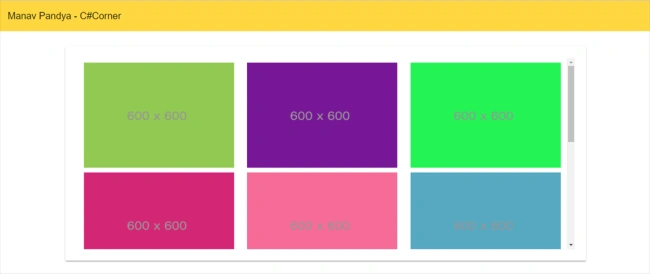
When we run our project, you can see the output like the below screen.
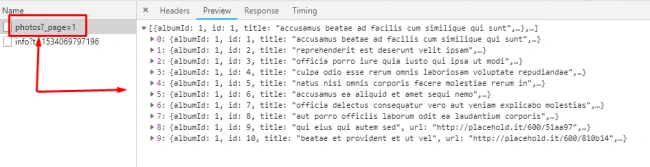
Initially on the first api call I'm getting 10 records, and then we can see the response of the rest api call.
Total number of records in the api is around 5000, but we just have loaded 10 of them/ Now when I scroll down the element, the result of the api will be added to existing records, observe the second api call for the scroll event.
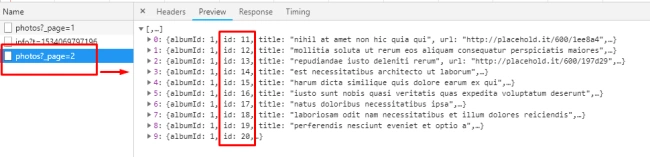
In short I'm loading 10 records at a time to populate elements with newly added records. This enhances website performance, and it also leads users to load data as per the requirement.
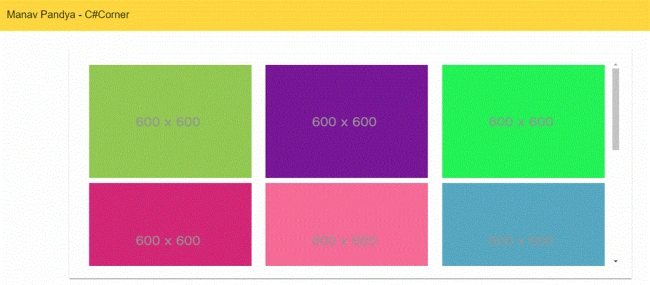
When you complete this article, you will be able to get the output as per the below gif screen.
Conclusion
This is how we can implement a simple infinite scroll functionality using Angular 6. To understand better, I suggest you get the source code from git repository here, or you can download the attached source code here with this article.
Thus this article does not follows standard coding, so it is advisable to use proper code standards. If you have any questions or suggestions then feel free to comment. Thanks for reading.
Chittaranjan SwainPosted Nov 27, 2019, 9:04 PM
Very useful article.
Shripad AvhadPosted Jun 27, 2019, 9:16 AM
I am not able to load data on scroll. Scroll does not making next api call on scroll.
sebashku zbashkPosted Jun 18, 2019, 4:57 AM
What will happend if we have a large screen where number of first items will not show the scrollbar ? try this guys
Navaruban NithiyananthamPosted Mar 7, 2019, 2:34 AM
I got following error on browser. please guide me
Navaruban NithiyananthamPosted Mar 7, 2019, 2:33 AM
Client:159 [WDS] Warnings while compiling.warnings @ client:159 client:168 E:/node_modules/@angular/core/fesm5/core.js 4982:15-36 Critical dependency: the request of a dependency is an expression warnings @ client:168 client:168 E:/node_modules/@angular/core/fesm5/core.js 4994:15-102 Critical dependency: the request of a dependency is an expression
Prasu CPosted Oct 12, 2018, 1:18 AM
Superb explanation. Thank you :)
Ammar HanifPosted Oct 4, 2018, 7:43 AM
Cannot find module './_modal'.
Dharmraj ThakurPosted Aug 14, 2018, 1:32 AM
Great topic manav........
L APosted Aug 13, 2018, 2:01 PM
Great article Manav Pandya, i was going through the git repo and noticed '_modal' folder with 'index.ts' in which you defined structure (Photos - interface) for the jsonAPI response but couldn't understand use of (Photos - class) with constructor. Could you please elaborate what's happening in `PhotosObj` constructor.