

Introduction:
This article explains how to implement infinite scrolling in the ASP.NET Web API. We use the paging with the scrolling.
The following is the procedure for creating the application.
Step 1
Create a Web Application as in the following:
- Start Visual Studio 2012.
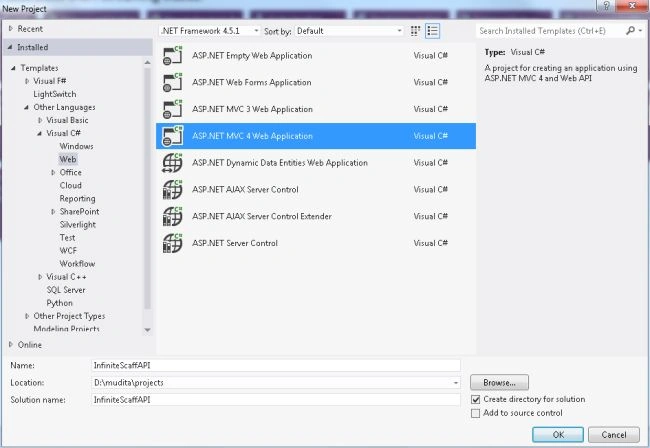
- From the Start window select "Installed" -> "Visual C#" -> "Web".
- Select "ASP.NET MVC4 Web Application" and click on the "Ok" button.
- From the "MVC4 Project" window select "Web API".
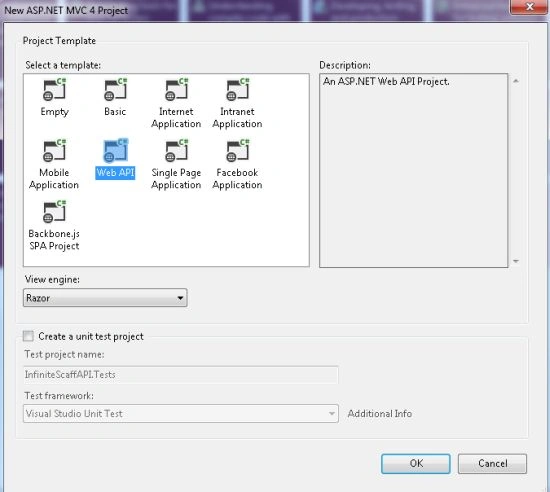
- Click on the "OK" button.
Step 2
Create a Model Class as in the following:
- In the "Solution Explorer".
- Right-click on the Model Folder.
- Select "Add" -> "Class".
- Select "Install" -> "Visual C#" and then select class.
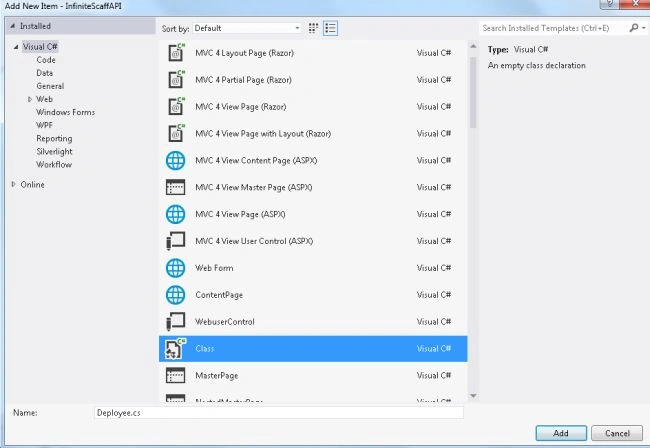
- Click on the "Add" button.
Add the following code:
- using System;
- using System.Collections.Generic;
- using System.Linq;
- using System.Web;
- namespace InfiniteScaffAPI.Models
- {
- public class Deployee
- {
- public int Id { get; set; }
- public string Topic { get; set; }
- public string TextMetter { get; set; }
- public string Writer{ get; set; }
- }
- }
Step 3
Now install the MVCScaffholdingpackage as in the following:
- Go to the Tools menu and select "Library Package Manager" -> "Package Manager Console".
- And enter the command "install-package MvcScaffolding".
Step 4
Now add the Scaffolding Data Controller as in the following:
- In the "Solution Explorer".
- Right-click on the Controller.
- Select "Add" -> "Controller".
- Set the controller name and from the Scaffolding options select "MVC controller with read/Write actions and views, using Entity Framework".
- And select the model class.
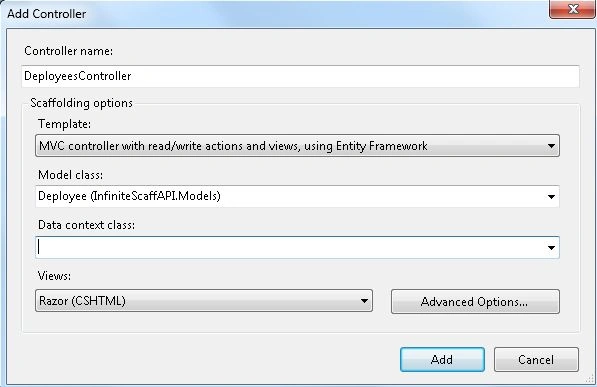
- Now click on the "Data Context Class".
- And select "New Data Context".
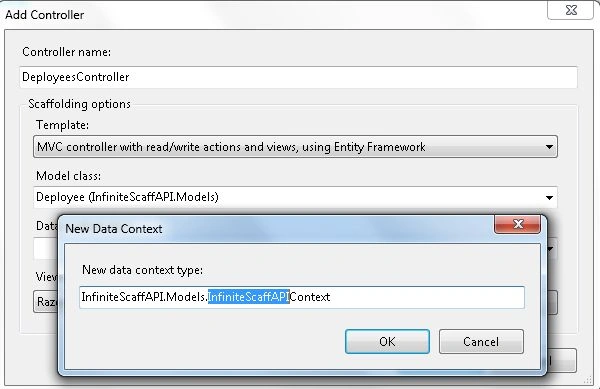
- And click on the "Ok" button.
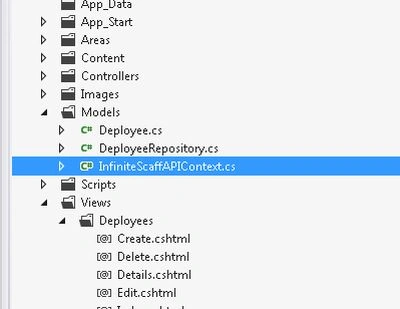
After creating this controller it adds the following two files to your project :
- First is "InfiniteScaffAPIContext.cs" in the Model Folder.
- The second is a "Deployees" folder in the "Views" folder in which some view files are created, such as Create, Edit, Delete and Index.
Step 5
Add another Repository Class in the Model folder using the same procedure as Step 2.
Add the following code:
- using System;
- using System.Collections.Generic;
- using System.Data;
- using System.Data.Entity;
- using System.Linq;
- using System.Linq.Expressions;
- using System.Web;
- namespace InfiniteScaffAPI.Models
- {
- public class DeployeeRepository:IDeployeeRepository
- {
- InfiniteScaffAPIContext scafcontext = new InfiniteScaffAPIContext();
- public IQueryable<Deployee> All
- {
- get { return scafcontext.Deployees; }
- }
- public IQueryable<Deployee> AllIncluding(params Expression<Func<Deployee, object>>[] includeProperties)
- {
- IQueryable<Deployee> query = scafcontext.Deployees;
- foreach (var includeProperty in includeProperties)
- {
- query = query.Include(includeProperty);
- }
- return query;
- }
- public Deployee Find(int id)
- {
- return scafcontext.Deployees.Find(id);
- }
- public void InsertOrUpdate(Deployee deployee)
- {
- if (deployee.Id == default(int)) {
- // New entity
- scafcontext.Deployees.Add(deployee);
- } else {
- // Existing entity
- scafcontext.Entry(deployee).State = EntityState.Modified;
- }
- }
- public void Delete(int id)
- {
- var post = scafcontext.Deployees.Find(id);
- scafcontext.Deployees.Remove(post);
- }
- public void Save()
- {
- scafcontext.SaveChanges();
- }
- public void Dispose()
- {
- scafcontext.Dispose();
- }
- public IQueryable<Deployee> PostPage(int pageNumber, int pageSize)
- {
- return scafcontext.Deployees.OrderBy(f => f.Id).Skip(pageSize * pageNumber).Take(pageSize);
- }
- }
- public interface IDeployeeRepository : IDisposable
- {
- IQueryable<Deployee> All { get; }
- IQueryable<Deployee> AllIncluding(params Expression<Func<Deployee, object>>[] includeProperties);
- Deployee Find(int id);
- void InsertOrUpdate(Deployee deployee);
- void Delete(int id);
- void Save();
- IQueryable<Deployee> PostPage(int pageNumber, int pageSize);
- }
- }
Step 6
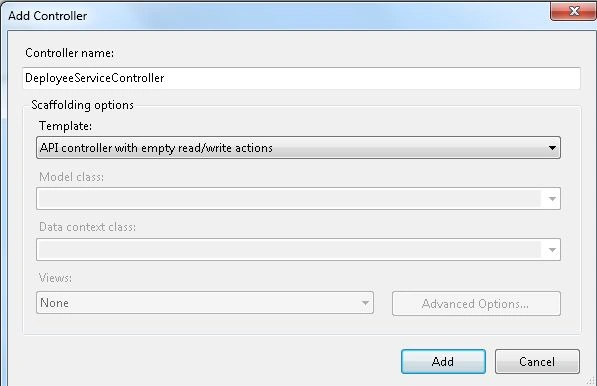
Now add an API controller as in the following:
-
Right-click on the Controller Folder.
-
Select "Add" -> "Controller" then select "API controller" from the Template.
-
Click on the "Add" button.
Add the following Code:
- using System;
- using System.Collections.Generic;
- using System.Linq;
- using System.Net;
- using System.Net.Http;
- using System.Web.Http;
- using InfiniteScaffAPI.Models;
- namespace InfiniteScaffAPI.Controllers
- {
- public class DeployeeServiceController : ApiController
- {
- IDeployeeRepository res;
- public DeployeeServiceController(IDeployeeRepository repo)
- {
- res = repo;
- }
- public DeployeeServiceController()
- {
- DeployeeRepository res = new DeployeeRepository();
- }
- [HttpGet]
- public IEnumerable<Deployee> GetPosts(int id)
- {
- IEnumerable<Deployee> deployees = res.PostPage(id, 5);
- return deployees;
- }
- }
- }
Step 7
Now change the controller and action name in the Rout.config file as in the following:
- {
- routes.IgnoreRoute("{resource}.axd/{*pathInfo}");
- routes.MapRoute(
- name: "Default",
- url: "{controller}/{action}/{id}",
- defaults: new { controller = "Deployees", action = "Create", id = UrlParameter.Optional }
- );
- }
Step 8
Execute the application and some text.


Click on edit and edit anything in the Post, click on "Save".
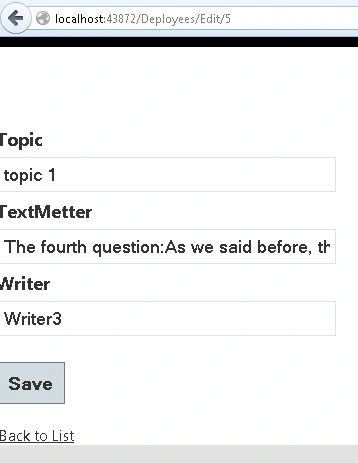
Click on "Delete" and click on the "Delete" button. It deletes the specific post.
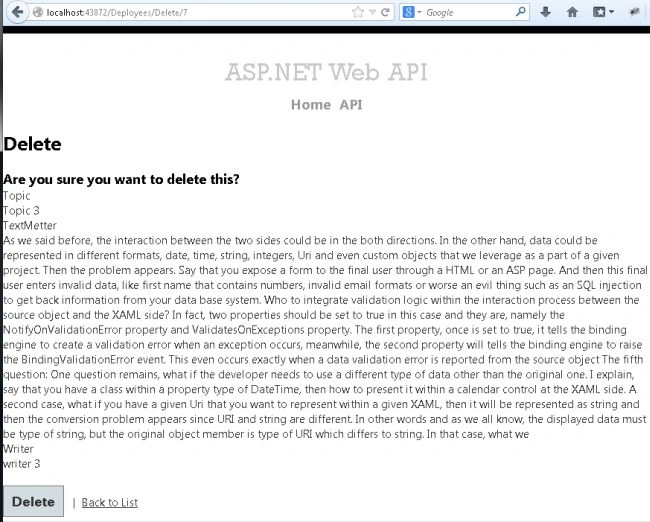
Now see that in the Post there is no one posting as Writer 3.
Join the conversation! Your thoughts help the community grow.