

What is image sprite in CSS
It is a technique to optimize the performance of website / web application in which all the images (mainly icons or header footer images) are combined in to the single image and this single image is loaded and using only a portion of image required for the control is displayed using CSS.
What are the benefits of sprite image
- Significantly optimize the performance of your website or web application.
- Reduces the count of HTTP request.
- Helps in optimized hover effect.
How to implement spite image in MVC 5
Step 1: Create your simple application having images / icons,
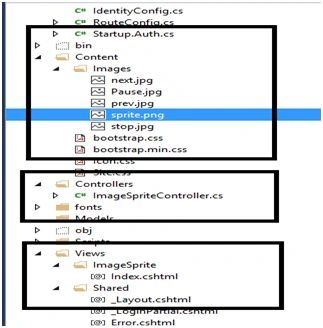
Step 2: Multiple free websites are available which helps you to create the sprite image and also generate .css file mentioned image sprite.
Some of the examples are:
Also there are software available which helps you to generate sprite image, I have tried by uploading all my icons and got my spite image as in the following,
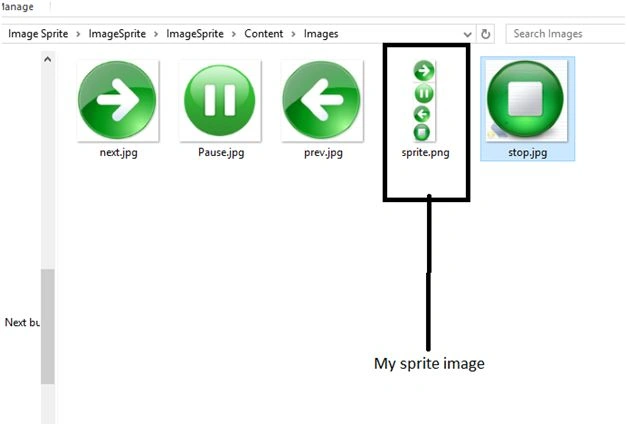
So I have included all these images in my solution.
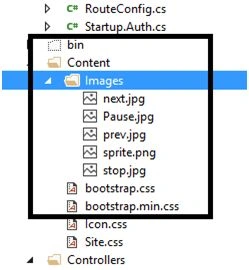
Step 3: Also include the css file which will give you separated icons as below,
- .sprite
- {
- background: url('Images/sprite.png') no - repeat top left;width: 204 px;height: 204 px;
- }
- .sprite.im1
- {
- background - position: 0 0;
- width: 256 px;
- height: 256 px;
- background - size: 20 % ;
- }
- .sprite.im2
- {
- background - position: 0 - 266 px;
- width: 256 px;
- height: 256 px;
- background - size: 20 % ;
- }
- .sprite.im3
- {
- background - position: 0 - 532 px;
- width: 204 px;
- height: 204 px;
- background - size: 20 % ;
- }
- .sprite.im4
- {
- background - position: 0 - 746 px;
- width: 204 px;
- height: 204 px;
- background - size: 20 % ;
- }
Note: I have created two section Normal images and Sprite Images. In Normal Image all images are individually downloaded and in sprite image section use the css file mentioned in step 3.
- @ {
- ViewBag.Title = "Index";
- }
- < link href = "~/Content/Icon.css"
- rel = "stylesheet" / >
- < h2 > Index < /h2>
- < fieldset >
- < div id = "dvCategoryResults" >
- < b > Normal Images < /b> < table >
- < tr >
- < td >
- < img src = "~/Content/Images/next.jpg"
- alt = "Image"
- height = "50"
- width = "50" / >
- < br >
- < img src = "~/Content/Images/Pause.jpg"
- alt = "Image"
- height = "50"
- width = "50" / >
- < br >
- < img src = "~/Content/Images/prev.jpg"
- alt = "Image"
- height = "50"
- width = "50" / >
- < br >
- < img src = "~/Content/Images/stop.jpg"
- alt = "Image"
- height = "50"
- width = "50" / >
- < br >
- < /td> < /tr> < /table> < br >
- < br >
- < b > Sprite Images < /b> < table >
- < tr >
- < td class = 'sprite im1' > < /td> < td class = 'sprite im2' > < /td> < td class = 'sprite im3' > < /td> < td class = 'sprite im4' > < /td> < /tr> < /table>
- < /div>
- < /fieldset>

Step 6: Performance test using Firebug,
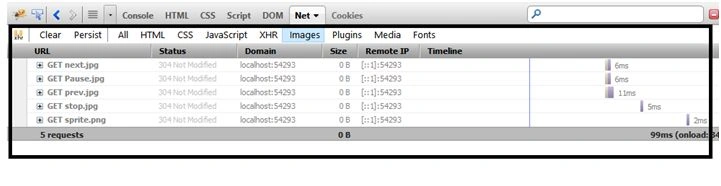
As shown in above results 5 images are downloaded out of which 4 are for normal images section that collectively takes more time than the single image sprite.png which only takes 2 ms.
Also there are 4 that get response for normal way but for sprite way only on request for image section.
I hope you understood the concept attached project will help you to understand in more detail way.
Humayun Kabir MamunPosted Dec 28, 2015, 1:46 AM
Nice...
Santhakumar MunuswamyPosted Dec 25, 2015, 3:17 PM
Thanks for nice article
Ajay GandhiPosted Dec 25, 2015, 1:59 PM
Thanks everyone
Sridhar SharmaPosted Dec 25, 2015, 11:37 AM
Nice Share
Ankur MistryPosted Dec 25, 2015, 11:12 AM
helpful info, nice share
Gowtham KPosted Dec 25, 2015, 10:20 AM
Good One, Thanks for sharing
Sibeesh VenuPosted Dec 25, 2015, 10:13 AM
Nice Share