

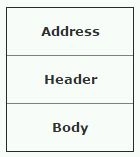
URL: Uniform Resource Identifier (Locator)
Every response contains a status code. The following are some pf the status code with its level number & meaning:
- 100 level: Informational (Continue)
This means server has received the request headers, and that the client should proceed to send the request body.
- 200 level: Successful (OK)
This request has succeeded, and the resulting resources (e.g. file or script output) is returned in the message body.
- 300 level : Redirection
Multiple choices: It indicates that the future action needs to be taken by user agent in order to fulfil the request. It indicates multiple options for the resource that the client may need to follow.
- 400 level: Client Error (401 == Bad request)
Client error.
- 404 level: Not found
The requested resource does not exist.
- 404.10: Request header too long.
- 404.13: Content length too large.
- 404.14: URL too long.
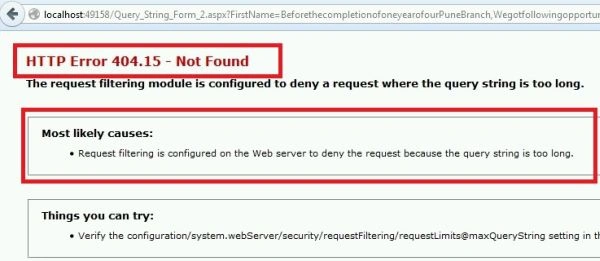
- 404.15: Query string too large.
- 500 level: Server Error (503 == Service Unavailable)
An unexpected server error. The most common cause is server side script that has bad syntax, fails, or otherwise cannot run correctly.
Step 1: Create an application Visual Studio 2013. Now add one web form with the following code (or you can drag drop controls from ToolBox also),
- <%@ Page Language="C#" AutoEventWireup="true" CodeBehind="View_State.aspx.cs" Inherits="State_Mangement.View_State" %>
- <!DOCTYPE html>
- <html xmlns="http://www.w3.org/1999/xhtml">
- <head runat="server">
- <title></title>
- </head>
- <body>
- <form id="form1" runat="server">
- <div>
- <asp:TextBox ID="TextBox1" runat="server"></asp:TextBox>
- <asp:Button ID="Button1" runat="server" Text="Click" OnClick="Button1_Click" />
- </div>
- </form>
- </body>
- </html>
- protected void Page_Load(object sender, EventArgs e)
- {
- if (!IsPostBack)
- {
- TextBox1.Text = "0";
- }
- }
- protected void Button1_Click(object sender, EventArgs e)
- {
- int click_Count = Convert.ToInt32(TextBox1.Text) + 1;
- TextBox1.Text = click_Count.ToString();
- }
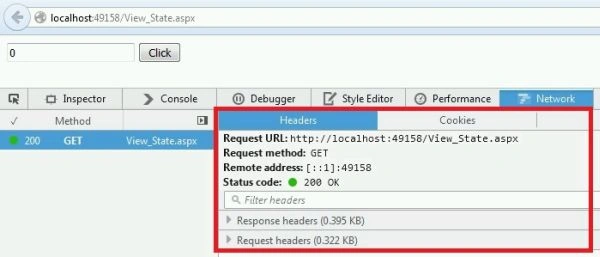
In above image we can see HTTP Message contains URL, Address, Status Code, Request & Response headers.
Here you can see status code 200.
Step 4: Now add two web forms, out of which one will take input from user in textbox & will pass text box values using query string to another form,
- <%@ Page Language="C#" AutoEventWireup="true" CodeBehind="Query_String_Form_1.aspx.cs" Inherits="State_Mangement.Query_String_Form_1" %>
- <!DOCTYPE html>
- <html xmlns="http://www.w3.org/1999/xhtml">
- <head runat="server">
- <title></title>
- </head>
- <body>
- <form id="form1" runat="server">
- <div>
- First Name:
- <asp:TextBox ID="TextBox1" runat="server" Columns="50" Rows="5" TextMode="MultiLine">
- </asp:TextBox>
- <br />
- <br />
- <asp:Button ID="Button1" runat="server" Text="Button" OnClick="Button1_Click" />
- </div>
- </form>
- </body>
- </html>
- protected void Button1_Click(object sender, EventArgs e)
- {
- int total_chars = TextBox1.Text.Length;
- Response.Redirect("Query_String_Form_2.aspx?FirstName=" + TextBox1.Text);
- }
- protected void Page_Load(object sender, EventArgs e)
- {
- string f_name = Request.QueryString["FirstName"].ToString();
- Label1.Text = f_name;
- }
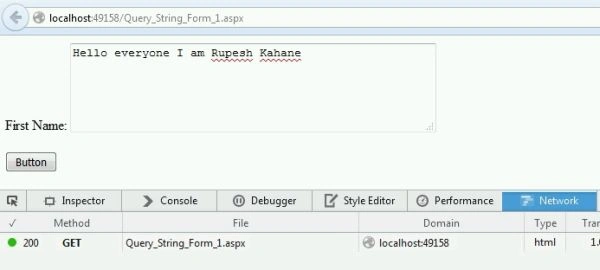

Now our output will look like the following with status code.
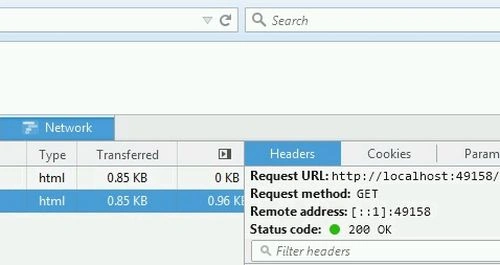
Step 7: Now if I enter more characters then the following will be visible,
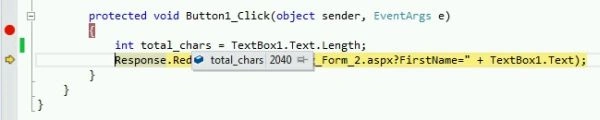
I have entered 2040 characters then you can see what happens in the output.
Here you can see status code 404.15.
Step 8: Now add another web form & take one button from tool box & add code on button click as in the following code snippet,
- protected void Button1_Click(object sender, EventArgs e)
- {
- Response.Redirect("my_page.aspx");
- }
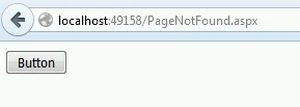
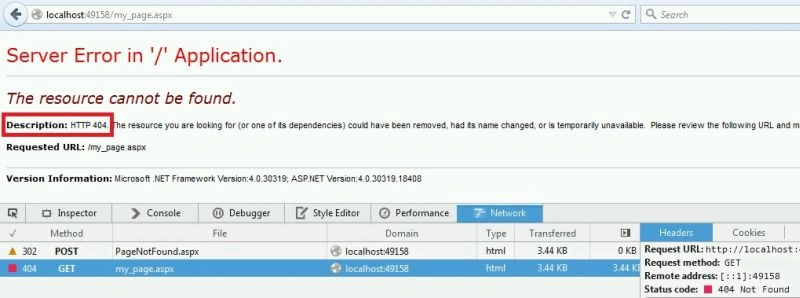
Click on button & see the output.
Here you can see status code 404.
For more understanding you can download the code.
Summary:
This article will help fresher candidates to understand HTTP Message Format in ASP.NET MVC 5.
Rupesh KahanePosted Dec 30, 2015, 9:43 AM
Thanks Mukesh Kumar sir
Mukesh KumarPosted Nov 4, 2015, 2:54 AM
Good One Sir
Rupesh KahanePosted Nov 4, 2015, 2:05 AM
Thanks to Humayun Kabir Mamun Sibeesh Venu & Dhanik Sahni
Dhanik SahniPosted Nov 4, 2015, 1:51 AM
Good Information
Sibeesh VenuPosted Nov 4, 2015, 12:20 AM
Nice Share
Humayun Kabir MamunPosted Nov 4, 2015, 12:19 AM
Nice...
Rupesh KahanePosted Nov 3, 2015, 2:03 PM
K will do this. Thanks for good suggestions
Afzaal Ahmad ZeeshanPosted Nov 3, 2015, 12:06 PM
No, category is all right. I am talking about the title. Most readers do not even care about the category, but title matters. So I would suggest that you change the title. :-)
Rupesh KahanePosted Nov 3, 2015, 11:19 AM
Afzaal Ahmad Zeeshan I agree with you. But I did not found category ASP.NET / Web Forms so I select ASP.NET 5
Afzaal Ahmad ZeeshanPosted Nov 3, 2015, 10:17 AM
Wait right there! ASP.NET 5 does not include or support Web Forms, Web Forms is left over in ASP.NET 4.6, so why are you using Web Forms to explain ASP.NET 5?
Vishal GilbilePosted Nov 3, 2015, 9:57 AM
Good One