

Introduction
In the ever-evolving landscape of web development, developers are constantly seeking ways to enhance the capabilities of HTML to create more interactive and dynamic web applications. HTMX, an innovative library, comes to the rescue by providing a straightforward approach to augmenting HTML with seamless server interaction. In this article, we'll explore HTMX and its powerful features through an example.
What is HTMX?
HTMX (short for "hypertext mixed") is an open-source library that empowers developers to add dynamic behavior to HTML using simple attributes. It follows the principles of progressive enhancement, allowing developers to enhance their existing HTML pages without complex JavaScript frameworks.
Power of HTMX Attributes
HTMX introduces a set of attributes that can be added to HTML elements to define their behavior and interaction. Let's delve into some essential qualities and understand how they work together.
1. 'hx-get' and 'hx-post'
- 'hx-get' defines the URL to send a GET request to retrieve data from the server.
- 'hx-post' specifies the URL to send a POST request to submit data to the server.
2. 'hx-trigger'
- This attribute determines the event that triggers the HTMX request.
- Events can include clicks, form submissions, or input changes.
3. 'hx-swap'
- 'hx-swap' designates the portion of the page that should be updated with the server response.
- This allows for partial page updates, improving the user experience.
4. 'hx-target'
- 'hx-target' specifies the element or elements that should receive the server response.
- It can be an ID, a CSS selector, or a JavaScript expression, providing flexibility in updating content.
5. 'hx-indicator'
- By using 'hx-indicator', developers can define an element to show while an HTMX request is in progress.
- This element visually indicates that an operation is being processed, enhancing user feedback.
An Example to Showcase HTMX's Power
Let's create a simple Asp.net MVC web application.
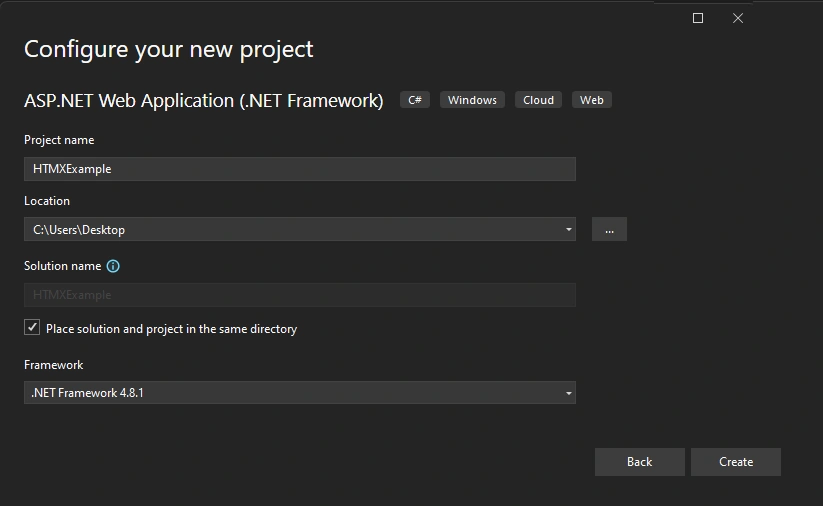
Now go to Index View and clear all code, and replace the below code.
@{
      ViewBag.Title = "Home Page";
 }

<h1>HTMX Example</h1>
<script src="https://cdn.jsdelivr.net/npm/htmx.org/dist/htmx.js"></script>

<button  hx-get="@Url.Action("GetData","Home")" hx-trigger="click" hx-target="#result">Load Data</button>

<div id="result">
    Click the "Load Data" button to load data here.

</div>
Now in the controller, create an ActionResult named GetData.
public ActionResult GetData() {
  var data = new

  {
    message = "Data loaded successfully!",
      value = 42
  };

  return Json(data, JsonRequestBehavior.AllowGet);
}
Now run the code.
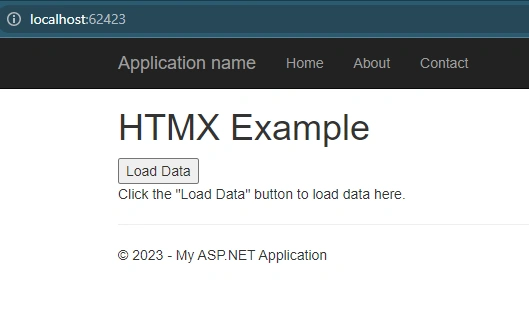
Now click the load button to show the data which is on ActionResult (GetData).
Code Explanation
- 'hx-get': This attribute specifies the URL to be requested when the button is clicked. It indicates that an HTTP GET request should be made to the specified URL. In this case, the `@Url.Action("GetData", "Home")` is used to generate the URL for the 'GetData' action in the `HomeController` using the ASP.NET Core routing conventions. The generated URL will be something like "/Home/GetData".
- 'hx-trigger': This attribute defines the event that triggers the HTMX request. In this case, it is set to "click", meaning the HTMX request will be triggered when the button is clicked.
- 'hx-target': This attribute specifies the HTML element where the response from the HTMX request will be inserted. In this example, it is set to `#result`, which refers to the element with the 'id' "result". When the HTMX request is complete, the response data will replace the content of this element.
So, when the "Load Data" button is clicked, HTMX will perform an HTTP GET request to the URL generated by '@Url.Action("GetData", "Home")'. The response from this request will be inserted into the element with the 'id' "result", dynamically updating the content on the page without requiring a full page reload.
By adding these attributes, HTMX seamlessly handles the request, retrieves the server response, and updates the "quote" element, providing a smooth and interactive experience for the user.
Conclusion
HTMX empowers developers to transform HTML into a dynamic and interactive medium without requiring extensive JavaScript code or complex frameworks. By leveraging simple attributes, such as 'hx-get', 'hx-post', 'hx-trigger', 'hx-swap', 'hx-target', and 'hx-indicator', developers can enhance their existing HTML pages and create modern web applications. HTMX is a valuable tool that combines the power of HTML with server interaction, taking web development to the next level.
Remember, HTMX is just the tip of the iceberg when it comes to enhancing HTML. Its simplicity and versatility make it an excellent choice for developers looking to create rich web experiences with minimal effort.
Give HTMX a try, and unlock the true potential of HTML on steroids!
References
- HTMX documentation: https://htmx.org/
- HTMX GitHub repository: https://github.com/bigskysoftware/htmx
Join the conversation! Your thoughts help the community grow.