

Introduction
In many web applications, we want to store data on the client-side. Before HTML5 we use cookies for this. There are some limitations of cookies as in the following:
Limitations of Cookies
- The storage limit of cookies in web browsers is limited to about 4KB.
- Cookies are sent with every HTTP request, thereby slowing down the web application performance.
To overcome these problems Web Storage API introduced.
 HTML Web Storage is originally part of HTML5 specifications but now found in its own dedicated space. Web Storage provides the way to store data and access data at the client-side. It stores data in the form of a KEY/VALUE pair. Any data stored in Web Storage is tied to the document origin. All pages from one origin can store and access the same data. The data stored in storage can be accessed using JavaScript.
Introduction to HTML 5 Web Storage
HTML5 Web Storage
Advantages of HTML5 Web Storage
- It can store 5 to 10 MB data. That is far more than cookies.
- Web storage data never transferred with an HTTP request, so it increases the performance of the application.
Supported Browsers

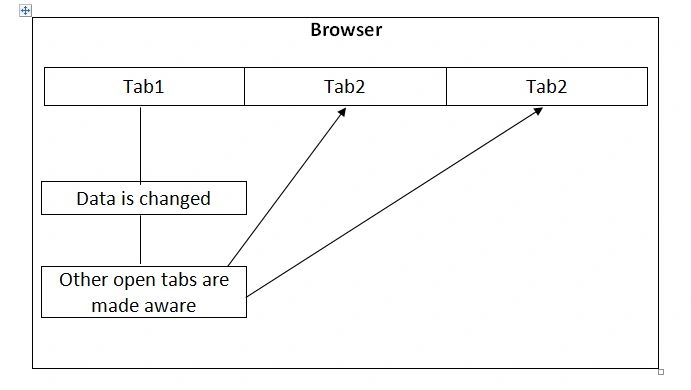
Web Storage Events
Types of Web Storage
- Session Storage
- Local Storage
In this article, we will see how to use Session Storage.
As its name implies that it stores data of the current session only which means the data stored in session storage are cleared when the browser closed. To access session storage in JavaScript the following methods are available.
Session Storage
- To store data in session storage setItem () function is used.
sessionStorage.setItem (‘key’,’value’);Ex: sessionStorage.setItem (‘username’,’ABC’);We can only store strings in session storage. To save objects in session first convert an object into a JSON string and then store this string in session storage as in the following,sessionStorage.setItem (‘object’, JSON.stringify(object));
- To retrieve data from the session storage getItem() function is used.
sessionStorage.getItem(‘key’);Ex: var username= sessionStorage.getItem(‘username’);If JSON string is stored in session storage, then you can convert it into the object as below.var object=JSON.parse(sessionStorage.getItem(‘object’));
- To delete a particular key from session storage removeItem function is used.
sessionStorage.removeItem(‘key’);Ex: sessionStorage.removeItem(‘username’);
- To delete all keys from session storage clear function is used,
sessionStorage.clear();To get all KEY/VALUE pairs from session storage, you can loop through session storage like the following.
- for (var i = 0; i < sessionStorage.length; i++)
- {
- var key = sessionStorage.key(i);
- var value = sessionStorage.getItem(key);
- }
Summary
In this article, we learned about HTML5 Web Storage Part 1 - Session Storage.
Prasanna MuraliPosted May 20, 2016, 11:21 AM
Nice one....
Humayun Kabir MamunPosted Jan 11, 2016, 11:04 PM
Nice...
Karthikeyan KPosted Jan 7, 2016, 11:27 AM
Good one...
Ankur MistryPosted Jan 7, 2016, 10:02 AM
Nice
Ranjit PowarPosted Jan 6, 2016, 1:18 AM
thanks all. Your comment inspires me to write new articles.
Santhakumar MunuswamyPosted Jan 5, 2016, 11:29 PM
Thanks for nice share
Muhammad Aqib ShehzadPosted Jan 5, 2016, 7:41 AM
Nice one
Ranjit PowarPosted Jan 4, 2016, 6:53 AM
thank you all
Ankit BansalPosted Jan 4, 2016, 6:21 AM
Nice one..
Raja TPosted Jan 4, 2016, 3:25 AM
Nice, thanks for sharing
Vinodh NarayananPosted Jan 3, 2016, 1:07 PM
nice
Ranjit PowarPosted Jan 3, 2016, 11:56 AM
Thanks
Gowtham KPosted Jan 3, 2016, 10:53 AM
Good One
Pankaj Kumar ChoudharyPosted Jan 3, 2016, 10:43 AM
Nice Explain.......
Sridhar SharmaPosted Jan 3, 2016, 10:41 AM
Nice Share :)