

Introduction
This article introduces both @Html.Action and @Html.RenderAction. These are used to call a partial view in another view by action method. As we have other options such as @Html.Partial and @Html.RenderPartial to call a partial view in other views then why do we use @Html.Action and @Html.RenderAction ? We use these two html helper methods in the following scenarios.
- To call partial view in another view.
- Partial view is independent to corresponding view in other words partial view model in not related to corresponding view model in strongly typed views.
- We need some operations over data of partial view before it render in corresponding view.
- We call a partial view from ChildActionOnly action methods in another view by GET request.
Whenever we got above situation in our application then we prefer to use these Html helper methods. Now let’s have a look on summary information of these Html helper methods.
@Html.Action
This Html.Action renders partial view as an HTML string so we can store it in another string variable. It is string return type method so first it returns result as a string then renders result to response.
@Html.RenderAction
This is also same as Html.Action but main difference is that it renders result directly to response that’s why it is more efficient if the action returns a large amount of HTML over @Html.Action.
Now we will have a look on particle implementation of these two.
Using Code
We create an MVC application which has a view for employee login and employee registration as both employee login and employee registration are independent to each other. To combine these on single view, we create two partial views, one for Employee login and another for employee registration. As these two views are also independent to corresponding views in which these call.
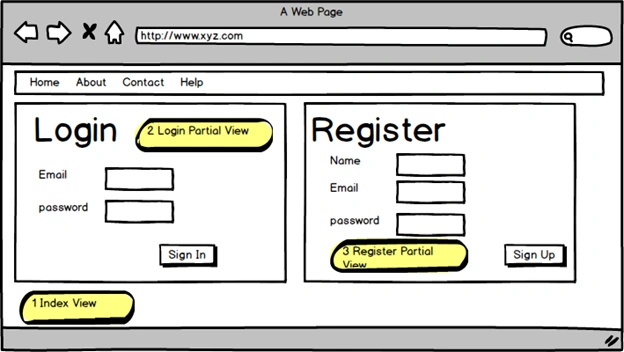
Figure 1: Partial View in corresponding View
First of all we create two view models one for Employee Login (EmployeeLoginViewModel) and another for Employee Registration (EmployeeViewModel). The following code snippet shows both.
- namespace EFOperation.Models
- {
- public class EmployeeLoginViewModel
- {
- public string Email { get; set; }
- public string Password { get; set; }
- }
- }
- using System.ComponentModel.DataAnnotations;
- namespace EFOperation.Models
- {
- public class EmployeeViewModel
- {
- public string Name { get; set; }
- public string Email { get; set; }
- public string Password { get; set; }
- [Display(Name="Confirm Password")]
- public string ConfirmPassword { get; set; }
- }
- }
- using EFOperation.Models;
- using System.Web.Mvc;
- namespace EFOperation.Controllers
- {
- public class EmployeeController : Controller
- {
- public ActionResult Index()
- {
- return View("Index");
- }
- [ChildActionOnly]
- public ActionResult EmployeeLogin()
- {
- EmployeeLoginViewModel model = new EmployeeLoginViewModel();
- return PartialView("_EmployeeLogin",model);
- }
- [ChildActionOnly]
- public ActionResult EmployeeRegistration()
- {
- EmployeeViewModel model = new EmployeeViewModel();
- return PartialView("_EmployeeRegistration",model);
- }
- }
- }
- @model EFOperation.Models.EmployeeLoginViewModel
- <section id="loginForm">
- @using (Html.BeginForm("EmployeeLogin", "Employee", new { ReturnUrl = ViewBag.ReturnUrl }, FormMethod.Post, new { @class = "form-horizontal", role = "form" }))
- {
- @Html.AntiForgeryToken()
- <h4>Use a local account to log in.</h4>
- <hr />
- <div class="form-group">
- @Html.LabelFor(m => m.Email, new { @class = "col-md-2 control-label" })
- <div class="col-md-10">
- @Html.TextBoxFor(m => m.Email, new { @class = "form-control" })
- </div>
- </div>
- <div class="form-group">
- @Html.LabelFor(m => m.Password, new { @class = "col-md-2 control-label" })
- <div class="col-md-10">
- @Html.PasswordFor(m => m.Password, new { @class = "form-control" })
- @Html.ValidationMessageFor(m => m.Password)
- </div>
- </div>
- <div class="form-group">
- <div class="col-md-offset-2 col-md-10">
- <input type="submit" value="Log in" class="btn btn-default" />
- </div>
- </div>
- }
- </section>
- @model EFOperation.Models.EmployeeViewModel
- @using (Html.BeginForm("EmployeeRegistration", "Employee", FormMethod.Post, new { @class = "form-horizontal", role = "form" }))
- {
- <h4>Create a new account.</h4>
- <hr />
- <div class="form-group">
- @Html.LabelFor(m => m.Name, new { @class = "col-md-2 control-label" })
- <div class="col-md-10">
- @Html.TextBoxFor(m => m.Name, new { @class = "form-control" })
- </div>
- </div>
- <div class="form-group">
- @Html.LabelFor(m => m.Email, new { @class = "col-md-2 control-label" })
- <div class="col-md-10">
- @Html.TextBoxFor(m => m.Email, new { @class = "form-control" })
- </div>
- </div>
- <div class="form-group">
- @Html.LabelFor(m => m.Password, new { @class = "col-md-2 control-label" })
- <div class="col-md-10">
- @Html.PasswordFor(m => m.Password, new { @class = "form-control" })
- </div>
- </div>
- <div class="form-group">
- @Html.LabelFor(m => m.ConfirmPassword, new { @class = "col-md-2 control-label" })
- <div class="col-md-10">
- @Html.PasswordFor(m => m.ConfirmPassword, new { @class = "form-control" })
- </div>
- </div>
- <div class="form-group">
- <div class="col-md-offset-2 col-md-10">
- <input type="submit" class="btn btn-default" value="Register" />
- </div>
- </div>
- }
- @{
- ViewBag.Title = "Index";
- }
- <div class="row">
- <div class="col-lg-6">
- @Html.Action("EmployeeLogin")
- </div>
- <div class="col-lg-6">
- @{Html.RenderAction("EmployeeRegistration");}
- </div>
- </div>
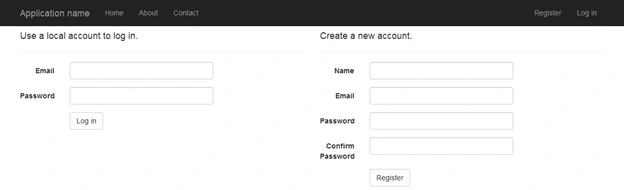
Figure 2: Index view
Read more articles on ASP.NET,
Sribin KumarPosted Oct 10, 2018, 6:05 AM
How to pass parameter in RenderAction
Tridip BhattacharjeePosted Jul 27, 2017, 5:22 AM
How to do wire framing because you posted a sample prototype picture....which tool you used to create that?
Sándor HatvaniPosted May 27, 2017, 4:02 PM
How can we put javascript in a @Html.Action partial view, pls? This pw load after the view and I put the script in a section but it does not load. Maybe I should import jQuery and my script in partial view in case of Action? Thank you in advance.
Vishal KotechaPosted Jan 5, 2017, 4:58 AM
Any alternatives to achieve the same screen?
Vishal KotechaPosted Jan 5, 2017, 4:57 AM
After clicking login or register, i am not able to perform "RediretToRoute" or "Redirect" in the controller
Bikesh SrivastavaPosted Jul 28, 2016, 8:35 AM
Great article.
sreenivasa kPosted Apr 25, 2016, 9:55 PM
very nice
Sandeep Singh ShekhawatPosted Apr 24, 2016, 11:05 PM
Thanks :)
Bhavik PatelPosted Apr 24, 2016, 8:38 PM
Interesting
Hari ShankerPosted Apr 24, 2016, 1:21 PM
Thanks for Sharing
Debasis SahaPosted Apr 24, 2016, 1:09 PM
Good one..
Kuppurasu NagarajPosted Apr 24, 2016, 12:37 PM
Nice Sharing..
Rahul Kumar SaxenaPosted Apr 24, 2016, 12:14 PM
Good Show
Vignesh ManiPosted Apr 24, 2016, 9:45 AM
Nice
Vivek KumarPosted Apr 24, 2016, 9:29 AM
Nice one