

Introduction
In this article, we will see how we can validate a given XML by using XML Schema (XSD). Sometimes, it needs to be validated at the business level. After reading this article, we can learn the below points.
- What is XML?
- What is XML Schema (XSD)?
- Why is it necessary to validate XML?
- How to validate XML?
What is XML?
Extensible Markup Language (XML) is used to describe the data. The XML standard is a flexible way to create information formats and electronically share structured data via the public Internet, as well as via corporate networks. The XML tags are not pre-defined in XML. You will have to create tags according to your needs.
Example – See below.
What is XML Schema (XSD)?
The XML Schema language is also referred to as XML Schema Definition (XSD). An XML Schema describes the structure of an XML document.
XSD is a schema language; you use it to define the possible structure and contents of an XML format. A validating parser can then check whether an XML instance document conforms to an XSD schema or a set of schemas.
Why is it necessary to validate XML?
When sending data from a sender to a receiver, it is essential that both parts have the same "expectations" about the content.
With XML Schemas, the sender can describe the data in a way that the receiver will understand.
How to validate XML?
We can validate XML using XSD schema file. Please see below steps and code.
Let’s create C# solution to validate XML data,
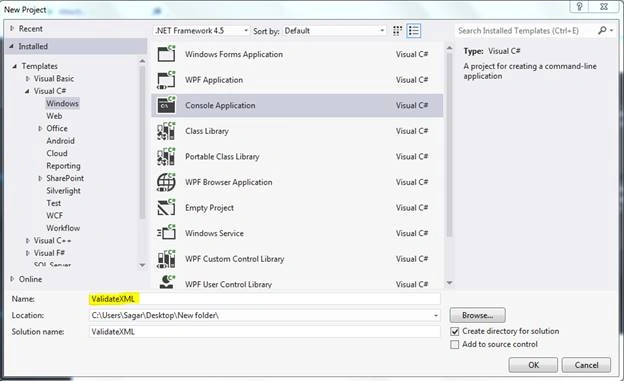
- Create console application. Steps – File-New - Project and give appropriate name for example – ValidateXML
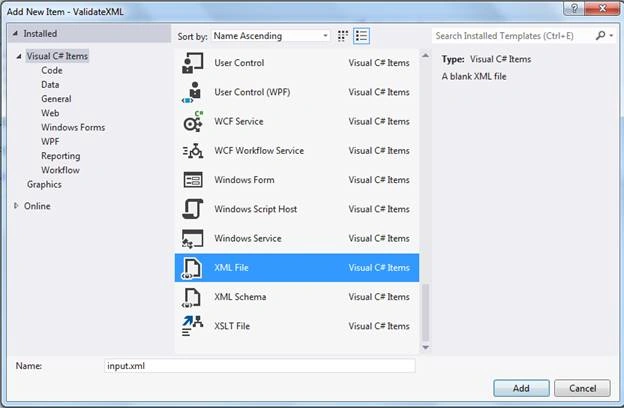
- Let’s Add XML. Steps – Right click on Solution file - Add New Item - XML File.
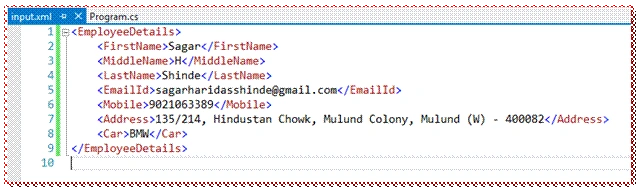
- XML File looks as below,
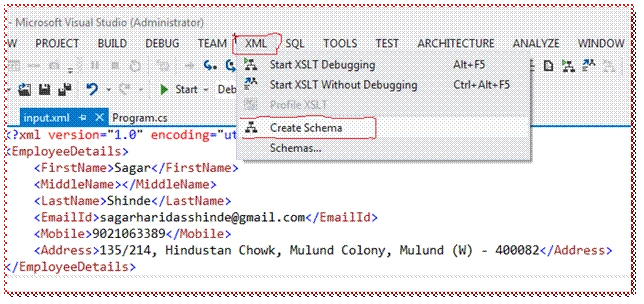
- How to create XSD,
- Open the existing XML.
- Go to XML menu.
- Select "Create schema" option.
- Your XSD will be created automatically.
XSD File
This is an automatically created file; we have modified this XSD, as per our requirement.
- <xs:schema attributeFormDefault="unqualified" elementFormDefault="qualified" xmlns:xs="http://www.w3.org/2001/XMLSchema">
- <xs:element name="EmployeeDetails">
- <xs:complexType>
- <xs:sequence>
- <xs:element name="FirstName" type="xs:string" />
- <xs:element name="MiddleName" />
- <xs:element name="LastName" type="xs:string" />
- <xs:element name="EmailId" type="xs:string" />
- <xs:element name="Mobile" type="xs:integer" />
- <xs:element name="Address" type="xs:string" /> </xs:sequence>
- </xs:complexType>
- </xs:element>
- </xs:schema>
Modified XSD
- <xs:schema attributeFormDefault="unqualified" elementFormDefault="qualified" xmlns:xs="http://www.w3.org/2001/XMLSchema">
- <xs:element name="EmployeeDetails">
- <xs:complexType>
- <xs:sequence>
- <xs:element name="FirstName" type="xs:string" />
- <xs:element name="MiddleName">
- <xs:simpleType>
- <xs:restriction base="xs:string">
- <xs:minLength value="1" /> </xs:restriction>
- </xs:simpleType>
- </xs:element>
- <xs:element name="LastName" type="xs:string" />
- <xs:element name="EmailId" type="xs:string" />
- <xs:element name="Mobile" type="xs:integer" />
- <xs:element name="Address">
- <xs:simpleType>
- <xs:restriction base="xs:string">
- <xs:minLength value="5" />
- <xs:maxLength value="100" /> </xs:restriction>
- </xs:simpleType>
- </xs:element>
- <xs:element name="Car">
- <xs:simpleType>
- <xs:restriction base="xs:string">
- <xs:enumeration value="Audi" />
- <xs:enumeration value="Golf" />
- <xs:enumeration value="BMW" /> </xs:restriction>
- </xs:simpleType>
- </xs:element>
- </xs:sequence>
- </xs:complexType>
- </xs:element>
- </xs:schema>
Validation description applied to the XSD.
| Element Name | Validation | XSD Parameter |
| FirstName | datatype as string | type="xs:string" |
| MiddleName | datatype as string Restricted maxlengt up to 1 |
type="xs:string" <xs:minLength value="1"/> |
| LastName | datatype as string | type="xs:string" |
| EmailId | datatype as string | type="xs:string" |
| Mobile | datatype as integer | type="xs:integer" |
| Address | datatype as string Restricted Min and Max length |
type="xs:string" <xs:minLength value="5"/> <xs:maxLength value="100"/> |
| Car | datatype as string Value Should be Audi, Golf, BMW |
type="xs:string" <xs:enumeration value="Audi"/> <xs:enumeration value="Golf"/> <xs:enumeration value="BMW"/> |
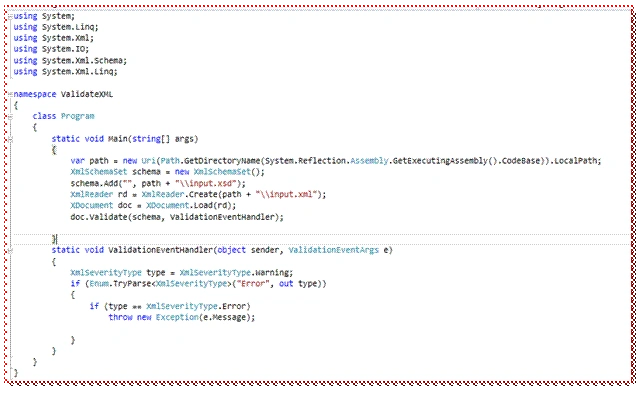
So, let’s validate our XML by using the above XSD file.
- static void Main(string[] args) {
- var path = new Uri(Path.GetDirectoryName(System.Reflection.Assembly.GetExecutingAssembly().CodeBase)).LocalPath;
- XmlSchemaSet schema = new XmlSchemaSet();
- schema.Add("", path + "\\input.xsd");
- XmlReader rd = XmlReader.Create(path + "\\input.xml");
- XDocument doc = XDocument.Load(rd);
- doc.Validate(schema, ValidationEventHandler);
- }
- static void ValidationEventHandler(object sender, ValidationEventArgs e) {
- XmlSeverityType type = XmlSeverityType.Warning;
- if (Enum.TryParse < XmlSeverityType > ("Error", out type)) {
- if (type == XmlSeverityType.Error) throw new Exception(e.Message);
- }
- }
Output
Success
Conclusion
I hope this article gave you a good idea of the validation of XML. Please download the attached code file. Thanks for reading this article. Please share your valuable feedback and comments.
Mario FigueroaPosted Sep 20, 2019, 10:37 AM
Very good article, thanks.
Jason PaynePosted Feb 17, 2019, 2:40 AM
Your validation event handler is pointless. It will always throw an exception. It simply tests that the XmlSeverityType.Error enum exists; there is no functional logic there at all. And even if you did want to do such a test, if the first if-statement is true, the second if-statement will always be true. There is no checking of e.Severity. If you want to have more meaningful handler, then you should at least use this code: if (e.Severity == XmlSeverityType.Error) throw new Exception(e.Message);
Romulus NegutPosted Oct 23, 2018, 12:06 PM
Hi. I used your code with existing xsd and it passes with no exceptions even if the xml is not well formed. It should throw some exceptions since I validated the xml with an online validator and it is full of errors...
Grif TopiaPosted Oct 3, 2018, 5:37 AM
How do I do this if both my XSD and XML are in memory, i.e. in Strings? I don't have them on files and would hate to have them written out just so I can use above sample code. Thinking there is a way but looking at various class methods, don't see it.
Tim AstanaPosted Sep 27, 2018, 3:16 AM
Great work Mr Shinde - well done!
felipe selisPosted May 23, 2018, 11:10 AM
hi, guys, Is there a way to validate an element based on another element on XSD? eg. based on the content of a tag, use as validation for another tag
NVK PRASADPosted May 4, 2018, 7:13 AM
Most helpful.. thanks
Антон ДенPosted Mar 13, 2018, 5:47 PM
Thanks for the helpful article
Hiten PandyaPosted Jan 30, 2018, 7:45 AM
Wonderful article sir....
Tridip BhattacharjeePosted Jan 30, 2018, 2:21 AM
Very nice article.....thanks
Manav PandyaPosted Jan 29, 2018, 11:35 PM
Great work sir ......
Sagar Pandurang KapPosted Jan 29, 2018, 10:52 PM
Awesome work.Nice explaination..