

Introduction
This article shows how to validate a user control in a Windows Forms form.
Step 1:
Open Visual Studio then select "Create New Project" --> "F# Console Application".

Step 2:
Now go the Solution Explorer on to the right side of the application. Right-click on "References" and select "Add references".


Step 3:
After selecting "Add References", in the framwork template you need to select "System.Windows.Forms" and "System.Drawing" while holding down the Ctrl key and Click on "Ok."
Step 4:
Write the following code in the F# editor:
// Learn more about F# at http://fsharp.net
open System.Collections.Generic
open System
open System.Windows.Forms
open System.ComponentModel
open System.Drawing
let validform = new Form(Text="Validate Inputs",AutoScaleDimensions=new System.Drawing.SizeF(60.0F, 13.0F),ClientSize=new System.Drawing.Size(300, 200),StartPosition=FormStartPosition.CenterScreen)
let exitbutton=new Button(Text="Exit", Location=new System.Drawing.Point(190, 170))
let okbutton=new Button(Text="Ok", Location=new System.Drawing.Point(100, 170))
let lblname=new Label(Text="Enter a name:",Location=new System.Drawing.Point(0, 10),AutoSize=true)
let lname=new Label(Text="Enter Last name:",Location=new System.Drawing.Point(0, 50),AutoSize=true)
let nametxtbox=new TextBox(Location=new System.Drawing.Point(120,10),BorderStyle=BorderStyle.FixedSingle)
let lnametxtbox=new TextBox(Location=new System.Drawing.Point(120,50),BorderStyle=BorderStyle.FixedSingle)
validform.Controls.Add(exitbutton)
validform.Controls.Add(okbutton)
validform.Controls.Add(lblname)
validform.Controls.Add(lname)
validform.Controls.Add(nametxtbox)
validform.Controls.Add(lnametxtbox)
okbutton.Click.Add(fun ok->
if(nametxtbox.Text="" || lnametxtbox.Text="")then
MessageBox.Show("Fields can not be empty","Validate Inputs",MessageBoxButtons.OK, MessageBoxIcon.Information)|>ignore)
exitbutton.Click.Add(fun exit->validform.Close())
Application.Run(validform)
Step 5:
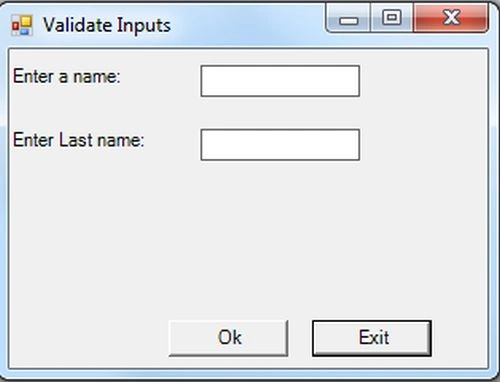
Debug the application by pressing F5 to execute the application. After debugging the application you will get an application as in the figure below:
Step 6:
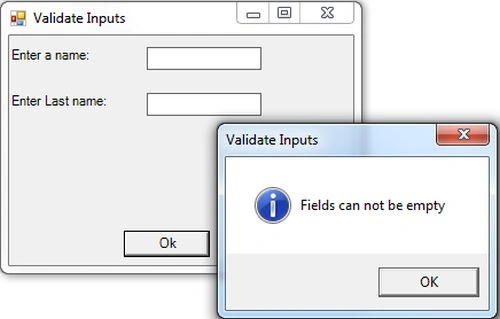
If you'll enter only name and left the field last name lastname textbox then lastname textbox validated see the figure

Step 7:
If both the fields gets empty and click on ok button then validation arises.
Bhuvanesh MohankumarPosted Apr 30, 2016, 3:16 PM
Good one...