

Introduction
In this article, you will learn how to use your C# coding prowess to set up the session state in your ASP.NET Core and MVC Core Web applications.
Create your core application
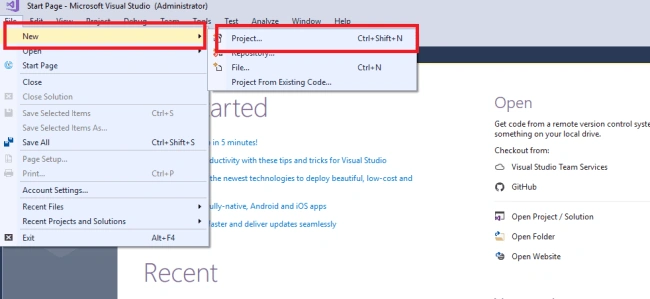
Step 1. Open Visual Studio and select File >> New Project.
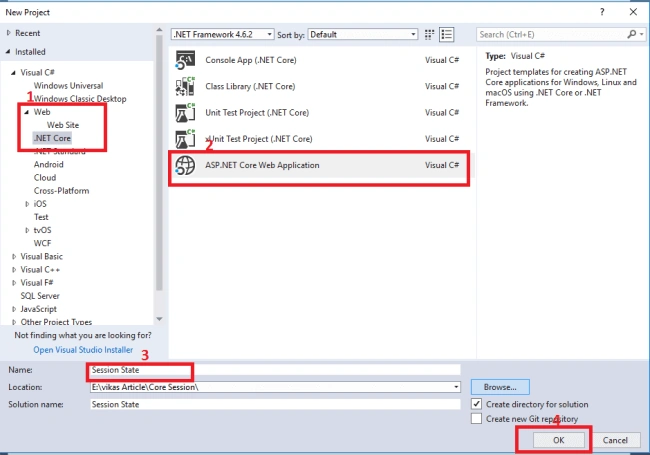
The ”New Project” window will pop up. Select .NET Core and select “ASP.NET Core Web Application”. Name your project and click “OK”.
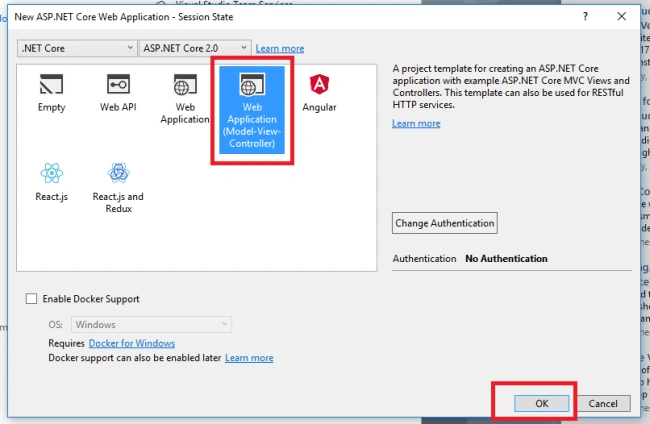
A "New Project" window will pop up. Select Web Application and click “OK”, as shown below.
Packages Required
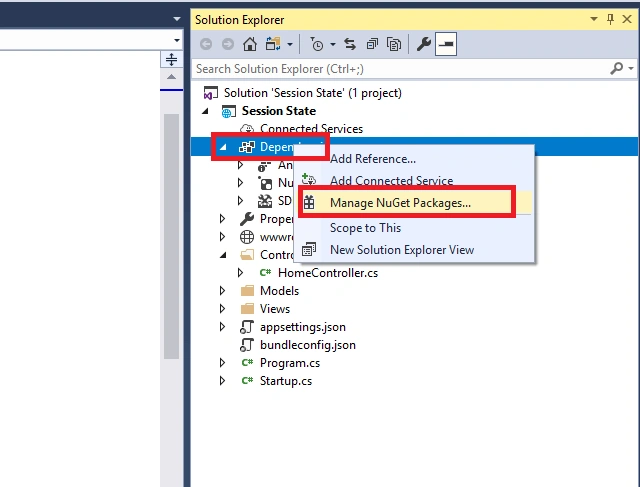
We need to install the stable version of “Microsoft.AspNetCore.Session” from the NuGet Package Manager. Then only we can access the session state in ASP.NET Core. Click on the “Install” button.
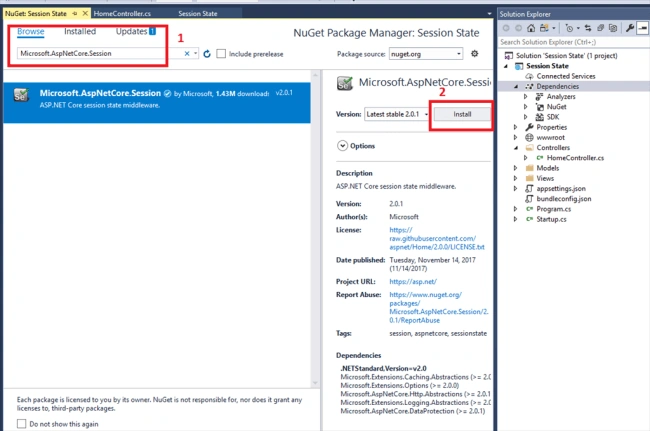
Step 3. Now, double-click “HomeControllers.cs”. The following is an example of a session sharing in ASP.NET Core.
using System;
using Microsoft.AspNetCore.Http;
using Microsoft.AspNetCore.Mvc;
using Session_State.Models;

namespace Session_State.Controllers
{
    public class HomeController : Controller
    {
        private const string SessionName = "_Name";
        private const string SessionAge = "_Age";

        public IActionResult Index()
        {
            // Set session data
            HttpContext.Session.SetString(SessionName, "Jarvik");
            HttpContext.Session.SetInt32(SessionAge, 24);

            return View();
        }

        public IActionResult About()
        {
            // Retrieve session data
            ViewBag.Name = HttpContext.Session.GetString(SessionName);
            ViewBag.Age = HttpContext.Session.GetInt32(SessionAge);
            ViewData["Message"] = "ASP.NET Core!";

            return View();
        }

        public IActionResult Contact()
        {
            ViewData["Message"] = "Your contact page.";
            return View();
        }

        public IActionResult Error()
        {
            return View(new ErrorViewModel { RequestId = Activity.Current?.Id ?? HttpContext.TraceIdentifier });
        }
    }
}
Step 4. Now, double-click” Startup.cs” to configure the services. The very first step we need to take is to add the session service to the container so that we can add the services in the “configureServices” function.
public void ConfigureServices(IServiceCollection services)
{
    // Add distributed memory cache for session
    services.AddDistributedMemoryCache();

    // Configure session options
    services.AddSession(options =>
    {
        options.IdleTimeout = TimeSpan.FromMinutes(1); // Set session timeout
    });

    // Add MVC services
    services.AddMvc();
}
Configure the HTTP Request Pipeline
Now, in the same class, we add “app.Usersession()” inside the “configure” function so that it gets called by the runtime.
public void Configure(IApplicationBuilder app, IHostingEnvironment env)
{
    if (env.IsDevelopment())
    {
        app.UseDeveloperExceptionPage();
        app.UseBrowserLink();
    }
    else
    {
        app.UseExceptionHandler("/Home/Error");
    }

    app.UseStaticFiles();

    app.UseSession();

    app.UseMvc(routes =>
    {
        routes.MapRoute(
            name: "default",
            template: "{controller=Home}/{action=Index}/{id?}");
    });
}
Now, run your project. You will see the output of an Active Session below.
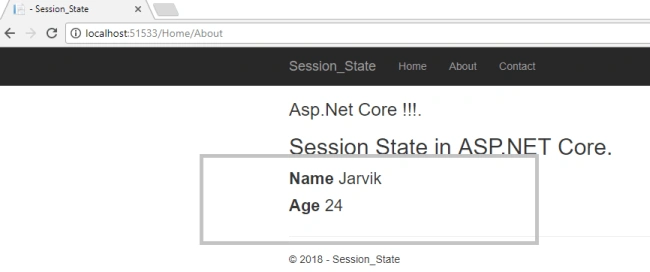
Let us set “one” minute as the Session TimeOut in the “ConfigureServices” function of the “Startup.cs” class.
services.AddSession(options => {
options.IdleTimeout = TimeSpan.FromMinutes(1);//You can set Time
});
Session Expires
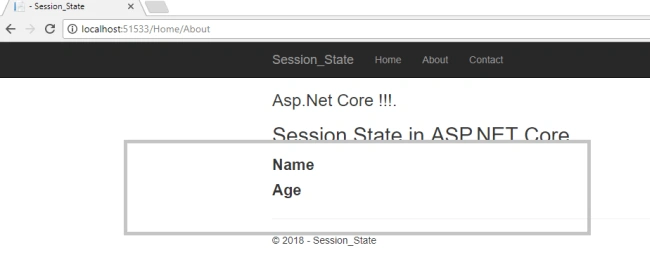
That's it. I hope you have found this article helpful. Do let me know via comments and likes.
Rashmi RansinghPosted Mar 27, 2023, 2:09 AM
Where is the cshtml code ?
vipin singhPosted Jul 10, 2021, 12:45 PM
How to redirect URL when session expired ?please help anyone in aap.net core mvc 3.1
vipin singhPosted Jul 10, 2021, 12:44 PM
How to redirect URL when session expired ?
Byron BrunoPosted Oct 5, 2020, 11:58 AM
Thanks for the good tutorial. How do you share session information between multiple controllers or classes for that matter?
Sandeep GuptaPosted May 12, 2020, 3:46 AM
Thank you bro.. This article is helpful for me...
reshma francisPosted Jun 11, 2019, 6:34 AM
Is it possible to use the session across multiple controllers?
Jorge Garmilla ManchoPosted Feb 12, 2019, 2:21 PM
Is this working only for web app?... I am trying with an API (web service) writing value in a GET endpoint and reading in another POST endpoint, but when I read the value for same key is always null.
Dennis MwebembeziPosted Nov 12, 2018, 7:25 AM
Is there a way to manage the session across multiple controllers? I see you are using only one controller
Pavol RúčekPosted Oct 15, 2018, 7:49 AM
Please fix typo in your article. Change app.Usersession() to app.UseSession().
Tridip BhattacharjeePosted Jan 17, 2018, 5:59 AM
What is the difference between Configure and ConfigureServices function ?
vineet sharmaPosted Jan 17, 2018, 4:54 AM
How kestrel manages session state
vineet sharmaPosted Jan 17, 2018, 4:53 AM
Is there any state server which is used, when session is created or what happen can you explain more. Because as I know my application is hosted on kestral on asp.net core so is there any facility
Tridip BhattacharjeePosted Jan 17, 2018, 3:47 AM
Why we need to add session related code twice that is services.AddSession()app.UseSession(); ?