

What is the benefits of using ServerSide Processing with JQuery Datatable?.
I personally found two important benefits of using ServerSide Processing with Datatable.
- We can handle more data using JQuery Datatable.
- Data can load quickly from the Database server .
Follow the following steps to use ServerSide processing with Datatable.
Step 1
Add JQuery Js file ,and Jquery Datatable css and Js file as shown in the below figure.
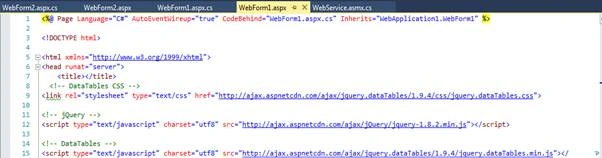
Add the following script to your .aspx page.
- <!-- DataTables CSS -->
- <link rel="stylesheet" type="text/css" href="http://ajax.aspnetcdn.com/ajax/jquery.dataTables/1.9.4/css/jquery.dataTables.css">
- <!—jQuery Js -->
- <script type="text/javascript" charset="utf8" src="http://ajax.aspnetcdn.com/ajax/jQuery/jquery-1.8.2.min.js"></script>
- <!-- DataTables JQuery file-->
- <script type="text/javascript" charset="utf8" src="http://ajax.aspnetcdn.com/ajax/jquery.dataTables/1.9.4/jquery.dataTables.min.js"></script>
Step 2
Create one WebService to Getdata (Here I am using asp.net WebService to get data). You can see my Solution Explorer . I have two web pages and one service, and the name of the service is webService.asmx.
Step 3
Create method inside service which will return data to bind Jquery Datatable.
- [WebMethod]
- public void HelloWorld()
- {
- List<MyClass> lst = new List<MyClass>();
- int i = 0;
- while (i < 10000)
- {
- lst.Add(new MyClass() { Empid = "1", Name = "Ar"});
- lst.Add(new MyClass() { Empid = "2", Name = "Br" });
- lst.Add(new MyClass() { Empid = "3", Name = "Cr" });
- i = i + 1;
- }
- var mydata=new DataTable()
- {
- aaData=lst,iTotalDisplayRecords=lst.Count,iTotalRecords=lst.Count
- };
- JavaScriptSerializer js=new JavaScriptSerializer();
- js.MaxJsonLength = int.MaxValue;
- Context.Response.Write(js.Serialize(mydata));
- }
In the above code you can see that I have defined one function named HelloWorld. editsInside the HelloWorld function I have used three classes.These three classes are MyClass, DataTable and JavaScriptSerializer. Now defined the MyClass inside the service class as I have defined below.
- public class MyClass
- {
- public string Empid { get; set; }
- public string Name { get; set; }
- }
Now define the second class DataTable as I have defined below.
- public class DataTable
- {
- public int iTotalRecords { get; set; }
- public int iTotalDisplayRecords { get; set; }
- public List<MyClass> aaData { get; set; }
- }
JavaScriptSerializer class is available inside System.Web.Script.Serialization namespace.Add this namespace to your service class.
Step4
Design Table from the following code.
- <table id="example" class="display" width="100%" cellspacing="0">
- <thead>
- <tr>
- <th >Employee Id</th>
- <th >Name</th>
- </tr>
- </thead>
- </table>
Step 5
Now use Ajax to call Service method and bind data to Jquery Datatable as shown in the below code.
- <script>
- $(document).ready(function ()
- {
- example').dataTable({
- "bProcessing": true,
- "sAjaxSource": "WebService.asmx/HelloWorld",
- "sServerMethod": "post",
- "aoColumns": [
- { mData: 'Empid' },
- { mData: 'Name' },
- ]
- });
- }
- );
- </script>
Step 6
Now run your application and see the result..
Remarks
You can download the working project from the given link.
Nilesh PatilPosted Oct 30, 2017, 8:52 AM
Nice article sir.........