

Introduction
In this article, I will demonstrate how we can perform join operations with SQL database using Language-Integrated Query (LINQ).
There are 4 types of join in LINQ
1. Group Join
2. Inner Join
3. Left Outer Join
4. Cross Join
Group Join
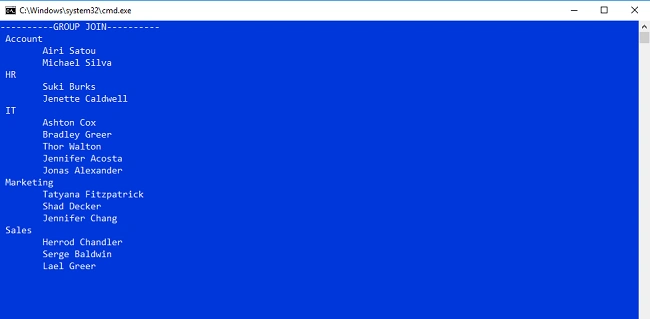
Group join produces hierarchical data structure. Each element from the first collection is paired with a set of correlated elements from the second collection
Inner Join
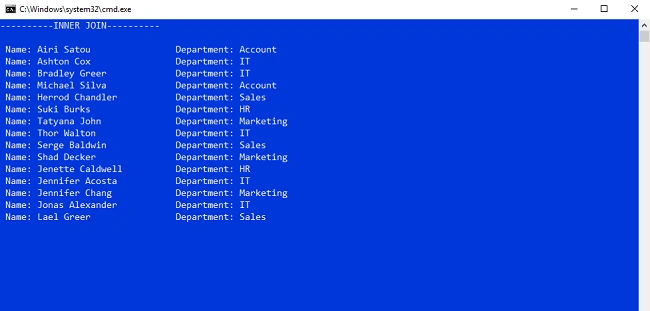
If you have 2 tables or collections, when you perform an inner join, then only the matching rows or elements between the 2 table or collections are included in the result set.
Left Outer Join
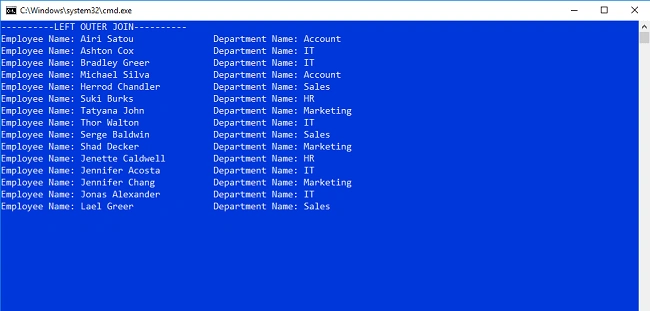
All the matching elements and non-matching elements from the left collection are included in the result set.
Cross Join
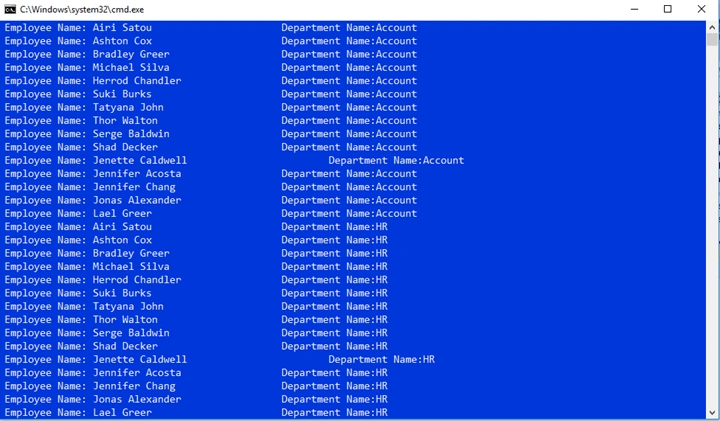
Cross join produces a Cartesian when we cross join two sequences, every element in the first collection is combined with every element in the second collection. The total number of elements in the result set will always be equal to the product of the elements in the two source sequences.
Step 1
Open SQL server 2014 and create Employee table and insert some records
- CREATE TABLE [dbo].[Employee](
- [ID] [int] IDENTITY(1,1) NOT NULL,
- [Name] [nvarchar](50) NULL,
- [Position] [nvarchar](50) NULL,
- [Office] [nvarchar](50) NULL,
- [Salary] [money] NULL,
- [DepartmentId] [int] NULL,
- CONSTRAINT [PK_Employee] PRIMARY KEY CLUSTERED
- (
- [ID] ASC
- )WITH (PAD_INDEX = OFF, STATISTICS_NORECOMPUTE = OFF, IGNORE_DUP_KEY = OFF, ALLOW_ROW_LOCKS = ON, ALLOW_PAGE_LOCKS = ON) ON [PRIMARY]
- ) ON [PRIMARY]
- GO
- CREATE TABLE [dbo].[Department](
- [ID] [int] IDENTITY(1,1) NOT NULL,
- [Department_Name] [nvarchar](50) NULL,
- CONSTRAINT [PK_Department] PRIMARY KEY CLUSTERED
- (
- [ID] ASC
- )WITH (PAD_INDEX = OFF, STATISTICS_NORECOMPUTE = OFF, IGNORE_DUP_KEY = OFF, ALLOW_ROW_LOCKS = ON, ALLOW_PAGE_LOCKS = ON) ON [PRIMARY]
- ) ON [PRIMARY]
- GO
Step 2
Open Visual Studio 2015 and create a new console application with a meaningful name.
Step 3
Add Entity Framework now. For that, right click on Models folder, select Add, then select New Item, then click on it.
Screenshot for adding Entity Framework 1
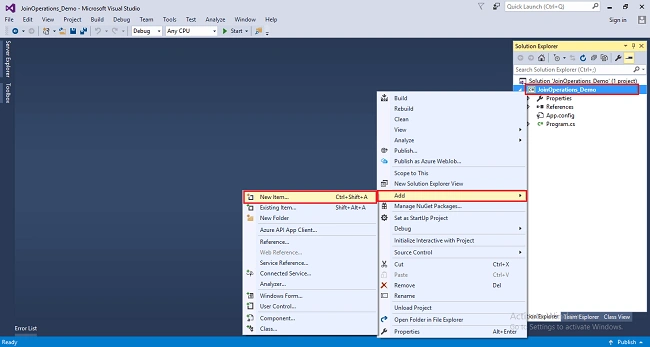
After clicking on new item, you will get a window; from there, select Data from the left panel and choose ADO.NET Entity Data Model, give it the name DBModels (this name is not mandatory you can give any name) and click on Add.
Screenshot for adding Entity Framework 2
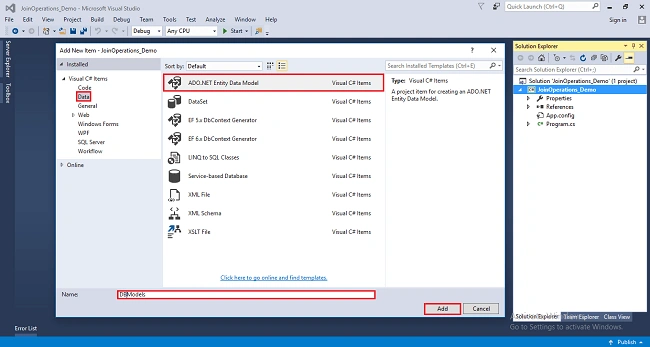
After you click on "Add a window", the wizard will open, choose EF Designer from the database and click next.
Screenshot for adding Entity Framework 3
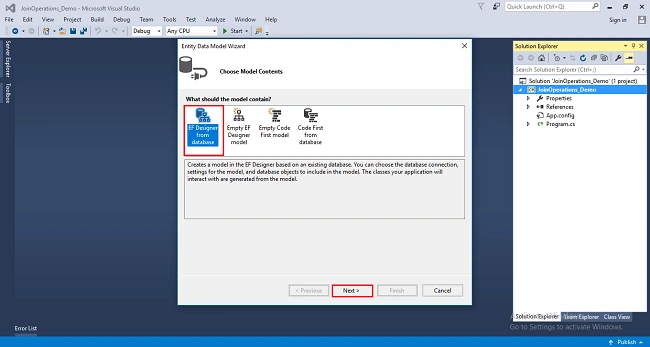
After clicking on Next a window will appear. Choose New Connection. Another window will appear, add your server name if it is local then enter dot (.). Choose your database and click on OK.
Screenshot for adding Entity Framework 4
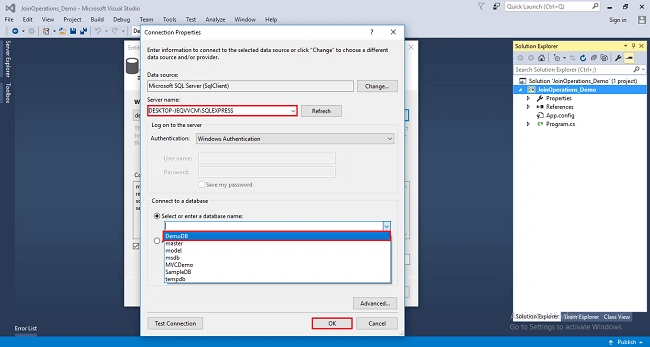
A connection will be added. You can change the name of your connection below. It will save connection in web config then click on Next.
Screenshot for adding Entity Framework 5
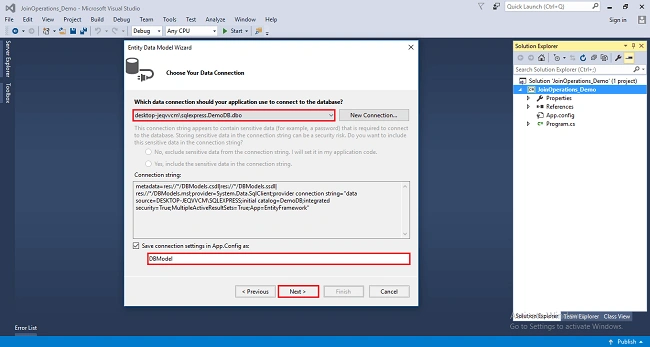
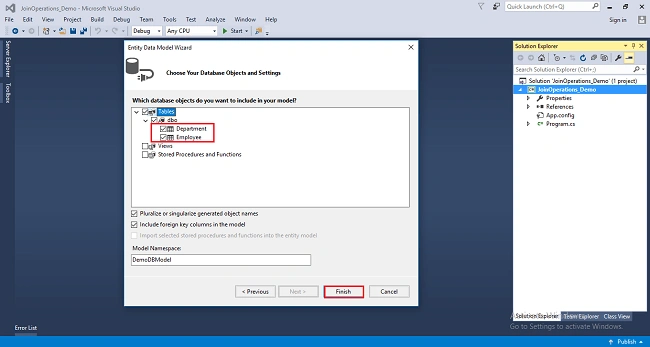
After clicking on NEXT another window will appear; choose database table name as shown in the below screenshot then click on Finish.
Screenshot for adding Entity Framework 6
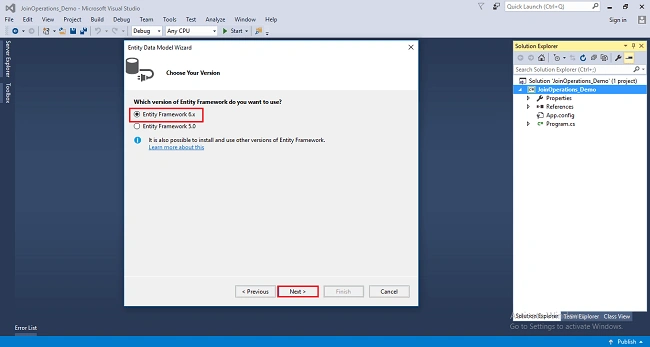
Entity framework will be added and respective class gets generated under Models folder.
Screenshot for adding Entity Framework 7
Screenshot for adding Entity Framework 8
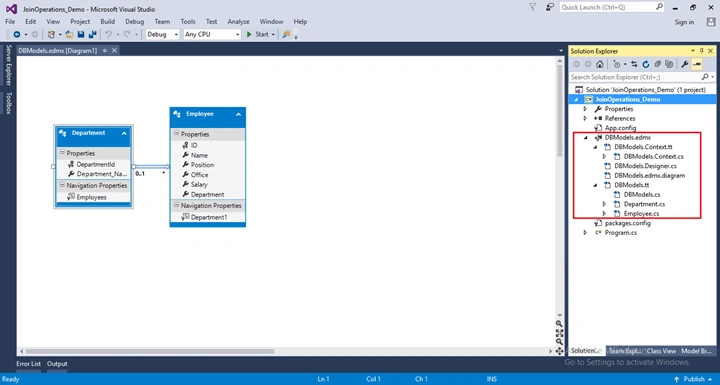
The following class will be added
Employee Class
- namespace JoinOperations_Demo
- {
- using System;
- using System.Collections.Generic;
- public partial class Employee
- {
- public int ID { get; set; }
- public string Name { get; set; }
- public string Position { get; set; }
- public string Office { get; set; }
- public Nullable<decimal> Salary { get; set; }
- public Nullable<int> DepartmentId { get; set; }
- }
- }
- namespace JoinOperations_Demo
- {
- using System;
- using System.Collections.Generic;
- public partial class Department
- {
- public int ID { get; set; }
- public string Department_Name { get; set; }
- }
- }
Example of Group Join With Extension Method
- using System;
- using System.Linq;
- namespace JoinOperations_Demo
- {
- class GroupJoin
- {
- static void Main()
- {
- using (DBModel db=new DBModel())
- {
- var results = db.Departments.GroupJoin(db.Employees,
- d => d.ID,
- e => e.DepartmentId,
- (department, employee) => new
- {
- Department = department,
- Employee = employee
- });
- Console.WriteLine("----------GROUP JOIN----------");
- foreach (var department in results)
- {
- Console.WriteLine(" "+ department.Department.Department_Name);
- foreach (var employee in department.Employee)
- {
- Console.WriteLine(" \t"+ employee.Name);
- }
- }
- Console.ReadLine();
- }
- }
- }
- }
Example of Group Join with SQL like syntax
- using System;
- using System.Linq;
- namespace JoinOperations_Demo
- {
- class GroupJoin
- {
- static void Main()
- {
- using (DBModel db=new DBModel())
- {
- var results = from d in db.Departments
- join e in db.Employees on
- d.ID equals e.DepartmentId into eGroup
- select new
- {
- Department = d,
- Employee = eGroup
- };
- Console.WriteLine("----------GROUP JOIN----------");
- foreach (var department in results)
- {
- Console.WriteLine(" "+ department.Department.Department_Name);
- foreach (var employee in department.Employee)
- {
- Console.WriteLine(" \t"+ employee.Name);
- }
- }
- Console.ReadLine();
- }
- }
- }
- }
Example of Inner Join With Extension Method
- using System;
- using System.Linq;
- namespace JoinOperations_Demo
- {
- class InnerJoin
- {
- static void Main()
- {
- using (DBModel db=new DBModel())
- {
- var result = db.Employees.Join(db.Departments,
- e => e.DepartmentId,
- d => d.ID,
- (employee, department) => new
- {
- EmployeeName=employee.Name,
- DepartmentName=department.Department_Name
- });
- Console.WriteLine("----------INNER JOIN----------\n");
- foreach (var employee in result)
- {
- Console.WriteLine(" Name: " + employee.EmployeeName + "\t\t" + " Department: "+ employee.DepartmentName);
- }
- Console.ReadLine();
- }
- }
- }
- }
- using System;
- using System.Linq;
- namespace JoinOperations_Demo
- {
- class InnerJoin
- {
- static void Main()
- {
- using (DBModel db=new DBModel())
- {
- var result = from e in db.Employees
- join d in db.Departments on e.DepartmentId equals d.ID
- select new
- {
- EmployeeName=e.Name,
- DepartmentName=d.Department_Name
- };
- Console.WriteLine("----------INNER JOIN----------\n");
- foreach (var employee in result)
- {
- Console.WriteLine(" Name: " + employee.EmployeeName + "\t\t" + " Department: "+ employee.DepartmentName);
- }
- Console.ReadLine();
- }
- }
- }
- }
Example of Left Outer Join With Extension Method
- using System;
- using System.Linq;
- namespace JoinOperations_Demo
- {
- class LeftOuterJoin
- {
- static void Main()
- {
- using (DBModel db=new DBModel())
- {
- var result = db.Employees.GroupJoin(db.Departments,
- e => e.DepartmentId, d => d.ID,(employee,department)=>new
- {
- EmployeeName=employee,
- DepartmentName =department
- })
- .SelectMany(x=>x.DepartmentName.DefaultIfEmpty(),
- (a,b)=>new
- {
- emp=a.EmployeeName.Name,
- dept=b==null? "No Department":b.Department_Name
- });
- Console.WriteLine("----------LEFT OUTER JOIN----------");
- foreach (var employee in result)
- {
- Console.WriteLine("Employee Name: " + employee.emp +"\t\t"+ "Department Name: " + employee.dept);
- }
- Console.ReadLine();
- }
- }
- }
- }
Example of Left Outer Join with SQL like syntax
- using System;
- using System.Linq;
- namespace JoinOperations_Demo
- {
- class LeftOuterJoin
- {
- static void Main()
- {
- using (DBModel db=new DBModel())
- {
- var result = from e in db.Employees
- join d in db.Departments
- on e.DepartmentId equals d.ID into eGroup
- from d in eGroup.DefaultIfEmpty()
- select new
- {
- EmployeeName=e.Name,
- DepartmentName=d==null? "No Department " :d.Department_Name //This line of code display if employee does not have department
- };
- Console.WriteLine("----------LEFT OUTER JOIN----------");
- foreach (var employee in result)
- {
- Console.WriteLine("Employee Name: " + employee.EmployeeName +"\t\t"+ "Department Name: " + employee.DepartmentName);
- }
- Console.ReadLine();
- }
- }
- }
- }
Example of Cross Join With Extension Method
- using System;
- using System.Linq;
- namespace JoinOperations_Demo
- {
- class CrossJoin
- {
- static void Main()
- {
- using (DBModel db=new DBModel())
- {
- var result = db.Employees.Join(db.Departments, e=>true,d=>true,(e,d)=>new { e,d });
- foreach (var employee in result)
- {
- Console.WriteLine(" Employee Name: " + employee.e.Name + "\t\t\t" + "Department Name:" + employee.d.Department_Name);
- }
- Console.ReadLine();
- }
- }
- }
- }
Example of Cross Join with SQL like syntax
- using System;
- using System.Linq;
- namespace JoinOperations_Demo
- {
- class CrossJoin
- {
- static void Main()
- {
- using (DBModel db=new DBModel())
- {
- var result=from e in db.Employees
- from d in db.Departments
- select new{ e, d };
- foreach (var employee in result)
- {
- Console.WriteLine(" Employee Name: " + employee.e.Name + "\t\t\t" + "Department Name:" + employee.d.Department_Name);
- }
- Console.ReadLine();
- }
- }
- }
- }
Josue SamanoPosted Aug 28, 2019, 1:36 PM
Thanks for the article :)
Sridhar YelagandhulaPosted Jun 6, 2019, 11:54 AM
Nice tutorial
Packiaraj SanthiyaguPosted Aug 30, 2018, 7:33 AM
Nice article.............,