

Introduction
In this article, I will demonstrate how we can perform join operation with multiple SQL database tables using Language-Integrated Query (LINQ).
Step 1
Open SQL Server 2014 and create a database table
Table 1 - Customer
- CREATE TABLE [dbo].[Customer](
- [CustId] [int] IDENTITY(1000,1) NOT NULL,
- [CustomerName] [nvarchar](50) NULL,
- [PhoneNumber] [nvarchar](50) NULL,
- [Email] [nvarchar](50) NULL,
- [ShippingAddress] [nvarchar](max) NULL,
- [City] [nvarchar](50) NULL,
- [State] [nvarchar](50) NULL,
- [Country] [nvarchar](50) NULL,
- [PostalCode] [nvarchar](50) NULL,
- CONSTRAINT [PK_Customer] PRIMARY KEY CLUSTERED
- (
- [CustId] ASC
- )WITH (PAD_INDEX = OFF, STATISTICS_NORECOMPUTE = OFF, IGNORE_DUP_KEY = OFF, ALLOW_ROW_LOCKS = ON, ALLOW_PAGE_LOCKS = ON) ON [PRIMARY]
- ) ON [PRIMARY] TEXTIMAGE_ON [PRIMARY]
- GO
Table 2 - Product
- CREATE TABLE [dbo].[Product](
- [ProductId] [int] IDENTITY(100,1) NOT NULL,
- [ProductName] [nvarchar](50) NULL,
- [ProductDescription] [nvarchar](max) NULL,
- [ProductPrice] [money] NULL,
- [ProductCategoryId] [int] NULL,
- CONSTRAINT [PK_Product] PRIMARY KEY CLUSTERED
- (
- [ProductId] ASC
- )WITH (PAD_INDEX = OFF, STATISTICS_NORECOMPUTE = OFF, IGNORE_DUP_KEY = OFF, ALLOW_ROW_LOCKS = ON, ALLOW_PAGE_LOCKS = ON) ON [PRIMARY]
- ) ON [PRIMARY] TEXTIMAGE_ON [PRIMARY]
- GO
- ALTER TABLE [dbo].[Product] WITH CHECK ADD CONSTRAINT [FK_Product_Category1] FOREIGN KEY([ProductCategoryId])
- REFERENCES [dbo].[Category] ([CategoryId])
- GO
- ALTER TABLE [dbo].[Product] CHECK CONSTRAINT [FK_Product_Category1]
- GO
Table 3 - Category
- CREATE TABLE [dbo].[Category](
- [CategoryId] [int] IDENTITY(1,1) NOT NULL,
- [CategoryName] [nvarchar](50) NULL,
- [CategoryDecription] [nvarchar](50) NULL,
- CONSTRAINT [PK_Category] PRIMARY KEY CLUSTERED
- (
- [CategoryId] ASC
- )WITH (PAD_INDEX = OFF, STATISTICS_NORECOMPUTE = OFF, IGNORE_DUP_KEY = OFF, ALLOW_ROW_LOCKS = ON, ALLOW_PAGE_LOCKS = ON) ON [PRIMARY]
- ) ON [PRIMARY]
- GO
Table 4 - CustomerOrder
- CREATE TABLE [dbo].[CustomerOrder](
- [OrderId] [int] IDENTITY(1,1) NOT NULL,
- [CustomerId] [int] NULL,
- [ProductId] [int] NULL,
- [CategoryId] [int] NULL,
- [Quantity] [int] NULL,
- [OrderDate] [date] NULL,
- CONSTRAINT [PK_Order] PRIMARY KEY CLUSTERED
- (
- [OrderId] ASC
- )WITH (PAD_INDEX = OFF, STATISTICS_NORECOMPUTE = OFF, IGNORE_DUP_KEY = OFF, ALLOW_ROW_LOCKS = ON, ALLOW_PAGE_LOCKS = ON) ON [PRIMARY]
- ) ON [PRIMARY]
- GO
- ALTER TABLE [dbo].[CustomerOrder] WITH CHECK ADD CONSTRAINT [FK_CustomerOrder_Category] FOREIGN KEY([CategoryId])
- REFERENCES [dbo].[Category] ([CategoryId])
- GO
- ALTER TABLE [dbo].[CustomerOrder] CHECK CONSTRAINT [FK_CustomerOrder_Category]
- GO
- ALTER TABLE [dbo].[CustomerOrder] WITH CHECK ADD CONSTRAINT [FK_CustomerOrder_Customer] FOREIGN KEY([CustomerId])
- REFERENCES [dbo].[Customer] ([CustId])
- GO
- ALTER TABLE [dbo].[CustomerOrder] CHECK CONSTRAINT [FK_CustomerOrder_Customer]
- GO
- ALTER TABLE [dbo].[CustomerOrder] WITH CHECK ADD CONSTRAINT [FK_CustomerOrder_Product] FOREIGN KEY([ProductId])
- REFERENCES [dbo].[Product] ([ProductId])
- GO
- ALTER TABLE [dbo].[CustomerOrder] CHECK CONSTRAINT [FK_CustomerOrder_Product]
- GO
Step 2
Open Visual Studio 2015 and create a new console application with a meaningful name.
Step 3
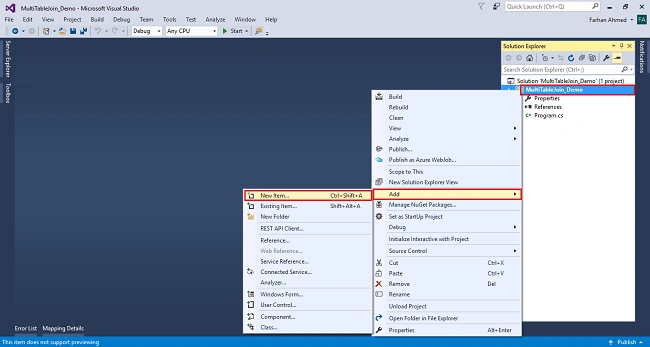
Add Entity Framework now. For that, right click on Models folder, select Add, then select New Item, then click on it.
Screenshot for adding Entity Framework 1
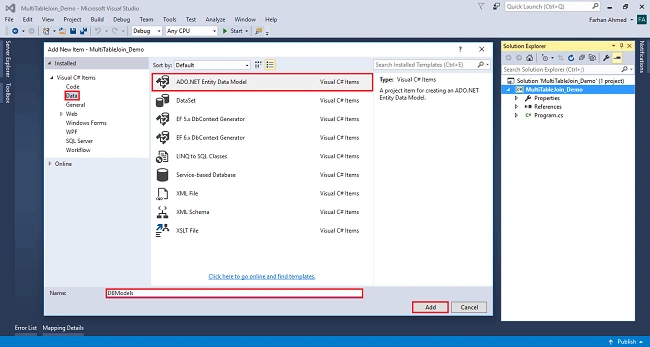
After clicking on the new item, you will get a window; from there, select Data from the left panel and choose ADO.NET Entity Data Model, give it the name DBModels (this name is not mandatory you can give any name) and click on Add.
Screenshot for adding Entity Framework 2
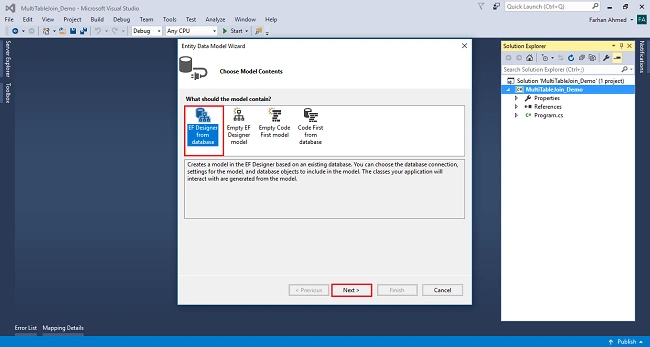
After you click on "Add a window", the wizard will open, choose EF Designer from a database and click next.
Screenshot for adding Entity Framework 3
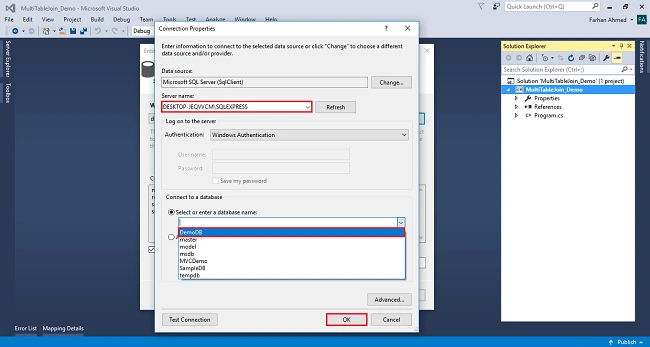
After clicking on Next a window will appear. Choose New Connection. Another window will appear, add your server name if it is local then enter a dot (.). Choose your database and click on OK.
Screenshot for adding Entity Framework 4
The connection will be added. If you wish to save, connect as you want. You can change the name of your connection below. It will save connection in web config then click on Next.
Screenshot for adding Entity Framework 5
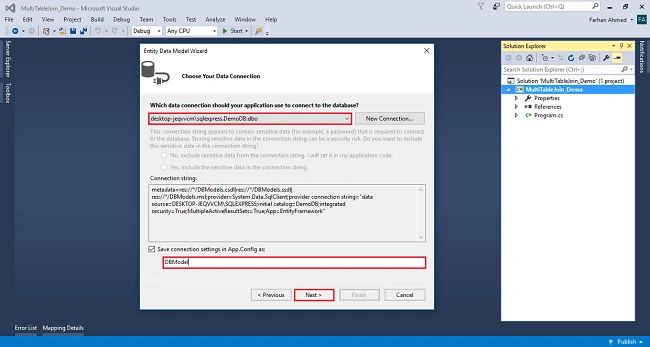
After clicking on NEXT another window will appear -- choose database table name as shown in the below screenshot then click on Finish.
Screenshot for adding Entity Framework 6
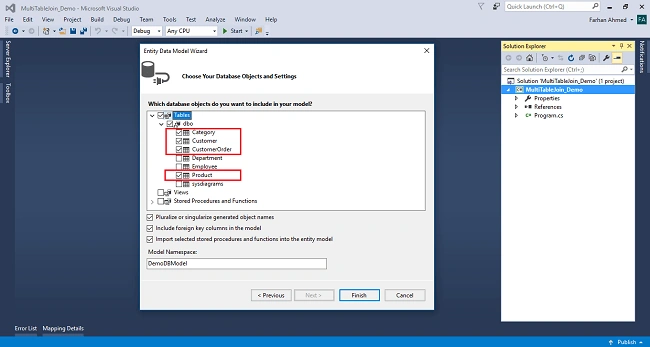
Entity Framework will be added and respective class gets generated under the Models folder.
Screenshot for adding Entity Framework 7
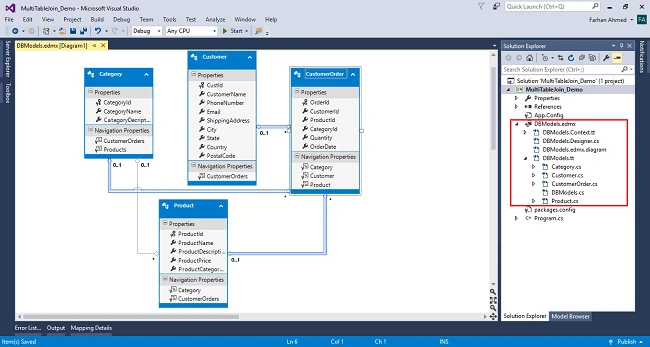
Example for Multiple Tables Join
- using System;
- using System.Linq;
- namespace MultiTableJoin_Demo
- {
- class Program
- {
- static void Main(string[] args)
- {
- using (DBModel db=new DBModel())
- {
- var results = from o in db.CustomerOrders
- join c in db.Customers on o.CustomerId equals c.CustId
- join p in db.Products on o.ProductId equals p.ProductId
- join cate in db.Categories on o.CategoryId equals cate.CategoryId
- select new {
- o.OrderId,
- c.CustomerName,
- c.PhoneNumber,
- c.ShippingAddress,
- c.PostalCode,
- p.ProductName,
- p.ProductPrice,
- o.Quantity,
- o.OrderDate
- };
- foreach (var customerOrder in results)
- {
- Console.WriteLine(" Order ID:\t\t" + customerOrder.OrderId + "\n");
- Console.WriteLine(" Customer Name:\t\t" + customerOrder.CustomerName + "\n");
- Console.WriteLine(" Phone Number:\t\t" + customerOrder.PhoneNumber + "\n");
- Console.WriteLine(" Shipping Address:\t" + customerOrder.ShippingAddress + "\n");
- Console.WriteLine(" Postal Code:\t\t" + customerOrder.PostalCode + "\n");
- Console.WriteLine(" Product Name:\t\t" + customerOrder.ProductName + "\n");
- Console.WriteLine(" Product Price:\t\t" + customerOrder.ProductPrice + "\n");
- Console.WriteLine(" Quantity:\t\t" + customerOrder.Quantity + "\n");
- Console.WriteLine(" Total Amount:\t\t"+customerOrder.ProductPrice*customerOrder.Quantity + "\n");
- Console.WriteLine(" Order Date:\t\t" + customerOrder.OrderDate + "\n");
- Console.WriteLine("-----------------------------------------------------");
- }
- Console.ReadLine();
- }
- }
- }
- }
Output
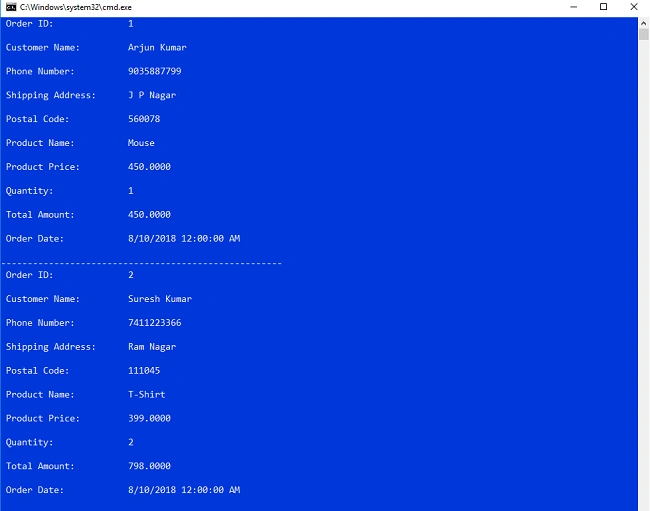
Sumit RajguruPosted Aug 16, 2018, 8:25 AM
Good one. Keep it up.
Guest UserPosted Aug 15, 2018, 7:58 AM
Good article