

Introduction
In this article, I will explain how to use canvas in Tkinter in Python.
Definition
The Canvas keyword is used to draw and do layout in a Python application. The Canvas is a square area intended for pictures or complex layouts. You can place graphics and text on the Canvas keyword. When you call the canvas function the first letter must be a capital letter.
Syntax
- c=Canvas (a, option=cost) //first letter must be capital letter.
Parameters
a − This represents the parent window of the computer.
option − The list of most used options for this widget.
Option & Description
-
bd- The Border is used to change the width in pixels. Default pixels value is 2.
-
bg - The background is used to change Normal background color background.
-
fg - The fg is used to change the normal foreground (text) color.
-
font - The font is used to change the text font to be used for the button's label.
-
height - The height is used to change the height of the button in text lines (text buttons) or pixels (images).
-
relief-Relief is used to specify the type of the border. The values are SUNKEN, RAISED, GROOVE, and RIDGE.
Example
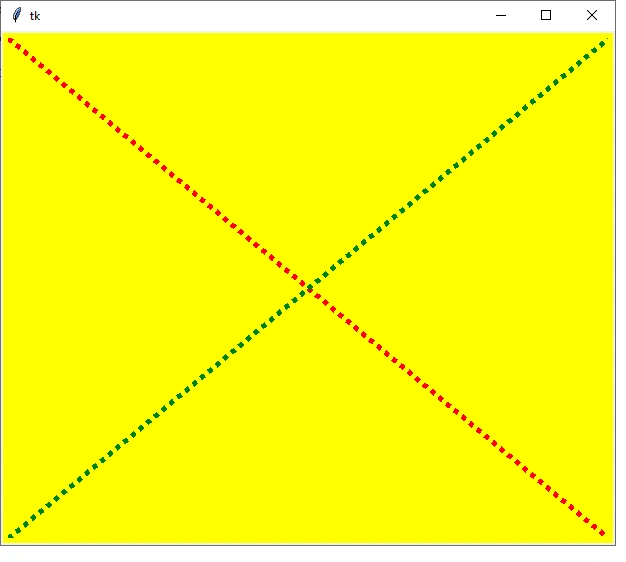
line − line keyword is used to create a line item.
- line =create_line(x0, y0, x1, y1)
Simple Program
- from tkinter import *
- a=Tk()
- c = Canvas(root, scrollregion=(0,0,500,500), height=200, width=200)
- c.pack()
- c.create_line(0,0,600,500,width=5,fill="red",dash=(3,3))
- c.create_line(0,500,600,0,width=5,fill="green",dash=(3,3))
- a.mainloop()
Output
Example
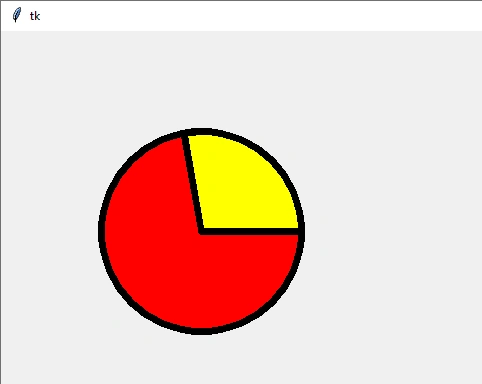
arc −arc keyword is used to create an arc item, you want to specify some value in the arc function.
- arc = create_arc(coord, start=0, extent=180, fill="red")
- oval = canvas.create_oval(x0, y0, x1, y1, options)
Program
- from tkinter import *
- a=Tk()
- c=Canvas(a,width=600,height=500)
- c.pack()
- c.create_oval(100,100,300,300,width=7,fill="red")
- c.create_arc(100,100,300,300,start=0,extent=100,width=7,fill="yellow")
- a.mainloop()
Output
-
Scroll region-The scroll region is used to tuple (w, n, e, s) that defines over how large the canvas can be scrolled; for example west =left side, north = top, east = right side, and south = bottom.
-
xscrollincrement-The xscrollincrement is moved in a horizontal direction.
-
yscrollincrement-The yscrollincrement is moved in a vertical direction.
-
xscrollcommand- The xscrollcommand keyword used for the canvas is scrollable, this attribute must be the. set () method of the horizontal scrollbar.
-
yscrollcommand- The yscrollcommand keyword used for the canvas is scrollable, this attribute must be the. set () method of the vertical scrollbar.
Program
- from tkinter import *
- a=Tk()
- a.title("list and scrollbar")
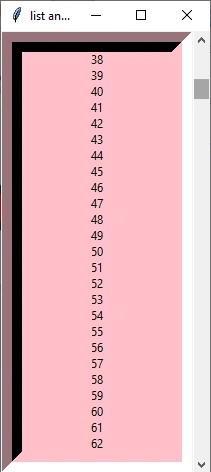
- list1=Listbox(a,width=25,height=25,justify=CENTER,bg="pink",bd=20)
- scroll=Scrollbar(a,command=list1.yview)
- list1.configure(yscrollcommand=scroll.set)
- list1.pack(side=LEFT)
- scroll.pack(side=RIGHT,fill=Y)
- for q in range(500):
- list1.insert(END,q)
Output
Conclusion
In this article, we have seen how to use canvas in Tkinter in Python. I hope this article was useful to you. Thanks for reading!
Vijay KPosted Jul 6, 2020, 9:53 AM
Wow nice article