

Step 1
We can use the Background Color property with Color Name or HEX-Value as shown below:
- body{ background-color:Black;}
- body{ background-color:#000;}
Step 2
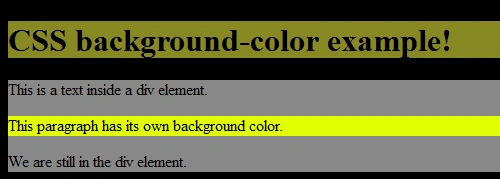
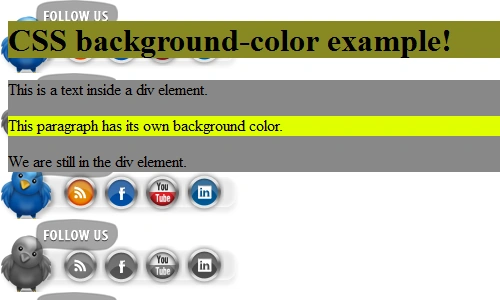
We can set various background colors for paragraph, heading and division using the code shown below:
CSS code as shown below:
- h1 {background-color:#888822;}
- p {background-color:#E0FF00;}
- div {background-color:#888888;}
HTML code as shown below:
- <!DOCTYPE html PUBLIC "-//W3C//DTD XHTML 1.0 Transitional//EN" "http://www.w3.org/TR/xhtml1/DTD/xhtml1-transitional.dtd">
- <html xmlns="http://www.w3.org/1999/xhtml" >
- <head>
- <title>Demo</title>
- <link href="css-background-style.css" rel=Stylesheet type="text/css" />
- </head>
- <body>
- <body>
- <h1>CSS background-color example!</h1>
- <div>
- This is a text inside a div element.
- <p>This paragraph has its own background color.</p>
- We are still in the div element.
- </div>
- </body>
- </html>
Here's the Result as displayed by the Browser:
Step 3
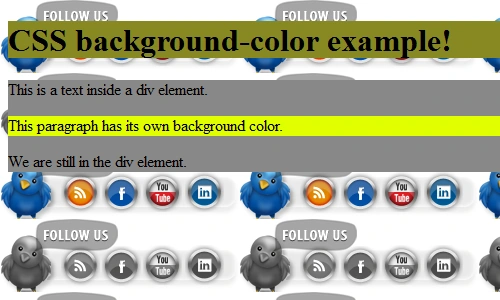
We can set an image also in the background as shown below:
CSS code as shown below:
- body {background: url('socials.png') 0 0 ;}
Note: By default, the background repeats an image for the entire page if we use the above code, whether the repeated word is written or not in the syntax.
Here's the result:
We can set the repetition of the image and position of the image using the code shown below.
-
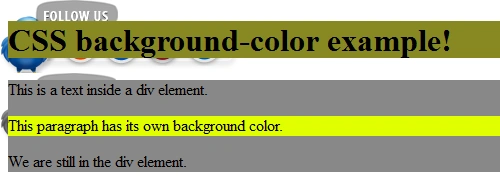
For no-repetition of the image:
- body {background: url('socials.png') 00 no-repeat ; }
-
For repetition of an image:
- body {background: url('socials.png') 00 repeat; }
-
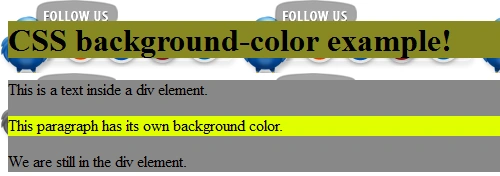
For repeat horizontally:
- body {background: url('socials.png') 00 repeat-x; }
-
For repeat vertically:
- body {background: url('socials.png') 00 repeat-y; }
-
For position of image:
- body {background: url('socials.png') 00 no-repeat;background-position: top right ; }

Step 4
When using the shorthand property the order of the property values is:
- background-color
- background-image
- background-repeat
- background-attachment
- background-position
Summary
Through this article, we learned about various properties of background styling using CSS in HTML.
Join the conversation! Your thoughts help the community grow.