

The provided code demonstrates a simple console application that performs an Image Resizer.
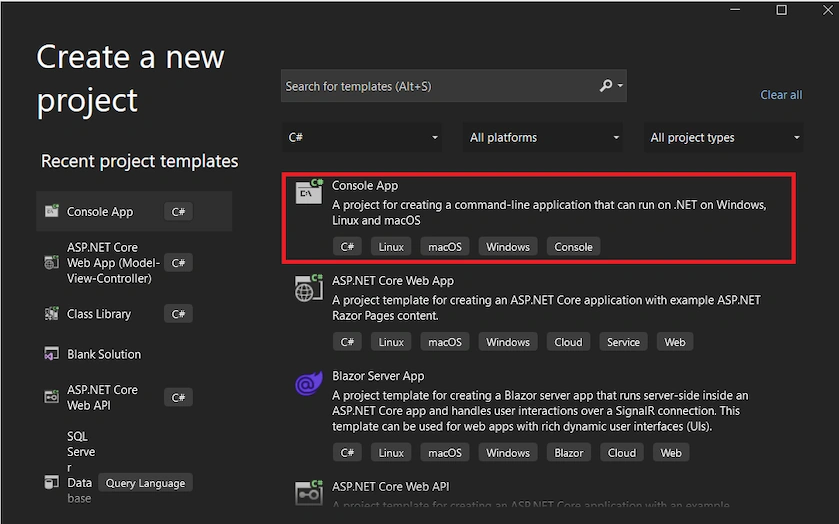
Step 1. Create a new C# console application project. In Visual Studio, you can follow these steps.
- Open Visual Studio.
- Select "Create a new project" or go to "File" > "New" > "Project."
- Choose "Console App (.NET)" as the project template.
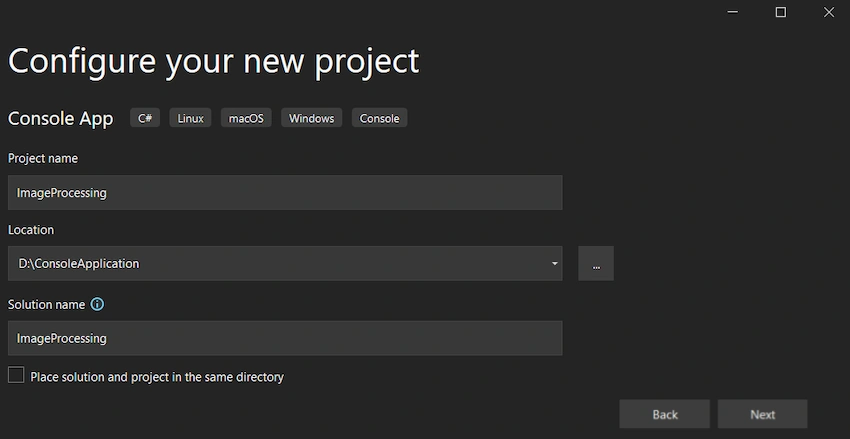
- Enter a name for your project (e.g., "ImageProcessing") and Choose a location to save the project.
- Select Framework and click on Next.
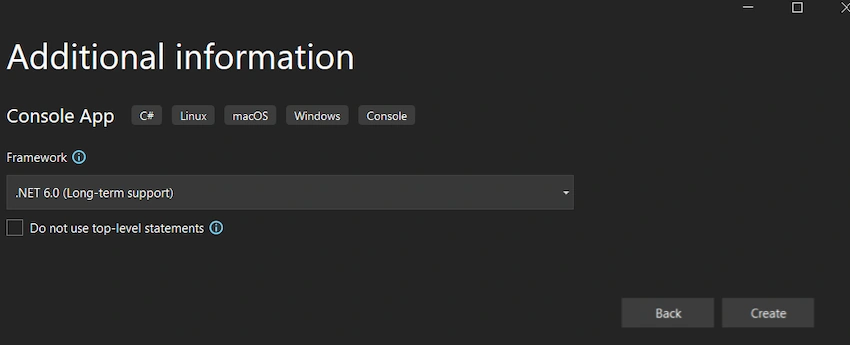
- Click "Create" to create the project.
Use the below code in Program.cs and replace all to Resize the Image from the folder.
Image Resizer
using System;
using System.Drawing;
using System.IO;

namespace ImageResizeConsoleApp
{
    class Program
    {
        static void Main(string[] args)
        {
            // Path to the source folder
            string sourceFolderPath = @"D:\ConsoleApplication\inputDirectoryPath\";

            // Path to the destination folder
            string destinationFolderPath = @"D:\ConsoleApplication\outputDirectoryPath\";

            // Desired width and height for the resized image
            int targetWidth = 800;
            int targetHeight = 600;

            // Get all image files from the source folder
            string[] imageFiles = Directory.GetFiles(sourceFolderPath, "*.jpg");

            foreach (string imagePath in imageFiles)
            {
                // Load the source image
                Image sourceImage = Image.FromFile(imagePath);

                // Create a new bitmap with the desired size
                Bitmap resizedImage = new Bitmap(targetWidth, targetHeight);

                // Create a graphics object from the resized image
                using (Graphics graphics = Graphics.FromImage(resizedImage))
                {
                    // Set the interpolation mode to high quality
                    graphics.InterpolationMode = System.Drawing.Drawing2D.InterpolationMode.HighQualityBicubic;

                    // Draw the source image onto the resized image with the desired size
                    graphics.DrawImage(sourceImage, 0, 0, targetWidth, targetHeight);
                }

                // Generate a unique filename for the resized image
                string resizedImagePath = Path.Combine(destinationFolderPath, GenerateUniqueFileName());

                // Save the resized image to the destination folder
                resizedImage.Save(resizedImagePath);

                // Cleanup
                sourceImage.Dispose();
                resizedImage.Dispose();

                Console.WriteLine($"Image resized and saved: {resizedImagePath}");
            }

            Console.WriteLine("All images resized and saved successfully.");
        }

        static string GenerateUniqueFileName()
        {
            // Generate a unique filename using a timestamp
            string timestamp = DateTime.Now.ToString("yyyyMMddHHmmssfff");
            string extension = ".jpg"; // or use the extension of your source image
            return $"resized_{timestamp}{extension}";
        }
    }
}
To test the code, follow these steps,
- Create a folder on your computer and note the folder path.
Eg: "D:\ConsoleApplication\inputDirectoryPath\"; - Update the
folderPathvariable in the code with the path of the folder you created.
Eg: "D:\ConsoleApplication\inputDirectoryPath\"; - Keep images inside the folder you want to resize.
- Build and run the application. You will see the Image resize process starting, followed by messages indicating each Image resize and saved.

I hope this blog post has provided you with an understanding of the Console Application to Resize an Image from a specific folder and save into a specific folder.
Thank you for reading, and happy coding!".
Join the conversation! Your thoughts help the community grow.