

The Need for Code Refactoring
In today’s fast-paced technological world, many software applications run on outdated frameworks, libraries, or programming languages that require frequent updates. Software evolves approximately every six months to a year, driven by security enhancements, performance optimizations, and improved functionality. Keeping code up to date is essential for maintaining secure and efficient applications. However, updating code manually can be time-consuming and resource-intensive.
Fortunately, GitHub Copilot provides an intelligent solution to streamline code refactoring, making it faster, more efficient, and less error-prone.
What is Code Refactoring?
Code refactoring involves rewriting existing code without altering its external behavior. This process enhances maintainability, readability, performance, and security. It is a key practice in agile development, where codebases continuously evolve.
Here are some common practices involved in refactoring.
- Improving Code Readability: Making the code easier to understand by renaming variables, breaking large functions into smaller ones, and adding comments where necessary.
- Reducing Complexity: Simplifying complex logic, for instance by breaking complex conditions into simpler ones or using design patterns.
- Eliminating Redundant Code: Removing unnecessary or duplicate code to streamline and optimize performance.
- Enhancing Performance: Optimizing the code to improve performance, which might involve improving algorithms or data structures.
- Improving Design: Adapting the code to make future changes easier and safer, often by applying solid design principles.
- Upgrade to the latest versions: Programming languages, frameworks, and libraries get frequent updates and patches. Code refactoring helps us to bring new updates in the code and remove obsolete code.
Code refactoring is needed when you suspect some code needs to be updated or reorganized.
Using Copilot, we can refactor a code block, an entire file, or even full application.
Refactor a code block
For testing, I wrote a basic version of the code that adds an Author object to a text file, similar to how a beginner might write it. Here’s the code block.
// Create an Author object and add it to the file
Author author = null;

if (!string.IsNullOrEmpty(name) &&
    !string.IsNullOrEmpty(email) &&
    !string.IsNullOrEmpty(country))
{
    // Create an instance of the Author class
    author = new Author
    {
        Name = name,
        Email = email,
        Country = country
    };
}

if (author != null)
{
    // Call the AddAuthorToFile method
    AddAuthorToFile(filePath, author);
}
I select a code block that I want to refactor and ask Copilot to refactor it.
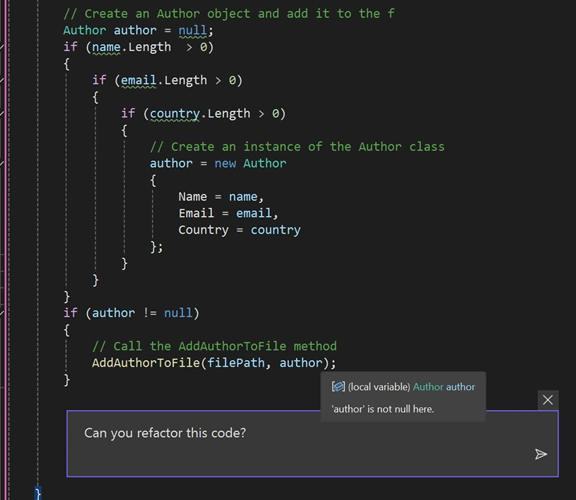
The new code generated by Copilot looks like the following.
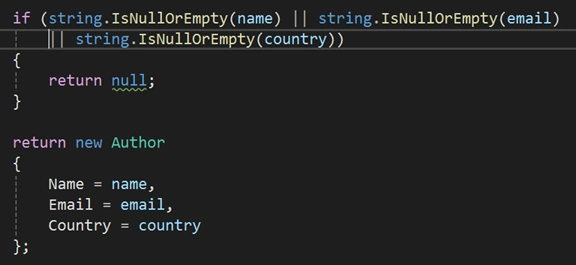
Not only is this code optimized, but it is also readable and uses updated syntaxes.
Refactored a program or application
Now, let’s try to refactor the entire program.

You will see the suggested changes.
Hit the Accept button to accept the changes.
Update code to new version
You can also use Copilot to update existing code from an older version to the new version.
The following prompts updates an existing program to C# version 12.0.

You will see that C# version 12 updates are recommended by Copilot.
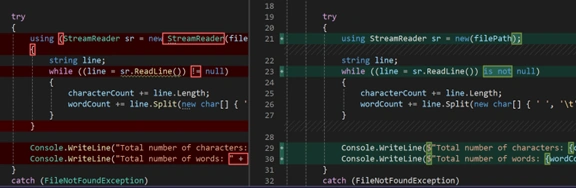
Hit Accept to accept the changes.
Now, your application is written in C# 12.
Conclusion
Code refactoring is crucial for maintaining high-quality software, but it can be challenging and time-consuming. GitHub Copilot simplifies this process by automating optimizations, making code cleaner, more efficient, and easier to maintain. Whether refactoring a small code block or upgrading an entire application, Copilot provides an intelligent and effective solution for modern software development.
Join the conversation! Your thoughts help the community grow.