

Introduction
In this article, we will learn how to Fetch API calls using the JSON server in React applications.
Now we will start by creating a new project.
Step 1
Create a React project setup using the below commands or however, you create your React app.
npx create-react-app projectname
Example,
npx create-react-app sample-fetch
Step 2 - Installing React JSON-server
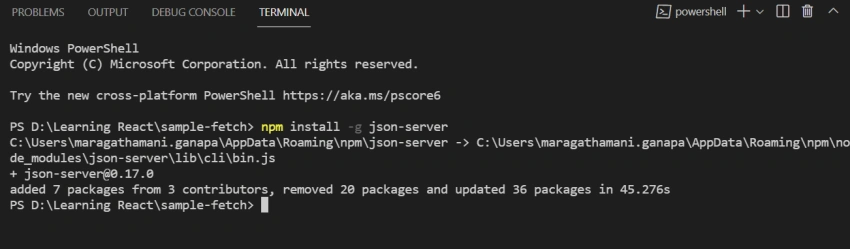
Since JSON Server is available as an NPM package, we can perform the installation by using the Node.js package manager.
Run the below command in the terminal.
npm install Json-server
Step 3 - Create a sample JSON file with data
JSON Server will take a JSON file from your main project folder and turn it into a RESTful database with all the right routes.
I have created a JSON file db.json inside my newly created project with the following sample data.
{
    "posts": [{
        "id": 1,
        "name": "Satheesh",
        "email": "[email protected]",
        "adderss": "South street"
    }, {
        "id": 2,
        "name": "John",
        "email": "[email protected]",
        "adderss": "North street"
    }, {
        "id": 3,
        "name": "Robert",
        "email": "[email protected]",
        "adderss": "East street"
    }, {
        "id": 4,
        "name": "Mani",
        "email": "[email protected]",
        "adderss": "West street"
    }],
    "comments": [{
        "id": 1,
        "body": "some comment",
        "postId": 1
    }],
    "profile": {
        "name": "typicode"
    }
}
Step 4 - Running the server
Start JSON server by executing the following command.
json-server –watch db.json
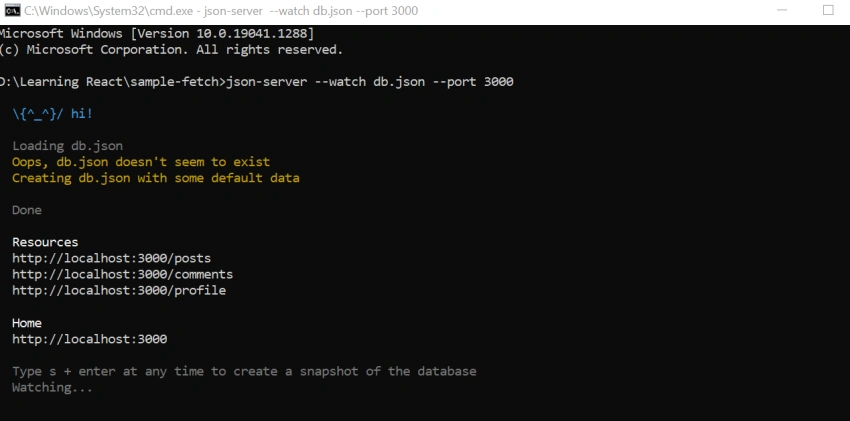
our JSON Server will be running on port 3000.
Step 5 - Fetch API
- It is available in modern browsers and allows us to make requests using JavaScript promises.
- We can use the fetch() method to get the data.
- To make a simple GET request with fetch, it includes the URL endpoint to which we want to make our request
- Uses Fetch API to GET the list of all Posts. ( endpoint http://localhost:3000/posts and others are provided by the already running JSON Server)
- The state of the App component (App.js) and populates the users state variable
getFetchUsers() {
    this.setState({
        loading: true
    }, () => {
        fetch("http://localhost:3000/posts").then(res => res.json()).then(result => this.setState({
            loading: false,
            users: result
        })).catch(console.log);
    });
}
In Fetch API Call,
First is Returning JSON object
The second is Printing the value.
Step 6
Src/App.js
import React, {
    Component
} from 'react';
class App extends React.Component {
        state = {
            isLoading: true,
            users: [],
            error: null
        };
        getFetchUsers() {
            this.setState({
                loading: true
            }, () => {
                fetch("http://localhost:3000/posts").then(res => res.json()).then(result => this.setState({
                    loading: false,
                    users: result
                })).catch(console.log);
            });
        }
        componentDidMount() {
            this.getFetchUsers();
        }
        render() {
            const {
                users,
                error
            } = this.state;
            return (
              <React.Fragment>
              <h1>All User</h1>
              {
                    error ? <p>
              {
                        error.message
                    } < /p> : null}  {
                        users.map(user => {
                            const {
                                adderss,
                                name,
                                email
                            } = user;
                            return (
                            <div key={name}>
                                <p>Name: {name}</p>
                                <p>Email: {email}</p>
                                <p>Address: {adderss}</p>
                                <hr />
                            </div>
                            );
                        })
                    } < /React.Fragment> );
            }
        }
export default App;
Step 7
Now we will run the application.
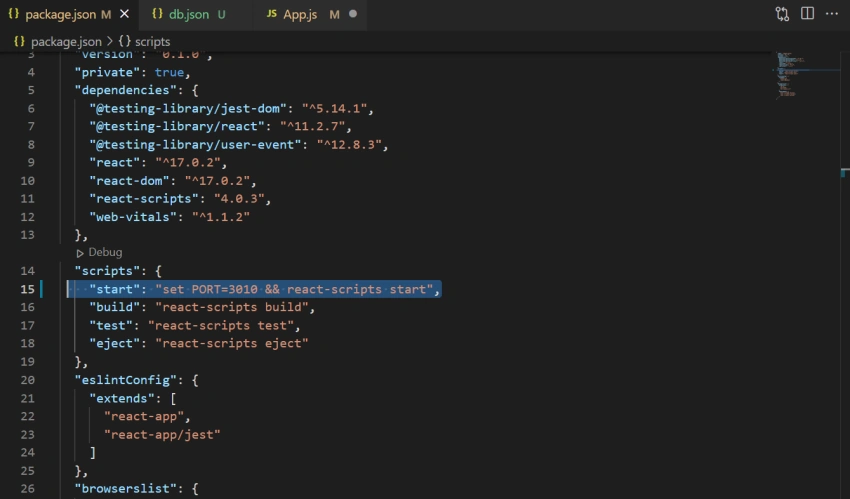
npm run start
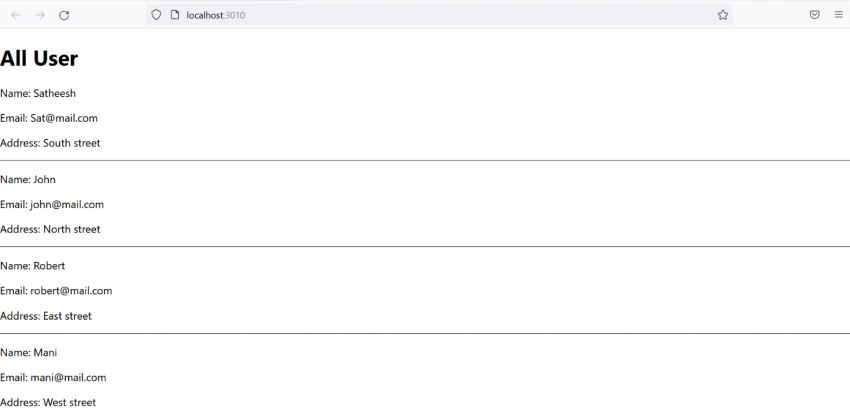
On successful execution of the above command, it will show the browser,
Join the conversation! Your thoughts help the community grow.