

Introduction
In this article, we will learn how to perform AsyncTask in Android with Kotlin. AsyncTask is used to perform some asynchronous tasks without blocking the main thread. It is very useful in Android development. Similar to Java, the same code can be used in Kotlin with some minor modifications.
Coding Part
I have divided the coding part into 3 steps as shown in the following.
- Creating a new project with Kotlin's support.
- Setting up the project with
- Implementing Async tasks with Kotlin.
Without any delay, we will start coding for Kotlin AsyncTask.
Step 1 - Creating a new project with Kotlin
- Open Android Studio and select Create a new project.
- Name the project as your wish and tick the Kotlin checkbox support.
- Then Select your Activity type (For Example Navigation Drawer Activity, Empty Activity, etc.).
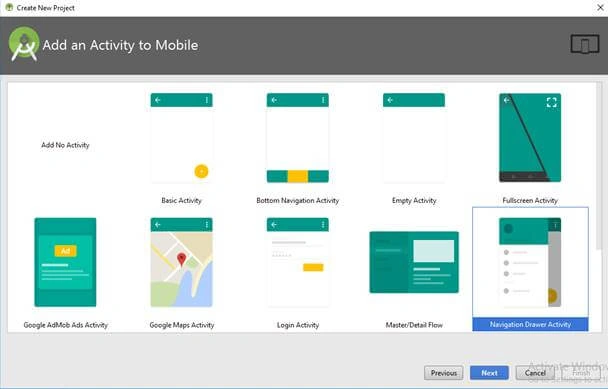
- Then click “Finish” button to create a new project in Android Studio.
Step 2 - Setting up the project with AndroidManifest
Now, we will add internet permission in the Android Manifest file. Because we will see the example with the URL Connection. Just open your AndroidManifest.xml file and add the following line.
- <uses-permission android:name="android.permission.INTERNET"/>
Step 3 - Implementing Async tasks with Kotlin
We will start coding. Here, I have used the following simple API to retrieve android version details.
http://demosmushtaq.16mb.com/api/post_sample.php?version_index=14
- I have included a Button and TextView in my layout (activity_main.xml) Here, Button and TextView is used to call the API and display the result from the API
- <?xml version="1.0" encoding="utf-8"?>
- <android.support.constraint.ConstraintLayout xmlns:android="http://schemas.android.com/apk/res/android"
- xmlns:app="http://schemas.android.com/apk/res-auto"
- xmlns:tools="http://schemas.android.com/tools"
- android:layout_width="match_parent"
- android:layout_height="match_parent"
- tools:context=".MainActivity"
- tools:layout_editor_absoluteX="0dp"
- tools:layout_editor_absoluteY="81dp">
- <TextView
- android:id="@+id/my_text"
- android:layout_width="wrap_content"
- android:layout_height="wrap_content"
- android:layout_marginEnd="8dp"
- android:layout_marginStart="8dp"
- android:layout_marginTop="72dp"
- android:text="AsyncTask Example"
- android:textSize="18sp"
- android:textStyle="bold"
- app:layout_constraintEnd_toEndOf="parent"
- app:layout_constraintStart_toStartOf="parent"
- app:layout_constraintTop_toTopOf="parent" />
- <ProgressBar
- android:id="@+id/MyprogressBar"
- style="?android:attr/progressBarStyle"
- android:layout_width="wrap_content"
- android:layout_height="wrap_content"
- android:layout_marginEnd="8dp"
- android:layout_marginStart="8dp"
- android:layout_marginTop="32dp"
- android:visibility="invisible"
- app:layout_constraintEnd_toEndOf="parent"
- app:layout_constraintStart_toStartOf="parent"
- app:layout_constraintTop_toBottomOf="@+id/my_text" />
- <Button
- android:id="@+id/CallBtn"
- android:layout_width="wrap_content"
- android:layout_height="wrap_content"
- android:layout_marginEnd="8dp"
- android:layout_marginStart="8dp"
- android:layout_marginTop="36dp"
- android:text="Execute AsyncTask"
- app:layout_constraintEnd_toEndOf="parent"
- app:layout_constraintStart_toStartOf="parent"
- app:layout_constraintTop_toBottomOf="@+id/MyprogressBar" />
- </android.support.constraint.ConstraintLayout>
- Then open your Activity file (in my case kt) and create a class with AsynTask as a parent.
- AsyncTask has three main methods.
- onPreExecute – State before task performance
- doInBackground – State for task performance
- onPostExecute – State after task performance
- AsyncTask has three main methods.
- Add the following code with your AsyncTask class.
- class AsyncTaskExample(private var activity: MainActivity?) : AsyncTask<String, String, String>() {
- override fun onPreExecute() {
- super.onPreExecute()
- activity?.MyprogressBar?.visibility = View.VISIBLE
- }
- override fun doInBackground(vararg p0: String?): String {
- var result = ""
- try {
- val url = URL("http://demosmushtaq.16mb.com/api/post_sample.php?version_index=14")
- val httpURLConnection = url.openConnection() as HttpURLConnection
- httpURLConnection.readTimeout = 8000
- httpURLConnection.connectTimeout = 8000
- httpURLConnection.doOutput = true
- httpURLConnection.connect()
- val responseCode: Int = httpURLConnection.responseCode
- Log.d(activity?.tag, "responseCode - " + responseCode)
- if (responseCode == 200) {
- val inStream: InputStream = httpURLConnection.inputStream
- val isReader = InputStreamReader(inStream)
- val bReader = BufferedReader(isReader)
- var tempStr: String?
- try {
- while (true) {
- tempStr = bReader.readLine()
- if (tempStr == null) {
- break
- }
- result += tempStr
- }
- } catch (Ex: Exception) {
- Log.e(activity?.tag, "Error in convertToString " + Ex.printStackTrace())
- }
- }
- } catch (ex: Exception) {
- Log.d("", "Error in doInBackground " + ex.message)
- }
- return result
- }
- override fun onPostExecute(result: String?) {
- super.onPostExecute(result)
- activity?.MyprogressBar?.visibility = View.INVISIBLE
- if (result == "") {
- activity?.my_text?.text = activity?.getString(R.string.network_error)
- } else {
- var parsedResult = ""
- var jsonObject: JSONObject? = JSONObject(result)
- jsonObject = jsonObject?.getJSONObject("data")
- parsedResult += "Code Name : " + (jsonObject?.get("code_name")) + "\n"
- parsedResult += "Version Number : " + (jsonObject?.get("version_number")) + "\n"
- parsedResult += "API Level : " + (jsonObject?.get("api_level"))
- activity?.my_text?.text = parsedResult
- }
- }
- }
- Here I have used
“HttpURLConnection” to access the API Link.
“BufferedReader” to read the response output of the API Link.
“JSONObject” to parse the response from the server.
- Class can be called in the following method.
- AsyncTaskExample(this).execute()
Full Code of MainActivity
You can find the full code implementation of MainActivty.kt in the following.
- class MainActivity : AppCompatActivity() {
- private val tag: String = "MainActivity"
- override fun onCreate(savedInstanceState: Bundle?) {
- super.onCreate(savedInstanceState)
- setContentView(R.layout.activity_main)
- CallBtn.setOnClickListener {
- AsyncTaskExample(this).execute()
- }
- }
- @SuppressLint("StaticFieldLeak")
- class AsyncTaskExample(private var activity: MainActivity?) : AsyncTask<String, String, String>() {
- override fun onPreExecute() {
- super.onPreExecute()
- activity?.MyprogressBar?.visibility = View.VISIBLE
- }
- override fun doInBackground(vararg p0: String?): String {
- var result = ""
- try {
- val url = URL("http://demosmushtaq.16mb.com/api/post_sample.php?version_index=14")
- val httpURLConnection = url.openConnection() as HttpURLConnection
- httpURLConnection.readTimeout = 8000
- httpURLConnection.connectTimeout = 8000
- httpURLConnection.doOutput = true
- httpURLConnection.connect()
- val responseCode: Int = httpURLConnection.responseCode
- Log.d(activity?.tag, "responseCode - " + responseCode)
- if (responseCode == 200) {
- val inStream: InputStream = httpURLConnection.inputStream
- val isReader = InputStreamReader(inStream)
- val bReader = BufferedReader(isReader)
- var tempStr: String?
- try {
- while (true) {
- tempStr = bReader.readLine()
- if (tempStr == null) {
- break
- }
- result += tempStr
- }
- } catch (Ex: Exception) {
- Log.e(activity?.tag, "Error in convertToString " + Ex.printStackTrace())
- }
- }
- } catch (ex: Exception) {
- Log.d("", "Error in doInBackground " + ex.message)
- }
- return result
- }
- override fun onPostExecute(result: String?) {
- super.onPostExecute(result)
- activity?.MyprogressBar?.visibility = View.INVISIBLE
- if (result == "") {
- activity?.my_text?.text = activity?.getString(R.string.network_error)
- } else {
- var parsedResult = ""
- var jsonObject: JSONObject? = JSONObject(result)
- jsonObject = jsonObject?.getJSONObject("data")
- parsedResult += "Code Name : " + (jsonObject?.get("code_name")) + "\n"
- parsedResult += "Version Number : " + (jsonObject?.get("version_number")) + "\n"
- parsedResult += "API Level : " + (jsonObject?.get("api_level"))
- activity?.my_text?.text = parsedResult
- }
- }
- }
- }
Download Code
You can download the sample code from the following GitHub link.
Hadshana KamalanathanPosted Jul 17, 2018, 5:56 PM
Thank you for sharing.