

In WPF .NET 6, 7, and 8, a message box, often referred to as a dialog or alert box, serves as a user interface element designed to present information, prompt user input, or deliver notifications within software applications. This essential component plays distinct roles and adheres to specific requirements, all aimed at enhancing user interaction. Here's a comprehensive overview of the functions and requirements associated with a message box:
Functions
Informational Messages
- Purpose: Display crucial information or notifications to the user.
- Importance: Users should be informed about critical events, updates, or changes in the application.
User Input Prompt
-
Purpose: Request input or decisions from the user through buttons or text fields.
-
Importance: Enables the collection of user input for confirmation, data entry, or configuration settings.
Error Handling
- Purpose: Communicate error messages to users during unexpected or erroneous situations.
- Importance: Helps users understand issues and take appropriate actions to resolve or report problems.
Warning Messages
- Purpose: Alert users about potential issues or actions with consequences.
- Importance: Warns users to prevent accidental actions and informs them of potential risks.
Confirmation Dialogs
- Purpose: Confirm user intent before executing critical actions (e.g., deleting a file).
- Importance: Reduces the likelihood of accidental or irreversible actions, ensuring user awareness of consequences.
Progress Indication
- Purpose: Display progress information during time-consuming operations.
- Importance: Keeps users informed about ongoing processes, preventing confusion about the application's responsiveness.
Requirements
Clarity and Readability
- Requirement: Message box content should be clear, concise, and easy to read.
- Importance: Users should quickly comprehend the information or action requested without confusion.
Consistent Design
- Requirement: Maintain a consistent design and style with the overall application.
- Importance: Consistency fosters a predictable user experience, aiding users in recognizing and understanding the purpose of the message box.
Configurability
- Requirement: Allow customization of message box appearance and behavior.
- Importance: Different scenarios may demand variations in design or functionality.
Accessibility
- Requirement: Ensure accessibility for users with disabilities.
- Importance: Design message boxes to accommodate users relying on assistive technologies.
User Interaction Handling
- Requirement: Implement clear and intuitive ways for users to interact with the message box.
- Importance: User interactions should be straightforward, minimizing the risk of errors or confusion.
Responsiveness
- Requirement: Ensure the prompt appearance of message boxes without hindering application responsiveness.
- Importance: Users should not experience delays or disruptions in their workflow due to message box display.
Localization
- Requirement: Support localization for messages to cater to a diverse user base.
- Importance: Ensure messages are presented in the user's preferred language, enhancing global usability.
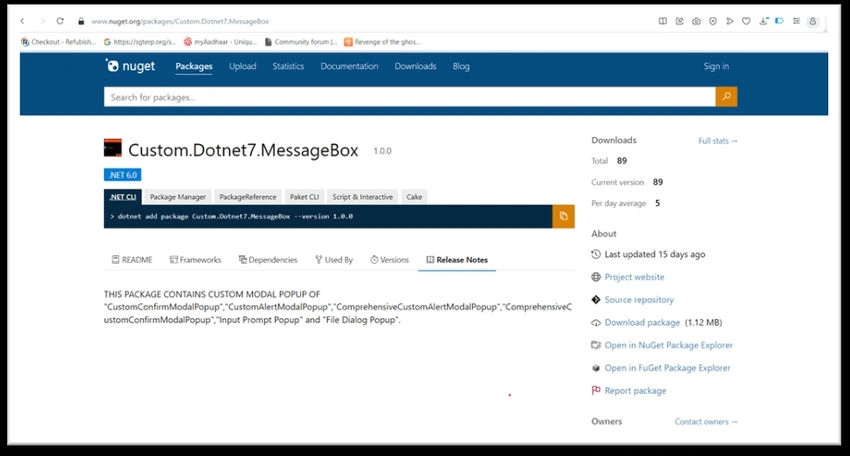
Implementing a custom message box in WPF using the Custom.Dotnet7.MessageBox NuGet package involves the following steps.
1. Installation of the NuGet Package
- Begin by installing the Custom.Dotnet7.MessageBox NuGet package into your WPF project.
- You can use the Package Manager Console with the command: `Install-Package Custom.Dotnet7.MessageBox`.
2. Integration into the WPF Project
- Once the package is installed, ensure that you integrate it into your WPF project. Verify that the necessary references are added.
3. Initial setup for the custom message box
Add the following details in App.xaml.cs
using Custom.Dotnet7.MessageBox.Implementation;
using Custom.Dotnet7.MessageBox.Interfaces;
using Custom.Dotnet7.MessageBox.Utility;
using Microsoft.Extensions.DependencyInjection;
using System;
using System.Windows;
using System.Windows.Media;
using System.Windows.Media.Imaging;

namespace Dotnet7CustomDialogSample
{
    /// <summary>
    /// Interaction logic for App.xaml
    /// </summary>
    public partial class App : Application
    {
        public static IServiceProvider ServiceProvider { get; private set; } = null;

        protected override void OnStartup(StartupEventArgs e)
        {
            base.OnStartup(e);

            // Initial setup for all types of modal MessageBox
            CustomMessageBoxHandler.GetInstance.ConfigureModalPopupSettings(
                ModalPopupMouseHoverButtonBackgroundColor: new SolidColorBrush(Colors.Blue),
                ModalPopupMouseHoverButtonForegroundColor: new SolidColorBrush(Colors.White),
                ModalPopupBodyBackgroundColor: new SolidColorBrush(Colors.Black),
                ModalPopupMessageTextColor: new SolidColorBrush(Colors.White),
                ModalPopupMessageTextFontSize: 13.0,
                ModalPopupMessageTextFontFamily: new FontFamily("Arial Black"),
                ModalPopupButtonBottomAlignment: HorizontalAlignment.Right,
                ModalPopupButtonWidth: 80.0,
                ModalPopupButtonTextColor: new SolidColorBrush(Colors.White),
                ModalPopupMessageButtonFontSize: 12.0,
                ModalPopupButtonDisplayBackgroundColor: new SolidColorBrush(Colors.OrangeRed),
                ModalPopupHeaderBackgroundColor: new SolidColorBrush(Colors.OrangeRed),
                ModalPopupHeaderTitleTextColor: new SolidColorBrush(Colors.White),
                ModalPopupHeaderFontFamily: new FontFamily("Arial Black"),
                ModalPopupHeaderFontSize: 13.0,
                ModalPopupHeaderIcon: CreateImageSourceFromPackUri());

            SetInstance();
        }

        private void SetInstance()
        {
            // Create a service collection
            var services = new ServiceCollection();

            // Add your services to the container
            services.AddSingleton<IModalPopupHandlerService, ModalPopupHandlerService>();
            services.AddTransient<MainWindow>();
            services.AddTransient<MainWindowViewModel>();

            // Build the service provider
            ServiceProvider = services.BuildServiceProvider();
        }

        public ImageSource CreateImageSourceFromPackUri()
        {
            try
            {
                // When the image is kept in the running assembly
                Uri uri = new Uri(@"pack://application:,,,/Dotnet7CustomDialogSample;component/Images/CameraControl.png", UriKind.RelativeOrAbsolute);
                return new BitmapImage(uri);
            }
            catch (Exception ex)
            {
                // Handle any exceptions, such as UriFormatException or FileNotFoundException
                // You can log the exception or return a default image source if needed
                return new BitmapImage();
            }
        }
    }
}
4. Integration in Code Behind
In the code-behind file (usually the .cs file associated with your XAML), handle the logic for invoking and responding to the custom message box.
Implement event handlers or methods to execute actions based on user interactions with the message box.
using Custom.Dotnet7.MessageBox.Utility;
using Microsoft.Extensions.DependencyInjection;
using System.Windows;

namespace Dotnet7CustomDialogSample
{
    /// <summary>
    /// Interaction logic for MainWindow.xaml
    /// </summary>
    public partial class MainWindow : Window
    {
        public MainWindow()
        {
            InitializeComponent();
            this.DataContext = App.ServiceProvider.GetRequiredService<MainWindowViewModel>();
            SharedOccurrenceEventsHandler.ModalConfirmDialogCallBackHandler += CommonEvents_ModalConfirmDialogCallBackHandler;
        }

        private void CommonEvents_ModalConfirmDialogCallBackHandler(object? sender, ProcessEventArgs e)
        {
            if (e.DialogResult)
            {
                // Perform your task
            }
            else
            {
                // Do action
            }
        }

        private void FileDialog_Click(object sender, RoutedEventArgs e)
        {
            string inputResult = CustomMessageBoxHandler.GetInstance.DisplayComprehensiveFileMessageBox(headerTitle: "File Handler", browseButtonText: "Browse Folder", modalPopupButtonText: "Ok");
            var str = inputResult;
        }

        private void InputDialog_Click(object sender, RoutedEventArgs e)
        {
            string inputResult = CustomMessageBoxHandler.GetInstance.DisplayComprehensiveInputMessageBox(headerTitle: "Input Prompt", inputLabelText: "Enter Text", modalPopupButtonText: "Ok");
            var str = inputResult;
        }

        private void CustomAlertModalPopup_Click(object sender, RoutedEventArgs e)
        {
            CustomMessageBoxHandler.GetInstance.DisplayCustomAlertMessageBox(headerTitle: "Information", modalPopupMessageText: "This is a custom message box", messageBoxImageIconType: CustomMessageBoxImage.Exclamation, modalPopupButtonText: "OK");
        }

        private void CustomConfirmModalPopup_Click(object sender, RoutedEventArgs e)
        {
            CustomMessageBoxHandler.GetInstance.DisplayCustomConfirmationMessageBox(headerTitle: "Information", modalPopupMessageText: "Do you want to close this popup? Do you want to close this popup? Do you want to close this popup?", messageBoxImageIconType: CustomMessageBoxImage.Warning, modalPopupFirstButtonText: "OK", modalPopupSecondButtonText: "Cancel");
        }

        private void ComprehensiveCustomAlertModalPopup_Click(object sender, RoutedEventArgs e)
        {
            CustomMessageBoxHandler.GetInstance.DisplayComprehensiveCustomAlertMessageBox(headerTitle: "Information", modalPopupMessageText: "This is a custom message box", messageBoxImageIconType: CustomMessageBoxImage.Error, modalPopupButtonText: "Okay");
        }

        private void ComprehensiveCustomConfirmModalPopup_Click(object sender, RoutedEventArgs e)
        {
            CustomMessageBoxHandler.GetInstance.DisplayComprehensiveCustomConfirmMessageBox(headerTitle: "Demo Modal Popup", modalPopupMessageText: "Do you want to close this application?", messageBoxImageIconType: CustomMessageBoxImage.Information, modalPopupFirstButtonText: "Yes", modalPopupSecondButtonText: "No");
        }
    }
}
5. Code integration in MVVM pattern
If you are using MVVM pattern and your application is based on dependency injection then follow the following instructions.
using Custom.Dotnet7.MessageBox.Interfaces;
using Custom.Dotnet7.MessageBox.Utility;
using Prism.Commands;
using Prism.Mvvm;

namespace Dotnet7CustomDialogSample
{
    public class MainWindowViewModel : BindableBase
    {
        // Custom Alert
        private DelegateCommand _ExecuteCustomAlertPopupCommand;

        public DelegateCommand ExecuteCustomAlertPopupCommand =>
            _ExecuteCustomAlertPopupCommand ?? (_ExecuteCustomAlertPopupCommand = new DelegateCommand(ExecuteCustomAlertPopupHandler));

        private void ExecuteCustomAlertPopupHandler()
        {
            modalPopupHandlerService.DisplayCustomAlertMessageBox(headerTitle: "Custom Message", modalPopupMessageText: "This is a custom message box", messageBoxImageIconType: CustomMessageBoxImage.Exclamation, modalPopupButtonText: "OK");
        }

        // Custom Confirm Modal Popup
        private DelegateCommand _ExecuteCustomConfirmPopupCommand;

        public DelegateCommand ExecuteCustomConfirmPopupCommand =>
            _ExecuteCustomConfirmPopupCommand ?? (_ExecuteCustomConfirmPopupCommand = new DelegateCommand(ExecuteCustomConfirmPopupHandler));

        private void ExecuteCustomConfirmPopupHandler()
        {
            modalPopupHandlerService.DisplayCustomConfirmationMessageBox(headerTitle: "Custom Message", modalPopupMessageText: "Do you want to close this popup? Do you want to close this popup? Do you want to close this popup?", messageBoxImageIconType: CustomMessageBoxImage.Warning, modalPopupFirstButtonText: "OK", modalPopupSecondButtonText: "Cancel");
        }

        // Comprehensive Alert
        private DelegateCommand _ExecuteComprehensiveAlertPopupCommand;

        public DelegateCommand ExecuteComprehensiveAlertPopupCommand =>
            _ExecuteComprehensiveAlertPopupCommand ?? (_ExecuteComprehensiveAlertPopupCommand = new DelegateCommand(ExecuteComprehensiveAlertPopupHandler));

        private void ExecuteComprehensiveAlertPopupHandler()
        {
            modalPopupHandlerService.DisplayComprehensiveCustomAlertMessageBox(headerTitle: "Custom Message", modalPopupMessageText: "This is a custom message box", messageBoxImageIconType: CustomMessageBoxImage.Error, modalPopupButtonText: "Okay");
        }

        // Comprehensive Confirm Modal Popup
        private DelegateCommand _ExecuteComprehensiveConfirmPopupCommand;

        public DelegateCommand ExecuteComprehensiveConfirmPopupCommand =>
            _ExecuteComprehensiveConfirmPopupCommand ?? (_ExecuteComprehensiveConfirmPopupCommand = new DelegateCommand(ExecuteComprehensiveConfirmPopupHandler));

        private void ExecuteComprehensiveConfirmPopupHandler()
        {
            modalPopupHandlerService.DisplayComprehensiveCustomConfirmMessageBox(headerTitle: "Custom Message", modalPopupMessageText: "This is a custom confirm message box", messageBoxImageIconType: CustomMessageBoxImage.Question, modalPopupFirstButtonText: "Okay", modalPopupSecondButtonText: "Close");
        }

        // Input Dialog
        private DelegateCommand _ExecuteCustomInputPopupCommand;

        public DelegateCommand ExecuteCustomInputPopupCommand =>
            _ExecuteCustomInputPopupCommand ?? (_ExecuteCustomInputPopupCommand = new DelegateCommand(ExecuteInputPopupHandler));

        private void ExecuteInputPopupHandler()
        {
            string inputResult = modalPopupHandlerService.DisplayComprehensiveInputMessageBox(headerTitle: "Custom Message", inputLabelText: "Enter your text", modalPopupButtonText: "Okay");
            var str = inputResult;
        }

        // File Dialog
        private DelegateCommand _ExecuteCustomFilePopupCommand;

        public DelegateCommand ExecuteCustomFilePopupCommand =>
            _ExecuteCustomFilePopupCommand ?? (_ExecuteCustomFilePopupCommand = new DelegateCommand(ExecuteFilePopupHandler));

        private void ExecuteFilePopupHandler()
        {
            string inputResult = modalPopupHandlerService.DisplayComprehensiveFileMessageBox(headerTitle: "File Dialog Popup", browseButtonText: "Browse your custom Folder", modalPopupButtonText: "Okay");
            var str = inputResult;
        }

        IModalPopupHandlerService? modalPopupHandlerService = null;

        public MainWindowViewModel(IModalPopupHandlerService modalPopupHandlerService)
        {
            this.modalPopupHandlerService = modalPopupHandlerService;
            SharedOccurrenceEventsHandler.ModalConfirmDialogCallBackHandler += CommonEvents_ModalConfirmDialogCallBackHandler;
        }

        private void CommonEvents_ModalConfirmDialogCallBackHandler(object? sender, ProcessEventArgs e)
        {
            if (e.DialogResult)
            {
                // Perform your task
            }
            else
            {
                // Do action
            }
        }
    }
}
6. Testing
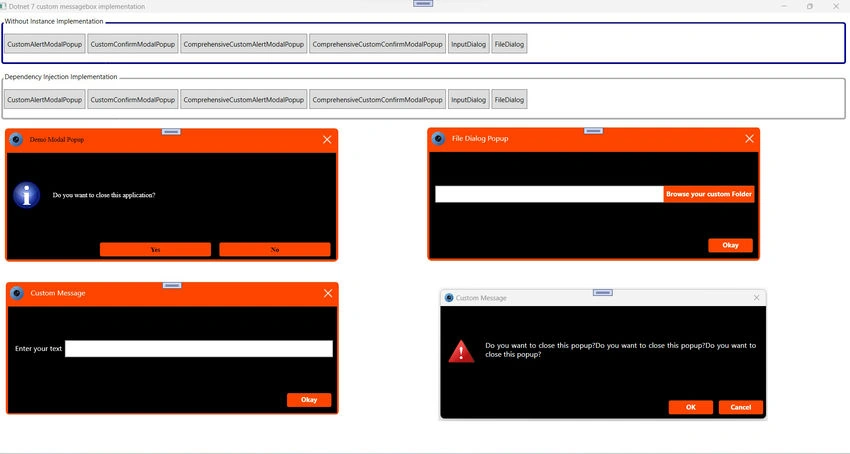
The final result will be like the one below.
Nuget Package: "Custom.Dotnet7.MessageBox"
Repository Path: https://github.com/OmatrixTech/Dotnet7CustomDialogSample
Join the conversation! Your thoughts help the community grow.