

Introduction
In this article, I am going to explain how to use the Bootstrap 4 Progress Bar in your project. Progress bar is a component which is used to display the progress of the process in which a user is involved. In HTML <progress> tag is used which is replaced by .progress class by Bootstrap technique in order to make it responsive.
To use Bootstrap 4 in your project, you need to have the following downloaded or CDN scripts. It should be added in a <head> tag.
- <link rel="stylesheet" href="https://stackpath.bootstrapcdn.com/bootstrap/4.1.3/css/bootstrap.min.css">
- <script src="https://code.jquery.com/jquery-3.3.1.slim.min.js" ></script>
- <script src="https://cdnjs.cloudflare.com/ajax/libs/popper.js/1.14.3/umd/popper.min.js" ></script>
- <script src="https://stackpath.bootstrapcdn.com/bootstrap/4.1.3/js/bootstrap.min.js" ></script>
Progress Bar
- Progress Bar in Bootstrap 4 is mainly used to indicate to the user, how much progress of the process is done. In many web applications progress bar plays a vital role. In uploading files and in the checkout process it plays an important role, so that the user understands how long the process takes to complete the work.
- For creating progress bar use .progress class in the container. Use the attributes aria-value for setting minimum and maximum value of the progress bar.
- Use utility classes for the background (bg-success, bg- info, bg-light, bg-dark, bg-danger, bg-warning) for creating a progress bar with a different color.
- Add a .progress-bar-animated class for creating a striped animated progress bar.
In the below examples, you can find step by step methods for creating a simple progress bar, and use utility classes to create an animated progress bar.
Add the following code to create the Progress bar in your project.
- <div class="progress">
- <div class="progress-bar" role="progressbar" aria-valuenow="0" aria-valuemin="0" aria-valuemax="100"></div>
- </div>
- <br>
- <div class="progress">
- <div class="progress-bar" role="progressbar" style="width: 25%" aria-valuenow="25" aria-valuemin="0" aria-valuemax="100"></div>
- </div>
- <br>
- <div class="progress">
- <div class="progress-bar" role="progressbar" style="width: 50%" aria-valuenow="50" aria-valuemin="0" aria-valuemax="100"></div>
- </div>
- <br>
- <div class="progress">
- <div class="progress-bar" role="progressbar" style="width: 75%" aria-valuenow="75" aria-valuemin="0" aria-valuemax="100"></div>
- </div>
- <br>
- <div class="progress">
- <div class="progress-bar" role="progressbar" style="width: 100%" aria-valuenow="100" aria-valuemin="0" aria-valuemax="100"></div>
- </div>
Output of Progress Bar
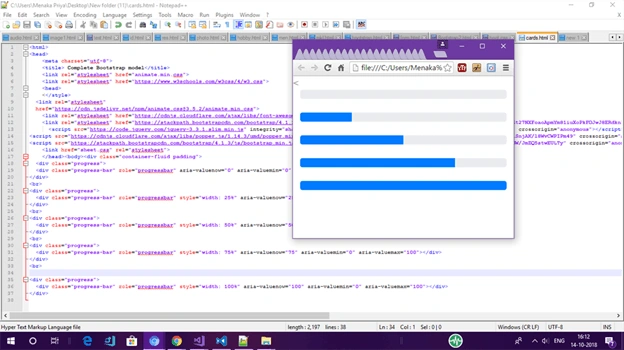
Add the following code to create the Progress bar with text in your project,
- <div class="progress">
- <div class="progress-bar" role="progressbar" aria-valuenow="0" aria-valuemin="0" aria-valuemax="100">0%</div>
- </div>
- <br>
- <div class="progress">
- <div class="progress-bar" role="progressbar" style="width: 25%" aria-valuenow="25" aria-valuemin="0" aria-valuemax="100">25%</div>
- </div>
- <br>
- <div class="progress">
- <div class="progress-bar" role="progressbar" style="width: 50%" aria-valuenow="50" aria-valuemin="0" aria-valuemax="100">50%</div>
- </div>
- <br>
- <div class="progress">
- <div class="progress-bar" role="progressbar" style="width: 75%" aria-valuenow="75" aria-valuemin="0" aria-valuemax="100">75%</div>
- </div>
- <br>
- <div class="progress">
- <div class="progress-bar" role="progressbar" style="width: 100%" aria-valuenow="100" aria-valuemin="0" aria-valuemax="100">100%</div>
- </div>
Output of Progress Bar with label
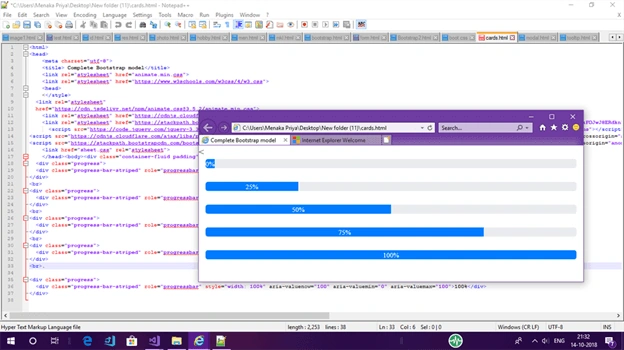
Add the following code to create the Progress bar with background color in your project,
- <div class="container-fluid padding">
- <div class="progress">
- <div class="progress-bar bg-primary" role="progressbar" aria-valuenow="0" aria-valuemin="0" aria-valuemax="100">0%</div>
- </div>
- <br>
- <div class="progress">
- <div class="progress-bar bg-warning" role="progressbar" style="width: 25%" aria-valuenow="25" aria-valuemin="0" aria-valuemax="100">25%</div>
- </div>
- <br>
- <div class="progress">
- <div class="progress-bar bg-success" role="progressbar" style="width: 50%" aria-valuenow="50" aria-valuemin="0" aria-valuemax="100">50%</div>
- </div>
- <br>
- <div class="progress">
- <div class="progress-bar bg-danger" role="progressbar" style="width: 75%" aria-valuenow="75" aria-valuemin="0" aria-valuemax="100">75%</div>
- </div>
- <br>.
- <div class="progress">
- <div class="progress-bar bg-info" role="progressbar" style="width: 100%" aria-valuenow="100" aria-valuemin="0" aria-valuemax="100">100%</div>
- </div>
Output of Progress Bar with Background color,
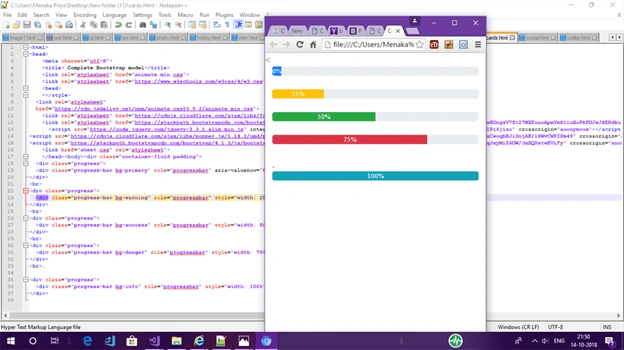
Add the following code to create the Progress bar with stripes in your project,
- div class="container-fluid padding">
- <div class="progress">
- <div class="progress-bar progress-bar-striped progress-bar-animated bg-primary" role="progressbar" aria-valuenow="0" aria-valuemin="0" aria-valuemax="100">0%</div>
- </div>
- <br>
- <div class="progress">
- <div class="progress-bar progress-bar-striped progress-bar-animated bg-secondary" role="progressbar" style="width: 25%" aria-valuenow="25" aria-valuemin="0" aria-valuemax="100">25%</div>
- </div>
- <br>
- <div class="progress">
- <div class="progress-bar progress-bar-striped progress-bar-animated bg-alert" role="progressbar" style="width: 50%" aria-valuenow="50" aria-valuemin="0" aria-valuemax="100">50%</div>
- </div>
- <br>
- <div class="progress">
- <div class="progress-bar progress-bar-striped progress-bar-animated bg-danger" role="progressbar" style="width: 75%" aria-valuenow="75" aria-valuemin="0" aria-valuemax="100">75%</div>
- </div>
- <br>.
- <div class="progress">
- <div class="progress-bar progress-bar-striped progress-bar-animated bg-info" role="progressbar" style="width: 100%" aria-valuenow="100" aria-valuemin="0" aria-valuemax="100">100%</div>
- </div>
Output of Progress Bar with Stripes
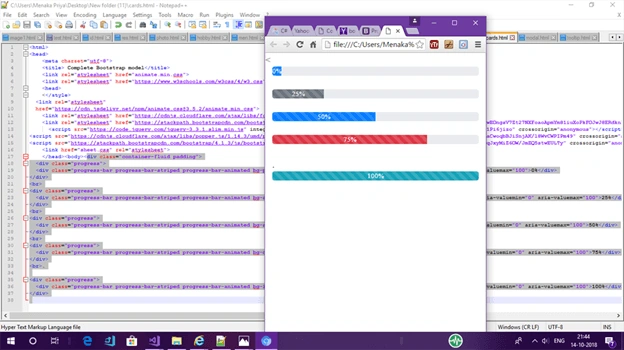
Summary
In this basic article, you saw how to use a Progress bar to create a responsive webpage using Bootstrap 4. Hope you found this article interesting. For any feedback, please post your comment at the bottom of this article. Thank you!
Sundaram SubramanianPosted Apr 23, 2019, 1:31 AM
Well written
Amit MakhijaPosted Apr 22, 2019, 11:33 PM
How can we use this progress bar on jqeury ajax success call??
Temidayo LongePosted Apr 19, 2019, 8:07 PM
Nice Article
Abhishek MishraPosted Apr 19, 2019, 9:45 AM
Good one. Way to go.