Introduction
This article demonstrates how to create a file picker in a Xamarin.Forms Application.
Let's start.
Step 1
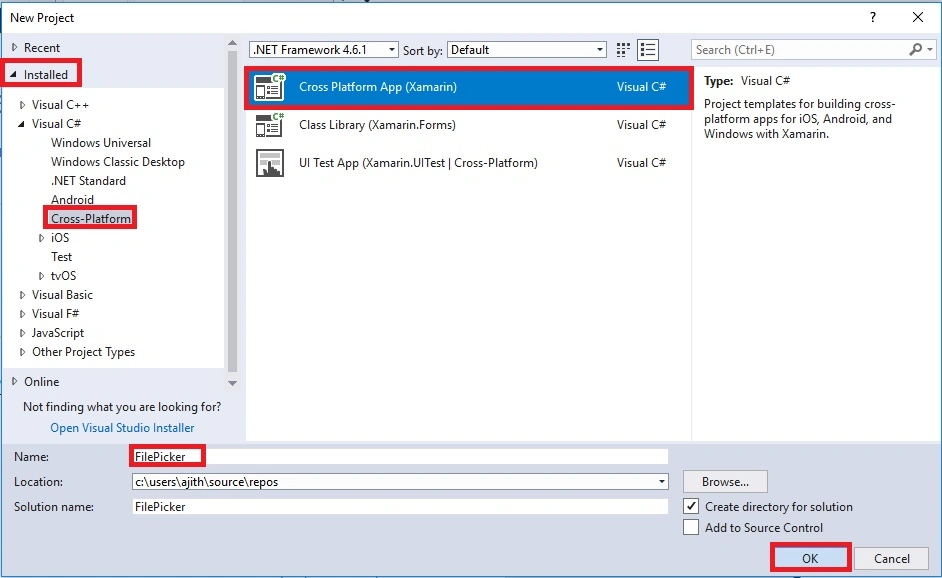
Open Visual Studio and go to New Project >> Installed >> Visual C# >> Cross-Platform.
Select Cross Platform app, then give your project a name and location.
Step 2
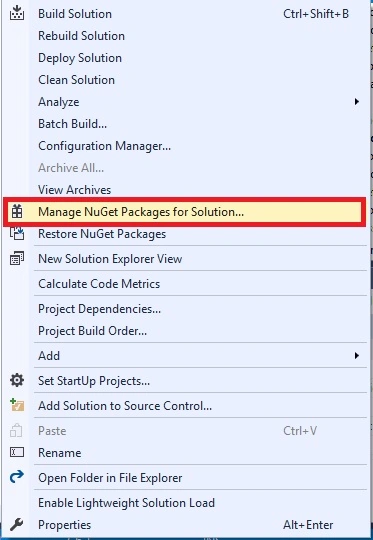
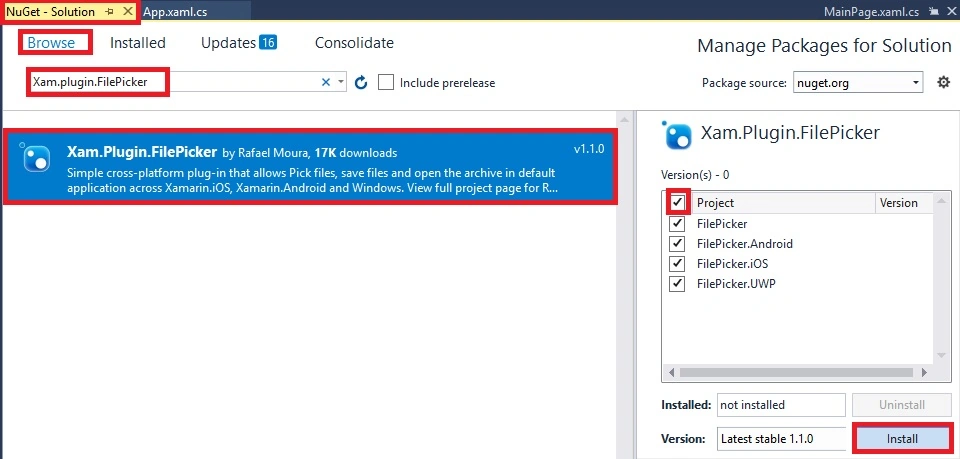
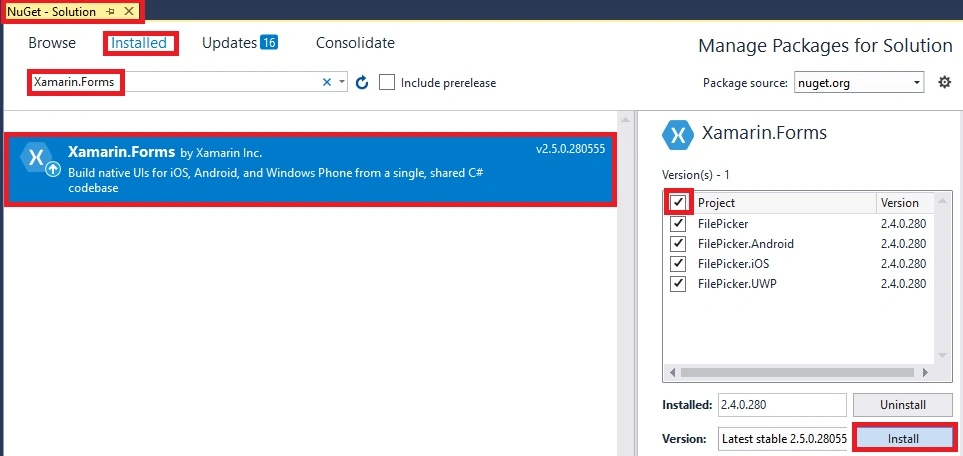
Install the following NuGet Packages to your project.
Xam.Plugin.FilePicker
Xamarin.Forms
Now, select the following NuGet packages and select your project to install the packages.
Step 3
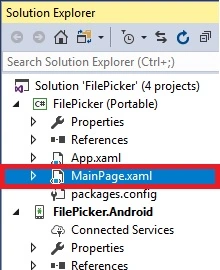
Open Solution Explorer >> Project Name >> MainPage.xaml. Open the Design View of this page.
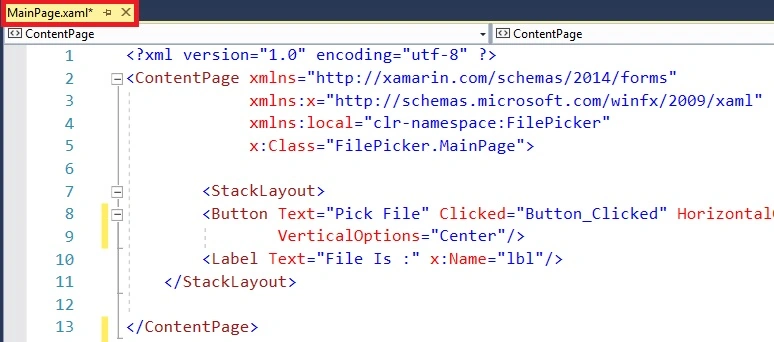
The code is given below.
XAML Code
We are Creating Button and Label Inside StackLayout.
< StackLayout > < Button Text = "Pick File" Clicked = "Button_Clicked" HorizontalOptions = "Center" VerticalOptions = "Center" /> < Label Text = "File Is :" x:Name = "lbl" /> </ StackLayout > Step 4
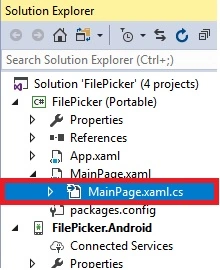
Open Solution Explorer >> Project Name >> MainPage.Xaml.cs. Open the design view of this page.
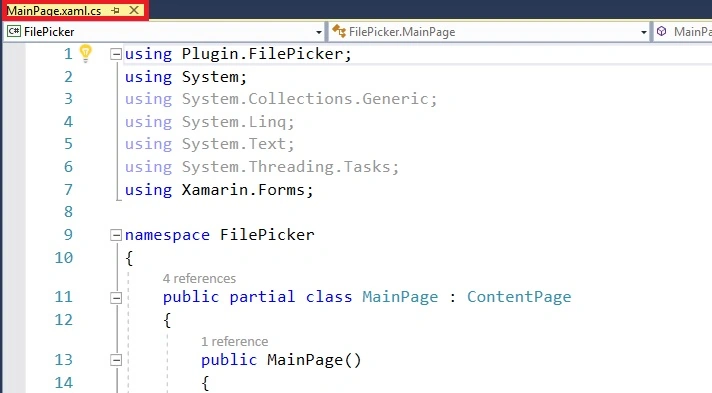
The code is given below.
C# Code
using Plugin.FilePicker; using System; using System.Collections.Generic; using System.Linq; using System.Text; using System.Threading.Tasks; using Xamarin.Forms; namespace FilePicker { public partial class MainPage : ContentPage { public MainPage() { InitializeComponent(); } private async void Button_Clicked( object sender, EventArgs e) { var file = await CrossFilePicker.Current.PickFile(); if (file != null ) { lbl.Text = file.FileName; } } } } Step 5
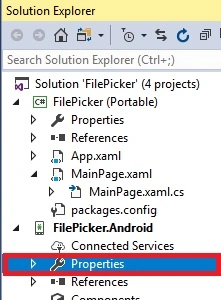
Next, go to Project Name.Android >> Properties.
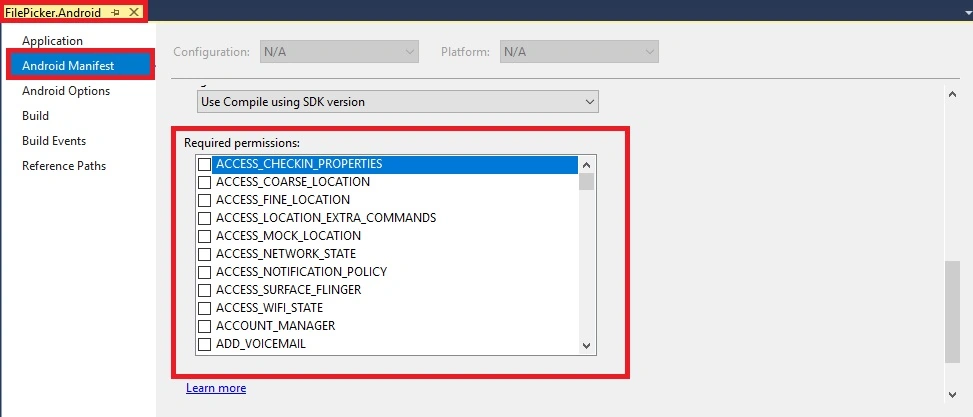
Next, double click to the left >> Open the Design Page >> click on Android Manifest.
For required permissions select on "READ EXTERNAL STORAGE" and "WRITE EXTERNAL STORAGE".
Step 6
Next, select the build & deploy option, followed by selecting from the list of Android Emulators or Simulator. You can choose any API (Application Program Interface) Level Emulator and Simulator to run it.
Output
After a few seconds, you will see your app working.
Click on Pick a File and then Choose Filename will be displayed.
Finally, we have successfully created Xamrin.Forms File Picker.
Detect language Afrikaans Albanian Arabic Armenian Azerbaijani Basque Belarusian Bengali Bosnian Bulgarian Catalan Cebuano Chichewa Chinese (Simplified) Chinese (Traditional) Croatian Czech Danish Dutch English Esperanto Estonian Filipino Finnish French Galician Georgian German Greek Gujarati Haitian Creole Hausa Hebrew Hindi Hmong Hungarian Icelandic Igbo Indonesian Irish Italian Japanese Javanese Kannada Kazakh Khmer Korean Lao Latin Latvian Lithuanian Macedonian Malagasy Malay Malayalam Maltese Maori Marathi Mongolian Myanmar (Burmese) Nepali Norwegian Persian Polish Portuguese Punjabi Romanian Russian Serbian Sesotho Sinhala Slovak Slovenian Somali Spanish Sundanese Swahili Swedish Tajik Tamil Telugu Thai Turkish Ukrainian Urdu Uzbek Vietnamese Welsh Yiddish Yoruba Zulu
Afrikaans Albanian Arabic Armenian Azerbaijani Basque Belarusian Bengali Bosnian Bulgarian Catalan Cebuano Chichewa Chinese (Simplified) Chinese (Traditional) Croatian Czech Danish Dutch English Esperanto Estonian Filipino Finnish French Galician Georgian German Greek Gujarati Haitian Creole Hausa Hebrew Hindi Hmong Hungarian Icelandic Igbo Indonesian Irish Italian Japanese Javanese Kannada Kazakh Khmer Korean Lao Latin Latvian Lithuanian Macedonian Malagasy Malay Malayalam Maltese Maori Marathi Mongolian Myanmar (Burmese) Nepali Norwegian Persian Polish Portuguese Punjabi Romanian Russian Serbian Sesotho Sinhala Slovak Slovenian Somali Spanish Sundanese Swahili Swedish Tajik Tamil Telugu Thai Turkish Ukrainian Urdu Uzbek Vietnamese Welsh Yiddish Yoruba Zulu
Text-to-speech function is limited to 200 characters
Detect language Afrikaans Albanian Arabic Armenian Azerbaijani Basque Belarusian Bengali Bosnian Bulgarian Catalan Cebuano Chichewa Chinese (Simplified) Chinese (Traditional) Croatian Czech Danish Dutch English Esperanto Estonian Filipino Finnish French Galician Georgian German Greek Gujarati Haitian Creole Hausa Hebrew Hindi Hmong Hungarian Icelandic Igbo Indonesian Irish Italian Japanese Javanese Kannada Kazakh Khmer Korean Lao Latin Latvian Lithuanian Macedonian Malagasy Malay Malayalam Maltese Maori Marathi Mongolian Myanmar (Burmese) Nepali Norwegian Persian Polish Portuguese Punjabi Romanian Russian Serbian Sesotho Sinhala Slovak Slovenian Somali Spanish Sundanese Swahili Swedish Tajik Tamil Telugu Thai Turkish Ukrainian Urdu Uzbek Vietnamese Welsh Yiddish Yoruba Zulu
Afrikaans Albanian Arabic Armenian Azerbaijani Basque Belarusian Bengali Bosnian Bulgarian Catalan Cebuano Chichewa Chinese (Simplified) Chinese (Traditional) Croatian Czech Danish Dutch English Esperanto Estonian Filipino Finnish French Galician Georgian German Greek Gujarati Haitian Creole Hausa Hebrew Hindi Hmong Hungarian Icelandic Igbo Indonesian Irish Italian Japanese Javanese Kannada Kazakh Khmer Korean Lao Latin Latvian Lithuanian Macedonian Malagasy Malay Malayalam Maltese Maori Marathi Mongolian Myanmar (Burmese) Nepali Norwegian Persian Polish Portuguese Punjabi Romanian Russian Serbian Sesotho Sinhala Slovak Slovenian Somali Spanish Sundanese Swahili Swedish Tajik Tamil Telugu Thai Turkish Ukrainian Urdu Uzbek Vietnamese Welsh Yiddish Yoruba Zulu
Text-to-speech function is limited to 200 characters




gadda rajuPosted Dec 6, 2021, 3:25 PM
Its working fine in android 10 and below version. When i attached pdf and doc file the foll0wing exception I'm getting in android 11. ex = {Java.Lang.NullPointerException: uri at Java.Interop.JniEnvironment+InstanceMethods.CallNonvirtualObjectMethod (Java.Interop.JniObjectReference instance, Java.Interop.JniObjectReference type, Java.Interop.JniMethodInfo method, Java.Interop.JniArgumentValu...
arslan mehboobPosted Sep 24, 2021, 11:57 AM
After these steps how to file send to sever plz send any example or source code???
Shantimohan ElchuriPosted Jun 23, 2020, 8:33 PM
It is not working in iOS Simulator. It is complaining about referencing in the main project. All references appear to be good. Any suggestions?
Sagar PatilPosted Dec 24, 2019, 12:56 AM
It is working fine. How to achieve multiple file upload?
Wawingi AntonioPosted Dec 5, 2019, 3:37 AM
It work for me, but not pick a file from SD card... i need a help
Chandrasekhar PatraPosted Sep 27, 2019, 6:57 AM
Can you open pdf file as well ?
aba shindePosted Jul 7, 2019, 1:18 AM
Select particular format file is possible?
ashok yadavPosted Nov 2, 2018, 3:54 AM
getting file name is Ok but Data array is empty.
mohammad daqqqouriPosted Jul 16, 2018, 5:55 AM
Multiple file selection is possible ?
Prashanth ramineniPosted Apr 23, 2018, 5:34 AM
You said it works for emulator and simulator does it works in ios simulator? i think there is so much to do
Venkata Swamy BalarajuPosted Mar 24, 2018, 1:51 PM
Nice keep sharing...