

In this article, you will see how to create a carousel using CSS. Yes, you heard it right, no jQuery, no JavaScript, and no angular routing animations.
Let’s get started!
Step 1
Create the angular project,
ng new CSSCarousel
Step 2
Create parent component,
ng generate component parent
Step 3
Create child component1,
ng generate component component1
Step 4
Create child component2,
ng generate component component2
To open the source code in Visual studio enter the command Code. in command prompt.
Step 5
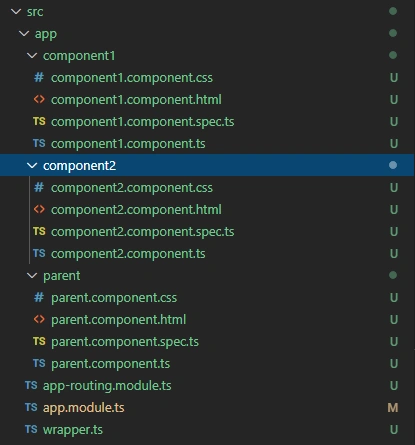
Add a wrapper file named wrapper.ts in the app folder as shown in the below picture along with created components,
Step 6
Make changes to wrapper.ts,
- import {Component} from '@angular/core';
- @Component({
- selector:'wrapper-app',
- template:'<router-outlet></router-outlet>'
- })
- export class WrapperComponent{ }
Step 7
Make changes to app.module.ts,
- import { BrowserModule } from '@angular/platform-browser';
- import { NgModule } from '@angular/core';
- import { AppRoutingModule } from './app-routing.module';
- import { ParentComponent } from './parent/parent.component';
- import { Component1Component } from './component1/component1.component';
- import { Component2Component } from './component2/component2.component';
- import { WrapperComponent } from "src/app/wrapper";
- @NgModule({
- declarations: [ ParentComponent, Component1Component, Component2Component, WrapperComponent ],
- imports: [ BrowserModule, AppRoutingModule ],
- providers: [], bootstrap: [WrapperComponent]
- })
- export class AppModule { }
Step 8
Make changes to index.html,
- <!doctype html>
- <html lang="en">
- <head>
- <meta charset="utf-8">
- <title>CSSCarousel</title>
- <base href="/">
- <meta name="viewport" content="width=device-width, initial-scale=1">
- <link rel="icon" type="image/x-icon" href="favicon.ico">
- </head>
- <body>
- <wrapper-app></wrapper-app>
- </body>
- </html>
Step 9
Make changes to component1.html
- <div>
- <h1 style="background-color: coral; opacity:0.5; text-align: center;">Component 1 Component 1 Component 1 </h1>
- </div>
Step 10
Make changes to component2.html,
- <div>
- <h1 style="background-color:crimson; opacity:0.5; text-align: center;">Component 2 Component 2 Component 2</h1>
- </div>
Step 11
Make changes to parent component.html,
- <div class="container">
- <div class="col-md-12">
- <button class="right-button" (click)="moveRight()">Right</button>
- <button class="left-button" (click)="moveLeft()">Left</button>
- <div *ngIf="isRefresh" class="component-container">
- <app-component1></app-component1>
- </div>
- <div *ngIf="buttonClicked==='left'" class="component-container">
- <app-component1 [ngClass]="{'left-active':!isLeft,'left':isLeft}"></app-component1>
- </div>
- <div *ngIf="buttonClicked==='left'" class="component-container">
- <app-component2 [ngClass]="{'left-active':isLeft,'left':!isLeft}"></app-component2>
- </div>
- <div *ngIf="buttonClicked==='right'" class="component-container">
- <app-component1 [ngClass]="{'right-active':isRight,'right':!isRight}"></app-component1>
- </div>
- <div *ngIf="buttonClicked==='right'" class="component-container">
- <app-component2 [ngClass]="{'right-active':!isRight,'right':isRight}"></app-component2>
- </div>
- </div>
- </div>
Step 12
Make changes to parent component.ts,
- import {
- Component,
- OnInit
- } from '@angular/core';
- @Component({
- selector: 'app-parent',
- templateUrl: './parent.component.html',
- styleUrls: ['./parent.component.css']
- })
- export class ParentComponent implements OnInit {
- buttonClicked = "";
- isLeft: boolean = false;
- isRight: boolean = true;
- isRefresh: boolean = false;
- ngOnInit() {
- this.isRefresh = true;
- }
- moveLeft() {
- this.buttonClicked = "left";
- this.isLeft = !this.isLeft;
- this.isRefresh = false;
- }
- moveRight() {
- this.buttonClicked = "right";
- this.isRight = !this.isRight;
- this.isRefresh = false;
- }
- }
Step 13
Make changes to parent component.css,
- .right - button {
- float: right;
- cursor: pointer!important;
- position: fixed;
- top: 50 % ;right: 0;
- z - index: 999;
- width: 100 px;
- height: 50 px;
- background - color: darkmagenta;
- }.left - button {
- cursor: pointer!important;
- position: fixed;
- top: 50 % ;
- left: 0;
- z - index: 999;
- width: 100 px;
- height: 50 px;
- background - color: darkmagenta;
- }.component - container {
- width: 100 % ;
- height: 120 vh;
- overflow: hidden;
- position: absolute;
- top: 10 px;
- left: 0;
- z - index: 0;
- }.left {
- position: relative;
- animation: slideLeftNone 1 s;
- opacity: 0;
- left: -100 % ;
- top: 0;
- }.left - active {
- position: relative;
- opacity: 1;
- animation: slideLeftBlock 1 s;
- top: 0;
- left: 0 % ;
- }.right {
- position: relative;
- animation: slideRightNone 1 s;
- opacity: 0;
- left: 100 % ;
- top: 0;
- }.right - active {
- position: relative;
- opacity: 1;
- animation: slideRightBlock 1 s;
- left: 0 % ;
- top: 0;
- }
- @keyframes slideLeftNone {
- from {
- left: 0 % ;opacity: 1;
- }
- to {
- left: -100 % ;opacity: 0;
- }
- }
- @keyframes slideRightNone {
- from {
- left: 0 % ;opacity: 1;
- }
- to {
- left: 100 % ;opacity: 0;
- }
- }
- @keyframes slideRightBlock {
- from {
- left: -100 % ;
- }
- to {
- left: 0 % ;
- }
- }
- @keyframes slideLeftBlock {
- from {
- left: 100 % ;
- }
- to {
- left: 0 % ;
- }
- }
Step 14
Make changes to app-routing.module.ts,
- import { NgModule } from '@angular/core';
- import { Routes, RouterModule } from '@angular/router';
- import { ParentComponent } from './parent/parent.component';
- const routes: Routes = [{
- path: '',
- component: ParentComponent,
- pathMatch: 'full'
- }, {
- path: '**',
- redirectTo: '',
- pathMatch: 'full'
- }];
- @NgModule({
- imports: [RouterModule.forRoot(routes)],
- exports: [RouterModule]
- })
- export class AppRoutingModule {}
Note
Remove app.component.html, app.component.ts, and app.component.css files from the solution before executing Step 15.
Step 15
Run ng-serve to check the output on http://localhost:4200/
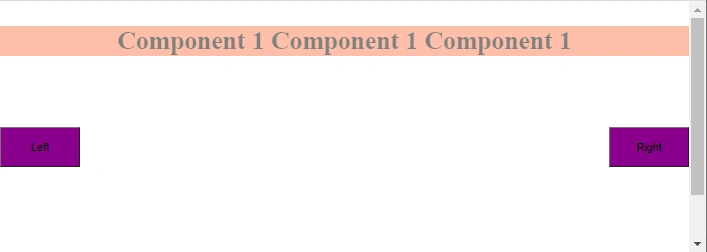
The below picture depicts the end result of the CSSCarousel. If you click on the buttons, Component 1 and Component 2 will keep sliding as a carousel.
Download the GitHub repository here.
Join the conversation! Your thoughts help the community grow.