

In this article, I'll guide you in making a delete modal dynamic in Java. You need to create a modal popup that can adjust its content based on the specific item you want to delete. This means that when you click the delete button for a particular item, the modal should update to show details about that item and confirm the deletion.
Steps to Create a Dynamic Delete Modal in Java
Create the Modal Layout: Start by designing the basic structure of the modal in your HTML or JSP file. This modal should include a title, a message asking if the user is sure they want to delete the item, and two buttons: one to confirm the deletion and one to cancel.
- Set Up a Click Event Listener: Add a click event listener to your delete button in your JavaScript or jQuery code. This listener will trigger the modal to open when the delete button is clicked.
- Pass Item Data to the Modal: When the delete button is clicked, the JavaScript or jQuery code should pass the relevant data about the item (like its ID or name) to the modal. This could involve setting the text of the modal’s message to include the item’s name or storing the item’s ID in a hidden field within the modal.
- Handle the Deletion in Java: In your Java code (like a servlet or a controller), write the logic to delete the item from the database when the user confirms the deletion. When the user clicks the confirm button, it should trigger a form submission or an AJAX call that sends the item’s ID to your Java code. The Java code then processes this request and deletes the item from the database.
- Provide Feedback to the User: After the deletion, update the UI to reflect that the item has been removed. You might close the modal and remove the deleted item from the list on the page or show a success message.
Layman’s Explanation
Imagine you have a list of items on a webpage, and each item has a delete button. When you click the delete button, a pop-up appears asking, “Are you sure you want to delete this item?” The pop-up should show the name of the item you’re about to delete and give you two choices: delete it or cancel.
To make this happen, you need to set up your webpage so that when you click delete, the pop-up knows which item you clicked on and shows the right information. Then, if you decide to go ahead with the deletion, the pop-up will tell your Java code to remove the item from your system. After that, the webpage should update to show that the item is gone.
- Backend (Java Modal/Entity)
import java.io.Serializable; import java.util.Date; import java.util.UUID; import jakarta.persistence.Column; import jakarta.persistence.Entity; import jakarta.persistence.FetchType; import jakarta.persistence.GeneratedValue; import jakarta.persistence.GenerationType; import jakarta.persistence.Id; import jakarta.persistence.JoinColumn; import jakarta.persistence.ManyToOne; import jakarta.persistence.Table; import jakarta.persistence.Temporal; import jakarta.persistence.TemporalType; import lombok.AllArgsConstructor; import lombok.Data; import lombok.NoArgsConstructor; @Data @NoArgsConstructor @AllArgsConstructor @Entity @Table(name = "Item") public class Item implements Serializable { private static final long serialVersionUID = 7550366616815293436L; @Id @GeneratedValue(strategy = GenerationType.UUID) @Column(name = "paydata_id",unique = true, nullable = false) private UUID payid; @Column(name = "payrun_id") private UUID payrunId; @Column(name = "cobalt_entity_id") private UUID entityId; @Column(name = "pay_element_no") private UUID payElementCode; @Column(name = "pay_element_name") private String payElementName; @Column(name = "wage_group") private String wageGroup; @Column(name = "value") private String value; @Column(name = "rate") private String rate; @Column(name = "units") private String units; @Column(name = "currency") private String currency; @Column(name = "Recurring") private String Recurring; @Column(name = "frequency") private String frequency; @Column(name = "effective_date") private Date effectiveDate; @Column(name = "status") private String status; @Column(name = "created_by") private UUID createdBy; @Temporal(TemporalType.TIMESTAMP) @Column(name = "created_at") private Date createdAt; @Temporal(TemporalType.TIMESTAMP) @Column(name = "updated_at") private Date updatedAt; @Column(name = "updated_by") private UUID updatedBy; } - Backend (Java Servlet/Controller)
- Controller for Fetching Item Details: Create a controller method that handles requests to get the details of the item to be deleted.
- Controller for Deleting Item: Another controller method handles the deletion of the item from the database.
- Example Java (Spring MVC)
@RestController
public class ItemController {
    @GetMapping("/getItemDetails")
    public ResponseEntity<Item> getItemDetails(@RequestParam("employeeId") Long employeeId) {
        // Fetch item details from the database
        Item item = itemService.findById(itemId);
        return ResponseEntity.ok(item);
    }
    @PostMapping("/deleteItem")
    public ResponseEntity<String> deleteItem(@RequestParam("employeeId") Long employeeId) {
        // Delete item from the database
        itemService.delete(itemId);
        return ResponseEntity.ok("Item deleted successfully");
    }
}
- Service Layer
- The service layer interacts with the data repository to fetch item details and perform deletion.
- Example Java (Service Layer)
@Service
public class ItemService {
    @Autowired
    private ItemRepository itemRepository;
    public Item findById(Long itemId) {
        return itemRepository.findById(itemId).orElseThrow(() -> new ItemNotFoundException("Item not found"));
    }
    public void delete(Long itemId) {
        itemRepository.deleteById(itemId);
    }
}
- Repository Layer
- This layer handles database operations, typically using JPA or another ORM framework.
- Example Java (Repository Layer)
@Repository
public interface ItemRepository extends JpaRepository<Item, Long> {
}
How Does It Work?
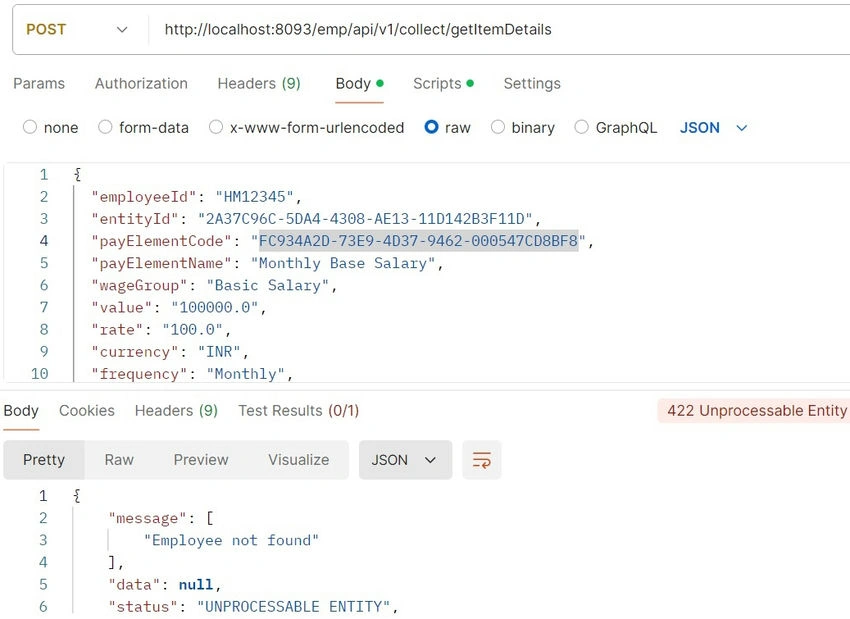
- Once you hit a request on Postman with the URL "http://localhost:8093/emp/api/v1/collect/getItemDetails" and the wrong EmployeeID, we will be rendering to the output screen saying Employee Not Found for the given employeeID.
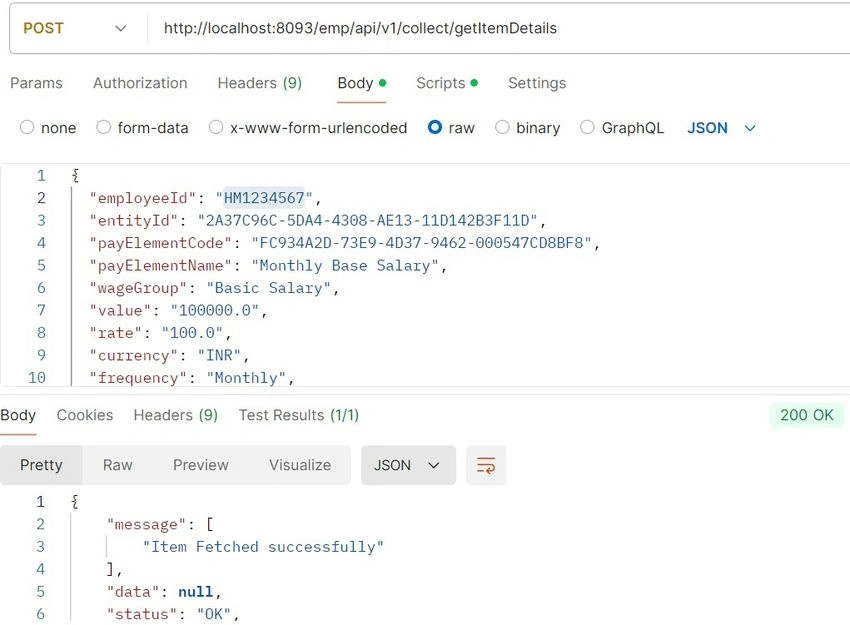
- Once you hit a request on Postman with the URL "http://localhost:8093/emp/api/v1/collect/getItemDetails" and correct EmployeeID and payload, we will be rendering to the output screen saying Item Fetched Success.
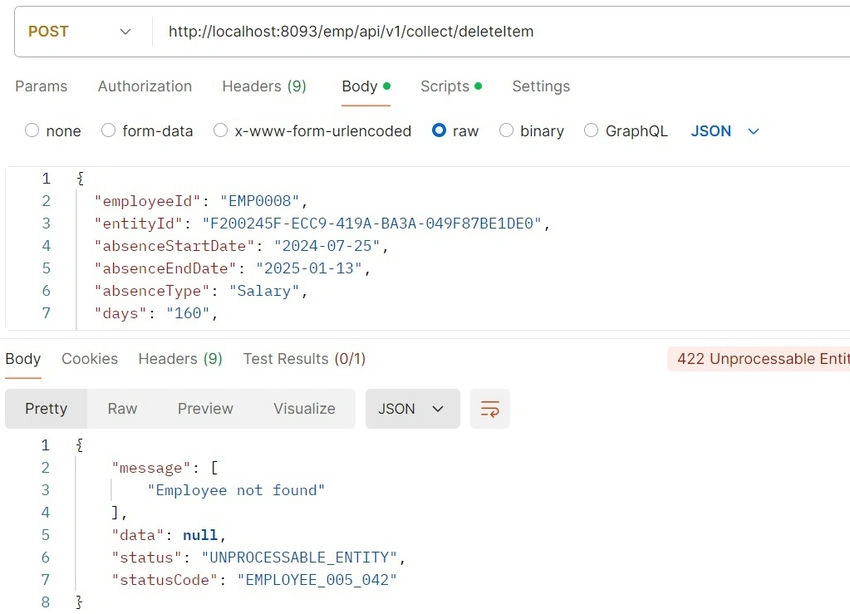
- Once you hit a request on Postman with url "http://localhost:8093/emp/api/v1/collect/deleteItems" and the wrong EmployeeID, we will be rendering an output screen saying Employee Not Found for the given employeeID.
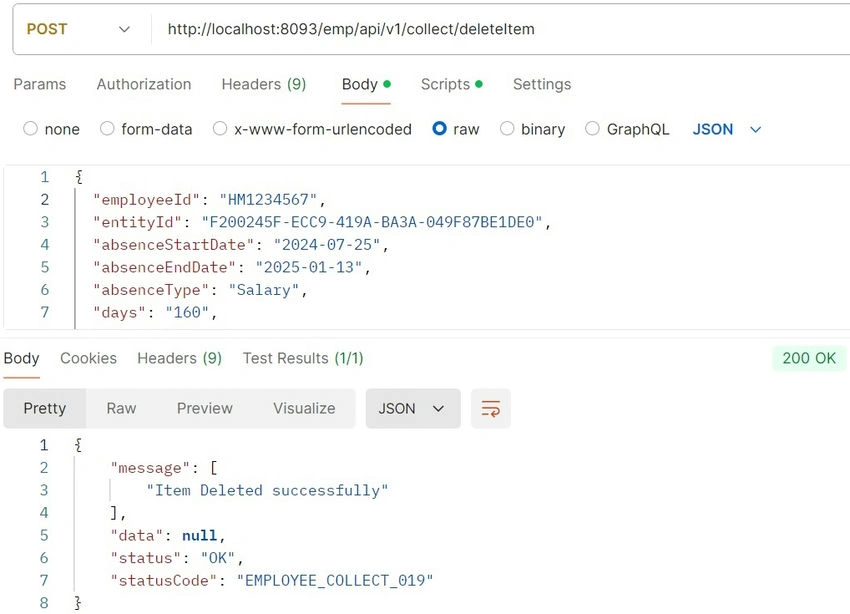
- Once you hit a request on Postman with url "http://localhost:8093/emp/api/v1/collect/getItemDetails" and correct EmployeeID and payload, we will be rendering to the output screen saying Item Fetched Success.
Why This Approach Is Useful?
- Efficiency: The page doesn’t need to reload every time you click delete. This makes the experience faster and smoother.
- Personalization: The pop-up shows details specific to the item you’re interacting with, reducing the chance of accidentally deleting the wrong thing.
In essence, making the delete modal dynamic ensures that the user interacts with exactly the right data in a quick and efficient manner, improving both usability and safety in the web application.
Summary
- Frontend: Use JavaScript and AJAX to make the modal dynamic, sending and receiving data to and from the server.
- Backend: Implement Java controllers to handle the retrieval of item details and the deletion process.
This way, the delete pop-up works for any item on your list, making it “dynamic,” or flexible enough to handle different items without needing separate code for each one.
Join the conversation! Your thoughts help the community grow.