

Introduction
In this article, I'm going to show you how to connect a client computer to the server domain in the proper and easiest method.
Benefits of connecting client to server
- Generally, more secure than peer-to-peer networks
- One client computer crashing does not affect the other computers
- Easier to recover files as backups can be controlled centrally by the network administrator
- Files and resources are easier to share and control from the server
- Improved levels of security as files are centralized
- It’s easier to administrate the whole network using a server
- Faster performance as each computer is only fulfilling one role
- Security is potentially cheaper and easier when done centrally
- Individual users do not have to worry about backups or security
- Larger networks can be created
Note. Check whether your client and server are connected same switch, if you want to know how to crated and connect the switch in Hyper please check my previous article How to Create Virtual Switch in Hyper–V Manager (c-sharpcorner.com)
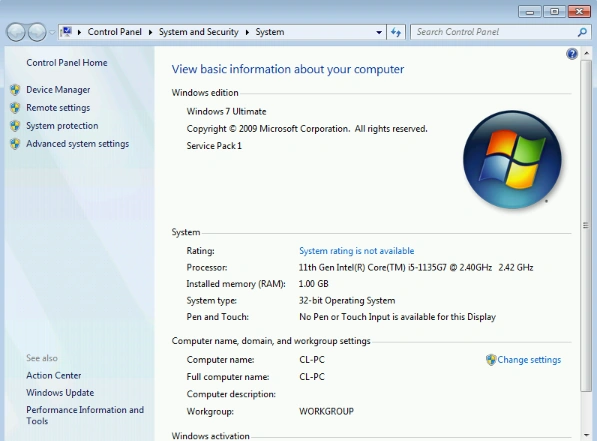
Step 1. On your client computer go to computer properties.
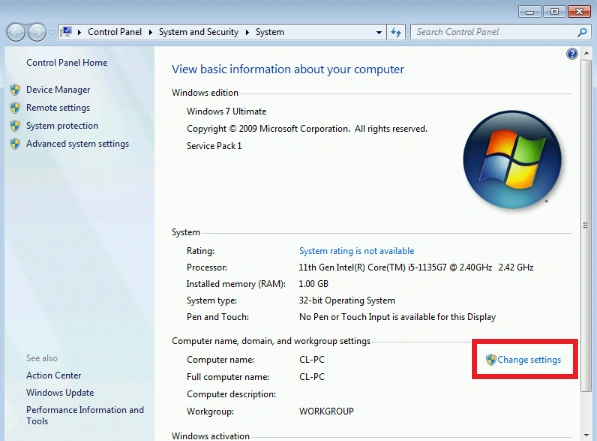
Step 2. Click “change settings”.
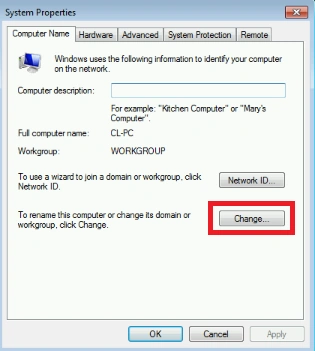
Step 3. Click “change”.
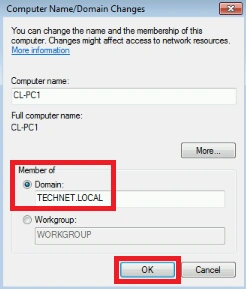
Step 4. Click “domain” and type your server’s domain name properly after clicking “ok”.
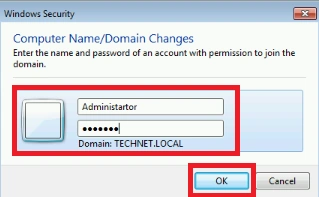
Step 5. Once click you will receive the server’s user details enter your server’s username name password, after clicking ok.
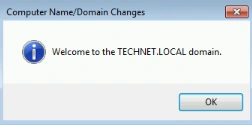
Step 6. After you will receive a welcome message now you can restart the client.
Conclusion
In this article, we all clearly understand how to connect the client computer to the server domain in the proper and easiest method. If there is clarification regarding this topic, feel free to drop comments below.
Join the conversation! Your thoughts help the community grow.