

Database backup is nowadays very critical aspect of any development and maintains project.
What is Database Mirroring?
Database mirroring is primarily a software solution for increasing database availability. Mirroring is implemented on a per-database basis and works only with databases that use the full recovery model. The simple and bulk-logged recovery models do not support database mirroring. Therefore, all bulk operations are always fully logged. Database mirroring works with any supported database compatibility level.
You cannot mirror the master, msdb, tempdb, or model databases.
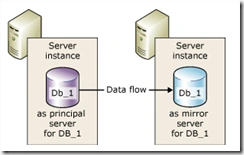
Database mirroring maintains two copies of a single database that must reside on different server instances of SQL Server Database Engine. Typically, these server instances reside on computers in different locations. One server instance serves the database to clients (the principal server). The other instance acts as a hot or warm standby server (the mirror server), depending on the configuration and state of the mirroring session. When a database mirroring session is synchronized, database mirroring provides a hot standby server that supports rapid failover without a loss of data from committed transactions. When the session is not synchronized, the mirror server is typically available as a warm standby server (with possible data loss).
Benefits of Database Mirroring
Database mirroring is a simple strategy that offers the following benefits,
- Increases data protection
Database mirroring provides complete or almost complete redundancy of the data, depending on whether the operating mode is high-safety or high-performance. For more information, see "Operating Modes," later in this topic.
A database mirroring partner running on SQL Server 2008 Enterprise or later versions automatically tries to resolve certain types of errors that prevent reading a data page. The partner that is unable to read a page requests a fresh copy from the other partner. If this request succeeds, the unreadable page is replaced by the copy, which usually resolves the error. For more information, see Automatic Page Repair During a Database Mirroring Session.
- Increases availability of a database.
In the event of a disaster, in high-safety mode with automatic failover, failover quickly brings the standby copy of the database online (without data loss). In the other operating modes, the database administrator has the alternative of forcing service (with possible data loss) to the standby copy of the database. For more information, see "Role Switching," later in this topic.
- Improves the availability of the production database during upgrades.
To minimize downtime for a mirrored database, you can sequentially upgrade the instances of SQL Server that are participating in a database mirroring session. This will incur the downtime of only a single failover. This form of upgrade is known as a rolling upgrade. For more information, see How to: Install a Service Pack on a System with Minimal Downtime for Mirrored Databases.
The principal and mirror servers communicate and cooperate as partners in a database mirroring session. The two partners perform complementary roles in the session: the principal role and the mirror role. At any given time, one partner performs the principal role, and the other partner performs the mirror role. Each partner is described as owning its current role. The partner that owns the principal role is known as the principal server, and its copy of the database is the current principal database. The partner that owns the mirror role is known as the mirror server, and its copy of the database is the current mirror database. When database mirroring is deployed in a production environment, the principal database is the production database.
Database mirroring involves redoing every insert, update, and delete operation that occurs on the principal database onto the mirror database as quickly as possible. Redoing is accomplished by sending a stream of active transaction log records to the mirror server, which applies log records to the mirror database, in sequence, as quickly as possible. Unlike replication, which works at the logical level, database mirroring works at the level of the physical log record. Beginning in SQL Server 2008, the principal server compresses the stream of transaction log records before sending it to the mirror server. This log compression occurs in all mirroring sessions.
Operating Modes
A database mirroring session runs with either synchronous or asynchronous operation. Under asynchronous operation, the transactions commit without waiting for the mirror server to write the log to disk, which maximizes performance. Under synchronous operation, a transaction is committed on both partners, but at the cost of increased transaction latency.
There are two mirroring operating modes. One of them, high-safety mode supports synchronous operation. Under high-safety mode, when a session starts, the mirror server synchronizes the mirror database together with the principal database as quickly as possible. As soon as the databases are synchronized, a transaction is committed on both partners, at the cost of increased transaction latency.
The second operating mode, high-performance mode, runs asynchronously. The mirror server tries to keep up with the log records sent by the principal server. The mirror database might lag somewhat behind the principal database. However, typically, the gap between the databases is small. However, the gap can become significant if the principal server is under a heavy work load or the system of the mirror server is overloaded.
In high-performance mode, as soon as the principal server sends a log record to the mirror server, the principal server sends a confirmation to the client. It does not wait for an acknowledgment from the mirror server. This means that transactions commit without waiting for the mirror server to write the log to disk. Such asynchronous operation enables the principal server to run with minimum transaction latency, at the potential risk of some data loss.
All database mirroring sessions support only one principal server and one mirror server. This configuration is shown in the following illustration.
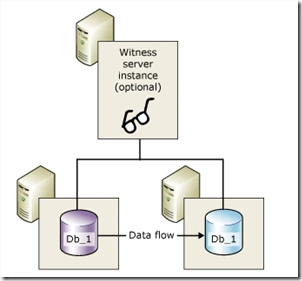
High-safety mode with automatic failover requires a third server instance, known as a witness. Unlike the two partners, the witness does not serve the database. The witness supports automatic failover by verifying whether the principal server is up and functioning. The mirror server initiates automatic failover only if the mirror and the witness remain connected to each other after both have been disconnected from the principal server.
The following illustration shows a configuration that includes a witness.
Solution
Create a SQL agent job that does the following,
- Job Step 1 – Check if the database‘s mirroring role on the current instance is primary. Proceed to Step2 if condition is true; or abort the job with success
- Job Step2 – perform database backup
Above mentioned agent job can be created on both primary and mirrored instance and run on a schedule. Even if the database fails over, database backup completes successfully.
Sample Script
This script assumes that c:\Backup folder is available on machines running primary and mirrored instance.
- USE [msdb] GO BEGIN TRANSACTION DECLARE @ReturnCode INT
- SELECT
- @ReturnCode = 0 IF NOT EXISTS (
- SELECT
- name
- FROM
- msdb.dbo.syscategories
- WHERE
- name = N '[Uncategorized (Local)]’ AND category_class=1)
- BEGIN
- EXEC @ReturnCode = msdb.dbo.sp_add_category @class=N’JOB’, @type=N’LOCAL’, @name=N' [Uncategorized (Local) ]’ IF (
- @@ERROR <> 0
- OR @ReturnCode <> 0
- ) GOTO QuitWithRollback END DECLARE @jobId BINARY(16) EXEC @ReturnCode = msdb.dbo.sp_add_job @job_name = N’Backup Mirrored DB’,
- @enabled = 1,
- @notify_level_eventlog = 0,
- @notify_level_email = 0,
- @notify_level_netsend = 0,
- @notify_level_page = 0,
- @delete_level = 0,
- @description = N’No description available.’,
- @category_name = N '[Uncategorized (Local)]’,
- @job_id = @jobId OUTPUT
- IF (@@ERROR <> 0 OR @ReturnCode <> 0) GOTO QuitWithRollback
- EXEC @ReturnCode = msdb.dbo.sp_add_jobstep @job_id=@jobId, @step_name=N’Check if database on current instance is not primary’,
- @step_id=1,
- @cmdexec_success_code=0,
- @on_success_action=3,
- @on_success_step_id=0,
- @on_fail_action=1,
- @on_fail_step_id=0,
- @retry_attempts=0,
- @retry_interval=0,
- @os_run_priority=0, @subsystem=N’TSQL’,
- @command=N’DECLARE @mirroring_role int
- SELECT @mirroring_role = mirroring_role
- FROM sys.database_mirroring m, sys.databases d
- WHERE m.database_id = d.database_id
- AND d.name = ”DemoDatabase”
- — If mirroring role is 2 ; ie not principal
- IF (@mirroring_role = 2)
- BEGIN
- RAISERROR (N”Mirroring role is 2”,16,1)
- END’,
- @database_name=N’master’,
- @flags=0
- IF (@@ERROR <> 0 OR @ReturnCode <> 0) GOTO QuitWithRollback
- EXEC @ReturnCode = msdb.dbo.sp_add_jobstep @job_id=@jobId, @step_name=N’Backup a Mirrored Database’,
- @step_id=2,
- @cmdexec_success_code=0,
- @on_success_action=1,
- @on_success_step_id=0,
- @on_fail_action=2,
- @on_fail_step_id=0,
- @retry_attempts=0,
- @retry_interval=0,
- @os_run_priority=0, @subsystem=N’TSQL’,
- @command=N’– Script to backup database
- BACKUP DATABASE [DemoDatabase]
- TO DISK = N”C:\Backup\DemoDatabase.bak” ‘,
- @database_name=N’master’,
- @flags=0
- IF (@@ERROR <> 0 OR @ReturnCode <> 0) GOTO QuitWithRollback
- EXEC @ReturnCode = msdb.dbo.sp_update_job @job_id = @jobId, @start_step_id = 1
- IF (@@ERROR <> 0 OR @ReturnCode <> 0) GOTO QuitWithRollback
- EXEC @ReturnCode = msdb.dbo.sp_add_jobserver @job_id = @jobId, @server_name = N'(local) ’ IF (
- @@ERROR <> 0
- OR @ReturnCode <> 0
- ) GOTO QuitWithRollback COMMIT TRANSACTION GOTO EndSave QuitWithRollback : IF (@@TRANCOUNT > 0) ROLLBACK TRANSACTION EndSave : GO
Hope this helps !!!!
Join the conversation! Your thoughts help the community grow.