

Introduction
In this article, we will learn how we can show the Loader in Angular 8 using Ngx spinner library. Ngx spinner is a library for loading spinner for Angular, which is meant to inform the user that data loading is in progress. Basically Loader is used to show the loading state of data in application.
Prerequisites
- Basic Knowledge of Angular 2 or higher
- Visual Studio Code
- Visual studio and SQL Server Management studio
- Node and NPM installed
- Bootstrap
Step 1
Create an Angular project by using the following command.
- ng new Angularloader
Step 2
Open this project in Visual Studio Code and install bootstrap by using following command
- npm install bootstrap --save
Now open styles.css file and add Bootstrap file reference. To add reference in styles.css file add this line.
- @import '~bootstrap/dist/css/bootstrap.min.css';
Step 3
Now install ngx spinner library in this project, to install ngx spinner library use the following command
- npm install ngx-spinner --save
Step 4
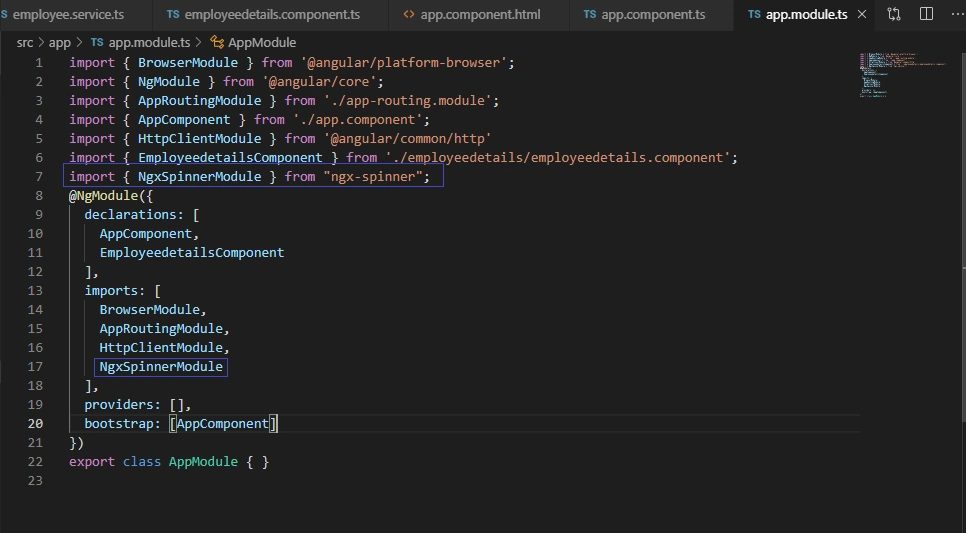
Now Update app.module.ts
Open app.module.ts file and add Import NgxSpinnerModule in the root module,
- import { BrowserModule } from '@angular/platform-browser';
- import { NgModule } from '@angular/core';
- import { AppRoutingModule } from './app-routing.module';
- import { AppComponent } from './app.component';
- import { HttpClientModule } from '@angular/common/http'
- import { EmployeedetailsComponent } from './employeedetails/employeedetails.component';
- import { NgxSpinnerModule } from "ngx-spinner";
- @NgModule({
- declarations: [
- AppComponent,
- EmployeedetailsComponent
- ],
- imports: [
- BrowserModule,
- AppRoutingModule,
- HttpClientModule,
- NgxSpinnerModule
- ],
- providers: [],
- bootstrap: [AppComponent]
- })
- export class AppModule { }
Step 5
Now create a new component by using the following command.
- ng g c Employeedetails --spec=false
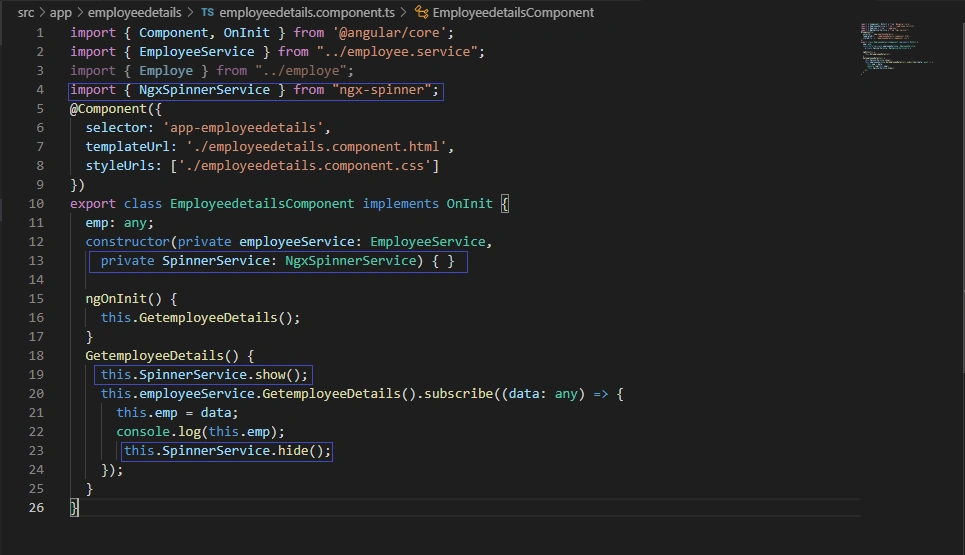
Now open employeedetails.component.ts file and import NgxSpinnerService
- import { Component, OnInit } from '@angular/core';
- import { EmployeeService } from "../employee.service";
- import { Employe } from "../employe";
- import { NgxSpinnerService } from "ngx-spinner";
- @Component({
- selector: 'app-employeedetails',
- templateUrl: './employeedetails.component.html',
- styleUrls: ['./employeedetails.component.css']
- })
- export class EmployeedetailsComponent implements OnInit {
- emp: any;
- constructor(private employeeService: EmployeeService,
- private SpinnerService: NgxSpinnerService) { }
- ngOnInit() {
- this.GetemployeeDetails();
- }
- GetemployeeDetails() {
- this.SpinnerService.show();
- this.employeeService.GetemployeeDetails().subscribe((data: any) => {
- this.emp = data;
- console.log(this.emp);
- this.SpinnerService.hide();
- });
- }
- }
Open employeedetails.component.html file and following lines
- <div>
- <div class="row" style="margin-top:10px;margin-bottom: 10px;">
- <div class="col-sm-12 btn btn-success">
- Loader in Angular Application with Dynamic Data
- </div>
- </div>
- <div class="row" style="margin-top:10px;margin-bottom: 10px;">
- </div>
- </div>
- <hr style="background-color:black" />
- <div>
- <table class="table table-dark table-striped">
- <thead>
- <tr>
- <th>Id</th>
- <th>Name</th>
- <th>Age</th>
- <th>Address</th>
- <th>City</th>
- <th>ContactNum</th>
- <th>Salary</th>
- <th>Department</th>
- </tr>
- </thead>
- <tbody>
- <tr *ngFor="let e of emp">
- <td>{{e.Id}}</td>
- <td>{{e.Name}}</td>
- <td>{{e.Age}}</td>
- <td>{{e.Address}}</td>
- <td>{{e.City}}</td>
- <td>{{e.ContactNum}}</td>
- <td>{{e.Salary}}</td>
- <td>{{e.Department}}</td>
- </tr>
- </tbody>
- </table>
- </div>
- <ngx-spinner bdColor="rgba(51, 51, 51, 0.8)" size="default" type="ball-spin-clockwise">
- <p style="color: white">Please Wait. </p>
- </ngx-spinner>
Step 6
Create a new class using following command,
- ng g class Employe --spec=false
- export class Employe {
- Id:number;
- Name:any;
- Age:any;
- Address:any;
- City:any;
- ContactNum:number;
- Salary:number;
- Department:any;
- }
Create a new service using following command
- ng g s Employee --spec=false
- import { Injectable } from '@angular/core';
- import { HttpClient } from "@angular/common/http";
- @Injectable({
- providedIn: 'root'
- })
- export class EmployeeService {
- url:any;
- constructor(private http:HttpClient ) {
- }
- GetemployeeDetails()
- {
- this.url='http://localhost:56932/api/Employee/Employeedetails';
- return this.http.get(this.url);
- }
- }
Step 8 - Create database and a table
Open SQL Server Management Studio, create a database named "Employee", and in this database, create a table. Give that table a name like "employee".
- CREATE TABLE [dbo].[Employee](
- [Id] [int] IDENTITY(1,1) NOT NULL,
- [Name] [varchar](50) NULL,
- [Age] [int] NULL,
- [Address] [varchar](50) NULL,
- [City] [varchar](50) NULL,
- [ContactNum] [varchar](50) NULL,
- [Salary] [decimal](18, 0) NULL,
- [Department] [varchar](50) NULL,
- CONSTRAINT [PK_Employee] PRIMARY KEY CLUSTERED
- (
- [Id] ASC
- )WITH (PAD_INDEX = OFF, STATISTICS_NORECOMPUTE = OFF, IGNORE_DUP_KEY = OFF, ALLOW_ROW_LOCKS = ON, ALLOW_PAGE_LOCKS = ON) ON [PRIMARY]
- ) ON [PRIMARY]
- GO
- SET ANSI_PADDING OFF
- GO
Create a new Web API project
Step 9
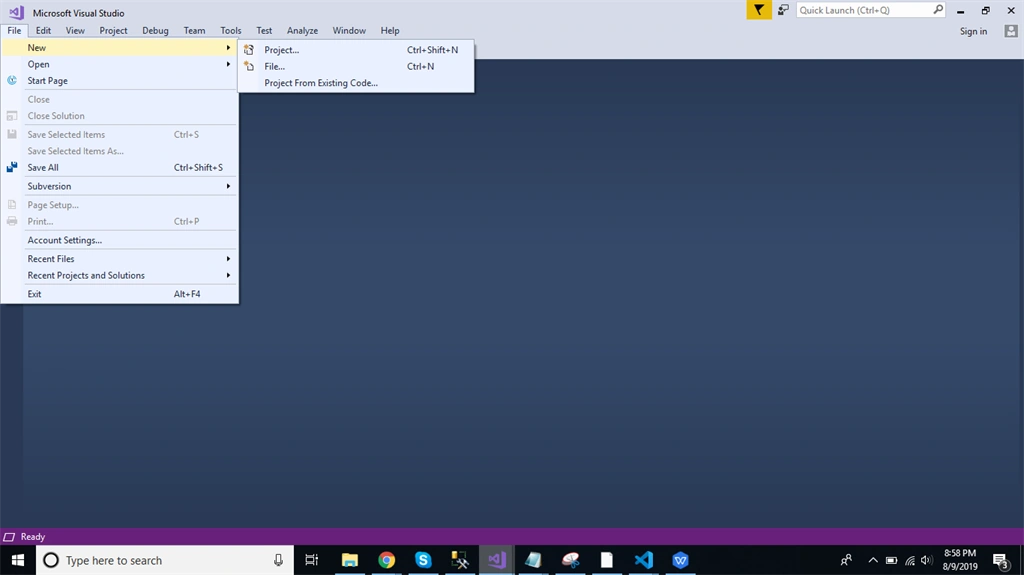
Open Visual Studio and create a new project.
Step 10
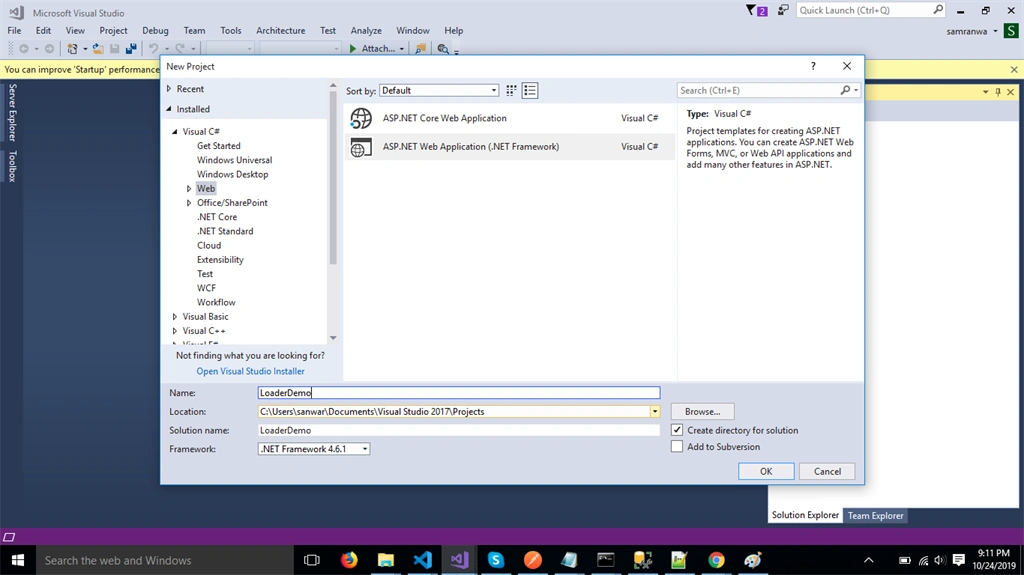
Change the name to LoaderDemo
Step 11
Choose the template as Web API.
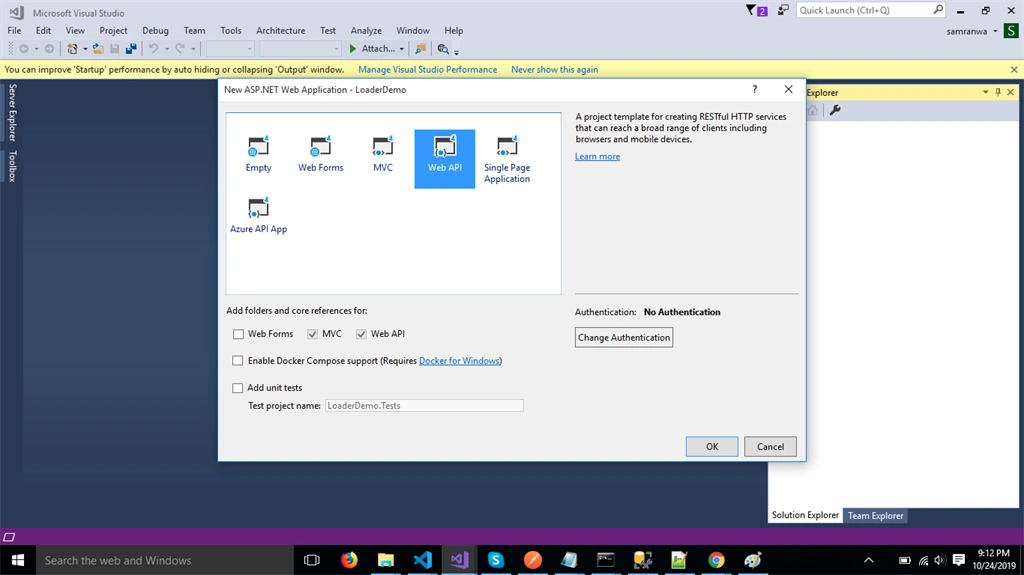
Step 12
Right-click the Models folder from Solution Explorer and go to Add >> New Item >> data.
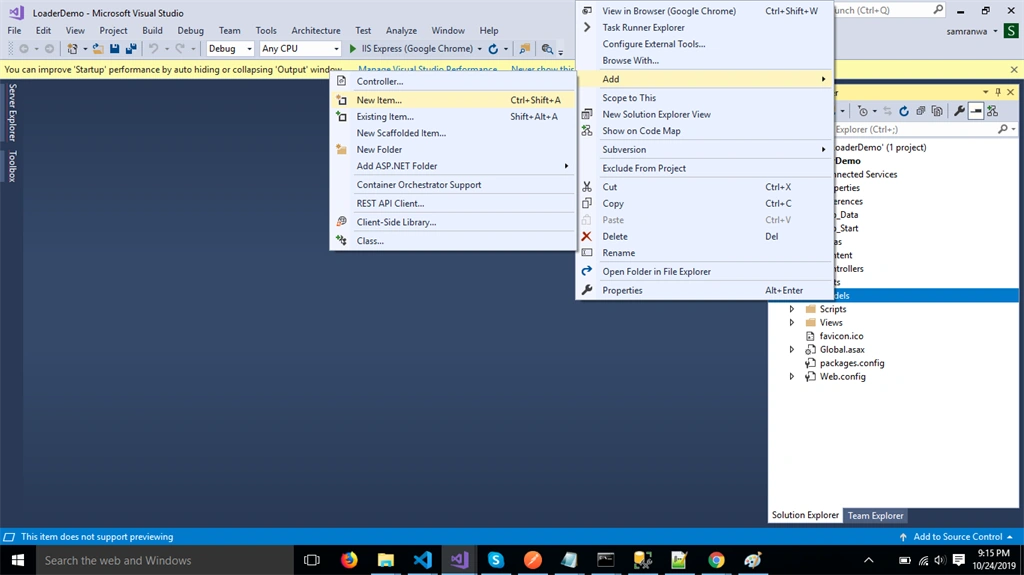
Step 13
Click on the "ADO.NET Entity Data Model" option and click "Add".
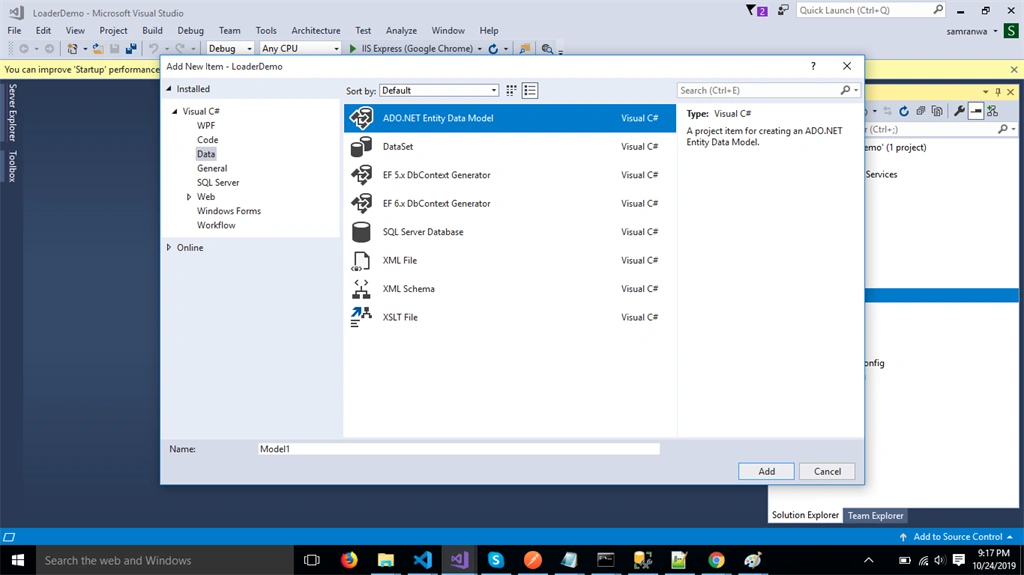
Step 14
Select EF Designer from the database and click the "Next" button.
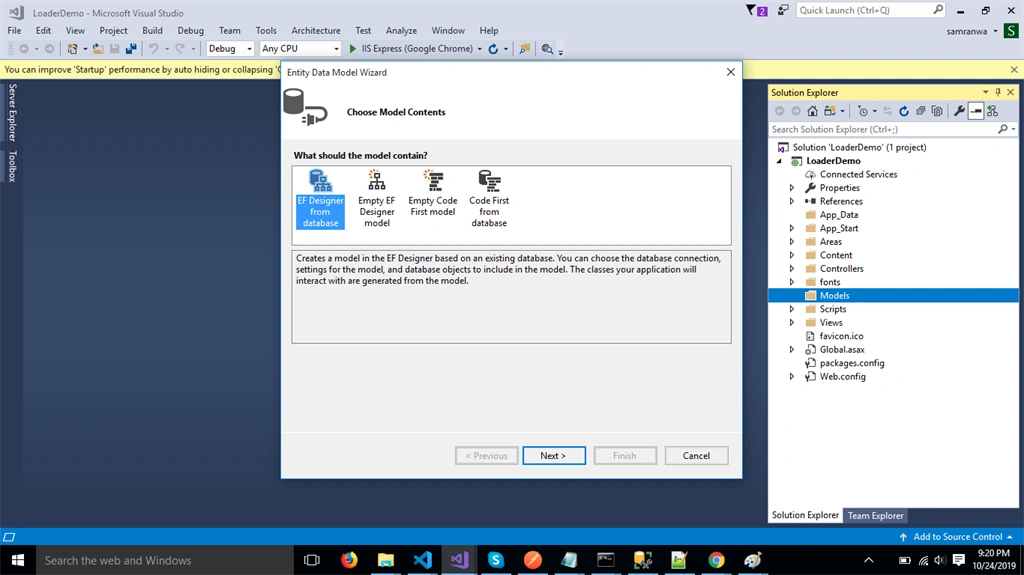
Step 15
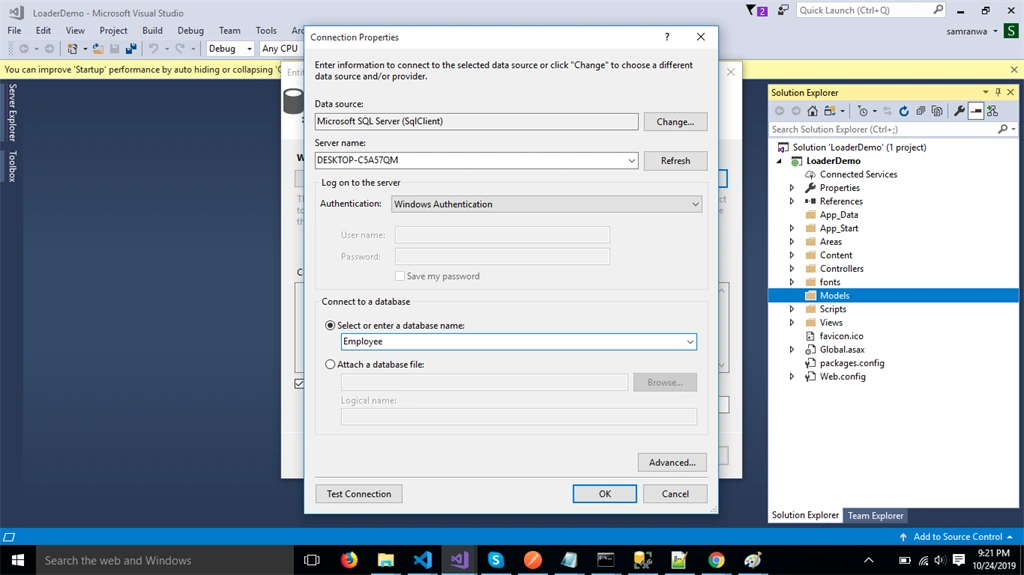
Add the connection properties and select database name on the next page and click OK.
Step 16
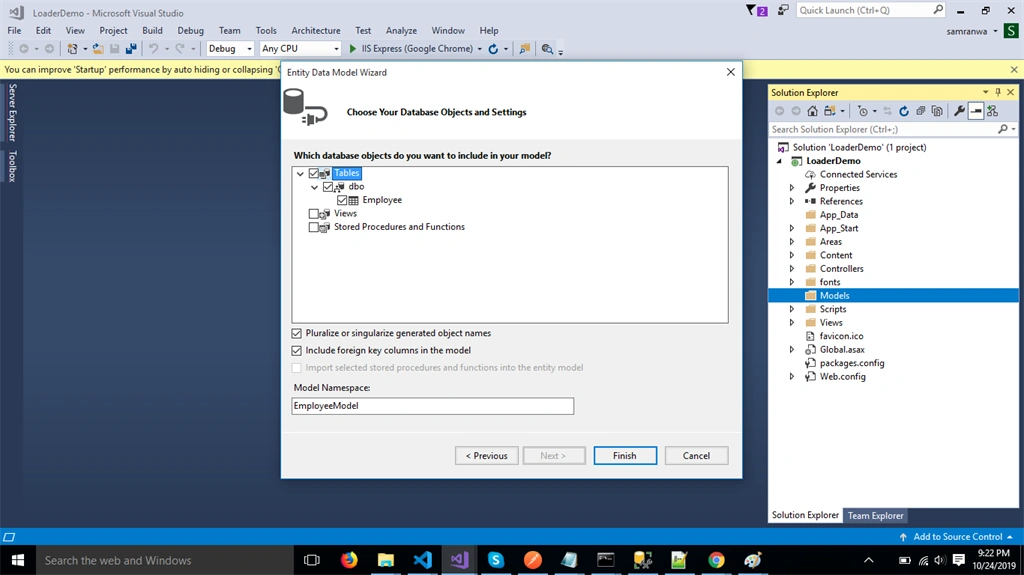
Check the "Table" checkbox. The internal options will be selected by default. Now, click the "Finish" button.
Step 17
Right-click on the Controllers folder and add a new controller. Name it as "Employee controller" and add the following namespace in the Employee controller.
- using LoaderDemo.Models;
Step 18
Now, add a method to fetch data from database.
Employee controller
- using System;
- using System.Collections.Generic;
- using System.Linq;
- using System.Net;
- using System.Net.Http;
- using System.Web.Http;
- using LoaderDemo.Models;
- namespace LoaderDemo.Controllers
- {
- [RoutePrefix("Api/Employee")]
- public class EmployeeController : ApiController
- {
- [Route("Employeedetails")]
- [HttpGet]
- public object Studentdetails()
- {
- EmployeeEntities DB = new EmployeeEntities();
- var emp = DB.Employees.ToList();
- return emp;
- }
- }
- }
Step 19
Now, let's enable CORS. Go to Tools, open NuGet Package Manager, search for CORS, and install the "Microsoft.Asp.Net.WebApi.Cors" package. Open Webapiconfig.cs and add the following lines.
- EnableCorsAttribute cors = new EnableCorsAttribute("*", "*", "*");
- config.EnableCors(cors);
Step 20
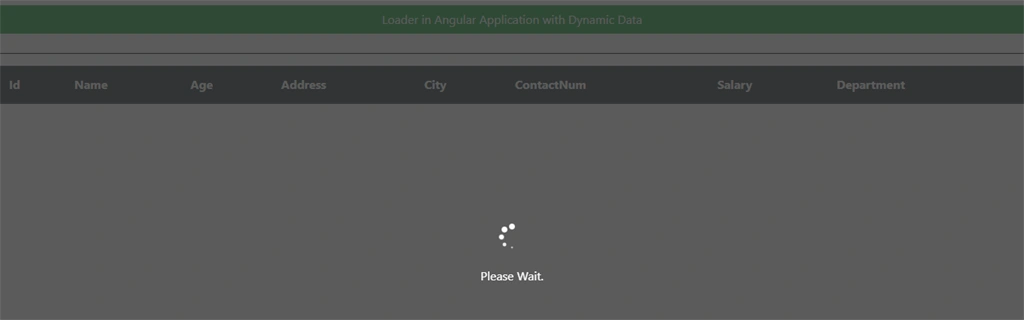
Now run the project and check result
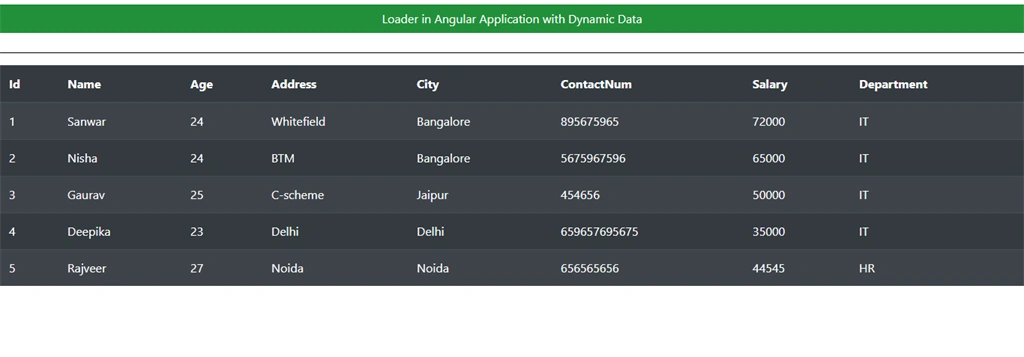
When data is load, the loader is hidden.
Summary
In this article, we learned how we add Loader in Angular application with dynamic data load.
Raju VermaPosted Sep 21, 2021, 11:04 AM
ERROR in node_modules/ngx-spinner/lib/ngx-spinner.service.d.ts:33:21 - error TS2694: Namespace '"C:/Users/rajukumar.verma/My Work/iRFS (Z070061)/iRFSMain/iRFSApiVer2/NgApp/node_modules/@angular/core/core"' has no exported member '??FactoryDeclaration'. 33 static ?fac: i0.??FactoryDeclaration<NgxSpinnerService, never>;ERROR in ./node_modules/ngx-spinner/fesm2015/ngx-spinner.js 133:147-165 "export '??FactoryTarget' (imported as 'i0') was not found in '@angular/core' ERROR in ./node_modules/ngx-spinner/fesm2015/ngx-spinner.js 152:163-181 "export '??FactoryTarget' (imported as 'i0') was not found in '@angular/core' ERROR in ./node_modules/ngx-spinner/fesm2015/ngx-spinner.js 333:238-256 "export '??FactoryTarget' (imported as 'i0') was not found in '@angular/core' ERROR in ./node_modules/ngx-spinner/fesm2015/ngx-spinner.js 392:145-163 "export '??FactoryTarget' (imported as 'i0') was not found in '@angular/core' ERROR in ./node_modules/ngx-spinner/fesm2015/ngx-spinner.js 135:0-27 "export '??ngDeclareClassMetadata' (imported as 'i0') was not found in '@angular/core'
Raju VermaPosted Sep 21, 2021, 11:03 AM
Not working
Amit MohantyPosted Oct 31, 2019, 7:34 AM
Nice article
Sarathlal SaseendranPosted Oct 29, 2019, 2:49 PM
Very interesting post Sanwar.