

Microsoft Graph .Net SDK is available and it can be included in the Console Application by installing NuGet packages.
- Graph
- Graph.Beta
- Graph.Core
- Graph.Auth
Click here to learn more about Microsoft Graph SDK available for other platforms and languages.
Auth Provider Instance
For this console application, I have used Client credentials provider. The client credential flow enables service applications to run without user interaction. Access is based on the identity of the application.
Click here to choose a Microsoft Graph authentication provider based on scenario.
List Groups Graph API - Get all the groups using Graph API
Permissions required
- Permission Type – Application
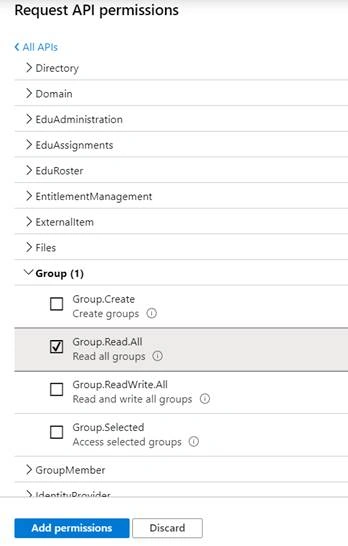
- Permissions - Group.Read.All, Directory.Read.All, Group.ReadWrite.All, Directory.ReadWrite.All
In this article, you will see how to perform the following tasks,
- Register an Application in Azure - Register an app in Azure AD and add the required permissions to access the Graph API
- Create and run the console application
Register an application in Azure
Register an application in Azure AD to access the Graph API.
- Navigate to Azure portal.
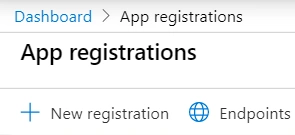
- Search for App Registrations. Click App Registrations as show below.

- Click New Registration.
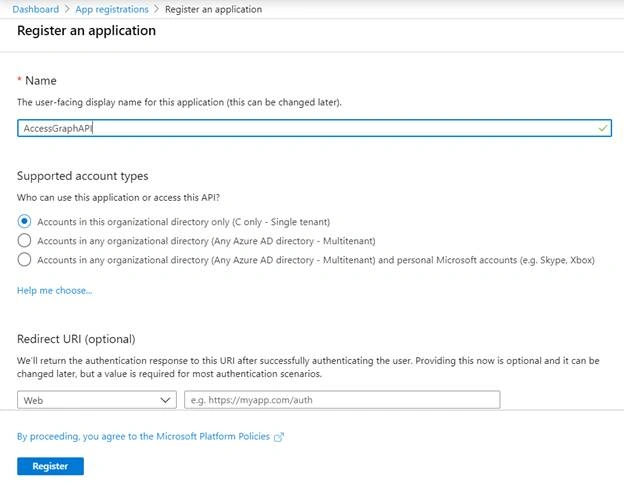
- Enter the Name and click Register.
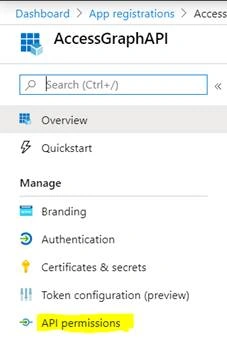
- App registered successfully. In the left navigation, click API Permissions.
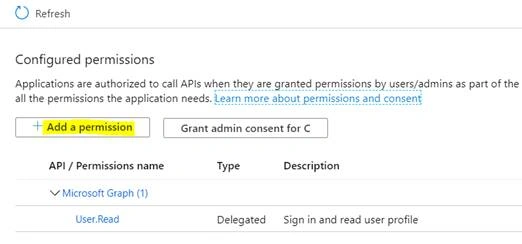
- Click Add a permission.
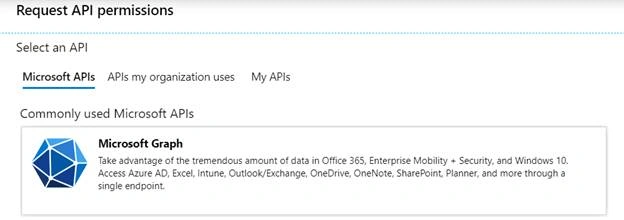
- Select Microsoft Graph API as shown below.
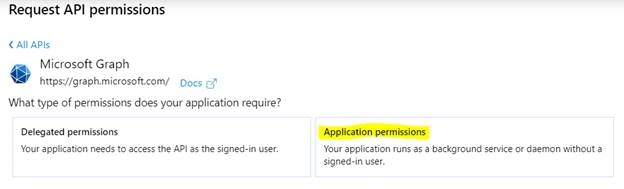
- Click Application Permissions.
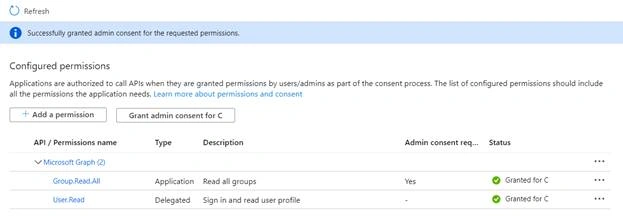
- SelectRead.All, Directory.Read.All, Group.ReadWrite.All, Directory.ReadWrite.All permission and click Add permissions.
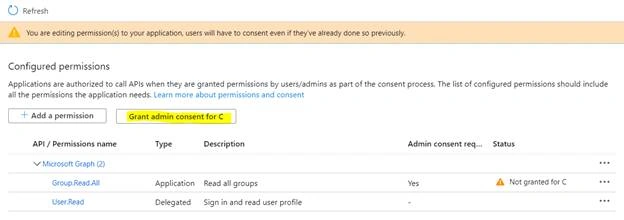
- Click Grant admin consent.
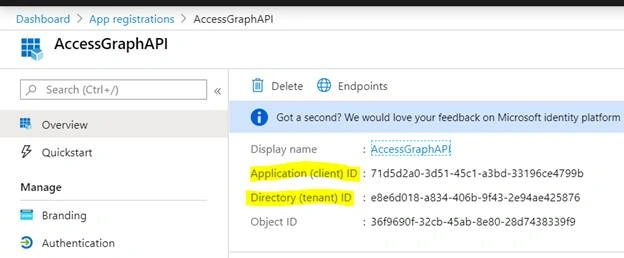
- In the left navigation, click Overview. Copy the Application (client) ID and Directory (tenant) ID values. These values will be used in the console application for authentication.
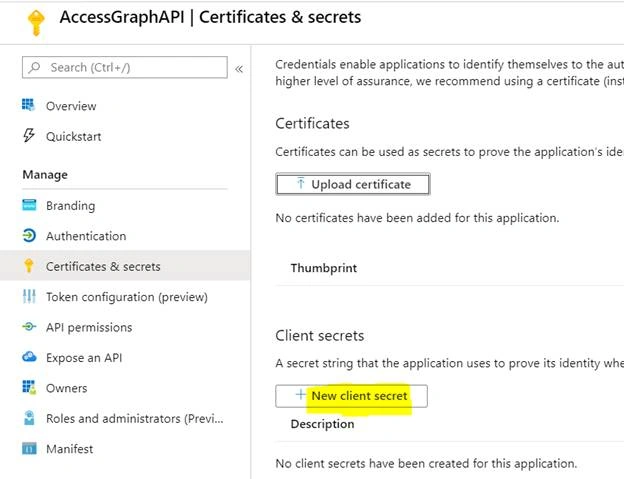
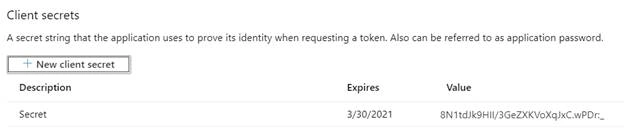
- In the left navigation, click Certificates & secrets. Click New client secret.
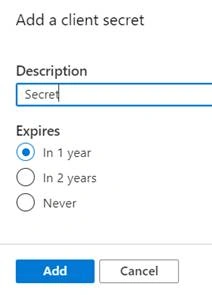
- Enter the description and click Add.
- Copy the secret value which will be used in console application for authentication.
Create and run the Console Application
- Open Visual Studio 2019 and create a Console Application (.Net Framework).
- Install the following NuGet Packages either using Package Manager UI in Visual Studio or the Package Manager Console.
- Install-Package Microsoft.Graph
- Install-Package Microsoft.Graph.Auth -IncludePrerelease
- Open Program.cs and add the following code.
- using Microsoft.Graph;
- using Microsoft.Graph.Auth;
- using Microsoft.Identity.Client;
- using System;
- using System.Collections.Generic;
- using System.Linq;
- using System.Text;
- using System.Threading.Tasks;
- namespace GraphAPIConsole
- {
- class Program
- {
- static void Main(string[] args)
- {
- try
- {
- getUsersAsync().GetAwaiter().GetResult();
- }
- catch (Exception ex)
- {
- Console.WriteLine(ex.Message);
- }
- Console.ReadLine();
- }
- public async static Task getUsersAsync()
- {
- var clientId = "7b1ce1ad-af15-4e5f-9ae4-aaf0a68a7ab4";
- var tenantId = "e8e6d018-a834-406b-9f43-2e94ae425876";
- var clientSecret = "2G_tDd4AM92Jv4j_a2hSa0mu05V5ddDr..";
- IConfidentialClientApplication confidentialClientApplication = ConfidentialClientApplicationBuilder
- .Create(clientId)
- .WithTenantId(tenantId)
- .WithClientSecret(clientSecret)
- .Build();
- ClientCredentialProvider authProvider = new ClientCredentialProvider(confidentialClientApplication);
- GraphServiceClient graphClient = new GraphServiceClient(authProvider);
- var groups = await graphClient.Groups.Request().Select(x => new { x.Id, x.DisplayName }).GetAsync();
- foreach (var group in groups)
- {
- Console.WriteLine($"{group.DisplayName}, {group.Id}");
- }
- }
- }
- }
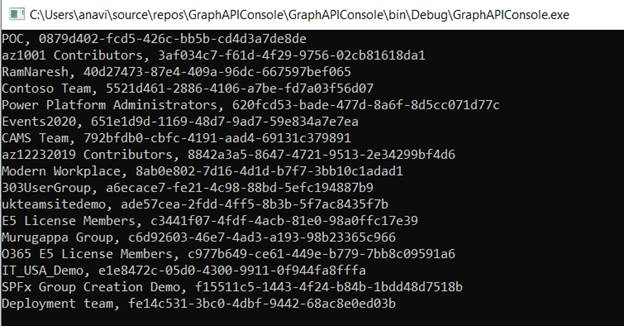
- Hit F5.
Summary
Thus, in this article, you saw how to access Microsoft Graph API in Console Application.
Manish PatilPosted Oct 28, 2022, 9:28 AM
I am able to access groups, But stcuked while reading mail data can you please help me in this below is my code var data = client.Users["UserMailID"].MailFolders["inbox"].Messages.Request().GetAsync().Result; I have a trial account and getting ResourceNotFound
gisik kwonPosted May 10, 2022, 9:28 PM
When i run this, I got "Only HTTP/1.0 and HTTP/1.1 version requests are currently supported.". how can I solve this issue?
Timothy GibsonPosted Feb 18, 2022, 3:19 PM
Confidential Client is not supported in Cross Cloud request
mohammed almazariPosted Sep 1, 2021, 11:53 AM
Code: Authorization_RequestDeniedMessage: Insufficient privileges to complete the operation.
Mohsin AzamPosted Mar 16, 2021, 7:29 AM
Thanks Vijai for sharing article.