

When working with databases in .NET, Language Integrated Query (LINQ) is one of the most elegant features ever introduced.
It allows you to query databases using pure C# code, while the framework automatically converts your LINQ expressions into SQL queries behind the scenes.
In this article, you'll learn exactly how LINQ translates your C# into SQL, with clear, step-by-step examples that'll make you a LINQ pro by the end.
What Is LINQ?
LINQ (Language Integrated Query) is a feature in C# that provides a consistent syntax for querying data from different sources — whether it's an in-memory collection, XML, or a database (via Entity Framework or LINQ to SQL).
With LINQ, you can write:
var result = from user in Users
             where user.Age > 25
             select user;
Instead of writing
SELECT * FROM Users WHERE Age > 25;
In short, LINQ is your bridge between C# and SQL.
How LINQ Translates C# to SQL
When you write a LINQ query against an IQueryable (like a DbSet in Entity Framework), you're not executing the query immediately.
Instead, you're building an expression tree — a representation of your query in code form.
Entity Framework then parses this expression tree, translates it into SQL, and sends it to your database for execution.
Let's break that down 👇
Example 1. Simple Where Clause
🔹 C# LINQ Code
var employees = from emp in context.Employees
                where emp.Salary > 50000
                select emp;
🔹 SQL Generated by EF Core
SELECT [e].[Id], [e].[Name], [e].[Salary]
FROM [Employees] AS [e]
WHERE [e].[Salary] > 50000
Explanation
The
from emp in context.Employeestells EF you're querying the Employees table.The
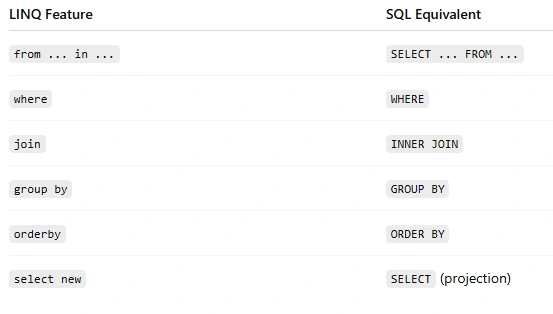
where emp.Salary > 50000becomes the WHERE clause.The
select empmeans return all columns (based on your model).
Example 2. Filtering and Projection
🔹 C# LINQ Code
var employeeNames = from emp in context.Employees
                    where emp.Department == "IT"
                    select emp.Name;
🔹 SQL Generated
SELECT [e].[Name]
FROM [Employees] AS [e]
WHERE [e].[Department] = N'IT';
What Happened
LINQ only selects
emp.Name, so EF generates a projection — only the Name column is fetched.This improves performance, as fewer columns are loaded into memory.
Example 3. Joining Tables
🔹 C# LINQ Code
var query = from emp in context.Employees
            join dept in context.Departments
            on emp.DepartmentId equals dept.Id
            select new
            {
                emp.Name,
                DepartmentName = dept.Name
            };
🔹 SQL Generated
SELECT [e].[Name], [d].[Name] AS [DepartmentName]
FROM [Employees] AS [e]
INNER JOIN [Departments] AS [d] ON [e].[DepartmentId] = [d].[Id];
Explanation
The
joinkeyword in LINQ becomes an INNER JOIN in SQL.You can also use
DefaultIfEmpty()to create a LEFT JOIN.
Example 4. Ordering and Grouping
🔹 C# LINQ Code
var salariesByDept = from emp in context.Employees
                     group emp by emp.Department into deptGroup
                     orderby deptGroup.Key
                     select new
                     {
                         Department = deptGroup.Key,
                         AverageSalary = deptGroup.Average(e => e.Salary)
                     };
🔹 SQL Generated
SELECT [e].[Department], AVG([e].[Salary]) AS [AverageSalary]
FROM [Employees] AS [e]
GROUP BY [e].[Department]
ORDER BY [e].[Department];
Explanation
LINQ's group by + orderby naturally map to SQL GROUP BY and ORDER BY clauses.
Example 5. Deferred Execution
Here's the magic part — LINQ queries are not executed immediately.
var query = from emp in context.Employees
            where emp.Salary > 50000
            select emp;

// No SQL executed yet!

var list = query.ToList();
// SQL is executed here!
When you call .ToList(), .FirstOrDefault(), .Count(), or iterate over the query, that's when EF Core generates and executes the SQL query.
This concept is called deferred execution.
Example 6. Method Syntax (Fluent LINQ)
You don't have to use query syntax. The following is equivalent:
var result = context.Employees
                    .Where(e => e.Salary > 50000)
                    .Select(e => e.Name);
Generated SQL
SELECT [e].[Name]
FROM [Employees] AS [e]
WHERE [e].[Salary] > 50000;
Entity Framework translates both query syntax and method syntax in the same way.
LINQ to Entities vs LINQ to Objects
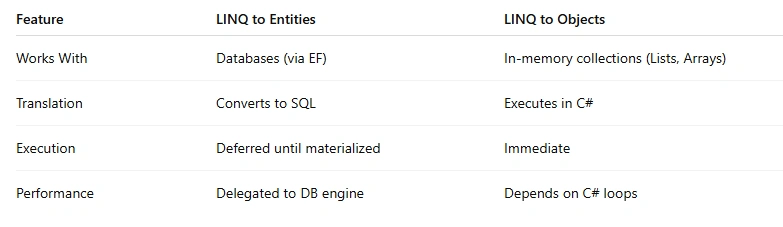
If your data source is IQueryable, LINQ builds SQL.
If it's IEnumerable, it runs in memory.
LINQ to SQL Conversion Cheat Sheet
If you found this article helpful, consider sharing it or bookmarking it for future reference.
Keep learning….! 😊
Join the conversation! Your thoughts help the community grow.